
MONSGEEK FUN60 Pro Rapid Trigger Gaming Keyboard
4.5Editor score
Ultra precise 0.005mm rapid trigger
Compatible with five third party switches
8K polling rate for near zero latency
This guide compares the best magnetic switch keyboard for rapid trigger models featuring hall effect technology adjustable actuation and high polling rates for
Magnetic switch keyboards with rapid trigger technology are redefining competitive gaming by offering unmatched speed and precision. These devices use hall effect sensors to detect key presses without physical contact enabling faster actuation and release times than traditional mechanical switches.
We evaluated ten top models based on polling rates actuation adjustability build quality and software features. Our analysis focuses on how well each keyboard supports rapid trigger modes sncd logic and dynamic key rollover for intense FPS and MOBA gameplay.
Each pick highlights unique strengths from budget friendly options to premium wireless designs. Prices and availability can change so verify current details before purchasing to ensure you get the best value for your specific gaming needs.
4.5Editor score

4.7Editor score

4.5Editor score
The following table provides a side by side comparison of all ten selected keyboards highlighting their core specifications layout types and unique features to help you make an informed decision.
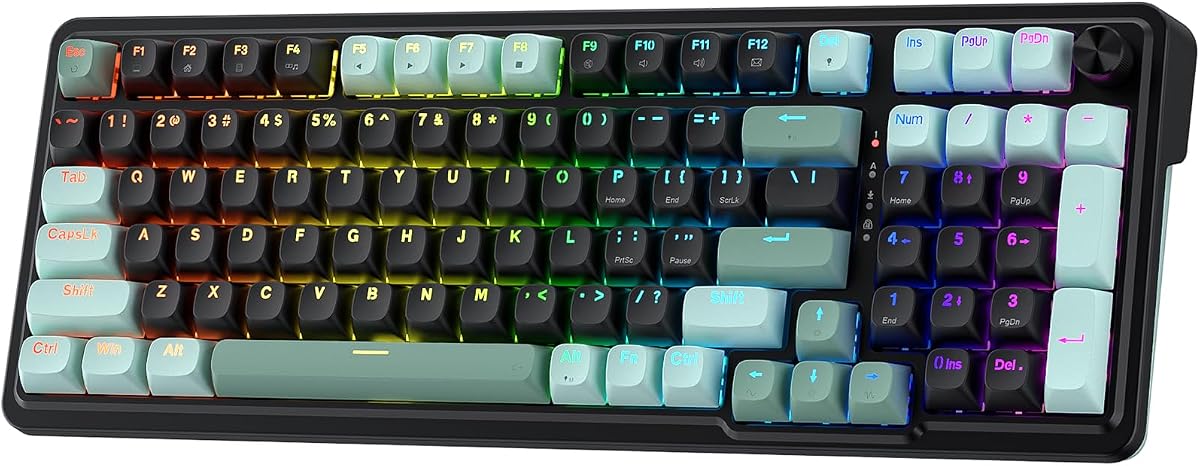


The EPOMAKER G84 HE stands out as a top tier choice for gamers seeking precision and flexibility. With a rating of 4.7 stars it delivers on its promise of rapid trigger performance and versatile connectivity options.
We may earn a commission when you buy through this link, at no additional cost to you.
Its standout feature is the adjustable actuation range allowing users to set trigger points as low as 0.01mm for hyper responsive gameplay. The inclusion of snap key logic and dynamic key rollover further enhances competitive edge by prioritizing the last input during conflicts.
While the price is higher than budget options the build quality and acoustic tuning justify the cost. The gasket mount design with five layers of dampening material ensures a mellow sound that reduces fatigue during long sessions.
This keyboard is ideal for competitive FPS players who value speed and wireless freedom. Whether on PC or Mac the software supports deep customization making it a powerful tool for any serious gamer.
Users can fine tune actuation travel to match their finger sensitivity ensuring every movement is registered without delay.
With 2.4GHz and Bluetooth support the G84 HE seamlessly switches between devices without compromising polling speed or accuracy.
We may earn a commission when you buy through this link, at no additional cost to you.
The MONSGEEK FUN60 Pro offers exceptional value for gamers who need high end performance without breaking the bank. Its ability to support rapid trigger with 0.005mm accuracy makes it a serious contender for competitive play.
We may earn a commission when you buy through this link, at no additional cost to you.
One of its most unique traits is compatibility with five third party magnetic switches allowing users to swap in their preferred tactile feel. The 8K polling rate ensures near zero latency while the ARGB lighting adds a polished aesthetic to any setup.
The compact 60 percent design saves desk space for larger mouse movements which is critical for low sensitivity shooters. However the lack of wireless connectivity may be a drawback for those seeking a clutter free desk.
For budget conscious gamers the FUN60 Pro delivers premium features at an accessible price. Its customization options and switch compatibility make it a flexible choice for those willing to tinker with settings.
The ability to mix and match switches means you can customize specific keys while keeping a consistent overall feel.
Adjusting actuation in 0.005mm steps allows for ultra fine tuning that can separate winners from losers in tight matches.
We may earn a commission when you buy through this link, at no additional cost to you.
The Keychron K2 HE represents the premium end of the market with its refined build and extensive customization options. Designed for both work and gaming it offers a 75 percent layout that keeps essential keys while saving space.
We may earn a commission when you buy through this link, at no additional cost to you.
Its hot swap feature supports Gateron double rail magnetic switches providing a stable and responsive typing experience. The web based launcher makes it easy to configure actuation points and macros without installing heavy software.
While it comes at a higher price point the versatility is unmatched. You can switch between Bluetooth and 2.4GHz wireless effortlessly making it perfect for users with multiple devices. The sound dampening ensures a pleasant acoustic experience.
This keyboard is best suited for professionals and gamers who demand premium quality and flexibility. If budget is not a concern the K2 HE delivers a polished and powerful experience.
Support for three devices simultaneously lets you switch between a work laptop and a gaming PC without unpairing.
Swap in different Gateron magnetic switches to tailor the feel of specific keys without soldering or complex tools.
We may earn a commission when you buy through this link, at no additional cost to you.
The Redragon K686 HE provides a reliable entry into magnetic switch technology without overwhelming complexity. Its one knob simplicity makes it easy to manage lighting and media without memorizing key combinations.
We may earn a commission when you buy through this link, at no additional cost to you.
Built for stop and shoot moments the UltraMag POM switches ensure timing accuracy. The dual module floating structure reduces noise and wobble offering a silky bounce that feels more expensive than the price suggests.
While it lacks wireless connectivity the 8000Hz polling rate ensures stable performance. The software allows you to save multiple profiles so you can adjust for different games on the fly.
This keyboard is a great choice for budget gamers who want core rapid trigger features. It balances functionality and cost effectively making it a strong contender for entry level setups.
The single knob adjusts brightness and playback reducing the need for extra key layers during gameplay.
Independent switch plates and dampening layers create a softer sound profile that reduces auditory fatigue.
We may earn a commission when you buy through this link, at no additional cost to you.
The Aula WIN60 HE is designed for gamers who prioritize speed and portability. Its 60 percent layout frees up desk space while its hall effect switches deliver consistent and precise actuation.
We may earn a commission when you buy through this link, at no additional cost to you.
The rapid trigger mode with a 0.02mm step ensures that direction changes are instantaneous. This makes it ideal for titles like Valorant and CS where every millisecond counts during peek and fire scenarios.
Unlike many competitors the web based driver means you do not need to install heavy software. You can customize keys and macros directly from your browser which is convenient for shared or restricted systems.
For users seeking a compact and lightweight magnetic keyboard the WIN60 HE is a strong option. It delivers high performance features in a small form factor suitable for travel or limited spaces.
The magnetic switches are tuned to support faster peeking and stopping which directly improves aim accuracy in shooters.
Access all customization features through your browser making it easy to setup without admin rights or downloads.
We may earn a commission when you buy through this link, at no additional cost to you.
The MONSGEEK M1 V5 TMR offers a high tech approach to magnetic keyboards with its impressive scan rate and aluminum build. It is designed for users who want to tweak every aspect of their input experience.
We may earn a commission when you buy through this link, at no additional cost to you.
The TMR sensor provides an adjustable range from 0.1mm to 3.3mm with 0.01mm steps. This level of precision is rare and ensures that your inputs are registered exactly how you intend them to be.
The quick release case design allows for tool free disassembly making it easy to modify or clean. You can even swap magnetic and mechanical switches on the same board for a mixed tactile experience.
For enthusiasts who love to customize the M1 V5 TMR is a fantastic choice. Its performance metrics are top notch and the build quality feels premium and durable for daily use.
The 32K scan rate detects key changes faster than standard polling ensuring your movements are tracked instantly.
Tool free quick release aluminum panels allow you to access internals easily for maintenance or personalization.
We may earn a commission when you buy through this link, at no additional cost to you.
The ATTACK SHARK X68 HE bridges the gap between gaming and work with robust Mac and Windows support. Its magnetic pole switches are designed to deliver speed and precision for any task.
We may earn a commission when you buy through this link, at no additional cost to you.
Snap tap functionality ensures seamless directional changes which is crucial for competitive FPS play. The web driver makes it simple to remap keys and adjust lighting without needing complex software.
While it is wired the coiled cable helps reduce signal latency. The ergonomic design with a soft edge wrist guard provides comfort during extended sessions preventing hand fatigue.
This keyboard is a solid choice for users who switch between operating systems often. Its reliability and cross compatibility make it a trustworthy option for both gaming and productivity.
Full key anti ghosting and remapping tools work seamlessly across different operating systems without conflicts.
A soft edge wrist guard provides support and reduces strain during long gaming marathons.
We may earn a commission when you buy through this link, at no additional cost to you.
The Redragon K673 HE brings rapid trigger technology to a broader audience at an accessible price. While it may lack the polish of premium models it delivers the core functions needed for competitive play.
We may earn a commission when you buy through this link, at no additional cost to you.
Its dual module floating structure provides noise dampening that softens the sound of keystrokes. The one knob simplicity allows for quick adjustments to brightness and volume without interrupting gameplay.
The software enables precision tuning which is vital for competitive gaming. Although it is basic it allows you to calibrate switches effectively for consistent performance across different titles.
For entry level gamers or those on a tight budget this keyboard is a worthy option. It introduces the benefits of magnetic switches without a heavy financial commitment.
Even with basic software you can adjust actuation profiles to suit your preferred sensitivity and feel.
The combination of rapid trigger and dampening at this price point offers significant value for beginners.
We may earn a commission when you buy through this link, at no additional cost to you.
The Redragon K745 HE focuses on delivering a vibrant gaming experience with adjustable RGB lighting and core magnetic features. It is a strong option for those who prioritize visual flair alongside performance.
We may earn a commission when you buy through this link, at no additional cost to you.
UltraMag POM switches ensure consistent actuation without physical contact. The five layer noise dampening system helps reduce harsh sounds making the typing experience smoother and less distracting.
While its rating is average it still provides essential features like 8000Hz polling and software tuning. It serves well for gamers who need a reliable input device without extra bells and whistles.
This keyboard is best for users who want a simple magnetic keyboard with good lighting. It offers a functional alternative to mechanical switches at a competitive price point.
Adjustable brightness and lighting modes bring your desk to life enhancing your gaming setup visually.
Use the software to save profiles and keep your setup consistent across different games and matches.
We may earn a commission when you buy through this link, at no additional cost to you.
The Redragon K617 HE is a compact budget option that does not compromise on core magnetic switch benefits. Its 60 percent layout frees up desk space for wide mouse movements essential for precise aiming.
We may earn a commission when you buy through this link, at no additional cost to you.
Software adjustable actuation lets you fine tune trigger points to match your playstyle. Whether you need hair trigger sensitivity for aiming or a heavier feel for typing this keyboard adapts to your needs.
The magnetic switches promise twice the lifespan of standard mechanical switches offering durability over time. This makes it a cost effective solution for frequent users who do not want to upgrade often.
For budget users with limited desk space this keyboard is a practical choice. It delivers the speed and reliability of magnetic technology in a small and affordable package.
Ditching the numpad gives you room to swipe freely improving your mouse control and accuracy.
Magnetic technology ensures that switches last longer reducing the need for replacements over time.
We may earn a commission when you buy through this link, at no additional cost to you.
Choosing the right keyboard requires evaluating several key factors beyond just price. These elements determine how well a device fits your gaming style workspace and technical preferences.
Rapid trigger technology allows keys to reset instantly upon release enabling faster directional changes and complex combos. This is critical for competitive shooters like Valorant and CS where split second reactions decide matches. Look for keyboards with low reset steps and high sensitivity to ensure your inputs are recognized without delay.
Prioritize models that offer adjustable actuation to match your finger sensitivity and playing style.
Polling rate measures how often the keyboard reports input to the computer. Higher rates like 8000Hz ensure minimal latency which is essential for competitive play. Low latency guarantees your movements are transmitted instantly without lag interfering with your aim.
Choose keyboards with high polling rates for the fastest possible response times.
The ability to adjust actuation points lets you set how deep a keypress needs to be to register. This customization is vital for reducing accidental inputs and improving typing accuracy. A wide range gives you flexibility to tune your keyboard for different games or work tasks.
Ensure the keyboard supports fine tuned adjustments to optimize your specific needs.
Build quality impacts durability and typing feel. Gasket mounts and sound dampening layers contribute to a premium experience while compact layouts save space for mouse movement. Consider whether you prefer a 60 percent design or a full sized layout based on your desk.
Select a layout that balances your need for speed with physical comfort and desk space.
Software tools allow you to customize macros lighting and key mappings. Web based drivers are convenient as they require no installation while desktop apps may offer more features. Check if the software supports cross platform use if you switch between Mac and Windows.
Verify software flexibility to ensure you can tailor the keyboard to your exact preferences.
Connectivity affects both performance and convenience. Wired keyboards offer the lowest latency while wireless options reduce cable clutter. Some premium models support 2.4GHz wireless which maintains high polling rates comparable to wired connections.
Choose wired for maximum speed or wireless if you prioritize a clean desk setup.
Hot swap capabilities allow you to change switches without soldering. Magnetic keyboards with hot swap support give you the freedom to experiment with different switch types. This feature is ideal for enthusiasts who want to tweak their setup over time.
Look for hot swap support if you plan to customize your switch feel in the future.
RGB lighting enhances the visual appeal of your setup. Addressable RGB lets you control individual keys for effects that react to gameplay. While not essential for performance it can improve immersion and personalization.
Consider lighting features if visual customization is important to your overall setup experience.
To get the most out of your keyboard start by calibrating the actuation points using the provided software or web driver. Set trigger levels that match your typical keypress strength to avoid missed inputs.
Clean the keyboard regularly using compressed air to remove dust from under the keycaps. Avoid using harsh chemicals on the surface as this may damage the magnets or switches.
Store the keyboard in a dry environment when not in use to prevent moisture buildup. If using wireless models charge the battery regularly to maintain connection stability.
A magnetic switch keyboard uses hall effect sensors to detect key presses instead of physical metal contacts. This difference eliminates wear and tear on the switch allowing for faster actuation and longer lifespan. It also enables features like rapid trigger which are difficult to achieve with traditional mechanical switches.
Most magnetic keyboards require software to unlock features like adjustable actuation and rapid trigger. However they can function as standard keyboards without drivers. For competitive gaming installing the software is necessary to access high polling rates and customization settings.
Yes magnetic keyboards are excellent for office work due to their quiet operation and adjustable actuation. You can set deeper actuation points to avoid accidental presses which helps with typing accuracy. Some models also offer wireless connectivity for seamless multi-device use.
Most keyboards have a reset option within their driver or software interface. If unavailable consult the manual for a hardware key combination like holding specific keys during startup. This restores default actuation and lighting settings.
Generally magnetic switches are quieter because they do not rely on metal-on-metal contact. The sound you hear comes from the stabilizer or keycap bottoming out. Many models include dampening layers to further reduce noise for a quieter experience.
Many modern magnetic keyboards support hot swapping which allows you to replace switches easily. However some models have proprietary switches so check compatibility before purchasing replacements. Always use the correct magnet polarity to ensure proper functionality.
A higher polling rate reduces latency but performance also depends on processing power and monitor refresh rate. Most users cannot perceive differences beyond 1000Hz on standard monitors. However competitive gamers may benefit from the precision 8000Hz offers.
Most magnetic keyboards are compatible with Windows and macOS but software features may vary. Some drivers do not support Linux or older operating systems. Always check system requirements before purchasing to ensure full functionality.
The top picks include the EPOMAKER G84 HE for overall versatility the MONSGEEK FUN60 Pro for value and the Keychron K2 HE for premium wireless performance. Each option excels in specific areas to suit different gaming styles and budgets.
Prioritize features like polling rate and actuation adjustment if competitive performance is your main goal. For general users wireless connectivity and build quality may matter more than raw speed metrics.
Prices and availability change frequently so check the latest offers before finalizing your purchase. Investing in the right keyboard can significantly improve your performance and comfort over time.