
msi Touch Screen All-in-One Business Desktop
4.0Editor score
Intel Core 7-150U Processor
23.8 Inch FHD Touchscreen
Affordable Business Solution
Finding the right All in One Desktop PC with Touchscreen can transform your workspace. These devices combine power and portability. They offer seamless interaction for work and play.
We analyzed ten top models based on specs and user feedback. Each unit brings unique strengths to the table. Our guide helps you find the perfect fit.
Every pick highlights key features and real-world performance. Prices fluctuate often so check current listings. This list covers diverse needs from home to office.
4.0Editor score

5.0Editor score

5.0Editor score
As an Amazon Associate we earn from qualifying purchases.
This side-by-side comparison highlights key specs across all ten models. Look at processor power memory capacity and display size to decide which fits your needs best.


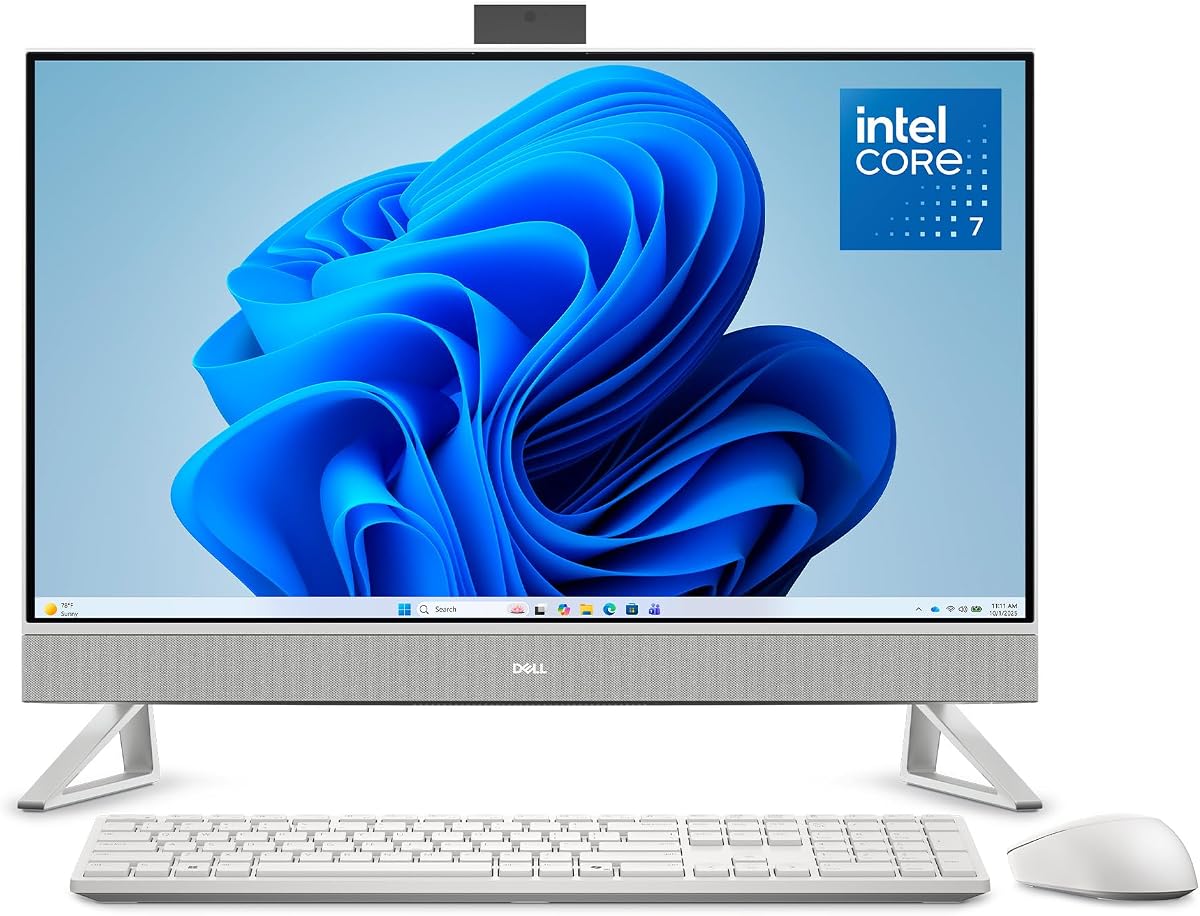


This Dell model stands out as a top choice for most users. It earned a perfect five-star rating from reviewers who praise its reliability and power.
We may earn a commission when you buy through this link, at no additional cost to you.
The Intel Core 7 150U processor handles multitasking with ease. You can run multiple applications without slowdowns thanks to the 16GB of RAM.
While storage is decent at 512GB it might fill up quickly for heavy media users. This is acceptable since cloud storage is common and affordable today.
Ideal for professionals and students needing a complete package. The included keyboard and mouse save setup time and ensure a clean workspace.
Windows 11 Pro offers advanced security and management tools perfect for business users.
The ComfortView Plus technology minimizes blue light during long work sessions.
We may earn a commission when you buy through this link, at no additional cost to you.
The MSI option offers incredible value for budget-conscious buyers. It delivers solid performance without breaking the bank making it a smart choice.
We may earn a commission when you buy through this link, at no additional cost to you.
With the Intel Core 7-150U it handles daily tasks efficiently. The ability to connect external monitors adds flexibility for expanded desktop space.
The 8GB RAM is the main limitation for heavy multitasking. However for general office work and browsing it remains sufficient for most users.
Best for small businesses or home offices needing affordability. The wireless accessories ensure a tidy desk right from the start.
Connect additional displays to boost productivity and workspace versatility.
Pre-installed Windows 11 provides enterprise-grade security and features.
We may earn a commission when you buy through this link, at no additional cost to you.
This ASUS model is a powerhouse for demanding users and creatives. It earns top marks for its exceptional speed and future-proof specifications.
We may earn a commission when you buy through this link, at no additional cost to you.
The 32GB DDR5 RAM ensures seamless multitasking across heavy applications. The 1TB SSD provides ample room for large files and media libraries.
The premium price reflects the high-end hardware included. Most users find the investment worthwhile given the performance and longevity offered.
Perfect for power users needing top-tier processing power. The advanced ports allow connection to various peripherals without adapters.
NPU acceleration speeds up AI workflows for creative professionals.
The 27-inch screen delivers crisp visuals for design and media tasks.
We may earn a commission when you buy through this link, at no additional cost to you.
HP integrates cutting-edge AI tools directly into this desktop model. The Copilot key offers instant access to intelligent assistance features.
We may earn a commission when you buy through this link, at no additional cost to you.
Performance is snappy with the Ryzen AI processor and DDR5 memory. Users report quick boot times and smooth multitasking across many apps.
The accessory bundle adds extra value to the purchase price. You get everything needed to start working immediately without extra costs.
Great for early adopters interested in AI productivity. The ergonomic design ensures comfort during long work hours.
Dedicated Copilot key helps streamline daily tasks instantly.
Includes pen flash drive and cleaning cloth for convenience.
We may earn a commission when you buy through this link, at no additional cost to you.
Dell brings the latest Wi-Fi 7 to this compact all-in-one design. It ensures ultra-fast connectivity for seamless cloud collaboration and streaming.
We may earn a commission when you buy through this link, at no additional cost to you.
The 32GB DDR5 RAM handles heavy workloads effortlessly. Even with multiple tabs open performance remains consistent without lag.
Support for pens adds creative versatility for notes and drawing. This feature is rare in this category making it unique.
Ideal for businesses wanting the latest tech standards. The build quality and connectivity options justify the higher investment.
Wi-Fi 7 provides unprecedented speed and low latency for offices.
Touchscreen support for pens enhances creative workflows significantly.
We may earn a commission when you buy through this link, at no additional cost to you.
HP focuses on display quality with this 27-inch model. The anti-glare panel makes it comfortable to use in bright environments.
We may earn a commission when you buy through this link, at no additional cost to you.
The Ryzen 5 processor provides reliable performance for daily tasks. Users appreciate the fast SSD for quick file access and loading.
Missing an AI chip is a trade-off for price savings. Many users find this acceptable for standard office and home use.
Best for those prioritizing screen comfort and clarity. The 1TB storage ensures plenty of room for documents.
Anti-glare technology reduces strain during long viewing sessions.
IPS panel delivers consistent colors from various angles.
We may earn a commission when you buy through this link, at no additional cost to you.
This Dell model offers a large screen with strong performance. The 32GB of RAM ensures smooth operation for demanding workflows.
We may earn a commission when you buy through this link, at no additional cost to you.
The 27-inch display provides ample workspace for multitasking. It is great for users who want to view multiple windows.
Onsite service support is a significant benefit for business users. It reduces downtime if any hardware issues arise.
Perfect for professionals needing a big screen and reliability. The investment pays off in productivity and support.
Onsite service ensures minimal disruption to daily workflows.
Large screen allows efficient management of multiple tasks.
We may earn a commission when you buy through this link, at no additional cost to you.
HP offers an affordable option without sacrificing essential features. It is well-suited for basic home and school computing needs.
We may earn a commission when you buy through this link, at no additional cost to you.
The 1TB SSD provides plenty of storage for files. Even though the processor is slower it handles web browsing efficiently.
The 16GB of DDR4 RAM is generous for this price point. It allows for multiple tabs without significant slowdowns.
Ideal for students or home users on a budget. It delivers reliable performance for everyday computing tasks.
Generous SSD capacity ensures room for growing file libraries.
Lower price makes quality tech accessible to more families.
We may earn a commission when you buy through this link, at no additional cost to you.
ASUS delivers a high-performance system with advanced AI capabilities. The 32GB DDR5 RAM ensures no slowdowns during heavy use.
We may earn a commission when you buy through this link, at no additional cost to you.
The Copilot key offers convenient access to AI tools quickly. Users appreciate how it streamlines daily workflow tasks and searches.
While powerful it might exceed the needs of light users. For power users this machine provides future-proof performance power.
Best for professionals who need raw speed and features. The Pro OS adds valuable security features for work.
NPU acceleration ensures AI apps run at maximum speed.
Windows 11 Pro offers enhanced security for business use.
We may earn a commission when you buy through this link, at no additional cost to you.
This Dell model provides reliable performance for standard computing. It is a solid choice for home users needing versatility.
We may earn a commission when you buy through this link, at no additional cost to you.
The screen offers vivid colors and high contrast for viewing. Users enjoy the ComfortView Plus feature for eye comfort.
Memory is mid-range which may limit heavy multitasking. Most users find it sufficient for browsing and standard applications.
Good for home users prioritizing display quality and reliability. It offers a balanced experience for daily tasks.
IPS display provides vivid colors for an immersive experience.
Reduced blue light emissions support better eye health.
We may earn a commission when you buy through this link, at no additional cost to you.
Selecting the right all-in-one requires evaluating several key factors that impact performance and usability.
The processor determines how quickly your machine handles tasks. Look for Intel Core or AMD Ryzen chips to ensure smooth operation.
Choose newer generations for better speed and longevity over time.
RAM affects how many apps you can run simultaneously. 16GB is a safe baseline for multitasking.
If you work with large files consider upgrading to 32GB for speed.
A 24-inch screen is compact while 27-inch offers more workspace. Ensure the panel has high resolution for sharp visuals.
IPS panels provide better color accuracy and viewing angles.
Solid state drives ensure fast boot times and file access. Aim for at least 512GB to store applications and media.
Larger SSDs reduce the need for external drives constantly.
Windows 11 Pro offers better security and management than Home. Home editions work well for personal use cases.
Check if business features are necessary for your specific needs.
Ensure the device has enough USB ports for your peripherals. Wi-Fi 6 and Bluetooth help connect modern devices.
Additional HDMI ports allow for external monitors and setups.
A high-quality camera is vital for video conferencing. Look for HD or 4K resolution options for clarity.
Dolby Atmos speakers enhance music and meeting experiences.
Check for onsite support to reduce downtime if issues arise. Standard warranties vary by manufacturer and model type.
Longer support ensures peace of mind for long-term use.
Place your touchscreen device on a stable surface to prevent accidents. Avoid direct sunlight to prevent screen glare and overheating.
Use a soft microfiber cloth to clean the screen regularly. Avoid harsh chemicals that might damage the coating on the display.
Keep ports clear from dust to maintain connectivity. Use compressed air periodically to clean internal fans for cooling.
Many all-in-ones have integrated graphics sufficient for casual gaming. However dedicated gaming PCs offer better performance for high-end titles.
Some models allow RAM upgrades but many are soldered. Check product specs to confirm if user-upgradability is available.
Pro offers advanced security and remote management features. Home is generally sufficient for personal and basic business use.
Modern touchscreen panels are designed for daily use. Using a stylus reduces wear compared to rough finger contact.
Many units include HDMI or USB-C ports for second screens. Verify connectivity options before purchase for multi-monitor setups.
Wi-Fi 6 offers faster speeds and less interference. It improves performance for streaming and video calls.
Our top picks cover diverse needs from budget to premium options. Each model offers unique strengths depending on your priorities.
Prioritize RAM and storage capacity to ensure longevity. A good processor ensures smooth daily performance for years.
Always check current prices as deals change frequently. These guides help you make informed decisions quickly.