
RasTech Pi Zero 2W Kit
4.2Editor score
Affordable starter package
Includes essential adapters
Compact aluminum heatsink
This guide compares the best Bedt Raspberry Pi Zero 2 W Kit options for beginners and pros, reviewing performance, cooling, and connectivity for your next
Finding the right Bedt Raspberry Pi Zero 2 W Kit can be challenging with so many options available. We focus on kits that provide essential accessories like headers, adapters, and cooling solutions to ensure smooth setup.
We evaluated ten top-rated kits based on included components, build quality, and user feedback. Our analysis highlights which sets offer the best value for specific project needs like home automation or media centers.
Each pick shows key features and compatibility details to help you decide quickly. Note that prices and availability change frequently, so check the linked pages for the most current information before purchasing.
4.2Editor score

4.6Editor score

5.0Editor score
The following table provides a side-by-side comparison of all ten kits. It highlights key specifications and included accessories to help you identify the best fit for your specific needs and budget.


This top-rated kit delivers powerful performance with its quad-core 64-bit processor and built-in wireless connectivity. It stands out for including essential adapters like Mini HDMI to HDMI and Micro-USB OTG to ease setup.
We may earn a commission when you buy through this link, at no additional cost to you.
The aluminum heatsink ensures stable operation under heavy loads, making it ideal for media centers or IoT projects. The 40-pin header allows for easy expansion with HATs and sensors.
While it lacks a power supply and case, the included components cover most immediate needs. Users should purchase these separately based on their specific project requirements.
Beginners and enthusiasts alike should choose this kit for its balance of performance and essential accessories. It is the best all-rounder for launching Raspberry Pi Zero 2 W projects quickly.
The Cortex-A53 processor provides five times the speed of its predecessor for demanding tasks.
The aluminum heatsink dissipates heat effectively to maintain consistent performance.
We may earn a commission when you buy through this link, at no additional cost to you.
This kit offers a cost-effective entry point into the Raspberry Pi Zero 2 W ecosystem. It includes a heatsink and essential adapters to get started without extra purchases.
We may earn a commission when you buy through this link, at no additional cost to you.
The aluminum heatsink helps prevent overheating during use, and the compact size fits well in small spaces. It supports standard connectivity options for displays and peripherals.
While the rating is slightly lower, the value for money is strong for those on a tight budget. It covers the basics well for learning and simple projects.
Choose this kit if you need an affordable starter solution without compromising on core cooling. It is perfect for students or hobbyists testing new ideas.
Provides essential components at a competitive price for new users.
Ensures stable performance even during extended operation times.
We may earn a commission when you buy through this link, at no additional cost to you.
This kit stands out with a perfect 5.0 rating and includes a pre-soldered header for immediate use. The high-quality silver heatsink ensures excellent thermal management for demanding tasks.
We may earn a commission when you buy through this link, at no additional cost to you.
The quad-core processor delivers enhanced speed compared to previous generations, making it suitable for AI and IoT projects. Wireless connectivity is built-in for seamless integration.
While it costs more, the convenience of a pre-soldered header and superior cooling justifies the investment. It minimizes setup time for experienced users.
Pros and pros looking for the highest quality accessories should choose this kit. It is the premium choice for reliability and performance.
Eliminates the need for soldering headers during initial setup.
Silver heatsink maintains stable temperatures under heavy workloads.
We may earn a commission when you buy through this link, at no additional cost to you.
This accessory-focused item helps beginners connect GPIO pins easily with color-coded coding. It enhances the base board experience by adding clarity to complex connections.
We may earn a commission when you buy through this link, at no additional cost to you.
The board it supports offers significant performance boosts and reliable wireless compliance. It maintains the compact footprint for embedded designs effectively.
Users should note this is a header add-on rather than a full kit. It requires purchasing the base board separately for a complete system.
Educators and DIYers should use this to simplify wiring and improve project success rates. It is a smart addition to any Zero 2 W setup.
Color-coded pins reduce errors when wiring sensors and modules.
Improved shielding ensures stable wireless communication performance.
We may earn a commission when you buy through this link, at no additional cost to you.
This kit provides extensive educational resources with 128 projects and 223 components for learning. It supports multiple coding languages including Python, C, and Java effectively.
We may earn a commission when you buy through this link, at no additional cost to you.
The detailed tutorials offer step-by-step guides with schematics and wiring diagrams. It is excellent for building electronics knowledge gradually from simple to complex.
Users should note the board is not included and tutorials are digital only. You need to download the PDF or view online via the product link.
Students and educators should choose this kit for comprehensive learning and skill building. It is unmatched for structured project progression.
Projects range from basics to advanced electronics skills effectively.
Includes Python, C, Java, Scratch, and Processing for flexibility.
We may earn a commission when you buy through this link, at no additional cost to you.
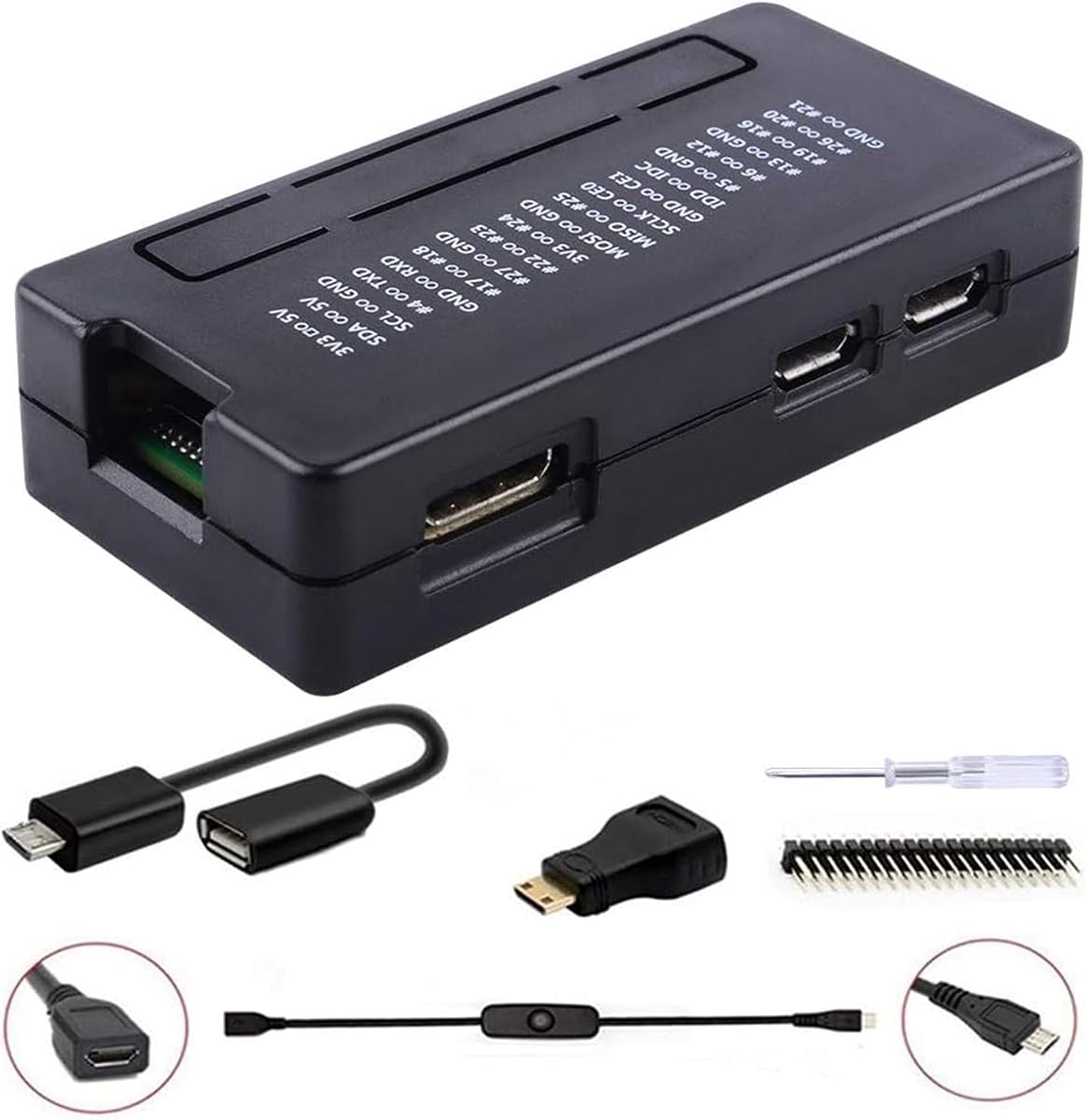
This kit focuses on physical protection and connectivity with an aluminum case and USB hub. It includes a power switch for convenient shutdown without accessing the SD card.
We may earn a commission when you buy through this link, at no additional cost to you.
The thermal tape and aluminum case help dissipate heat from the board. A pin header is included for GPIO expansion if needed.
The USB hub allows multiple devices to connect through one micro USB port. It solves connectivity limitations for users with many peripherals.
Users needing a solid case and power management should buy this kit. It is ideal for permanent or portable installations requiring protection.
The included switch cable allows easy system shutdown.
USB hub enables multiple device connections through one port.
We may earn a commission when you buy through this link, at no additional cost to you.
This kit includes the Pico 2 W board itself, providing a complete package for microcontroller learning. It features 119 projects and detailed guides for building practical electronics.
We may earn a commission when you buy through this link, at no additional cost to you.
The high-performance cores and wireless LAN expand capabilities beyond standard boards. It supports MicroPython, C, and Processing for flexible coding.
Users should note the tutorial is digital only and specific to this board type. It requires internet access to download the PDF guide.
Learners wanting a full package with the board included should choose this option. It is perfect for embedded systems and IoT education.
Includes the Pico 2 W board with onboard wireless capabilities.
Supports MicroPython, C, and Processing for diverse development.
We may earn a commission when you buy through this link, at no additional cost to you.
This comprehensive case kit includes power supply, hub, and heatsink for a ready-to-use setup. The case has two covers and screws for secure installation.
We may earn a commission when you buy through this link, at no additional cost to you.
Access to all ports remains easy while the board is protected. The GPIO header simplifies sensor and display connections effectively.
It is a strong option for those needing power and expansion without separate purchases. However, it does not include the Raspberry Pi board itself.
Home automation enthusiasts should buy this kit for a robust housing and accessory package. It simplifies deployment for stationary Zero 2 W devices.
Includes a dedicated power supply for reliable operation.
USB hub and GPIO header enable extensive connectivity.
We may earn a commission when you buy through this link, at no additional cost to you.
This alternative board offers higher memory and faster frequency than typical Zero 2 W kits. It supports 4K displays and runs Android or Ubuntu smoothly.
We may earn a commission when you buy through this link, at no additional cost to you.
The Allwinner H618 processor and quad-core design provide strong performance. It includes Wi-Fi 5.0 and Bluetooth 5.0 for better connectivity.
Users should note it runs a different software ecosystem compared to Raspberry Pi. It may require more setup for Linux-based projects.
Advanced users needing more RAM and video power should consider this alternative. It is excellent for media centers and high-performance IoT.
Up to 4GB LPDDR4 memory handles complex multitasking well.
Wi-Fi 5.0 and Bluetooth 5.0 ensure fast and stable links.
We may earn a commission when you buy through this link, at no additional cost to you.
This basic kit offers an affordable entry into protecting the Pi Zero 2 W. It includes essential cables and adapters to simplify initial connections.
We may earn a commission when you buy through this link, at no additional cost to you.
The acrylic case provides clear visibility and physical protection for the board. A switch cable allows for easier power management.
It lacks a power supply and is strictly a case and accessory bundle. Users must source power separately based on their project setup.
Those needing a simple case and minimal accessories should choose this option. It is the most budget-friendly choice for basic housing.
Provides just the necessary items to protect and connect the board.
Clear black case offers visibility and lightweight protection.
We may earn a commission when you buy through this link, at no additional cost to you.
Selecting the right kit involves understanding which components you already own and what your project needs. We cover the key factors to consider before buying.
Check if the kit includes headers, adapters, or cases you might need separately. Many kits omit power supplies or SD cards to lower costs, requiring you to buy those items additionally.
Prioritize kits that bundle essential adapters like Mini HDMI to Standard HDMI if you do not already have them.
The Pi Zero 2 W can generate significant heat during use, so a heatsink is crucial for stability. Look for aluminum or silver heatsinks that cover the processor effectively.
Kits without cooling are fine for light tasks but may throttle under heavy workloads like video streaming.
Determine if the kit comes with a pre-soldered header or if you need to solder one yourself. Pre-soldered headers save time and reduce the risk of damaging pins.
If you are not confident in soldering, choose a kit that already has the GPIO pins installed.
Most kits do not include a power supply, so verify your existing power adapter is compatible. The Zero 2 W typically requires a 5V micro USB power source.
Ensure the power adapter can handle the extra load if you plan to connect USB hubs or sensors.
Confirm that the kit supports HATs or specific projects you have planned, such as home automation. The 40-pin header compatibility is key for expandability.
Choose kits that list compatible accessories like cameras or displays to avoid connection issues.
Review materials used for cases and heatsinks to ensure durability and effective heat dissipation. Acrylic cases are cheap but may scratch easily compared to metal options.
Higher quality kits often include better screws and thermal tape for secure installation.
Balance the cost of the kit against the value of included accessories to avoid overspending. Some budget kits save money by removing non-essential items like extra cables.
Decide whether you need a complete starter set or just specific add-ons for your existing setup.
Look for well-reviewed brands that provide clear documentation and reliable customer support. Brands with high ratings often ensure better consistency in accessory quality.
Check feedback for common complaints like missing items or poor cable quality before purchasing.
Begin by installing the operating system on your SD card using a tool like Raspberry Pi Imager before connecting the board. Insert the card carefully into the slot to avoid damaging the connector.
Attach the provided heatsink and connect the HDMI adapter and power supply to get started. Ensure the board is well-ventilated and not placed in a confined space.
Regularly check for system updates and monitor temperatures if running heavy applications to maintain performance. Clean dust from the case and ports periodically to prevent overheating.
Most kits do not include a power supply to keep costs lower. You will need to purchase a compatible 5V micro USB power adapter separately. Always check the product description to confirm exactly what is included before buying.
Some premium kits come with pre-soldered headers while others require you to solder them yourself. Pre-soldered options save time and reduce the risk of damaging pins during assembly. Check the kit details if soldering is not an option for you.
Yes, the Pi Zero 2 W uses a Mini HDMI port so you need a Mini HDMI to Standard HDMI adapter. Most quality kits include this adapter so you can connect to standard monitors or TVs easily.
Absolutely, the Pi Zero 2 W is ideal for home automation due to its wireless connectivity and compact size. It supports HATs and sensors that integrate with systems like Home Assistant.
A kit includes accessories like adapters, heatsinks, and headers that save you buying them separately. The board alone requires you to source all these items individually which can be more time-consuming.
Yes, the Raspberry Pi Zero 2 W includes built-in Wi-Fi and Bluetooth capabilities. This means you do not need to buy extra wireless dongles for internet or peripheral connections.
We highlighted the Raspberry Pi Zero 2W Kit as the overall favorite due to its strong performance and included adapters. The Vemico version offers premium value with a pre-soldered header for convenience.
Prioritize kits that include essential cooling and connectivity accessories to ensure a smooth experience. Avoid cheap bundles that omit critical components like heatsinks which are vital for stability.
Remember to check current prices and availability as they can change frequently. Select the kit that best matches your specific project needs and technical comfort level.