
SSK Portable SSD
4.5Editor score
Affordable price point
1050MB/s read speeds
Lightweight aluminum case
This guide compares the top 10 external SSDs for Linux users, covering speed, compatibility, durability, and features to help you find the perfect storage
Linux users often face unique challenges when selecting external storage that works seamlessly with their operating system. A good external SSD for Linux must offer reliable file system support, high transfer speeds, and robust durability for diverse workflows.
We compared ten top-rated portable drives based on their compatibility with Linux distributions, read and write performance, build quality, and additional features like encryption and thermal management to ensure they meet professional needs.
Each pick highlights specific strengths for Linux environments, from open-source tool support to native USB-C connectivity. Please note that product availability and pricing can change frequently, so check current listings before purchasing your drive.
4.5Editor score

4.7Editor score

4.6Editor score
This side-by-side comparison evaluates the top external SSDs for Linux based on speed, durability, capacity, and specific features that matter most to open-source enthusiasts and professionals.





The Samsung T7 Portable SSD stands out as a top choice for Linux users seeking a balance of performance, portability, and reliability. With a 4.7 rating, it consistently delivers fast data transfer speeds that significantly improve workflow efficiency for developers and creators alike.
We may earn a commission when you buy through this link, at no additional cost to you.
Its embedded PCIe NVMe technology enables read speeds up to 1050MB/s, making file transfers nearly twice as fast as previous generations. The compact aluminum unibody design not only looks premium but also dissipates heat effectively, ensuring consistent performance during heavy use on any Linux distribution.
While the T7 is highly compatible, users may need to download the latest firmware update via Samsung's software to ensure optimal performance on Linux systems. Additionally, non-original cables can lead to performance degradation, so sticking with the included ones is recommended for best results.
Linux professionals, students, and creatives who need a dependable external drive for backups, large file transfers, or media editing should consider the T7. Its combination of speed, durability, and broad compatibility makes it a versatile solution for both everyday tasks and demanding projects.
The T7’s NVMe technology ensures rapid access to files, reducing wait times when loading projects or transferring large datasets on Linux systems.
With shock resistance and an aluminum body, this drive is built to withstand drops and daily wear, protecting your valuable data wherever you go.
We may earn a commission when you buy through this link, at no additional cost to you.
The SSK Portable SSD offers impressive performance at a budget-friendly price point, making it an attractive option for Linux users who need reliable storage without breaking the bank. With a 4.5 rating, it provides solid speeds and features typically found in more expensive drives.
We may earn a commission when you buy through this link, at no additional cost to you.
Featuring a 1050MB/s read speed and adaptive TRIM optimization, this drive ensures fast file access and consistent write speeds even during large transfers. The 2mm thick aluminum alloy case effectively dissipates heat, keeping temperatures low and performance stable during extended use on Linux machines.
One limitation is that SSK is a less recognized brand compared to giants like Samsung or WD, which might affect long-term software support perception. However, the included USB-C and USB-A cables ensure versatility, and the S.M.A.R.T. health diagnostics help monitor drive longevity effectively.
Budget-conscious Linux users, students, or hobbyists looking for a cost-effective external SSD for everyday backups or moderate creative work will find the SSK drive excellent. Its blend of speed, durability, and value makes it a smart choice for those prioritizing affordability.
The SLC caching feature allocates a portion of capacity for high-speed transfers, ensuring steady performance without slowdowns during typical usage scenarios.
Included USB-C and USB-A cables allow seamless connection to various devices, enhancing flexibility for Linux setups with different port configurations.
We may earn a commission when you buy through this link, at no additional cost to you.
The Samsung T9 Portable SSD represents the pinnacle of portable storage performance, ideal for Linux professionals who demand the fastest data transfer speeds available. With a 4.6 rating, it delivers sustained read and write speeds up to 2000MB/s, significantly outperforming standard external drives.
We may earn a commission when you buy through this link, at no additional cost to you.
Its Dynamic Thermal Guard technology ensures the drive stays cool during intense workloads, preventing performance throttling even during heavy file transfers or video editing on Linux. The Magician Software provides firmware updates, encryption, and drive health monitoring, adding a layer of professional-grade management.
However, the T9’s full speed requires a USB 3.2 Gen 2×2 port, which may not be available on older systems, potentially limiting its performance. The premium price also reflects its top-tier specs, making it a significant investment compared to other options in the market.
Power users, video editors, and data scientists working with large datasets on Linux will benefit most from the T9’s unmatched speed and thermal stability. If you need the best performance for demanding tasks and have the necessary hardware, this drive is worth the investment.
At up to 2000MB/s, the T9 reduces wait times dramatically, allowing you to load and edit massive files on Linux systems in record time.
Samsung Magician offers essential tools for optimization and security, ensuring your drive runs smoothly and securely within your Linux environment.
We may earn a commission when you buy through this link, at no additional cost to you.
The SanDisk Extreme Portable SSD is designed for users who need a rugged, high-capacity solution for Linux systems in challenging environments. With a 4.6 rating, it combines fast speeds with exceptional durability, making it ideal for field work or outdoor adventures where reliability is paramount.
We may earn a commission when you buy through this link, at no additional cost to you.
Its IP65 rating means the drive can withstand water and dust exposure, while the 3-meter drop protection ensures safety against accidental falls. The included password protection with 256-bit AES hardware encryption keeps your data secure, which is crucial for Linux professionals handling sensitive projects.
Although durable, the drive is slightly bulkier than some competitors due to its protective casing, which may impact portability. Additionally, the carabiner loop is a thoughtful feature but can sometimes be cumbersome when storing the drive in a small pocket or case.
Linux users working in construction, photography, or remote locations will appreciate the Extreme’s resilience and security features. If you need a drive that can handle tough conditions without compromising on performance, this model is a top contender for your collection.
With IP65 and drop protection, this drive can survive harsh environments, ensuring your Linux data remains safe even in unpredictable conditions.
Hardware encryption provides robust protection against unauthorized access, keeping your Linux files private without relying on external software.
We may earn a commission when you buy through this link, at no additional cost to you.
The Samsung T7 Shield combines the speed of the T7 with enhanced durability, making it a reliable choice for Linux users who need a rugged drive. With a 4.7 rating, it offers consistent performance while resisting water, dust, and significant drops, ideal for demanding work environments.
We may earn a commission when you buy through this link, at no additional cost to you.
Its IP65 rating ensures protection against water and dust ingress, while drop resistance up to 9.8 feet provides peace of mind during transport. The drive maintains high read and write speeds, and Samsung Magician software offers tools to monitor health and protect your Linux data effectively.
Compared to the standard T7, the Shield is slightly heavier and bulkier due to its protective rubberized casing, which may be less convenient for everyday pocket carry. However, this added protection is necessary if you frequently work outdoors or in environments where accidental damage is a risk.
Linux adventurers, outdoor professionals, and field technicians will find the T7 Shield perfect for safeguarding their data without sacrificing speed. If your workflow involves travel or exposure to elements, this rugged SSD delivers the durability and performance you need.
The IP65 rating ensures the drive continues working even in wet or dusty conditions, making it suitable for all-weather Linux workflows.
Samsung Magician provides essential utilities for maintenance and security, helping Linux users manage the drive efficiently.
We may earn a commission when you buy through this link, at no additional cost to you.
The Lexar ES3 Portable SSD stands out for its ultra-thin design, making it an ideal travel companion for Linux users. With a 4.4 rating, it delivers fast read and write speeds while maintaining a sleek, card-like form factor that easily fits into any pocket or laptop bag.
We may earn a commission when you buy through this link, at no additional cost to you.
Its USB 3.2 Gen 2 interface supports speeds up to 1050MB/s, ensuring efficient file transfers for Linux tasks. The included DataShield encryption software adds a layer of security to protect your files, while the plug-and-play convenience simplifies setup across various operating systems.
One potential drawback is compatibility with older devices, as some mobile models may not support the drive fully. Additionally, the thin profile may make it more susceptible to bending or damage if not handled carefully, so caution is advised during use and transport.
Students, frequent travelers, and casual Linux users who prioritize portability and speed will love the Lexar ES3. If you need a compact, reliable drive for everyday backups and media storage, this model offers a compelling blend of style and performance.
At just 10.5mm thick, this drive is one of the slimmest options available, ensuring it adds minimal bulk to your Linux setup.
Lexar DataShield encryption helps keep your files safe from unauthorized access, providing peace of mind for Linux users on the go.
We may earn a commission when you buy through this link, at no additional cost to you.
The Western Digital My Passport SSD is known for its balance of speed and security, making it a solid option for Linux users. With a 4.5 rating, it offers blazing-fast NVMe performance while including hardware encryption features that safeguard your data against unauthorized access.
We may earn a commission when you buy through this link, at no additional cost to you.
Featuring read speeds up to 1050MB/s, the drive ensures quick file transfers for Linux workflows. Its sturdy construction provides resistance to shock and vibration, with drop resistance up to 6.5 feet, protecting your data during everyday use or transport.
While WD is a reputable brand, some of its proprietary software tools may have limited functionality on Linux systems compared to Windows. This might require users to rely more on native OS tools for management, though the core drive performance remains excellent.
Linux professionals who prioritize data security and brand reliability will find the My Passport SSD a trustworthy choice. If you need a secure, fast drive for sensitive projects and are comfortable with native Linux tools, this model delivers strong performance.
Password-enabled 256-bit AES encryption secures your data at the hardware level, offering robust protection without slowing down your Linux system.
Built to withstand drops and vibrations, this drive ensures your data remains intact even if it gets accidentally dropped in your Linux environment.
We may earn a commission when you buy through this link, at no additional cost to you.
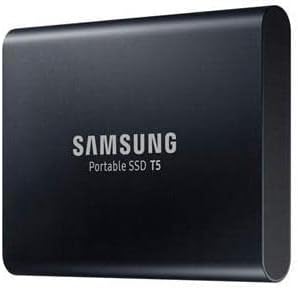
The Samsung T5 Portable SSD has long been a favorite among Linux users for its proven reliability and premium build quality. With a 4.8 rating, it delivers consistent performance and durability, making it a trusted option for those who value stability over cutting-edge speeds.
We may earn a commission when you buy through this link, at no additional cost to you.
Its metal design not only looks elegant but also provides excellent heat dissipation and shock resistance. The optional password protection and AES encryption help secure your files, while the included USB-C to C and C to A cables ensure easy connectivity across different Linux hardware setups.
However, the T5’s maximum speed of 540MB/s is significantly slower than newer models like the T7 or T9. This may be noticeable when transferring very large files or working with demanding applications that require faster data throughput on Linux systems.
Linux users with older systems or those who prioritize reliability and build quality over maximum speed will appreciate the T5. If you need a dependable drive for general backups and don’t require the latest high-speed specs, this model remains a solid investment.
The all-metal chassis ensures durability and effective cooling, making this drive suitable for long sessions of use on Linux machines.
Samsung’s reputation for quality and long-term reliability makes the T5 a safe choice for users seeking a proven external SSD.
We may earn a commission when you buy through this link, at no additional cost to you.
The Samsung T7 Red offers the same performance features as the classic T7 but with a stylish color choice, appealing to users who value aesthetics. With a 4.7 rating, it provides fast read and write speeds along with robust thermal management, ensuring reliability for Linux workloads.
We may earn a commission when you buy through this link, at no additional cost to you.
Dynamic Thermal Guard technology protects the drive from overheating by adjusting performance if necessary, maintaining safety and longevity. The password security feature allows users to protect their files, making it suitable for Linux professionals handling sensitive data on the go.
This version comes with a smaller base capacity of 500GB compared to other models, which may require more frequent transfers for users with large data needs. However, the core performance and build quality match the standard T7, delivering consistent results across various Linux distributions.
Students, gamers, and professionals who want a fast, secure, and stylish drive for their Linux setup will love the T7 Red. If you appreciate design variety without sacrificing performance, this model offers an excellent combination of speed, style, and reliability.
Dynamic Thermal Guard prevents overheating during intensive use, ensuring stable performance for Linux tasks without risking data loss.
Built-in password protection keeps your files private, offering an extra layer of security for Linux users storing sensitive information.
We may earn a commission when you buy through this link, at no additional cost to you.
The Samsung T5 Blue combines reliable performance with a distinctive blue color, offering a stylish option for Linux users who want to personalize their gear. With a 4.8 rating, it delivers consistent speeds and robust build quality, making it a trusted choice for everyday tasks.
We may earn a commission when you buy through this link, at no additional cost to you.
Its compact and portable design fits easily in your pocket, while the metal casing provides shock resistance and durability. Optional AES 256-bit hardware encryption ensures your files stay secure, and the included USB cables support flexible connectivity across different Linux devices.
While the T5 is durable and reliable, its maximum speed of 540MB/s is slower than newer models, which may be a limitation for heavy Linux workloads. However, for typical file transfers and backups, it performs adequately without noticeable delays or hiccups.
Linux users who appreciate design and brand reliability but have moderate speed requirements will find the T5 Blue a great fit. If you need a portable, secure drive for general storage and don’t require the latest high-speed performance, this model is a solid option.
The unique blue finish adds a touch of personality to your gear, making it easy to identify and aesthetically pleasing.
AES 256-bit hardware encryption offers strong security for your files, ensuring privacy on Linux systems with minimal software overhead.
We may earn a commission when you buy through this link, at no additional cost to you.
Selecting the right external SSD for Linux involves considering several key factors to ensure compatibility, performance, and durability.
Linux systems rely on specific file systems and kernel support, so it is crucial to choose an SSD that is plug-and-play or supports ext4, XFS, or Btrfs. Most modern USB 3.0 SSDs work out of the box, but proprietary software tools may have limited support.
Always check that the drive manufacturer offers Linux-friendly firmware updates or utilities if you need advanced management features.
Performance varies significantly between USB 3.0 and USB-C 3.2 models. Look for NVMe SSDs with read speeds above 1000MB/s for fast file transfers, especially when working with large media files or databases.
Faster drives reduce wait times during backups or project loads, improving overall productivity in your Linux workflow.
Choose a capacity that matches your storage needs and budget. For Linux distributions, backups, and development tools, 1TB or more is ideal for long-term use without constant reformatting.
Higher capacity drives may offer better long-term value as storage needs grow over time.
For mobile Linux users, rugged designs with IP ratings and drop protection ensure your drive survives daily wear and environmental exposure. This is particularly important if you work outdoors or travel frequently.
Investing in a durable drive protects your data from physical damage and extends the lifespan of your investment.
Hardware encryption and password protection are essential for sensitive data. Many SSDs include built-in 256-bit AES encryption that works independently of the operating system for enhanced security.
These features keep your files safe even if the drive is lost or stolen, which is vital for professional users.
Some SSD manufacturers provide proprietary software for monitoring drive health or updating firmware. Verify that these tools are available for Linux or that the drive works well with native tools like GNOME Disks.
Good software support makes managing and maintaining your drive easier within the Linux ecosystem.
Ensure your SSD has the right connectors for your laptop. USB-C is standard on most Linux hardware, but models with USB-A adapters offer better backward compatibility for older systems.
Proper connectivity ensures you can plug the drive in anywhere without needing extra adapters or cables.
Balance your budget with the features you need. While premium drives offer higher speeds and better durability, budget options can suffice for casual use and backups.
Evaluate the cost per gigabyte and warranty terms to find the best value for your specific requirements.
To use your SSD, plug it into an available USB port on your Linux machine. Most drives will auto-mount in the file manager, allowing immediate access to your files without additional setup.
Proper care includes always ejecting the drive safely before unplugging to prevent data corruption. This can be done via the GUI or using commands like umount to ensure all data is written.
Keep the SSD in a cool, dry environment and avoid extreme temperatures that might affect performance. Regularly check drive health using built-in Linux tools to monitor for any potential issues early.
Yes, most modern external SSDs with USB-C or USB 3.0 work plug-and-play on Linux because they use standard mass storage protocols. The kernel automatically detects them and mounts the partitions if they are formatted correctly.
For best compatibility with Linux systems, ext4, XFS, or Btrfs are recommended as they are natively supported. However, exFAT or NTFS are also usable if you need to share files with Windows or macOS systems.
Yes, the SSD will still work, but it will operate at USB 2.0 speeds, which are significantly slower. Ensure your system has USB 3.0 ports to get the advertised performance from the drive.
Some drives benefit from firmware updates to fix bugs or improve compatibility, but this may require downloading and running a Linux-compatible utility. Always check the manufacturer’s website for any available tools or instructions.
Always safely eject the drive before unplugging to prevent data loss. You can do this through the file manager by clicking the eject icon or by using the command line with the umount command.
Many external SSDs support hardware encryption with password protection, which is independent of the OS. Additionally, you can use Linux tools like LUKS to encrypt the entire drive for extra security.
Our top picks highlight the Samsung T7 Portable SSD as the overall best option for most users, offering excellent speed, durability, and compatibility for Linux environments.
Consider your specific needs such as capacity, durability requirements, and budget when making your final decision. The T9 offers top-tier speeds for professionals while the SSK provides great value for casual users.
Remember to check the latest prices and availability as these factors can change frequently. Always ensure the drive you choose matches your current system specifications for optimal performance.