
HDM61 HDMI to Coax Adapter
5.0Editor score
Compact ABS outer housing
Fixed NTSC channel output
No driver installation required
This guide compares the top HDMI RF modulators for connecting modern devices to older TVs using coaxial cables and antenna inputs.
Connecting modern gaming consoles and streaming boxes to older televisions can be challenging without the right adapter. An HDMI RF modulator solves this by converting digital signals into analog formats compatible with legacy coaxial inputs.
We evaluated ten top-rated models based on signal stability, resolution support, and ease of setup. Our analysis covers both budget-friendly consumer units and professional-grade networked modulators for wider distribution needs.
Each pick highlights unique features like NTSC output, PLL control, or ATSC support to match your specific setup. Please note that product availability and pricing may change frequently on retailer platforms.
5.0Editor score

4.4Editor score

4.7Editor score
The following table provides a side-by-side comparison of all ten selected HDMI RF modulators to help you identify the right model for your specific connectivity needs and budget constraints.
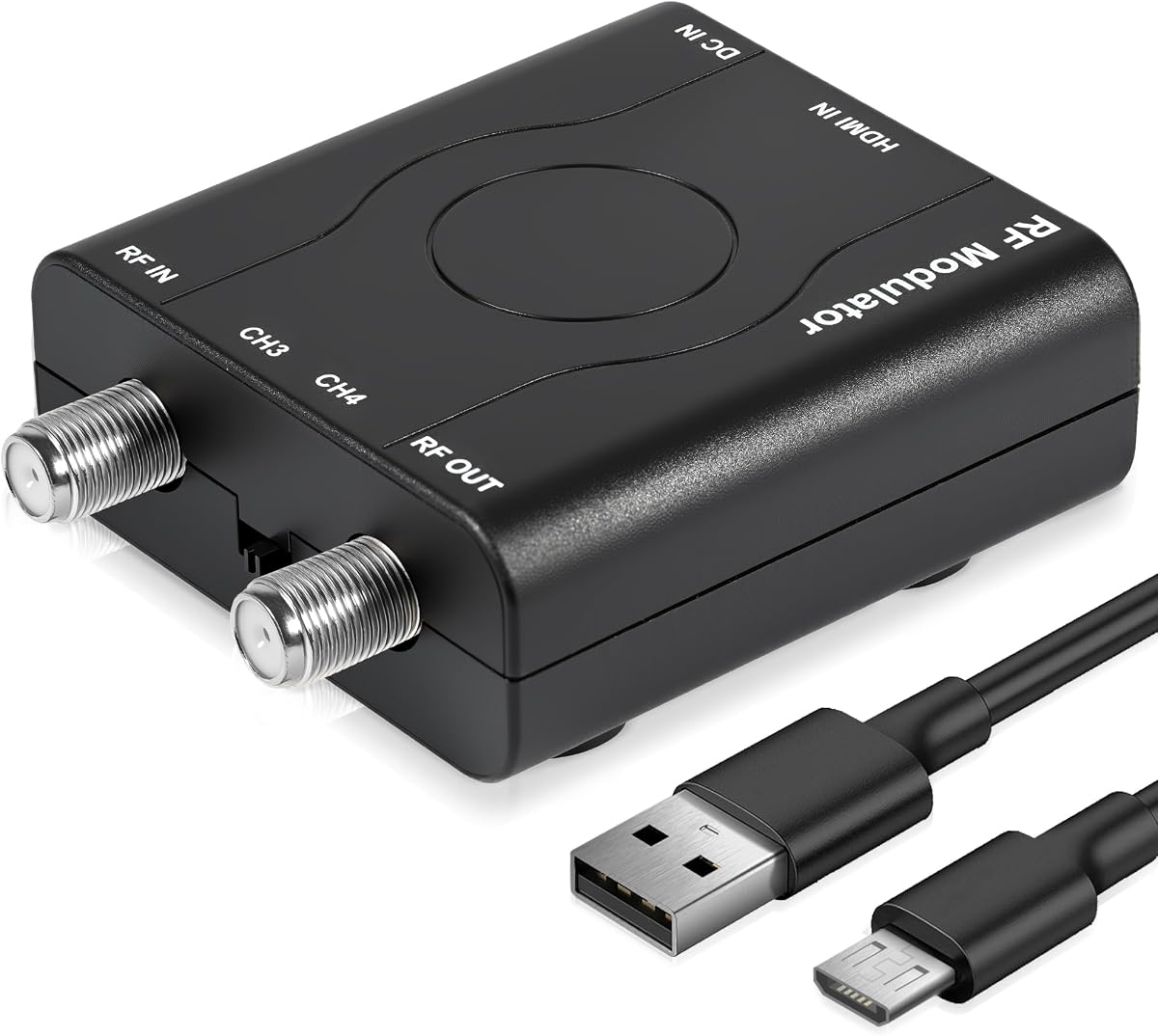


This HDMI to RF modulator stands out for its complete package and reliable signal conversion. With a 4.4 rating, it offers a seamless way to connect modern HDMI sources to older TVs using coaxial inputs.
We may earn a commission when you buy through this link, at no additional cost to you.
The built-in PLL control ensures stable VHF frequency output on channels 3 and 4. It supports multiple input resolutions including 1080p, making it versatile for game consoles and streaming sticks.
Users should note that this device only converts HDMI to RF, not the reverse. Additionally, it is not compatible with Mac Mini or certain laptops which may limit specific use cases.
It is ideal for households needing a straightforward solution to connect streaming devices to older displays. The included cable and adapter make it ready to use immediately.
The PLL control technology maintains consistent output frequency for clear video without signal loss.
Getting a cable and power adapter included saves time and extra cost during initial setup.
We may earn a commission when you buy through this link, at no additional cost to you.
The HDM61 adapter achieves a perfect 5.0 rating by delivering exactly what users need at an affordable price point. It converts digital HDMI signals into analog RF for older television sets effectively.
We may earn a commission when you buy through this link, at no additional cost to you.
Its compact molded ABS shell ensures durability while allowing flexible placement near the TV. The fixed NTSC-M signal output on channels 3 and 4 simplifies tuning for most viewers.
While it lacks reverse conversion capability, this limitation is acceptable for one-way signal distribution. The absence of driver requirements makes deployment instant for any HDMI source.
This adapter is perfect for budget-conscious buyers who need basic connectivity without extra features. It maintains steady transmission performance for long-term daily use reliably.
No software installation is needed allowing immediate connection between source and display devices.
Molded ABS outer housing protects internal components during regular handling and use.
We may earn a commission when you buy through this link, at no additional cost to you.
This Thor Broadcast unit delivers professional-grade performance for distributing HDMI signals across multiple TVs. With a 4.7 rating, it handles high-definition content with impressive clarity and stability.
We may earn a commission when you buy through this link, at no additional cost to you.
The integrated MPEG2 encoder converts HDMI into ATSC or QAM channels for seamless CATV integration. Users can control settings via a proprietary GUI on a connected PC for precise tuning.
While the price is higher than consumer models, the networked capability justifies the investment for hotels or classrooms. It supports 720p up to 1080p resolutions for diverse content sources.
It is the best choice for commercial or large home setups needing centralized control. The AC3 Dolby audio ensures high quality sound alongside sharp video distribution.
One source can be broadcast across many televisions simultaneously without signal degradation.
Graphical user interface allows fine tuning of channels and audio settings remotely.
We may earn a commission when you buy through this link, at no additional cost to you.
The HDM61 VHF converter is designed to handle inputs from game consoles and cameras efficiently. It supports HDMI 1.4 and HDCP 1.4 for secure and reliable operation with modern sources.
We may earn a commission when you buy through this link, at no additional cost to you.
Constructed from high quality ABS material, it offers a durable build for consistent performance over time. The plug and play nature means no drivers are required for immediate connectivity.
It limits output to specific NTSC channels but supports a wide range of input resolutions up to 1080p. This makes it flexible for older TVs that require analog coaxial connections.
Gamers and hobbyists looking for a portable solution will find this unit suitable. It ensures stable signal transmission when connecting modern systems to legacy displays reliably.
Compatible with protected content sources ensuring legal and stable signal transmission.
Accepts multiple resolutions allowing it to work with various modern media players.
We may earn a commission when you buy through this link, at no additional cost to you.
This digital modulator delivers 1080p HDMI video as HD ATSC or QAM channels over coax networks. It is designed for environments needing standardized channel distribution like offices or schools.
We may earn a commission when you buy through this link, at no additional cost to you.
SatLink provides high quality digital encoding to maintain signal integrity across multiple distribution points. The device accepts HDMI and RCA inputs for flexible source connection options.
Setup requires understanding networked coax systems which may be daunting for average users. However, the performance in professional settings justifies the complexity for reliable broadcasts.
It is best suited for commercial applications requiring consistent channel management and HD delivery. This device ensures your HDMI source appears as a native broadcast channel seamlessly.
Generates ATSC or QAM signals compatible with standard digital tuners worldwide.
Preserves 1080p resolution quality through efficient digital compression and encoding.
We may earn a commission when you buy through this link, at no additional cost to you.
This modulator supports multiple standards including DVB-C QAM, ATSC, and DVB-T for international compatibility. It provides full HD support up to 1080p with low latency for real-time viewing.
We may earn a commission when you buy through this link, at no additional cost to you.
Control is handled via a web based NMS allowing easy updates and configuration from a browser. It ensures HDCP compliance for working with protected content from cable or satellite sources.
The cost is high compared to simple adapters but offers advanced features for professional AV systems. Latency remains low between 50 to 100 milliseconds for smooth playback.
It is ideal for system integrators needing versatile modulation standards and remote management. Web access simplifies ongoing maintenance and adjustments without physical access.
Supports various regional formats making it useful for international deployment scenarios.
Network interface allows control from any connected device on the local network.
We may earn a commission when you buy through this link, at no additional cost to you.
This modulator supports both VHF and UHF frequencies along with HDMI and CVBS RCA inputs for versatility. Users can adjust AV output levels to suit different equipment sensitivities and preferences.
We may earn a commission when you buy through this link, at no additional cost to you.
The lightweight construction with ABS and metal materials ensures it withstands regular use without bulk. It allows direct RF output via standard F female connectors common on older televisions.
Adjusting the signal level might require patience to find the sweet spot for specific TVs. However, this flexibility ensures compatibility with a wide range of legacy equipment.
It is perfect for mixed setups involving both analog RCA and modern HDMI sources. The dual frequency support broadens its utility across different broadcasting standards.
Output levels can be tuned to prevent overload or weak signal issues on displays.
Supports both HDMI and analog RCA allowing connection of older audio video gear.
We may earn a commission when you buy through this link, at no additional cost to you.
Designed for reliable HDMI signal transmission through coaxial cable systems, this modulator supports distribution to multiple TVs. It works with streaming players, consoles, and laptops effectively.
We may earn a commission when you buy through this link, at no additional cost to you.
The complete kit includes cables and adapters alongside a detailed manual for easy installation. You can connect your source and TV quickly without complicated settings or extra equipment.
While it offers standard features, the stability makes it suitable for educational environments. Customer support is available within 18 hours to address any setup issues promptly.
It is ideal for classrooms or hotels needing simple distribution solutions with good support. The kit ensures you have everything necessary to start using the device immediately.
Stable output allows multiple displays to receive content simultaneously without interference.
Responsive customer service ensures any technical problems are resolved quickly.
We may earn a commission when you buy through this link, at no additional cost to you.
This HDMI RF modulator offers consistent daily performance with a durable ABS construction. It includes a power cable and manual ensuring you can connect and use it right away.
We may earn a commission when you buy through this link, at no additional cost to you.
The 1080P PLL control ensures stable VHF frequency output which is critical for clear viewing. It supports a wide range of input resolutions for flexibility across different media devices.
Build quality is focused on longevity allowing it to handle continuous use without overheating. The unit meets diverse home and commercial application needs effectively.
It is recommended for users needing a reliable converter for everyday tasks. The included accessories simplify the process making it hassle free to set up.
Built-in control circuitry maintains consistent output quality over extended periods.
Includes all necessary power components to start using the device immediately.
We may earn a commission when you buy through this link, at no additional cost to you.
This modulator supports optional PAL or NTSC output formats along with VHF and UHF frequencies. It accepts HDMI and AV inputs for flexible connections to different signal sources.
We may earn a commission when you buy through this link, at no additional cost to you.
Designed with universal voltage input of 90 to 240V it works globally without power issues. You can adjust resolution settings for accurate analysis and more flexible usage scenarios.
The compact footprint saves space when placed next to or on a TV unit. It is ready to use without driver installation making setup simple for anyone.
It is perfect for travelers or international settings requiring format switching. The flexible resolution support ensures compatibility with various display configurations easily.
Works with standard global voltage ranges preventing need for extra power adapters.
Switch between PAL and NTSC to match regional television standards accurately.
We may earn a commission when you buy through this link, at no additional cost to you.
Selecting the right HDMI RF modulator involves considering your display type and signal needs.
Check if your TV requires NTSC or ATSC signals to ensure compatibility. Some units support both standards for broader use across different regions.
Choose a unit matching your local broadcast requirements for proper signal decoding.
Verify the input resolution capabilities to match your source devices like gaming consoles. Most units support up to 1080p input for high definition quality.
Ensure the modulator accepts the highest resolution your device outputs to avoid downsizing.
Confirm whether the device outputs on VHF or UHF frequencies depending on your coaxial setup. Many consumer models focus on standard CH3 and CH4 outputs.
Select a modulator with the correct frequency range to match your TV tuner settings.
Look for audio encoding support such as AAC or Dolby to maintain sound quality. Some professional units offer advanced audio handling for cinema experiences.
Ensure audio compatibility with your TV inputs to avoid sound signal loss.
If distributing to multiple displays, consider a networked modulator with web control. These units allow centralized management of channels and settings across a building.
Opt for networked solutions if managing content on dozens of TVs simultaneously.
Check the materials used such as ABS or metal for long term reliability. Units with proper heat dissipation perform better during extended operation periods.
Choose a sturdy build if the device will be used frequently or in public spaces.
Verify available inputs like HDMI and RCA to match your existing source equipment. More inputs provide flexibility for switching between multiple devices easily.
Ensure you have the necessary cables included or purchased separately for connection.
Balance the cost against needed features like PLL control or digital encoding. Budget models suit simple home tasks while professional units offer advanced management.
Invest in higher-end models only if you need networked or multi-format capabilities.
Connect your HDMI source device to the modulator using a standard HDMI cable. Ensure the connection is secure before turning on any power sources.
Attach a coaxial cable from the modulator output to the antenna input on your TV. Set the TV to the corresponding channel such as 3 or 4.
Keep the unit in a well ventilated area to prevent overheating during long sessions. Avoid placing it near heat sources to maintain optimal performance longevity.
Yes it works with Smart TVs that have coaxial inputs. However most modern Smart TVs use HDMI directly so a modulator is usually only needed for older models.
Basic consumer modulators typically connect to one TV. For multiple TVs you need a networked modulator or a coaxial signal splitter after the output.
No drivers are required for most models. They are designed as plug and play devices allowing immediate use once connected to power and source devices.
VHF and UHF are different frequency bands. Most modern units allow selection between them to match the TV tuner settings available in your region.
No most devices only convert HDMI to RF. Reverse conversion requires a different device called an RF to HDMI demodulator which is less common.
Blurry images often happen due to signal interference. Check coaxial connections or try adjusting the output level settings on the modulator if available.
Set your TV to channel 3 or 4 depending on the modulator settings. Check the device manual for exact frequency assignments before connecting.
Most models support up to 1080p input. 4K sources will be downscaled so ensure your device supports your source resolution for best results.
Our top picks include the Editor's Choice for stability and the Budget option for simplicity. Each model offers a reliable bridge between modern sources and legacy displays.
Prioritize the output standard and resolution support to match your specific setup needs. Networked features are useful for larger installations requiring central control.
Always verify current product availability and pricing on retailer platforms before purchasing. Technical specs and support policies may change over time without notice.