
RedThunder One Handed
4.4Editor score
35 Keys Anti-Ghosting
Macro Recording Support
RGB Backlit Modes
This guide compares the top ten left handed gaming keyboards for 2026, evaluating performance, ergonomics, and features to help you choose the right setup.
Finding the perfect left handed gaming keyboard can transform your setup. These devices offer unique layouts tailored for southpaw gamers, ensuring comfort and precision during long sessions. We explore the best options available today.
Our team analyzed ten top products based on user feedback, technical specs, and ergonomic design. We considered factors like switch type, connectivity, and build quality to compile this definitive list for serious gamers.
Each pick highlights key strengths and potential trade-offs to suit different needs. Prices and availability fluctuate frequently, so check the latest details before purchasing. We hope this guide simplifies your decision process effectively.
4.4Editor score

4.6Editor score

4.3Editor score
We compare all ten products side-by-side to highlight their unique specifications and target audiences. This table helps you quickly identify which device aligns with your specific gaming needs and budget constraints.



The RK ROYAL KLUDGE L98 stands out as a premium choice for gamers needing a dedicated southpaw layout. With a 4.6 rating, it impresses with its unique design that moves the numpad to the left for better mouse access.
We may earn a commission when you buy through this link, at no additional cost to you.
Its gasket structure combined with PBT keycaps delivers a soft, cushioned typing feel. The five-layer sound dampening reduces hollow noise significantly, offering a smooth experience for both gaming and work environments.
While the price is higher than standard keyboards, the massive 8000 mAh battery justifies the investment. It offers over 300 hours of use without RGB, ensuring you rarely need to recharge during intense sessions.
This keyboard is ideal for professionals who game late into the night or those who prioritize ergonomic comfort above all else. The tri-mode connectivity makes it versatile enough for multi-device setups seamlessly.
Relocating the numpad to the left side frees up right-hand space for mouse movements, reducing shoulder strain during extended gaming or work sessions.
Five sound-dampening layers and a gasket structure minimize vibrations and noise, creating a premium acoustic experience that enhances focus and comfort.
We may earn a commission when you buy through this link, at no additional cost to you.
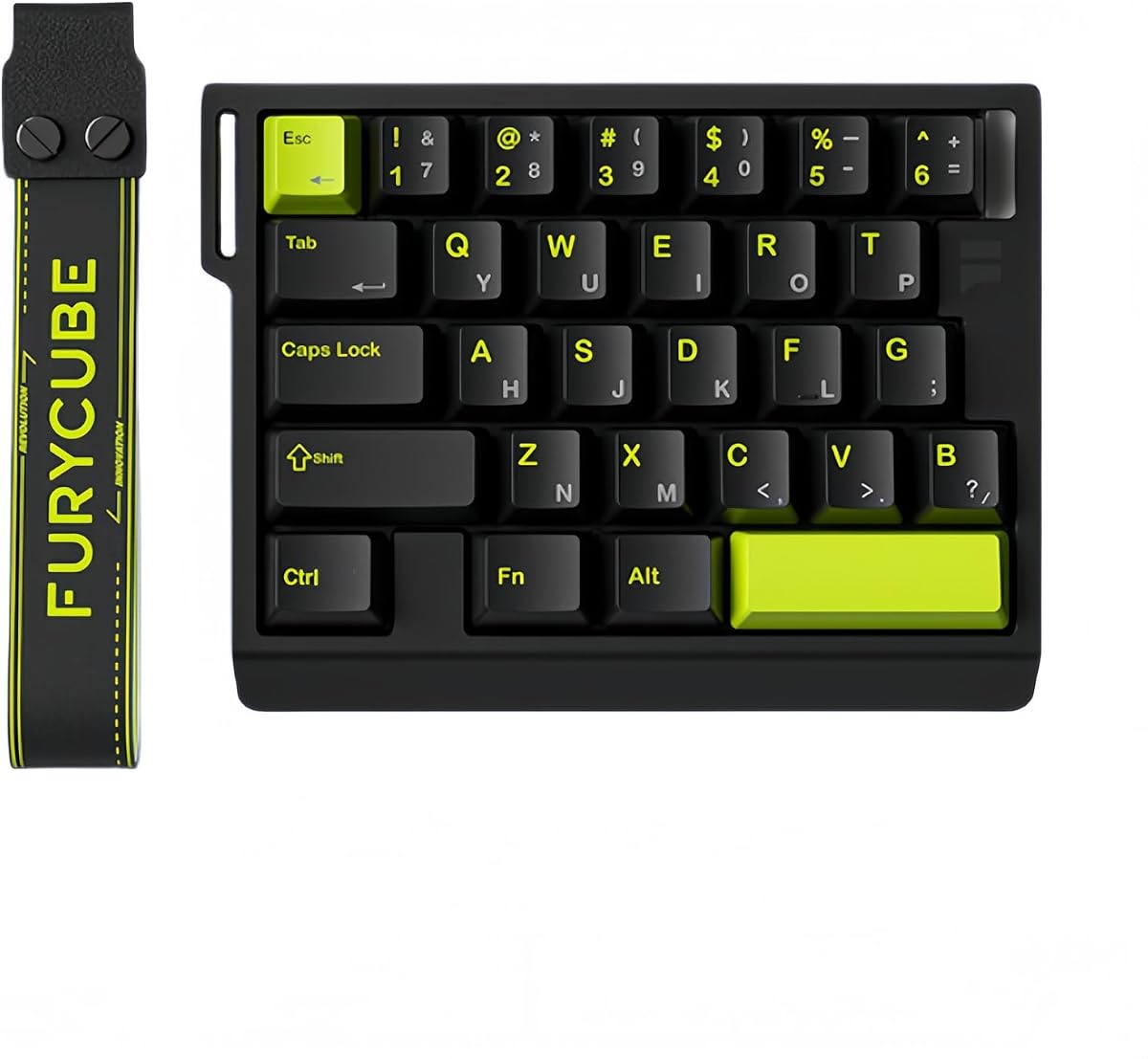
The RedThunder One Handed keyboard offers an accessible entry point for gamers wanting a specialized layout without breaking the bank. It receives a solid 4.4 rating for its reliable performance and ease of use.
We may earn a commission when you buy through this link, at no additional cost to you.
Featuring 35 keys with anti-ghosting capabilities, this keypad handles rapid inputs smoothly. The macro recording function allows you to save complex sequences to single keys, enhancing gameplay efficiency significantly.
While it lacks advanced features like wireless connectivity, the simple plug-and-play setup ensures no driver headaches. The wrist rest included provides necessary comfort during short to medium gaming sessions.
This product suits casual gamers or those needing a secondary device for specific games. Its low cost makes it a low-risk option for testing if a one-handed layout improves your performance.
Two sets of macro recording keys let you automate repetitive in-game actions, giving you a competitive edge without needing complex software configurations.
The small, compact design allows easy transport between setups, making it perfect for LAN parties or shared gaming spaces where desk space is limited.
We may earn a commission when you buy through this link, at no additional cost to you.
The AZERON Gaming Keypad represents the pinnacle of one-handed gaming technology with its unique Hall Effect thumbstick and extensive customization. Rated 4.3, it appeals to serious enthusiasts demanding precision control over their inputs.
We may earn a commission when you buy through this link, at no additional cost to you.
The analog thumbstick eliminates traditional stick drift, supporting 360-degree movement in compatible games. This feature transforms the keypad into a hybrid controller that offers more nuanced gameplay than standard keyboards.
Although the price is high, the 3D printed build allows for personalized adjustments to fit your hand perfectly. You can store up to six control layouts directly on the device for instant switching between games.
This device is perfect for users who play FPS or MOBA titles and want maximum control without using both hands. It is a specialized tool for those who understand the value of ergonomic optimization.
The Hall Effect thumbstick uses magnetic sensors for drift-free, smooth movement control, providing an analog experience rarely found in mechanical keypad setups.
With 3D printed parts and adjustable components, you can tailor the keyboard's shape to your specific hand size and grip style for optimal comfort.
We may earn a commission when you buy through this link, at no additional cost to you.
The AZERON Keyzen brings the legendary quality of Cherry MX switches to a one-handed keypad design. With a 4.6 rating, it promises durability and tactile satisfaction that mechanical keyboard enthusiasts appreciate deeply.
We may earn a commission when you buy through this link, at no additional cost to you.
Its 360-degree Hall-Effect joystick provides precise analog control without drift issues. The 32 keys are fully mappable to mouse or controller inputs, offering incredible versatility for complex game setups.
The adjustable ergonomic design and included palm rests help mitigate fatigue during long play sessions. DSA keycaps ensure uniform height for better typing consistency across the layout.
Ideal for power users who need reliability and precision, this keypad justifies its cost with superior component quality. It remains a top choice for those upgrading from standard controllers to dedicated gaming keyboards.
Choosing from Red, Brown, or Blue switches ensures you get the tactile feel you prefer, adding a layer of customization often missing in specialized keypads.
Keys can be mapped to keyboard, mouse, or controller inputs, allowing you to consolidate actions and reduce the physical effort needed during intense gameplay.
We may earn a commission when you buy through this link, at no additional cost to you.
The AJAZZ AK029 is engineered for competitive FPS players requiring the fastest possible response times. With a 4.5 rating, it delivers cutting-edge magnetic switches that reset instantly to support rapid movement commands.
We may earn a commission when you buy through this link, at no additional cost to you.
Its 8KHz polling rate ensures near-zero latency, translating every finger tap into on-screen action without delay. The integrated ergonomic wrist rest reduces strain during marathon sessions effectively.
Advanced technologies like SOCD and DKS allow complex movement techniques to be executed with single keystrokes. This gives skilled players a distinct advantage in high-pressure matches where split seconds matter.
While it is a wired device, the stability it offers is unmatched for competitive play. It is best suited for gamers who prioritize speed and precision over wireless convenience in their daily routine.
Magnetic switches detect real-time travel for instant key resets, enabling smoother strafing and faster directional changes without fixed actuation points.
Integrated SOCD and DKS allow binding multiple actions to one key, letting you execute advanced counter-strafing techniques effortlessly with one hand.
We may earn a commission when you buy through this link, at no additional cost to you.
The Ergonomic Left Handed Keyboard is designed primarily for business users and accountants who need a dedicated numeric keypad on the left. Rated 4.4, it focuses on posture improvement and reducing repetitive strain injuries over long hours.
We may earn a commission when you buy through this link, at no additional cost to you.
Its patented Natural_A key shape is laser inscribed to reduce back and shoulder strain. This layout allows the right hand to remain on the mouse while the left handles data entry tasks efficiently.
While it lacks gaming-specific features like RGB, the eight multimedia hotkeys provide quick access to volume and media controls. It supports both Windows and Mac systems seamlessly for broad utility.
This device is best for office workers or students typing extensively rather than gamers. It provides a practical ergonomic solution for those who need a standard full layout on their non-dominant side.
The ergonomic layout specifically targets RSI and carpal tunnel prevention, making it a smart investment for professionals working long hours at a computer.
Available in both USB and PS/2 connections, this keyboard ensures compatibility with older systems and modern computers alike without driver issues.
We may earn a commission when you buy through this link, at no additional cost to you.
The Keychron C0 HE offers a modern approach to one-handed gaming with magnetic switches and a web-based configurator. With a 4.2 rating, it is built for those who value speed and software flexibility without installations.
We may earn a commission when you buy through this link, at no additional cost to you.
Its Rapid Trigger Hall Effect switches provide adjustable actuation, allowing precise control over key registration. The 8K polling rate ensures consistent performance even during fast, repetitive inputs.
The 35-key layout is designed to keep essential commands within reach without taking up too much desk space. Per-key RGB lighting adds a customizable aesthetic that matches any desktop setup style.
Ideal for creators and gamers who switch between systems, the web-based tool works on both Windows and macOS. This universal approach simplifies workflow management without needing separate software for each device.
Customize mappings and RGB directly in your browser, eliminating the need for bulky software installations and simplifying setup across multiple operating systems.
Hall Effect switches detect key travel based on real-time input rather than fixed points, offering smoother and more consistent performance during intense gaming scenarios.
We may earn a commission when you buy through this link, at no additional cost to you.
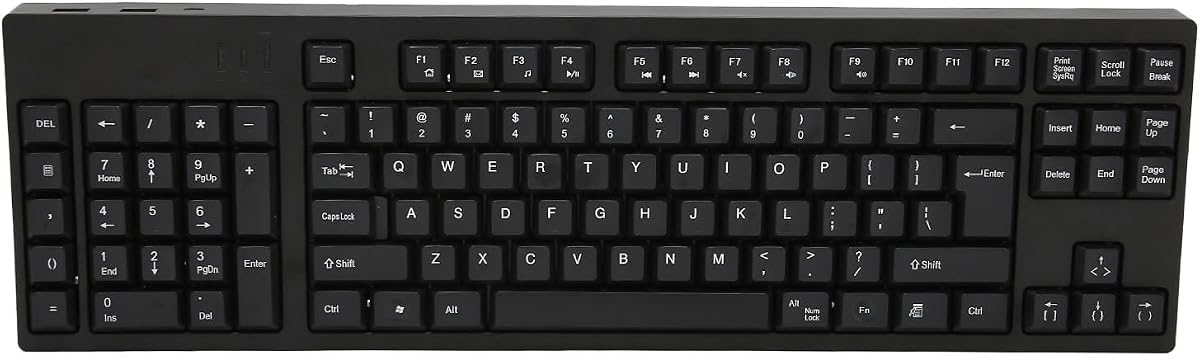
This Left Handed Keyboard offers a complete 109-key layout for users needing full functionality on the left side. It holds a perfect 5.0 rating among users who appreciate its straightforward design and reliable performance.
We may earn a commission when you buy through this link, at no additional cost to you.
The ergonomic key layout relieves right-hand fatigue, allowing the right hand to stay on the mouse while the left handles typing and number entry. Two extra USB interfaces add convenient connectivity for peripherals.
Constructed from high-quality ABS material, it provides a stable and accurate typing experience without needing complicated drivers. The plug-and-play nature ensures immediate use for both business and creative design tasks.
Best suited for professionals needing a full keyboard mirror image, this option simplifies workflow for accountants and designers. It balances essential functionality with ergonomic benefits in a simple package.
With 109 keys, this layout supports all standard typing tasks and number entries, ensuring no functionality is lost when moving to a southpaw setup.
Two additional USB interfaces allow you to connect flash drives or mice directly to the keyboard, adding convenience to your workstation without extra clutter.
We may earn a commission when you buy through this link, at no additional cost to you.
The FKZ M30HE features magnetic switches with adjustable sensitivity allowing users to customize actuation points for optimal performance. Rated 4.0, it is designed for gamers wanting precise control over their keystroke behavior.
We may earn a commission when you buy through this link, at no additional cost to you.
Its rapid trigger system activates and deactivates keys instantly to reduce input lag. The web driver allows you to remap keys and adjust lighting modes easily for a personalized gaming experience.
With north-facing LEDs and customizable RGB lighting, it adds visual flair to your setup. The compact 30-key layout keeps important gaming keys accessible without consuming too much desk space.
This device suits players who want to tweak actuation depth for different games. It offers a balanced mix of customization and performance for those willing to spend time configuring settings.
Full segment adjustable sensitivity lets you set actuation points from 0.1 to 3.4 mm, allowing you to tailor the feel to your specific gameplay style.
Access all configuration options via a web driver, making it easy to remap functions and adjust lighting without installing heavy local software.
We may earn a commission when you buy through this link, at no additional cost to you.
The A4tech Ergonomic Left Handed Keyboard is tailored for business environments where posture and comfort matter. With a 4.3 rating, it eliminates RSI and carpal tunnel risks through its ergonomic key layout.
We may earn a commission when you buy through this link, at no additional cost to you.
Eight multimedia hotkeys provide quick access to media controls, streamlining daily tasks. The wired USB connection ensures stable performance without battery concerns or signal interference issues.
Its design focuses on natural wrist positions to improve posture and reduce shoulder strain. While not gaming-specific, it offers reliable performance for administrative and accounting work.
This keyboard is best for office professionals needing a dedicated numeric keypad layout on the left. It provides a practical ergonomic solution for those spending long hours entering data or using a mouse.
The ergonomic design specifically targets natural wrist alignment to reduce shoulder and back strain, helping prevent long-term issues for office workers.
Eight dedicated multimedia hotkeys let you control volume and play/pause functions directly, improving efficiency when listening to audio during work.
We may earn a commission when you buy through this link, at no additional cost to you.
Choosing the right left handed gaming keyboard involves weighing several factors to ensure it fits your workflow and comfort needs.
Decide between a full layout with a numpad on the left or a compact keypad. Full layouts are better for data entry while compact ones save space for mouse movement.
Choose a layout that matches your primary tasks to optimize efficiency and comfort.
Magnetic Hall Effect switches offer faster response and adjustable actuation points compared to traditional mechanical switches. They are ideal for competitive gaming requiring rapid resets.
Select magnetic switches for FPS titles or mechanical for general versatility and tactile feedback.
Look for designs that align your wrist naturally to reduce strain. Features like adjustable angles and wrist rests are essential for long sessions.
Prioritize ergonomic features to prevent fatigue and maintain comfort during extended use.
Wired connections ensure zero latency which is critical for esports. Wireless options offer flexibility but may introduce slight lag or battery management needs.
Go wired for competitive gaming and wireless for convenience if latency is less critical.
Check if the keyboard supports macro recording and key remapping. Advanced software allows you to store multiple profiles for different games or applications.
Choose a model with robust software support to tailor functions to your specific needs.
Durable materials like aluminum plates and PBT keycaps extend the lifespan of your device. Look for reinforced construction if you plan heavy use.
Invest in higher build quality materials for long-term reliability and better typing feel.
Prices range from affordable keypads to premium ergonomic keyboards. Determine how much you are willing to spend based on essential features.
Balance your budget with the features that truly impact your daily workflow.
Start by positioning the keyboard to the left of your workspace, aligning it with your dominant hand. Ensure your wrist rests comfortably on any included pads to maintain neutral posture.
Use software tools provided by the manufacturer to map keys to your favorite games or applications. Adjust actuation points if available to optimize sensitivity for your play style.
Clean the keyboard regularly using a soft brush or compressed air to remove dust from between the keys. Store it in a dry place when not in use to protect the electronics from moisture.
Most modern keyboards work with both Windows and macOS through standard USB or Bluetooth connections. Check product listings to confirm driver availability before purchasing.
Many models include dedicated macro recording keys or software support to save complex sequences to single keystrokes. This feature enhances gameplay efficiency for repetitive actions.
Hall Effect switches use magnetic sensors to detect key movement without physical contact. This technology prevents wear and allows for rapid triggering without fixed actuation points.
Yes, many designs are intended for both gaming and office work. Look for models with full layouts and ergonomic features to support daily data entry effectively.
Wireless connections on standard Bluetooth can introduce slight delays. However, 2.4GHz wireless or wired options minimize this issue for competitive gaming scenarios.
While designed for left-handed users, right-handed individuals can adapt to them. However, they might find the extra desk space on the left less useful for mouse movements.
Battery life varies by model, with some offering hundreds of hours on a single charge. Features like RGB lighting significantly impact power consumption rates.
Hot-swappable models allow you to change switches and keycaps easily. Standard mechanical keyboards usually use universal sizes that fit most replacement caps.
We have reviewed ten distinct left handed gaming keyboards catering to different needs and budgets. The RK ROYAL KLUDGE L98, RedThunder, and AZERON stand out as top choices for performance and ergonomics.
Prioritize switch technology and ergonomic design to ensure your setup supports your long-term health. Choose wired options for zero lag or wireless for a clutter-free desk environment.
Remember to check current prices and availability before buying as values fluctuate frequently. Your perfect keyboard depends on balancing these factors to create an ideal gaming experience.