
HDMI KVM Switch 3 Monitors 2 Computers 4K@60Hz
4.0Editor score
4K@60Hz resolution support
4 USB 3.0 ports
Panel and wired switching
This guide compares the top KVM Switch for Triple Monitors 2 options for seamless multi-display workflows across multiple computers in 2026.
Managing multiple computers with a triple monitor setup often leads to cable clutter and inefficient switching. A reliable KVM switch simplifies this by allowing you to share displays and peripherals across systems effortlessly.
We evaluated ten top-rated models based on resolution support, port variety, switching ease, and build quality. Our goal is to help you find the perfect device for your specific desktop or workstation needs.
Each selection highlights key strengths, trade-offs, and ideal use cases to guide your decision. Please note that product availability and pricing may vary over time as you check the latest details.
4.0Editor score

3.9Editor score

4.9Editor score
The following table provides a side-by-side look at each model, highlighting their unique strengths and core specifications for your comparison.


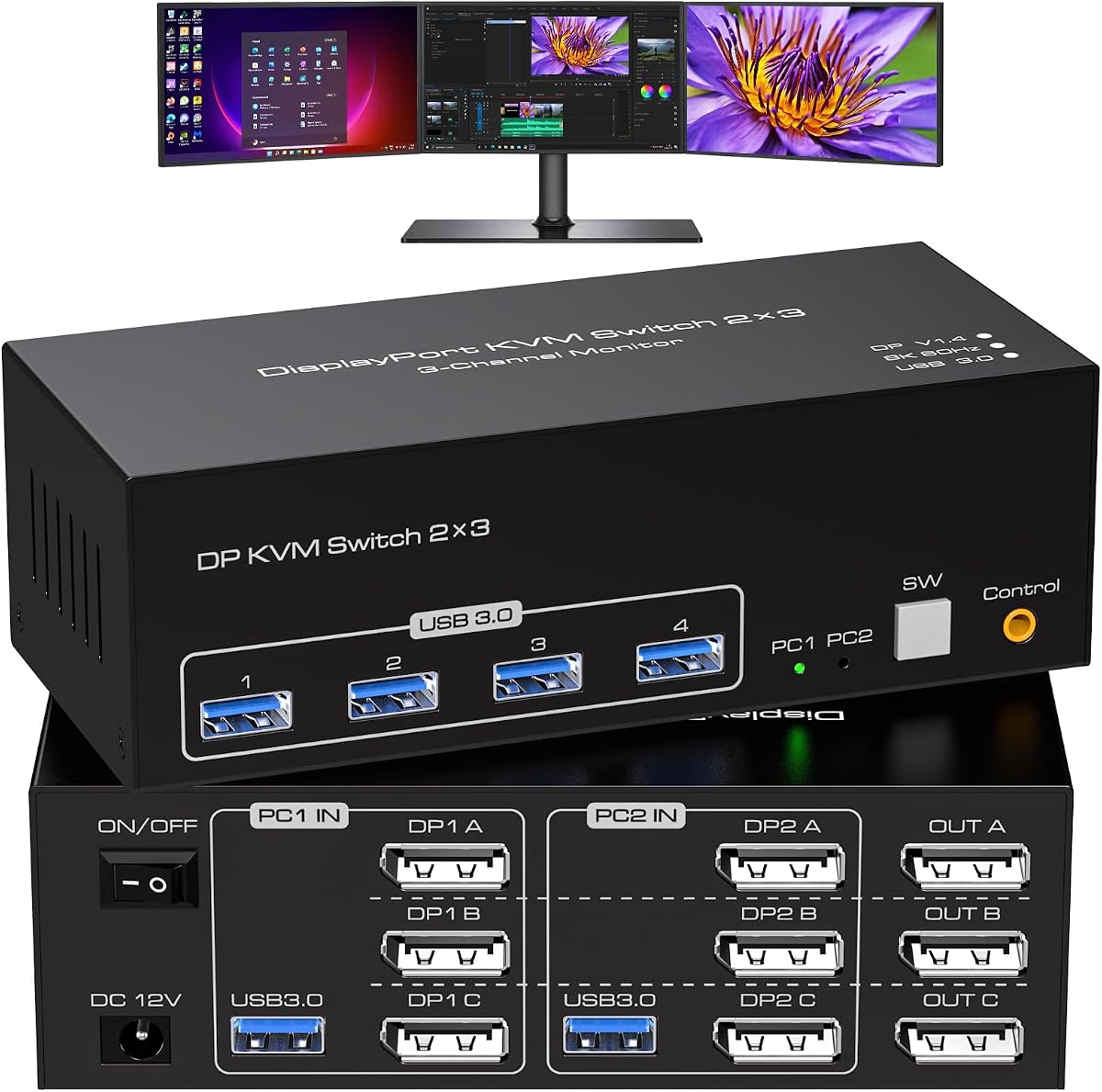



The UGREEN KVM switch stands out with its robust aluminum build and support for resolutions up to 8K at 60Hz. It combines two DisplayPort 1.4 ports with one HDMI 2.1 port, allowing high-performance triple monitor setups for two computers. This model is ideal for professionals needing high-fidelity visuals and advanced gaming features like G-Sync and FreeSync across multiple screens. Its included desktop controller adds significant convenience for workspace organization, keeping switching accessible without cluttering your desk.
We may earn a commission when you buy through this link, at no additional cost to you.
This device delivers exceptional video performance with backward compatibility for various refresh rates like 4K at 240Hz. It handles HDR10+, HDCP 2.3, and variable refresh rates effectively, ensuring smooth visuals without tearing or stuttering during intensive tasks. The four USB 3.0 ports support peripherals like keyboards, mice, and webcams seamlessly. Users can choose between button switching on the device or using the external controller for a cleaner setup, offering flexibility in how you manage your dual-computer environment.
However, this switch does not support keyboard hotkey toggling, meaning you must rely on physical buttons or the controller for switching. Additionally, it lacks EDID emulation, which may require manual window adjustments when toggling between computers with different layouts. While it supports extended and mirror modes well, you must ensure both PCs support triple-monitor output to utilize all three screens fully. Proper cable management and power supply adherence are crucial to avoid signal issues or dropped displays.
If you prioritize high-resolution support and build quality, this UGREEN model is a top recommendation. It is particularly well-suited for content creators and IT professionals needing reliable, high-fidelity switching without constant cable swaps. Just verify your computer's video ports and ensure you use high-quality cables under two meters to maximize performance. For a tidy, efficient triple-monitor workflow with premium video standards, this KVM switch offers a compelling solution with modern feature support.
Supports 8K at 60Hz and 4K at 240Hz with backward compatibility for varied refresh rates to suit different monitors and tasks.
Includes a desktop controller for out-of-reach switching and supports physical button control for added workspace flexibility.
We may earn a commission when you buy through this link, at no additional cost to you.
This HDMI KVM switch offers a budget-friendly solution for sharing three monitors across two computers. It uses HDMI connections exclusively, supporting up to 4K at 60Hz, which is sufficient for most productivity and media tasks. The included four USB 3.0 ports allow for fast data transfer and peripheral sharing like keyboards and printers. With support for both extended and copy display modes, users can tailor their workspace layout easily without additional software or driver installations.
We may earn a commission when you buy through this link, at no additional cost to you.
The device includes a wired controller for convenient switching without needing to reach behind the main unit. This helps maintain a cleaner desk, especially if the KVM is tucked away. It requires all computers to support triple-screen display and connect three HDMI cables each for full output. The USB 3.0 ports provide a tenfold speed increase over USB 2.0, making file transfers and device recognition snappy. It works across Windows, Mac, Linux, and Unix systems with straightforward plug-and-play functionality.
While affordable, this model lacks DisplayPort support, limiting it to HDMI-only setups. The maximum resolution of 4K at 60Hz is lower than premium alternatives, which may matter for high-end creative work or competitive gaming. Hotkey toggling is also not supported, relying solely on physical buttons or the controller. Ensure your PCs have enough HDMI outputs or use active adapters carefully, as passive ones may cause signal issues in this setup.
This switch is ideal for budget-conscious users needing solid triple-monitor performance without breaking the bank. It works well for offices or home setups prioritizing affordability and basic functionality. Check your computer's video outputs and cable lengths carefully to ensure stable 4K performance. For most standard productivity uses, this KVM provides reliable switching and peripheral sharing at an accessible price point.
Provides a budget-friendly option for HDMI-based triple monitor sharing with 4K at 60Hz support and essential USB 3.0 ports.
Includes a wired controller to place switching access outside your main work area for a cleaner desk and easier use.
We may earn a commission when you buy through this link, at no additional cost to you.
This KVM switch delivers high-performance switching with support for 8K at 60Hz and 4K at 144Hz, making it ideal for demanding visual tasks. It uses two DisplayPort and one HDMI port per computer to connect three monitors, with four USB 3.0 ports for peripheral sharing. A wired remote controller is included for convenient switching away from the device, keeping your workspace tidy. The setup supports extended and copy display modes, giving flexibility in how you configure your screens across both systems.
We may earn a commission when you buy through this link, at no additional cost to you.
The device provides data transfer speeds up to 5Gbps via USB 3.0, significantly faster than older standards for quick file transfers. It requires HDMI 2.1 and DP 1.4 cables for optimal resolution, with shorter cable lengths recommended to maintain signal integrity. A 12V power adapter ensures stable operation, especially for high-power USB devices like hard drives. While it lacks EDID emulation, users can adjust display settings manually as needed when switching between computers.
One limitation is the need for specific high-bandwidth cables to achieve maximum resolutions, which may add to setup costs. Also, the lack of hotkey support means you must use physical buttons or the remote for switching. Ensure your computer supports triple-monitor output natively, as mismatched video outputs can limit functionality. Proper power and cable adherence will help avoid signal dropouts or reduced performance under load.
For users seeking high-resolution support without premium pricing, this model is a strong value option. It balances performance with essential features like remote control and USB 3.0 speed effectively. Verify your system's video port availability and cable quality before purchasing to ensure smooth operation. This KVM is a practical choice for enthusiasts and professionals needing powerful triple-monitor switching with modern resolution standards.
Supports 8K at 60Hz and 4K at 144Hz for sharp visuals and smooth performance in creative and gaming workflows.
Includes a wired remote for flexible switching placement, helping keep your desk organized and clutter-free.
We may earn a commission when you buy through this link, at no additional cost to you.
This 8K KVM switch is designed for seamless sharing of three monitors between two computers with robust video and USB support. It includes two DisplayPort 1.4 and one HDMI 2.1 ports, supporting high resolutions and refresh rates for both productivity and gaming. The included 12V power port and separate power switch improve stability for high-power USB devices. You can switch via physical buttons or a wired option, with LED indicators showing the active computer for quick visual confirmation.
We may earn a commission when you buy through this link, at no additional cost to you.
It supports advanced gaming features like VRR, FreeSync, and G-Sync, ensuring smooth performance without screen tearing. The four USB 3.0 ports offer fast data transfer for peripherals and storage. The device is compatible with Windows, Mac OS, Chrome OS, Linux, and more, providing broad system support. Note that it works best with native DisplayPort and HDMI ports, using only active adapters if needed to avoid signal issues.
While powerful, it lacks EDID emulation, which might require manual window repositioning when toggling computers. Cable length should be kept under 1.5 meters for maximum resolution. Ensure your PCs support three independent displays to utilize all monitors. The separate power switch helps restart recognition without unplugging, reducing hassle during setup issues.
This model is excellent for gamers and professionals needing high-resolution, reliable switching. It handles demanding visuals and peripherals well with modern standards. Verify your video ports and cable setup carefully to achieve optimal performance. For a compact yet powerful triple-monitor KVM, this device offers strong features and flexibility.
Supports VRR, FreeSync, and G-Sync for tear-free visuals during gaming and intensive graphic tasks.
Includes a 12V power port and separate switch to manage high-power devices and restart recognition easily.
We may earn a commission when you buy through this link, at no additional cost to you.
This DP-only KVM switch supports 8K at 60Hz and 4K at 120Hz, delivering ultra HD clarity for triple monitor setups. It connects two computers via DisplayPort 1.4 to share three monitors and four USB 3.0 ports. A wired remote controller is included for flexible switching away from the device. It supports extended and copy modes, enabling versatile screen arrangements across systems. The 12V power supply supports high-powered USB devices reliably.
We may earn a commission when you buy through this link, at no additional cost to you.
It offers fast data transfer up to 5Gbps via USB 3.0, with backward compatibility for older peripherals. Switching can be done via panel buttons or the remote, with LEDs indicating the active computer. Plug-and-play functionality means no drivers are needed for Windows, Mac, Linux, and Unix. Bluetooth peripherals without USB receivers are not supported, so wired or receiver-based devices are required for best results.
The DP-only design may limit compatibility if your PCs lack sufficient DisplayPort outputs. Ensure your graphics card supports triple-monitor copy and expand modes for full functionality. Hotkey switching is not supported, relying solely on physical controls. This setup prioritizes high-resolution fidelity and is best for users with DP-native systems.
This model suits users needing pure DP connectivity with high-resolution support. It provides reliable switching and peripheral sharing with modern speed and clarity. Verify your PC's port availability and cable quality to achieve optimal 8K performance. For DP-based workstations, this KVM delivers strong performance and features.
Delivers 8K at 60Hz via DisplayPort for ultra HD visuals ideal for creative and professional workflows.
Includes a wired remote for switching access outside the main area, keeping your workspace tidy and efficient.
We may earn a commission when you buy through this link, at no additional cost to you.
This KVM switch features EDID emulation, saving monitor resolution and layout data to avoid window rearrangement when switching. It supports 4K at 60Hz via two HDMI and one DP port per PC. A wired remote allows switching access away from the device. It supports extended and mirrored modes for flexible workspace configurations. The included 12V power adapter ensures stable USB device performance.
We may earn a commission when you buy through this link, at no additional cost to you.
Four USB 3.0 ports provide fast data transfer for peripherals. It works across Windows, Mac, Linux, and Unix without drivers. LED indicators show the active computer for quick reference. Note that cables must be under 1.5 meters for best performance, and hotkey toggling is not supported. This design prioritizes layout consistency and ease of use.
While excellent for window preservation, it lacks 8K support, making it better for 4K setups. Ensure your PCs have two HDMI and one DP output each. The lack of hotkeys means reliance on physical controls. This setup is great for users needing consistent display states across switches.
This model is ideal for offices or users who dislike resetting layouts when switching. It provides stable, high-resolution switching with layout memory. Check your video port availability to ensure compatibility. For a reliable, layout-friendly KVM, this device offers strong functionality and features.
EDID emulation retains window placement and resolution when switching, avoiding tedious manual repositioning of windows.
Includes a wired remote to place switching control away from the main unit for a cleaner and more efficient workspace.
We may earn a commission when you buy through this link, at no additional cost to you.
This premium KVM docking station combines video switching with full docking features, including 100W Power Delivery for laptop charging via USB-C. It supports 8K at 60Hz for the desktop and up to 4K at 60Hz for the laptop, with advanced features like VRR and HDR. A shared Ethernet port keeps both systems online during switching. It also includes high-speed USB-C ports, an SD card reader, and audio jacks, reducing the need for extra hubs.
We may earn a commission when you buy through this link, at no additional cost to you.
Switching is done via a top-mounted button or included remote, seamlessly controlling displays, peripherals, and network together. The USB-C connection for the laptop carries video, data, and power in one cable, minimizing clutter. Note that MacBooks only support mirrored displays, not extended modes via USB-C. Ensure your laptop's USB-C port supports video output before purchasing.
While expensive, this model offers unmatched convenience for users with a laptop and desktop needing full expansion. The network sharing ensures background tasks continue uninterrupted. It requires HDMI and DisplayPort cables separately. This dock replaces multiple devices, creating a streamlined dual-system setup with powerful performance and modern connectivity.
This dock is ideal for professionals seeking a unified, powerful solution. It balances high-resolution switching with essential docking needs like charging and networking. Verify your laptop's video capabilities for compatibility. For a premium, all-in-one experience, this KVM dock delivers exceptional flexibility and performance.
Combines KVM switching with docking features like 100W charging and shared network to streamline your desk setup.
Includes USB-C with Power Delivery, high-speed data ports, and an SD card reader for versatile peripheral support.
We may earn a commission when you buy through this link, at no additional cost to you.
This KVM switch offers 8K at 60Hz and 4K at 120Hz, with two DisplayPort and one HDMI port per computer for triple displays. It includes four USB 3.0 ports for fast peripheral sharing. A wired controller allows switching away from the device, keeping your workspace organized. It supports extended and copy modes, and comes with a 12V power adapter for stable operation.
We may earn a commission when you buy through this link, at no additional cost to you.
Data transfer reaches 5Gbps, with backward compatibility for older USB devices. It is compatible with major brands and systems like Windows and Linux. The built-in switch button and controller offer flexible control. Note that high-power USB devices need the power adapter, and DP to HDMI adapters are not supported.
This model is not to lack EDID emulation, which may require manual layout adjustments. Ensure your PCs have sufficient video outputs. Proper cable and power adherence is key for best results. It balances performance and cost well for mid-range needs.
Ideal for users needing 8K support without premium dock features. It provides solid switching and peripheral sharing for productivity. Check your port availability and use quality cables for stable performance. This KVM offers a reliable mid-range option for modern multi-computer setups.
Supports 8K and 4K with high refresh rates for detailed work and smooth motion across multiple screens.
Includes a wired controller to place switching access conveniently away from the main unit.
We may earn a commission when you buy through this link, at no additional cost to you.
This KVM docking station offers a complete solution for dual-computer workflows with 8K at 60Hz and 4K at 165Hz support. It includes 100W Power Delivery for laptop charging via USB-C and shares Ethernet to keep both systems online. With high-speed USB-C ports, an SD card reader, and audio jacks, it consolidates multiple peripherals. Switching is done via a top-mounted button or remote, managing displays and devices together seamlessly.
We may earn a commission when you buy through this link, at no additional cost to you.
The USB-C connection for laptops carries video, data, and power, reducing cable clutter. It supports VRR, FreeSync, and HDR for smooth visuals. MacBooks are limited to mirrored displays only, not extended. Note that HDMI and DisplayPort cables are not included. This model combines KVM and docking features for a streamlined setup.
While powerful, the price reflects its advanced capabilities. Ensure your laptop supports USB-C video output for best results. This dock reduces the need for separate hubs and switches. Ideal for professionals seeking an all-in-one workstation solution with high performance and modern connectivity.
This docking KVM is perfect for users wanting a unified dual-computer experience. It provides extensive connectivity and stable performance for demanding tasks. Verify your laptop's USB-C capabilities before purchasing. For a comprehensive workstation setup, this model delivers flexibility and powerful integration.
Merges KVM switching with docking functions like charging, networking, and SD card access for a complete dual-PC setup.
Includes USB-C and high-speed USB ports with up to 10Gbps transfer for fast file sharing and peripheral support.
We may earn a commission when you buy through this link, at no additional cost to you.
This HDMI KVM switch supports 8K at 60Hz and 4K at 120Hz, using HDMI 2.1 for modern triple-monitor setups. It includes four USB 3.0 ports for fast peripheral sharing. A wired controller allows switching away from the main unit. It supports extended and copy modes, with plug-and-play functionality. The included 12V power adapter ensures stable operation for high-power devices.
We may earn a commission when you buy through this link, at no additional cost to you.
Data transfer reaches 5Gbps via USB 3.0, with backward compatibility for older devices. It is compatible with Windows and Linux systems. Switching is done via the select key or controller. Ensure your PCs have enough HDMI ports. Note that active adapters may be needed for compatibility, but passive ones are not recommended.
This model lacks DisplayPort and EDID emulation, limiting it to HDMI setups with manual layout adjustments. It is ideal for users prioritizing HDMI connectivity and modern resolutions. The 12V adapter supports demanding peripherals well. Verify your video outputs and use quality cables for best performance.
For HDMI-based triple-monitor setups, this KVM offers strong resolution and convenience. It balances performance with essential features for smooth operation. Check your system's HDMI availability to ensure full functionality. This model provides a reliable solution for modern multi-computer HDMI workflows.
Supports 8K at 60Hz via HDMI 2.1 for sharp visuals and modern triple-monitor compatibility.
Includes a wired controller for convenient switching access away from the device to keep your desk tidy.
We may earn a commission when you buy through this link, at no additional cost to you.
Choosing the right KVM switch for triple monitors involves understanding video standards, port types, and essential features that match your workflow needs.
Ensure the KVM supports your monitor's native resolution and refresh rate. Look for models supporting 8K at 60Hz or 4K at 120Hz if you use high-end displays. Verify backward compatibility to support lower resolutions seamlessly.
Prioritize switches matching your monitor specs for sharp, smooth visuals.
Check if your computers support DisplayPort, HDMI, or both. Select a KVM with matching inputs to avoid adapter issues. Dual DP plus one HDMI or all HDMI setups are common for triple monitors.
Ensure video ports match your PCs and KVM inputs to prevent signal loss.
Decide between physical buttons, wired controllers, or hotkeys. A wired controller helps keep the device hidden for a cleaner desk. Hotkey support can speed up switching if your model offers it.
Choose a switching method that fits your workspace and convenience preferences.
Look for USB 3.0 ports supporting 5Gbps data transfer for peripherals. Ensure at least four ports for keyboard, mouse, printer, and storage. This minimizes the need for additional hubs.
Select KVMs with sufficient fast USB ports for all shared devices.
High-power USB devices like hard drives need a 12V power adapter. Verify the KVM includes this to avoid unstable connections. External power ensures consistent performance under load.
Always use the provided power adapter for reliable USB device operation.
Use high-quality DP 1.4 and HDMI 2.1 cables under 1.5 or 2 meters for max resolution. Longer cables may cause signal degradation at higher refresh rates. Check cable inclusions in the package.
Opt for short, certified cables to maintain stable high-resolution video signals.
EDID emulation helps preserve window layouts when switching computers. Without it, you may need to manually reposition windows each time. This feature simplifies workflows across different systems.
Prioritize models with EDID emulation to avoid repetitive window adjustments.
Premium KVMs may include networking, card readers, and laptop charging via USB-C. These features reduce desk clutter and consolidate connectivity. Ideal for hybrid workflows using laptops and desktops.
Choose a docking KVM if you need network and charging integration beyond switching.
Connect each computer to the KVM with the appropriate number of video and USB cables. Ensure your PCs support triple-monitor output to activate all displays correctly. Double-check each connection for firmness.
Plug in the KVM's power adapter and attach peripherals like keyboards and mice to the USB ports. Install any included drivers if necessary, though most models work plug-and-play. Power on your computers and KVM.
Use the physical button or wired controller to toggle between computers. If issues arise, restart the KVM by toggling its power switch to re-initialize connections. Keep your workspace organized by managing cable slack neatly.
Most triple monitor KVM switches require either two DisplayPort and one HDMI port per computer, or three HDMI ports. Check your PC's graphics card outputs to confirm compatibility before purchasing a model.
Most modern KVM switches are plug-and-play and do not require drivers. However, always check the product details to confirm your specific model's requirements before setup.
Yes, but ensure the laptop supports USB-C video output with MST for extended displays. Some dock models support both systems effectively for a seamless dual-computer setup.
KVM switches can handle mixed resolutions, but some features may default to the lowest common display. Check if EDID emulation helps maintain consistent window layouts when switching.
Premium models include features like 100W Power Delivery, shared Ethernet, and advanced docking capabilities. These add convenience and connectivity, justifying the higher cost compared to basic switches.
No, passive adapters often cause signal issues. Use active adapters if your ports differ, and ensure cables meet the required HDMI 2.1 or DP 1.4 standards for best performance.
Yes, wireless peripherals with USB receivers work. However, Bluetooth devices without receivers are not supported as they require direct Bluetooth connections to the host PC.
Ensure your PC supports triple outputs and all cables are connected securely. Restart the KVM with the power switch, and verify cable lengths are within recommended limits for stable signal.
The ten KVM switches reviewed cover a range of needs from budget HDMI options to premium docking stations with Power Delivery. Each offers reliable triple-monitor sharing with modern resolution support and essential USB features.
Prioritize resolution compatibility, port matching, and switching convenience based on your workflow. Consider EDID emulation or docking features if you need advanced organization or network integration.
Always verify your system specs and check current availability before purchasing. The right KVM switch will streamline your dual-computer setup and enhance productivity seamlessly.