
Hamile for iPad 9 8 7th
4.5Editor score
180 hour battery life span
Magnetic detachable keyboard design
7 color backlit keyboard keys
Finding the right keyboard case for your 8th Generation iPad can transform it into a portable workstation. These accessories combine protection with typing functionality. They often include trackpads and backlit keys for productivity.
We evaluated ten leading options based on compatibility, build quality, and user features. Our comparison focuses on real-world usability and battery life. Each product offers unique advantages for different workflows and budgets.
This guide details top picks with specific feature highlights. Prices and availability change frequently so verify current details. We aim to provide clear insights for informed purchasing decisions today.
4.5Editor score

4.4Editor score

4.4Editor score
As an Amazon Associate we earn from qualifying purchases.
This side-by-side comparison highlights key specifications across all ten selected keyboard cases. It helps you quickly identify which model fits your specific needs.



The TUNKARMOR case stands out as a versatile option for iPad users needing full typing capabilities. It rates highly for its extensive compatibility across multiple iPad generations including the 8th Generation model.
We may earn a commission when you buy through this link, at no additional cost to you.
Its magnetic detachable keyboard transforms the tablet into a mini laptop instantly. The included Bluetooth mouse enhances productivity by allowing precise cursor control without touching the screen.
While the mouse inclusion is a pro some users might prefer a lighter setup. The keyboard is responsive though initial setup requires pairing both the keyboard and mouse via Bluetooth.
This case is ideal for students and professionals who need a reliable typing and navigation solution. The protective shell ensures your device stays safe during daily transport.
The bundled mouse allows for multi-window navigation and detailed editing tasks that are difficult with touch alone.
Three adjustable viewing angles ensure you can find the perfect posture for typing or watching media.
We may earn a commission when you buy through this link, at no additional cost to you.
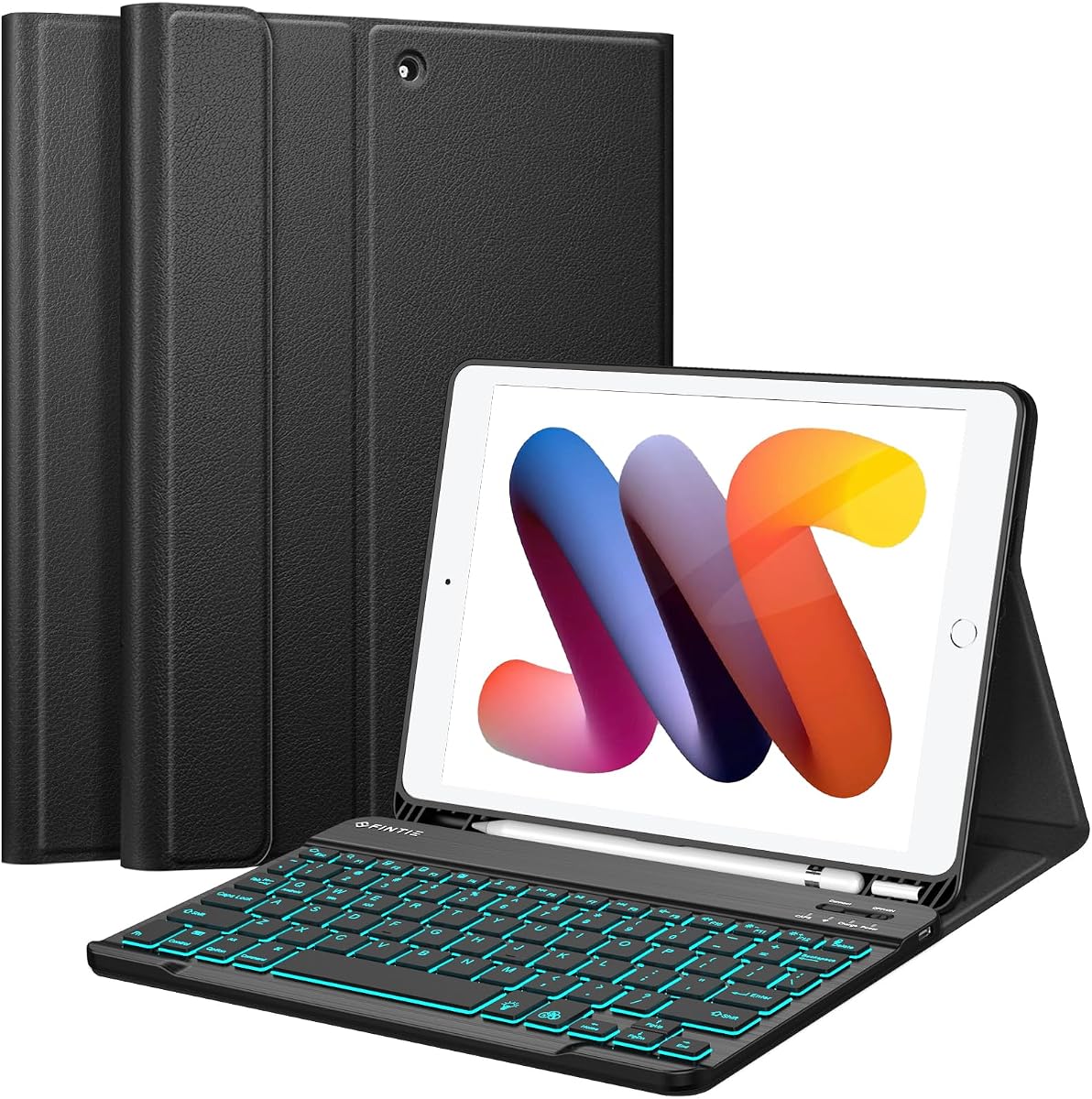
FINTIE offers a robust solution focused on endurance and typing comfort. Its impressive battery life means you rarely need to worry about charging during extended work sessions.
We may earn a commission when you buy through this link, at no additional cost to you.
The mechanical scissor keys provide tactile feedback similar to a laptop which many writers prefer. The Type-C charging port ensures quick recharges when power is low.
The lack of a trackpad means you must rely on touch or a separate mouse for navigation. This might be a drawback for power users who want a self-contained laptop experience.
Choose this if your priority is a lightweight typing shell with minimal maintenance. It suits those who mainly use their iPad for content creation on the go.
Up to 230 hours of use between charges means you can travel for weeks without plugging in.
The scissor mechanism reduces finger fatigue making long writing sessions more enjoyable.
We may earn a commission when you buy through this link, at no additional cost to you.
The typecase Touch Keyboard Case offers unique flexibility with its patented 360 degree hinge. This allows you to use the iPad in various modes from typing to reading easily.
We may earn a commission when you buy through this link, at no additional cost to you.
Its precision trackpad supports multi-gesture controls which streamlines navigation significantly. The RGB backlight adds a personal touch and ensures visibility in any lighting condition.
While the build is durable it adds some weight to the device which might matter for handheld use. The price reflects the advanced features but budget buyers might find it steep.
This is the top choice for users who value versatility and modern design. It transforms the iPad into a highly capable portable workstation for professionals.
The rotating hinge lets you switch between typing and watching modes without adjusting the stand.
Trackpad gestures reduce screen tapping and improve efficiency when browsing the web.
We may earn a commission when you buy through this link, at no additional cost to you.
Hamile provides an excellent entry point for those seeking a functional keyboard case without high costs. It delivers solid performance with a magnetic detachable keyboard that fits securely.
We may earn a commission when you buy through this link, at no additional cost to you.
The battery life is impressive for this price range ensuring you can work for days without charging. The backlight options help visibility in dim environments which is useful for travelers.
The materials are functional but feel less premium than more expensive options. Without a trackpad users will need to use touch navigation or connect an external mouse for cursor control.
Ideal for students or casual users who need a simple typing solution. It proves that you do not need to spend a fortune to get a quality keyboard case.
You get reliable typing protection at a fraction of the cost of premium models.
Long standby times ensure the keyboard is ready whenever you need to start working.
We may earn a commission when you buy through this link, at no additional cost to you.
Divufus offers a straightforward keyboard case with support for multiple operating systems. This flexibility is great if you switch between different devices often using your iPad.
We may earn a commission when you buy through this link, at no additional cost to you.
The standby time is very low which helps maintain battery health when the device is not in use. The pencil holder ensures your stylus is always within reach for quick notes.
While functional the build quality is average compared to higher tier models. It lacks a trackpad so navigation relies on screen taps which can be slower than using a mouse.
This case is suitable for general users who need basic typing and protection. The warranty adds a layer of security for your purchase against defects.
Seamlessly switch between iOS Android and Windows layouts with simple function key combos.
Built-in holders prevent your pencil from getting lost or damaged while traveling.
We may earn a commission when you buy through this link, at no additional cost to you.
Logitech is renowned for durable input devices and this Slim Folio follows that reputation. It uses replaceable coin cell batteries to offer years of use without complex recharging.
We may earn a commission when you buy through this link, at no additional cost to you.
The build quality is robust with a sleek design that matches Apple aesthetics. Bluetooth Low Energy ensures a stable connection that consumes very little power from your iPad.
Using replaceable batteries is a trade-off for longevity but some may prefer rechargeable internal batteries. The price is on the higher end reflecting the brand reputation and durability.
Best for professionals who want a reliable long-term accessory without constant battery management. It offers a premium feel that complements the iPad perfectly.
Up to four years of use on a set of batteries means minimal maintenance.
iOS shortcut keys provide one-tap access to common functions increasing efficiency.
We may earn a commission when you buy through this link, at no additional cost to you.
KBCASE brings a stylish option with a light blue finish for those who want to personalize their setup. It is slim and easy to carry in a bag without adding bulk.
We may earn a commission when you buy through this link, at no additional cost to you.
The honeycomb design helps manage heat which protects the iPad from overheating during extended use. A pencil holder is included to keep your stylus secure and accessible.
It lacks a trackpad meaning navigation is entirely touch based which might slow down some tasks. The keyboard is responsive though the keys are shallow which affects some typists.
This case is perfect for students or creative users who appreciate aesthetics. It combines style with essential protection and typing functionality for daily use.
Unique colors allow you to express your personality while protecting your device.
Grid patterns aid airflow keeping the device cool during intensive processing.
We may earn a commission when you buy through this link, at no additional cost to you.
Dexnor features a floating cantilever stand that looks modern and offers great viewing flexibility. The built-in trackpad makes navigation smooth without needing an external mouse.
We may earn a commission when you buy through this link, at no additional cost to you.
The battery capacity is high supporting long work sessions without interruption. The aluminum hinge ensures the keyboard stays in place even when you move the iPad.
The weight and complexity might make it less portable than thinner options. Users need to manage a few more settings for the trackpad and backlight which could be tricky for some.
Ideal for those who want a laptop-like experience with a floating aesthetic. It balances design and function well for productivity on the go.
The cantilever stand elevates the iPad for comfortable viewing from any angle.
Multi-finger gestures on the trackpad speed up browsing and editing significantly.
We may earn a commission when you buy through this link, at no additional cost to you.
INFILAND delivers a sleek black keyboard case with zero-lag response for smooth typing. The magnetic attachment is strong ensuring the keyboard stays put during intense use.
We may earn a commission when you buy through this link, at no additional cost to you.
The trackpad supports multi-touch gestures which makes file management and web browsing feel like using a laptop. Backlit keys are useful in dark conference rooms or planes.
While the protection is robust the design focuses heavily on functionality which may not appeal to color seekers. It is slightly more expensive than basic models but offers great value.
This is a solid choice for professionals who need reliability and a polished look. It ensures your iPad is ready for any business task at any time.
Instant magnetic pairing means less waiting time before you can start typing.
Reinforced edges protect against bumps and scratches during daily commuting.
We may earn a commission when you buy through this link, at no additional cost to you.
KBCASE offers a 360 degree swivel case allowing you to flip the screen for various modes. This is great for presentations or sharing the screen with others easily.
We may earn a commission when you buy through this link, at no additional cost to you.
The precision trackpad allows for easy cursor control without tapping the screen constantly. It protects all sides of the tablet from dust and minor impacts.
The rotation mechanism can add weight and bulk which might make one-handed use difficult. The price point is higher due to the mechanical hinge which could limit budget buyers.
Best for users who need flexible viewing angles and navigation control. It stands out for its ability to adapt to different interaction scenarios.
Swivel capability lets you share screens or type in landscape effortlessly.
Built-in touchpad removes the need for external peripherals during work.
We may earn a commission when you buy through this link, at no additional cost to you.
Choosing the right keyboard case involves evaluating compatibility, battery, and features. This guide explains the factors to consider before you buy.
Ensure the case fits your specific iPad model number exactly. The 8th Generation iPad has a 10.2 inch screen so verify the size matches. Some cases support multiple generations but check the model list.
Always confirm the exact model number on the back of your device before purchasing.
Look for cases with long-lasting batteries if you work frequently away from power. Some offer hundreds of hours of use on a single charge. Rechargeable options are convenient but check the charging time.
Prioritize models with energy-efficient modes to maximize battery duration between charges.
Decide between a detachable keyboard and a fixed one. Detachable options allow you to type sometimes use the iPad as a regular tablet easily. Fixed keyboards are sturdier but less versatile.
Detachable designs offer the best balance of flexibility and protection for most users.
Cases with built-in trackpads provide a more laptop-like experience. They allow you to navigate with gestures without touching the screen. This improves workflow for complex tasks and document editing.
If you need precise cursor control ensure the case includes a responsive trackpad.
Backlit keys are essential for working in low-light environments. Look for options with adjustable brightness or multiple colors for personalization. This feature prevents eye strain during night typing.
Check if the backlight is customizable to suit your preferences.
A built-in pencil holder keeps your stylus secure and accessible. This is useful if you frequently switch between writing and typing. Ensure the holder is sturdy enough to prevent drops.
A dedicated slot adds convenience and protects your expensive accessory.
The case should provide robust protection against drops and scratches. Materials like PU leather or hardshell plastics are durable and offer good grip. Check for features like anti-slip bases for stability.
Invest in a case with quality materials to ensure long-term durability.
Most modern cases use Bluetooth which is stable and low power. Ensure the case supports the correct Bluetooth profile for your iPad. Some models allow multi-device pairing for easier switching.
Bluetooth 5.0 or higher is recommended for reliable and fast connection.
First pair the keyboard via Bluetooth by entering pairing mode on the keyboard and selecting it on your iPad settings. This ensures a stable connection for all typing functions.
Clean the keyboard with a soft dry cloth to remove dust. Avoid using liquids directly on the keys or the trackpad to prevent damage to the electronics.
Store the case in a cool dry place when not in use. If the keyboard is detachable secure it in the magnetic slots to prevent it from getting lost.
Most cases are designed specifically for the 10.2 inch 8th Generation iPad. Always check the model numbers listed in the compatibility section to ensure a perfect fit. Some cases may support other generations but verification is necessary.
Yes many detachable models support Bluetooth mice for enhanced navigation. Some even include a mouse in the package. This setup mimics a laptop experience for better productivity on your iPad.
Battery life varies by model but many offer over 100 hours of use. Standby time is often much longer meaning you won't charge it often. Check the specific product specs for exact numbers.
Cases with built-in trackpads are generally responsive to multi-gesture controls. They allow for smooth scrolling and cursor movement. Testing the trackpad sensitivity can vary by device settings.
Many models feature a dedicated slot or magnet to hold the Apple Pencil. This ensures your stylus is safe and accessible. Not all cases have this so verify the product features.
No the case typically opens to access the keyboard and trackpad. When closed it enters sleep mode to save power. You must open the lid to use the typing functions.
Warranty periods vary from 60 days to one year depending on the manufacturer. Many offer customer support for technical issues. Always review the warranty terms before purchasing.
We explored ten top keyboard cases offering various features from trackpads to battery efficiency. The typecase and Logitech options stand out for premium experiences while Hamile and FINTIE offer budget-friendly alternatives.
Prioritize your specific needs like battery life or trackpad availability when selecting. A good case enhances productivity and protects your investment in the long run.
Remember to verify current prices and availability as they may fluctuate. Choose the model that best fits your workflow for a seamless typing experience.