
BENFEI USB C Hub 5-in-1
4.6Editor score
100W USB-C power delivery
4K HDMI display support
Soft silicone woven cable design
This guide compares the top HDMI hub for PC options to help you find the perfect multi-port adapter for your workstation setup in October 2026.
Finding the right HDMI hub for PC can transform your workflow by enabling multiple displays and peripheral connections. Whether you need video output or data transfer, the right hub ensures seamless connectivity without cluttering your desk with cables.
We evaluated ten leading HDMI hubs based on port variety, video quality, charging speed, and build durability. Our analysis focuses on real-world performance across Windows and Mac systems to ensure reliable operation in professional environments.
Each pick highlights specific strengths and limitations so you can match the device to your needs. Please note that availability and pricing may vary by region and retailer at the time of purchase.
4.6Editor score

4.5Editor score

4.4Editor score
The following table provides a side-by-side overview of key specifications for all ten selected HDMI hubs to help you quickly identify the best fit for your specific connectivity needs.






The Anker Laptop Docking Station stands out as the top choice for users seeking robust multi-monitor support. With a 4.5 rating from verified buyers, it delivers reliable performance for Windows and ChromeOS laptops equipped with USB-C and DP Alt Mode.
We may earn a commission when you buy through this link, at no additional cost to you.
Its dual HDMI ports allow you to connect two external monitors simultaneously, supporting up to 4K at 30Hz or a single display at 60Hz. The integrated Ethernet port ensures stable network connectivity without relying on Wi-Fi, which is crucial for remote work environments.
While it offers excellent expandability, macOS users should note that both external monitors will mirror the same content due to system limitations. Linux users will find this device incompatible, so alternative solutions may be necessary for those operating systems.
For professionals who need a reliable docking solution to streamline their workstation, this hub provides the right balance of video, data, and power. Its sturdy build and comprehensive port selection make it a worthwhile investment for productivity.
Connecting two external screens allows you to keep reference materials on one display while working on the other, significantly improving workflow efficiency during complex tasks.
The 85W pass-through charging ensures your laptop stays powered during extended sessions, eliminating the need for a separate power brick on your desk.
We may earn a commission when you buy through this link, at no additional cost to you.
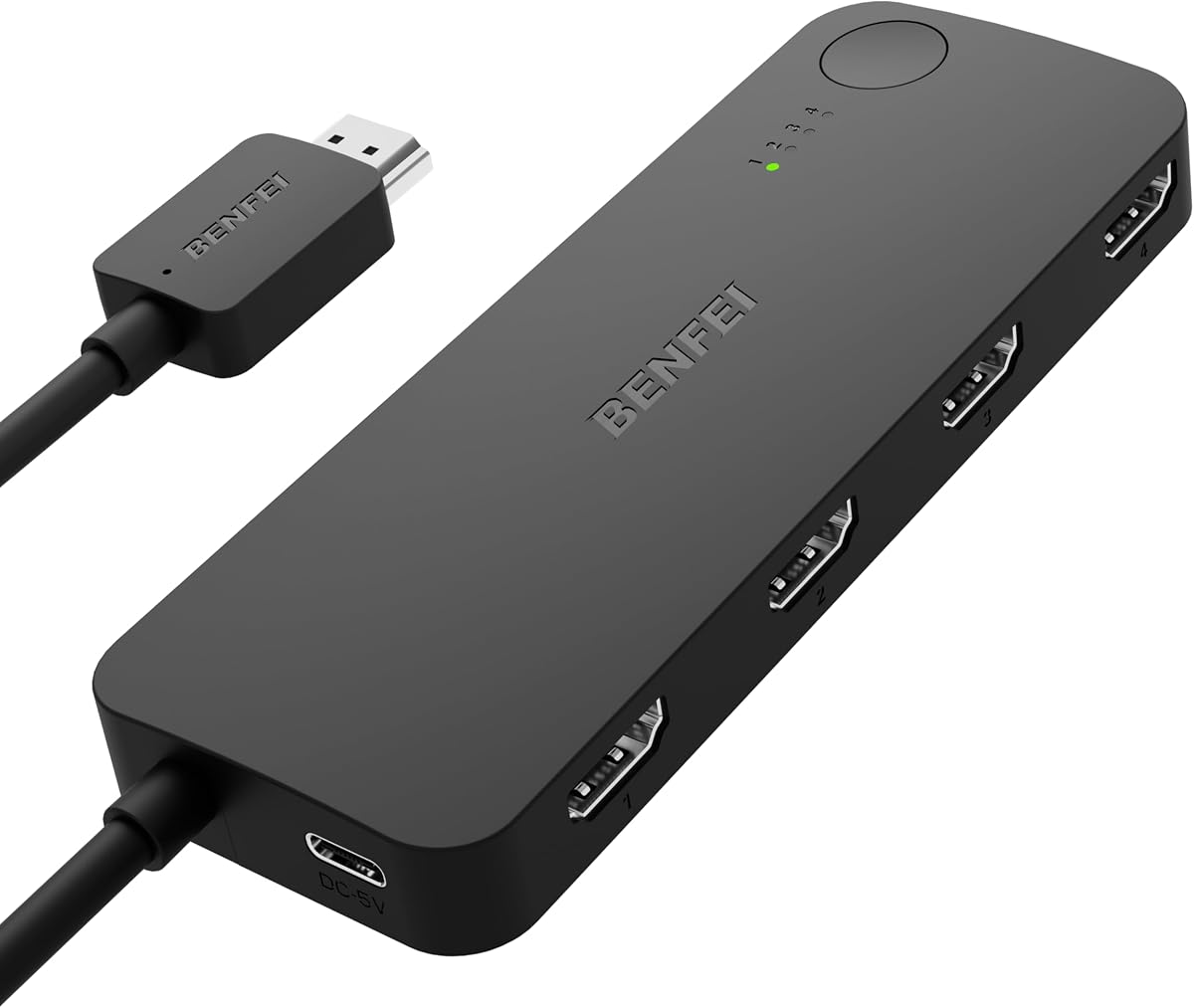
The BENFEI HDMI Switch offers an affordable way to manage multiple HDMI sources without constantly swapping cables. With a 4.0 rating, it is ideal for gamers or home theater users who want to connect consoles, streaming devices, and PCs to a single display.
We may earn a commission when you buy through this link, at no additional cost to you.
This switch supports 4K at 60Hz and utilizes adaptive equalization technology to maintain signal quality over longer cables. The manual button switching allows quick transitions between devices, while the included HDMI cable simplifies initial setup.
Users should note that it requires a USB-C power cable for operation and does not function as a splitter to duplicate one signal across four screens. It is strictly designed for switching between sources rather than extending a single input.
For budget-conscious buyers looking to declutter their entertainment center or workstation, this switch provides essential functionality without breaking the bank. Its compact design and clear labeling make it easy to integrate into existing setups.
Connect your PS5, Xbox, and PC to a single monitor or TV, allowing seamless switching between work and entertainment without physical cable changes.
Adaptive equalization ensures stable video transmission even with longer HDMI cables, reducing the risk of flickering or signal loss.
We may earn a commission when you buy through this link, at no additional cost to you.
This DisplayPort to Dual HDMI adapter is engineered for users who demand high-resolution dual monitor support from a single port. Rated 4.4 by users, it delivers smooth 4K at 60Hz on both screens when connected to a compatible DP 1.4 source.
We may earn a commission when you buy through this link, at no additional cost to you.
The adapter utilizes MST technology to extend your desktop across two displays, allowing independent content on each screen. It works with AMD and NVIDIA graphics cards as well as desktops that feature standard DisplayPort outputs.
A notable limitation is the requirement for a DP 1.4 source to achieve dual 4K performance; older graphics cards may only support lower resolutions or mirror mode. Additionally, it only supports one-way conversion from DisplayPort to HDMI and cannot work with docking stations.
For professionals working with high-fidelity visuals or multitasking across large screens, this adapter provides premium performance with reliable heat dissipation. Its robust design ensures longevity even with frequent plugging and unplugging in active work environments.
Achieve smooth dual 4K 60Hz visuals for video editing, gaming, or data analysis without compromising on frame rates or screen real estate.
Plug-and-play functionality eliminates the need for driver installations, saving time and reducing potential software conflicts on your PC.
We may earn a commission when you buy through this link, at no additional cost to you.
The Anker USB C Hub 7in1 delivers exceptional video performance with a dedicated HDMI port supporting 4K at 60Hz. With a 4.5 rating, this hub is ideal for creators and professionals who require smooth video playback during presentations or content creation.
We may earn a commission when you buy through this link, at no additional cost to you.
Beyond video, it offers two USB-A 3.0 ports and a USB-C data port for fast transfers up to 5Gbps. The inclusion of both SD and TF card slots makes it versatile for photographers or those who frequently move large files between storage devices.
While it supports up to 100W PD charging, the USB-C port on the hub is for data transfer and not video output. This design ensures that your primary video connection remains dedicated to the HDMI port for optimal signal integrity.
For users prioritizing high-definition video and flexible connectivity in a compact form factor, this hub provides the right features. Its sleek design and reliable performance make it a strong contender for daily desktop or laptop expansion.
Experience fluid video playback with 60Hz refresh rates, essential for video editing timelines or interactive dashboards on external monitors.
Access photos and data directly from SD and TF cards without needing external readers, speeding up your workflow significantly.
We may earn a commission when you buy through this link, at no additional cost to you.
BENFEI USB C Hub 5-in-1 combines portability with robust power delivery, making it perfect for travelers. With a 4.6 rating, users praise its soft silicone cable that resists tangling and durable construction that withstands daily carry in laptop bags.
We may earn a commission when you buy through this link, at no additional cost to you.
The hub supports up to 100W pass-through charging, ensuring your laptop remains powered even while connected to peripherals. It features one HDMI port for media output and three USB-A ports for connecting keyboards, mice, or external drives.
The USB-C port on the hub is dedicated to charging and does not support data or video output. This separation of functions helps maintain signal integrity for the HDMI port, ensuring clear video output on external displays.
For mobile professionals who need reliable charging and basic connectivity on the go, this hub offers the right features. Its comfortable cable design and high-power support make it a practical choice for frequent commuters.
The soft silicone woven cable stays flexible and resists knots, making it easier to pack and deploy quickly at coffee shops or offices.
With 100W PD charging, you can charge high-performance laptops even while using the hub for video and data, eliminating the need for separate adapters.
We may earn a commission when you buy through this link, at no additional cost to you.
This Anker 5-in-1 hub offers essential connectivity at a competitive price point. With a 4.4 rating, it provides solid video output up to 4K at 30Hz, which is sufficient for most office tasks and standard media consumption needs.
We may earn a commission when you buy through this link, at no additional cost to you.
The hub includes a USB-C port for 100W charging and multiple USB-A ports for peripherals. It supports 85W pass-through charging, allowing you to keep your laptop powered while using external displays and storage devices.
While the HDMI refresh rate is limited to 30Hz, this is generally acceptable for static content and general computing. Users looking for smoother video playback or gaming may need to consider hubs with 60Hz support.
For budget-conscious users needing a reliable everyday hub, this model balances performance and cost effectively. Its compact design and trusted brand reputation make it a safe choice for standard workstation expansion.
Handle essential peripherals and video output simultaneously without cluttering your desk with multiple adapters, ideal for standard office workflows.
The pass-through charging capability ensures your laptop stays powered during long meetings or work sessions, preventing battery drain interruptions.
We may earn a commission when you buy through this link, at no additional cost to you.
The NEWCARE HDMI Switch is a compact solution for managing three HDMI sources on a single display. With a 4.1 rating, it is ideal for users who need to switch between a laptop, console, and media player without buying separate cables.
We may earn a commission when you buy through this link, at no additional cost to you.
It supports 4K at 60Hz and uses gold-plated connectors to ensure stable signal transmission. The included 2.6-foot HDMI cable simplifies setup, allowing immediate use without purchasing additional accessories.
External power is required for stable operation, and it does not come with a remote control, meaning you must press the physical button to switch inputs. While simple, this design ensures consistent performance without dependency on battery power.
For users seeking an economical way to expand their HDMI options, this switch provides the necessary features. Its small footprint makes it easy to tuck behind a monitor or desk setup.
The physical button allows quick switching between devices, ensuring you can focus on your content without navigating complex menus.
Gold-plated connectors and high-speed support maintain image and audio quality, minimizing signal loss even with multiple connected devices.
We may earn a commission when you buy through this link, at no additional cost to you.
StarTech USB-A 3.0 to Dual HDMI Adapter is designed specifically for Windows environments. With a 4.5 rating, it offers reliable dual-monitor support for users who want to extend their desktop without relying on USB-C ports.
We may earn a commission when you buy through this link, at no additional cost to you.
It delivers 4K resolution at 30Hz on one monitor and 1080p at 60Hz on the other. The adapter supports Windows 10 and 11 systems, making it suitable for corporate laptops and older desktop setups lacking modern video output ports.
Installation requires administrator rights to load necessary drivers. While this adds a step to setup, it ensures stability and performance tailored specifically to Windows graphics architecture.
For IT professionals or office users on Windows machines needing dual-display functionality, this adapter is a robust choice. Its durable design and comprehensive warranty provide long-term reliability for professional use.
Tailored drivers ensure stable video output on Windows systems, providing consistent performance for business applications and productivity tools.
Extend your workspace across two screens for multitasking, allowing you to view reference material while editing or coding.
We may earn a commission when you buy through this link, at no additional cost to you.
VIENON USB 3.0 to HDMI Adapter offers broad connectivity with a 7-in-1 design suitable for basic docking needs. With a 4.0 rating, it allows users to connect multiple USB devices alongside an HDMI monitor for expanded workstation setups.
We may earn a commission when you buy through this link, at no additional cost to you.
It supports 1080P resolution and includes a driver installation process for compatibility with Windows and Mac OS. The USB-C power port helps maintain stability when connecting multiple high-power peripherals to the hub.
While not suitable for 4K workflows, it handles standard HD content effectively. The driver disk included in the box ensures you can set up the device without searching for software online.
For users needing a basic docking solution with ample USB ports, this hub delivers value. Its affordability and comprehensive port selection make it a practical option for budget-conscious buyers.
Connect multiple peripherals like drives and keyboards simultaneously, providing a centralized hub for your daily peripherals.
The USB-C power input ensures stable operation even when multiple USB devices are connected, preventing under-powering issues.
We may earn a commission when you buy through this link, at no additional cost to you.
The Acer USB C Hub 7-in-1 features a durable aluminum alloy body for heat dissipation and robust protection. With a 4.5 rating, it supports 4K video at 30Hz and 100W power delivery, making it suitable for high-performance laptops.
We may earn a commission when you buy through this link, at no additional cost to you.
It offers two USB-A 3.1 ports and a USB-C data port for fast transfers. Dual card slots for SD and MicroSD allow quick access to media files without external readers.
To ensure stable performance, connecting a PD charger with the hub is recommended. This allows simultaneous charging and data transfer without throttling speed or causing system drops.
For users seeking a durable and well-designed hub with broad compatibility, this model delivers strong performance. Its build quality and comprehensive feature set make it a reliable choice for daily use.
The aluminum housing helps manage heat effectively, ensuring consistent performance during long usage sessions.
With 5Gbps USB-A 3.1 ports, you can move large files quickly, enhancing productivity for creative professionals.
We may earn a commission when you buy through this link, at no additional cost to you.
Selecting the right HDMI hub requires evaluating several factors to ensure compatibility and performance with your existing setup.
Check if the hub supports 4K resolution and at least 60Hz refresh rate for smooth video. Lower refresh rates like 30Hz may cause flickering during scrolling or video playback.
Prioritize hubs with 4K 60Hz support if you need high-quality visuals for work or media.
Identify which ports are essential for your needs, such as USB-A, USB-C, SD slots, or Ethernet. A hub with limited ports may require multiple devices for full functionality.
Ensure the hub offers enough ports to connect all necessary peripherals simultaneously.
Look for USB-C Power Delivery support to keep your laptop charged while using the hub. Higher wattage, like 100W, ensures high-performance laptops stay powered during heavy use.
A hub with sufficient PD wattage prevents battery drain and allows uninterrupted work sessions.
Confirm that the hub works with your OS. Some hubs support Windows but not macOS or Linux due to driver or DP Alt Mode limitations.
Always verify system compatibility before purchasing to avoid driver issues or limited functionality.
Aluminum housings offer better heat dissipation and durability compared to plastic. A robust build ensures longevity and consistent performance under heavy use.
Choose a hub with high-quality materials to extend its lifespan and reliability.
Check if the hub includes a cable or requires a separate one. Longer cables provide flexibility but may reduce signal quality without proper shielding.
A short but flexible cable is often ideal for portability and ease of setup.
USB ports should support at least 5Gbps speeds for efficient file transfers. Slower USB 2.0 ports may bottleneck performance with external drives.
Ensure high-speed USB ports are included to maintain overall productivity.
A longer warranty period, like 18 months or more, indicates manufacturer confidence. Reliable customer support ensures quick resolution of technical issues.
Choose brands with proven track records for warranty service to protect your investment.
Plug the hub into a powered USB-C or USB-A port on your computer and connect your monitor via HDMI before attaching other peripherals. This order ensures stable detection and reduces boot errors.
Keep the hub and cables away from moisture and direct heat sources. Overheating can degrade internal components, so ensure proper ventilation around the device during use.
Periodically check and clean dust from the ports using compressed air. Avoid bending cables excessively to prevent internal wiring damage, especially for hubs with fixed cables.
Most USB-C hubs work with MacBooks provided they support DP Alt Mode. However, macOS may mirror displays on both external monitors when using dual HDMI ports. Check compatibility details before purchasing.
Ensure the hub is properly powered and your computer port supports video output. Some older USB-C ports only support data and not display signals. Restarting the computer often resolves detection issues.
Most USB-C hubs are plug-and-play and do not require drivers. However, USB 3.0 HDMI adapters or specialized docking stations may need specific drivers to enable video output on certain operating systems.
A splitter sends one video source to multiple displays simultaneously. A switch allows you to connect multiple sources and select one to display on a single monitor. Choose based on whether you need to share or select signals.
Yes, many hubs support 4K 60Hz suitable for gaming. However, some may introduce slight input lag. Check reviews and specifications to ensure low latency for competitive gaming setups.
Check your laptop's specifications to see if the USB-C port supports DisplayPort Alt Mode. If uncertain, look for a thunderbolt or video icon next to the port or consult your device manual.
Not all hubs require external power, but those with multiple ports and video output often benefit from it. Hubs that do not support pass-through charging may need their own adapter for stable operation.
The Anker Laptop Docking Station stands out as the top choice for multi-monitor setups with its dual HDMI support and Ethernet connectivity. It delivers the most comprehensive expansion for professional workstations.
For those needing budget-friendly options, the BENFEI USB C Hub 5-in-1 offers reliable performance with soft cable design and high-wattage charging. It balances portability with essential connectivity for everyday tasks.
Remember that prices and availability may change based on region and retailer. Always verify current specs and compatibility before purchasing to ensure the hub meets your specific workstation needs.