
HDMI Tester Portable High Definition Network Cable Tester Checker
4.4Editor score
Tests HDMI and RJ45 cables
Supports up to 19 wire scan
Portable main and remote unit design
This guide compares the top HDMI Cable and Port Tester models for 2026, analyzing features, accuracy, and value to help you choose the right diagnostic tool.
Finding the right HDMI Cable and Port Tester is essential for technicians and enthusiasts who need to verify signal integrity quickly. These devices help identify shorts, open circuits, and wiring errors without needing a display or complex setup. A good tester ensures your cabling meets performance standards before installation.
We evaluated ten distinct models based on their testing capabilities, port compatibility, and ease of use. Our analysis covers everything from basic continuity checks to advanced signal generation and analysis features. Each product was reviewed for its ability to handle various HDMI versions and connector types efficiently.
Each pick below highlights specific strengths such as portability, detailed pin diagnostics, or multi-function support. Please note that product availability and pricing can change frequently on retail platforms. Always verify current specifications and costs before making your final purchase decision for your needs.
4.4Editor score

4.8Editor score

4.5Editor score
The following table provides a side-by-side comparison of all ten models featured in this guide. It highlights key specifications and unique features to help you differentiate between basic testers and advanced diagnostic tools.


This HDMI Tester Portable is an excellent entry-level tool for users who need to verify cable integrity without breaking the bank. It holds a solid 4.4 rating from verified buyers who appreciate its straightforward design and dual testing capabilities. The device scans up to 19 wires to identify faults effectively.
We may earn a commission when you buy through this link, at no additional cost to you.
The main advantage of this model is its versatility in testing both HDMI and RJ45 network cables. It supports multiple HDMI versions ranging from 1.2V to 2.0V which covers most common consumer electronics needs. The remote unit stores conveniently on the side of the main unit which makes storage simple.
While it lacks advanced features like signal generation it fulfills the primary role of a continuity tester. Users should note that it relies on visual LED feedback which is easy to read but not as detailed as digital displays. The power source options include a single AAA battery or phone USB charger.
Anyone looking for a cost-effective solution to troubleshoot home theater or network cabling should consider this tester. It is particularly useful for technicians who need multiple units for different jobs without high costs. Overall it is a reliable budget choice for standard connectivity checks.
The ability to test both HDMI and network cables makes this tool versatile for home and office setups.
The remote unit fits directly onto the main unit ensuring you do not lose parts during transport.
We may earn a commission when you buy through this link, at no additional cost to you.
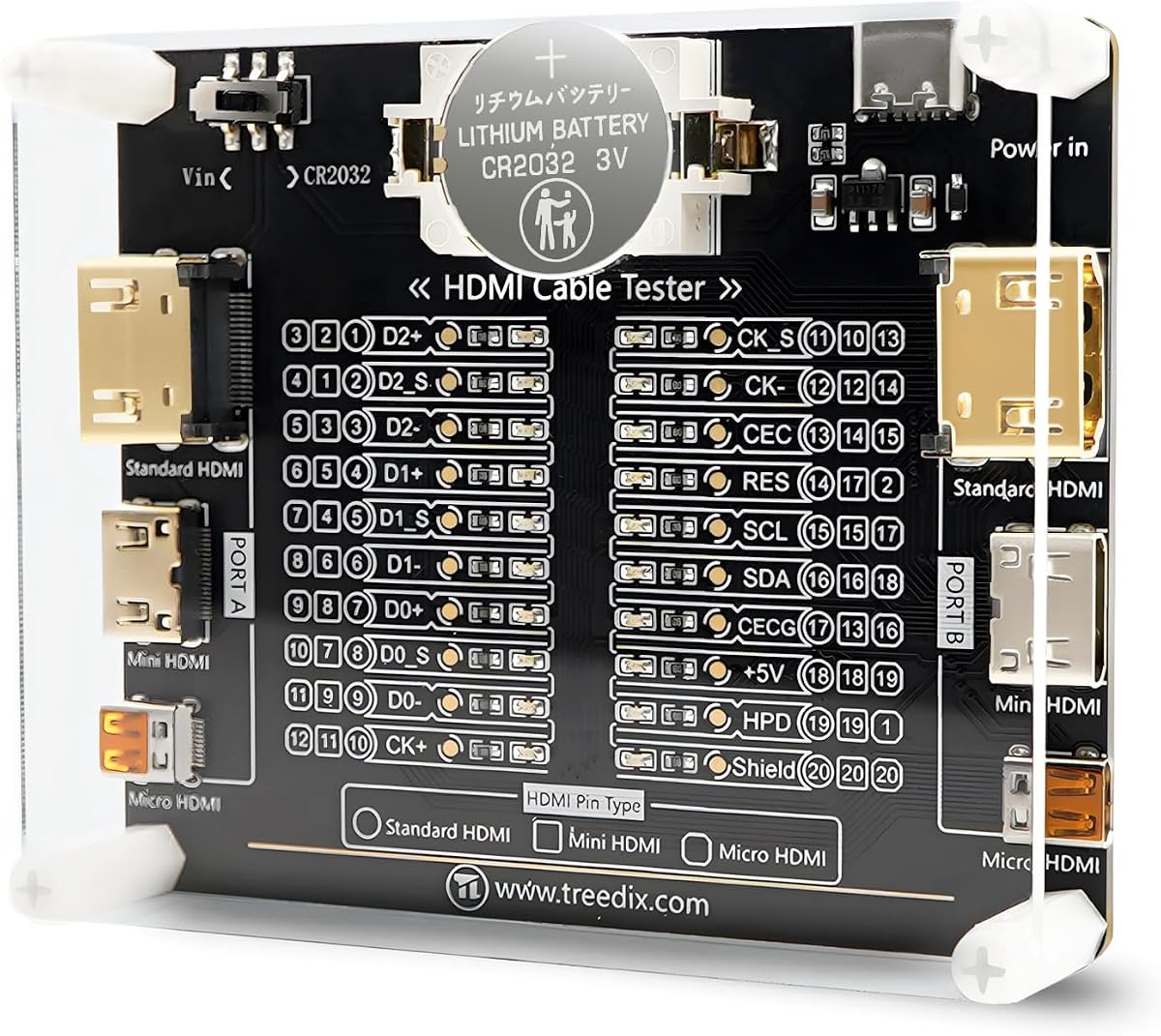
The Treedix Cable Tester Board is designed for those who need precise pin diagnostics for HDMI cables. With a high 4.6 rating it stands out for its compatibility with newer HDMI standards up to version 2.1. Each pin corresponds to an LED light allowing detailed analysis of connection status.
We may earn a commission when you buy through this link, at no additional cost to you.
Its wide application ensures it accommodates Standard Type A Mini Type C and Micro Type D interfaces. The board supports multiple power supply modes including battery or external power ranging from 3 to 12 volts. Reverse connection protection on the Vin input adds a layer of safety for users.
Users often use this device alongside a multimeter to measure line sequence effectively. While the acrylic housing protects the tester it is somewhat bulky compared to handheld units. The LED indicators are clear and help users understand cable functions quickly during maintenance tasks.
This board is ideal for repair shops or professionals who need detailed feedback beyond basic continuity. It is less portable but provides a comprehensive view of the cable structure. If you need to verify complex wiring this board offers the clarity required.
20 LED indicators provide immediate visual feedback on every single pin connection status.
The reverse connection protection on external power inputs prevents damage during testing.
We may earn a commission when you buy through this link, at no additional cost to you.
Jonard Tools HDMI-100 is a robust option for professionals requiring reliable cable verification. It has a solid 4.4 rating reflecting its durability and precision in testing HDMI and Mini HDMI cables. The device allows testing of cables up to 500 meters with a detachable remote.
We may earn a commission when you buy through this link, at no additional cost to you.
The scan mode is particularly useful for seeing each individual connection as it is tested step by step. In full display mode all tested connections appear at once which speeds up the verification process. This dual mode flexibility makes it adaptable to different testing scenarios.
While it requires a 9V battery for operation the battery life is generally sufficient for typical workdays. The price point is higher than consumer grade testers but the reliability justifies the investment for commercial use. It supports all common HDMI versions ensuring compatibility with various devices.
Techs working on installed systems will benefit greatly from the detachable remote feature. It allows testing cables that are routed through walls or ceilings without disconnecting sources. This tool is a standard for those who prioritize accuracy and efficiency in their workflow.
The detachable remote allows one person to test cables that are installed in difficult locations.
Switch between scan and full display to optimize your workflow based on the task.
We may earn a commission when you buy through this link, at no additional cost to you.
The Monoprice HDMI Signal Generator and Display Analyzer is unique as it can generate its own signals. With a 4.0 rating it serves as a comprehensive tool for verifying signal integrity rather than just continuity. It supports various high resolutions including 4K at 60Hz with specific chroma subsampling options.
We may earn a commission when you buy through this link, at no additional cost to you.
Users can set video resolution and HDCP content using a 4-pin DIP switch which provides precise control. The device supports HDCP OFF 1.4 and 2.2 outputs allowing verification of copy protection features. This makes it invaluable for troubleshooting complex AV systems where signal issues arise.
Compared to standard testers this device requires more setup knowledge but offers deeper insight. It can act as a display emulator to test sources without a TV. The ability to select different test patterns for HDCP versions enhances its utility for advanced technicians.
If you need to validate a source device or display emulator this tool is essential. It is not a basic plug-and-play checker but a specialized instrument for professionals. Its features allow you to simulate real-world conditions and verify system compatibility.
Generate your own video signals to test displays or sources without external devices.
Switch between HDCP versions to ensure your system handles copy protection correctly.
We may earn a commission when you buy through this link, at no additional cost to you.
This model is similar to the first one but features an auto shut-down function. It has a 3.9 rating from users who value its energy efficiency and basic functionality. The device saves battery life by turning off after 10 minutes of inactivity which is convenient for intermittent use.
We may earn a commission when you buy through this link, at no additional cost to you.
It supports fast scan and full display modes for flexible testing of HDMI and RJ45 cables. The scan tests up to 19 wires to detect shorts or open circuits effectively. It is designed for easy portability making it easy to carry in a toolkit.
The lower rating might stem from limitations in build quality or accuracy compared to higher rated models. However it remains a viable option for budget conscious users. The compatibility with standard connectors ensures it works with most common cable types.
For users who need a spare unit or occasional use this tester is appropriate. It is not the most robust option but it serves its purpose well for basic checks. The auto shut-down feature is a notable advantage for maintaining battery life.
The auto shut-down function ensures you do not drain batteries during short breaks.
Handle both audio video and network cabling tasks with a single tool.
We may earn a commission when you buy through this link, at no additional cost to you.
The MFL Detachable Professional Cable Tester is a comprehensive tool for complex AV setups. It holds a 4.5 rating due to its extensive compatibility and durable build. The device supports audio video and network cables with clear LED indicators for diagnostics.
We may earn a commission when you buy through this link, at no additional cost to you.
It features multiple ports including XLR HDMI USB RCA BNC and RJ11 for extensive connectivity. The detachable design allows split testing of cables in different locations efficiently. This is crucial for technicians working on systems where both ends are not accessible.
The durable metal housing and clearly labeled ports ensure efficient troubleshooting. While the price is high it provides value for those who need multi-interface support. The clear indicator system makes it easy to identify connection status at a glance.
This tester is ideal for studio technicians or AV professionals needing a unified solution. It eliminates the need for multiple testers for different cable types. Investing in this tool streamlines the testing process for complex installations.
Support for multiple interface types reduces the need for multiple testers.
The detachable design allows testing cables even when the ends are far apart.
We may earn a commission when you buy through this link, at no additional cost to you.
The UT681 HDMI Cable Tester stands out with the highest user rating of 4.8. It combines rapid analysis with intelligent power consumption features to ensure reliability. The device supports multiple HDMI versions and has a portable design ideal for field use.
We may earn a commission when you buy through this link, at no additional cost to you.
Its double-mode test offers both scanning and full display synchronization of LEDs for intuitive feedback. When the battery voltage drops below 7.2V a blue light flashes warning the user to replace it. This prevents unexpected failures during critical troubleshooting tasks.
The unit weighs only 175 grams and tolerates temperatures from -10 to 50 degrees Celsius. It is designed to be operated by a single person efficiently. The separate transceiver ensures you can test cables independently of the main unit.
This tester is perfect for users balancing portability and performance. The power warnings and rapid analysis make it a trusted choice for professionals. It is our top recommendation for general diagnostic needs due to its high reliability and features.
The low voltage warning system ensures you are never caught with a dead tester.
Lightweight and compact so you can keep it in a small toolkit without adding bulk.
We may earn a commission when you buy through this link, at no additional cost to you.
Parts Express HDMI Cable Signal Tester is designed for visual and signal diagnostics. It holds a 4.3 rating for its ability to identify causes of color shift or missing pictures. The tester displays the status of each signal component to pinpoint problems.
We may earn a commission when you buy through this link, at no additional cost to you.
Its simple to use design means you just plug cables into the DVI-F and HDMI-F connectors. It can be located at the source or display end of the system providing flexibility. This makes it easy to verify the signal before it reaches the display.
While it focuses on HDMI signals it does not test network cables. However for AV systems troubleshooting signal integrity is often the primary concern. The compact size ensures it is easy to carry during installations.
For those who deal with signal quality issues frequently this tool is useful. It helps quickly narrow down whether the cable or the device is at fault. It is a practical choice for maintaining high quality video outputs.
Focuses on diagnosing video signal issues rather than just continuity.
Can be used at the source or display end to isolate the problem area.
We may earn a commission when you buy through this link, at no additional cost to you.
This tester holds a perfect 5.0 rating from users who appreciate its network support. It tests HDMI cables including version 2.1V and RJ45 network cables effectively. The remote unit stores conveniently on the side of the main unit which keeps everything together.
We may earn a commission when you buy through this link, at no additional cost to you.
The network cable support includes various types like cat5 cat5e and cat6 making it versatile for home networking. Power options include a single 9V battery or a phone USB charger which adds convenience. It scans up to 19 wires for HDMI to detect faults.
Users praise the reliability and ease of use for basic continuity checks. While it lacks advanced features it does the job well for standard testing needs. The LED rotation ensures proper connection status is clear and easy to read.
For mixed environments where both HDMI and network cables are used this tool is efficient. It saves time by eliminating the need for separate testers. It is an excellent addition to any toolkit requiring network diagnostics.
Support for multiple network cable types ensures comprehensive connectivity testing.
Support for HDMI 2.1V ensures readiness for high bandwidth video signals.
We may earn a commission when you buy through this link, at no additional cost to you.
The STEREN Handheld HDMI Tester provides a unique full color audio video display. It holds a 4.5 rating for its ability to verify set top box installation without a TV. The device includes an HD LCD screen resistant to dust water and scratches for durability.
We may earn a commission when you buy through this link, at no additional cost to you.
It features three HDMI ports including two for continuity tests and one for the set top box. The auto-scale resolutions ensure the display matches the source signal correctly. This allows users to check channel lineup and installation status visually.
The ruggedized housing combines silicone rubber and plastic to resist shock and water. The 2300mAH battery provides 3 to 4 hours of use time per charge. This level of protection is essential for technicians working in harsh environments.
This premium tool is ideal for installers who need visual verification. It eliminates the guesswork in signal and installation checks. While expensive it offers a comprehensive solution for professional AV maintenance and setup.
Verify set top box and signal installation without needing a separate TV.
The shock and water resistant design ensures the tool survives tough job site conditions.
We may earn a commission when you buy through this link, at no additional cost to you.
Choosing the right tester depends on your specific needs whether you are a technician or a casual user. This guide outlines the key factors to consider before making your purchase.
Determine if you need to test HDMI cables only or also network cables. Some devices focus solely on HDMI while others support RJ45 as well.
If your work involves both audio video and network cabling a multi-function tester will save you from buying multiple tools.
Ensure the tester supports the HDMI versions you are using. While most support up to 2.0V newer models may support 2.1V for high bandwidth.
For future-proofing consider a model that supports the latest specifications if you plan to work with high resolution content.
Consider whether you need a handheld device or a board style tester. Handheld units are easier to transport while boards offer more detailed pin layouts.
Detachable units are beneficial for testing long cables that are installed in walls or ceilings where both ends are not accessible.
Check what type of power source the tester uses. Some require specific batteries like 9V while others support USB charging or multiple voltage options.
Long battery life and auto shut-down features help extend the operational time and save costs over the long term.
The type of feedback can range from simple LED indicators to HD LCD screens. LED lights are quick to read while screens provide detailed visual confirmation of signal.
If you need to verify color accuracy or signal integrity visually choose a tester with a display output feature.
Some advanced testers can generate signals independently which is useful for diagnosing display issues without a source.
This feature is typically found in higher end models and adds significant value if you often troubleshoot complex AV setups.
Look for ruggedized housings if you work in demanding environments. Features like water resistance and shock protection prolong the tool's lifespan.
Metal housings or durable plastics can prevent damage from accidental drops which is common during transport.
Balance the cost with the features you need. Basic testers are affordable while professional models with signal analysis are more expensive.
Investing in a higher quality tool often pays off by reducing errors and time spent troubleshooting on complex projects.
To use the tester plug one end of the cable into the main unit and the other into the remote unit if available. Ensure the device is powered on and the LEDs or display lights up.
For HDMI cables observe the LED indicators or screen to check continuity. If all lights turn on or the pattern matches the expected sequence the cable is working correctly.
Store the device in a protective case to prevent damage to the ports and screen. Avoid exposing it to extreme temperatures or moisture when not in use.
While basic testers check for continuity they may not confirm bandwidth for 4K. Advanced signal generators can test resolution support. Always check the product specs for specific resolution capabilities.
Many modern testers support multiple HDMI types including Mini and Micro. Ensure the specific model includes the adapters for your connector type. Most listed products in this guide cover standard and Mini types.
Yes, models with detachable remote units allow you to test installed cables. One unit goes to the source and the other to the display end. This eliminates the need to disconnect cables at both ends.
Testers are highly accurate for identifying open circuits and shorts. They scan individual wires to locate faults. However signal degradation due to interference may not be detected by simple continuity testers.
A continuity tester checks if wires are connected. A signal generator produces video signals to verify display and audio output. Both are useful but serve different diagnostic purposes in AV troubleshooting.
Battery life varies by model and usage. Some have auto shut-down to conserve power. Always keep spare batteries on hand to avoid interruptions during critical testing tasks.
Basic LED testers are very easy to use as they provide visual feedback. More complex models may require some learning. The guides provided with devices usually simplify the process for users.
Check the product specifications as not all testers support 2.1. Some newer models explicitly mention support for 2.1. It is important to verify compatibility before purchasing for high-end needs.
We have reviewed ten models ranging from basic testers to advanced signal generators to cover various user needs. Each product brings unique strengths to the table whether it is portability or detailed diagnostics.
When choosing prioritize the features that match your specific tasks such as network support or HDMI version compatibility. Investing in a reliable tool helps save time and frustration during installations.
Always check the current prices and availability on the retailer platform before purchasing. Product updates occur frequently so ensure you are getting the latest version of the device.