
Noctua NA-FC1
4.8Editor score
Compact PWM speed reducer
No stop mode prevents errors
Six year warranty included
This guide compares the top 10 front panel fan controllers for PC cooling, featuring LCD displays, PWM control, and temperature sensors to optimize airflow.
Managing heat inside your computer case is crucial for performance and longevity. A front panel fan controller gives you direct access to adjust fan speeds and monitor temperatures without opening your system or diving into software menus.
We evaluated ten real models based on display clarity, control precision, safety features, and build quality. Our list covers budget-friendly options, advanced RGB units, and specialized controllers for silent operation or high-power setups.
Each pick shows key specs, pros, and cons to help you match a controller to your specific cooling needs. Keep in mind that stock and pricing can change frequently, so verify current availability before purchasing.
4.8Editor score

5.0Editor score

4.2Editor score
The following table provides a side-by-side comparison of all ten models, highlighting their channel counts, display types, and key safety features to help you find the right fit.
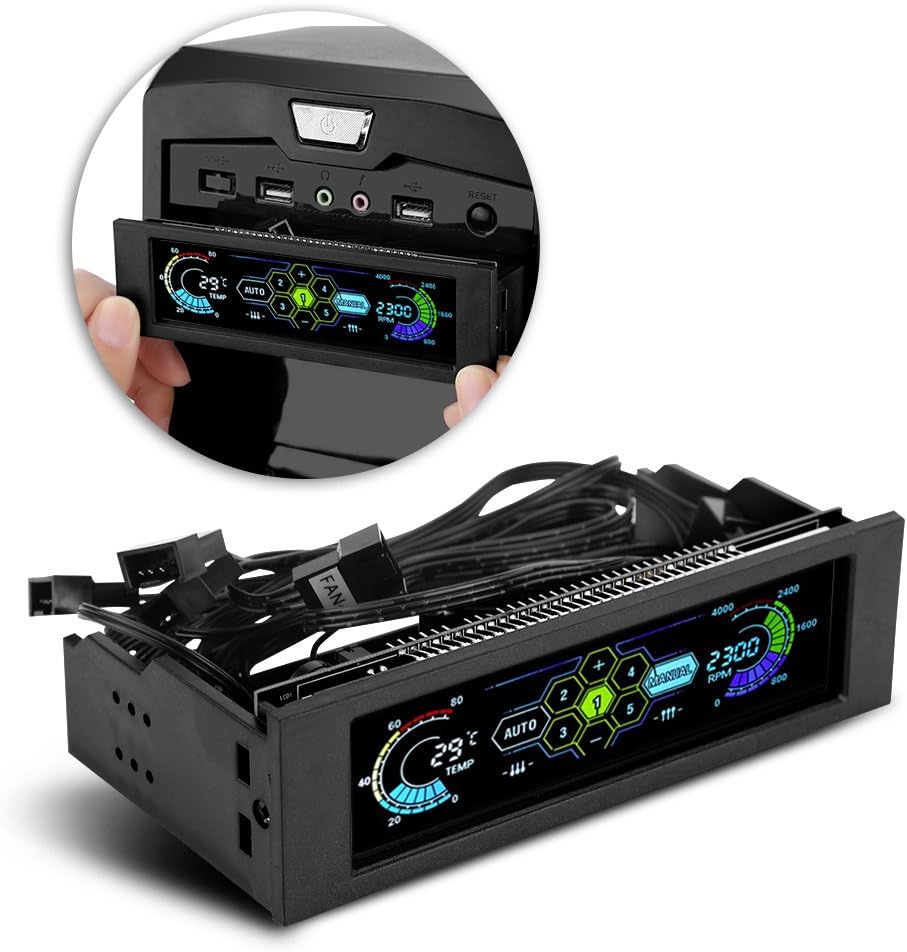


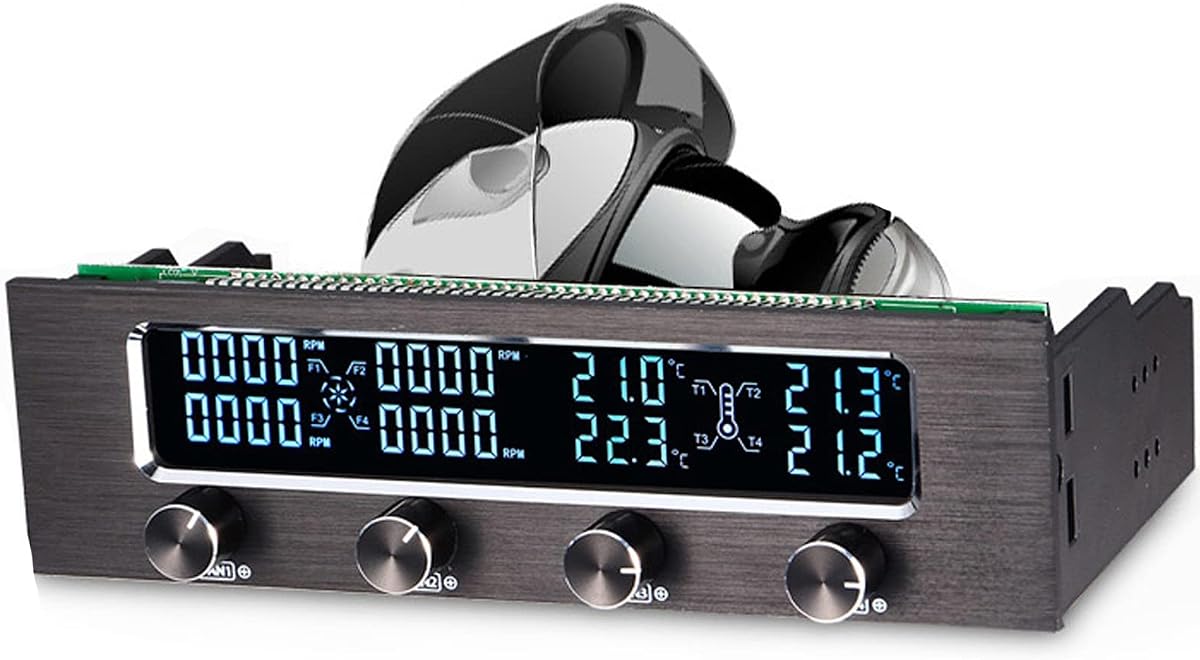
The STW‑6041 stands out with its perfect five star rating and clear LCD interface. It offers four independent channels for controlling case fans while displaying real-time temperatures and speeds.
We may earn a commission when you buy through this link, at no additional cost to you.
Its aluminum alloy panel provides a robust build that resists heat and wear. The over-temperature warning system ensures your hardware stays safe by alerting you if thresholds are exceeded.
While it lacks RGB lighting and limits you to four fans, these trade-offs are acceptable for most standard builds focused on function over flash.
This controller is ideal for users who want reliable, easy-to-read monitoring without complex software. It delivers consistent performance and peace of mind for daily operation.
The wide LCD screen shows four sets of fan speeds and temperatures simultaneously, giving you instant insight into your system's thermal health without needing to open the case.
Built-in PWM circuitry reduces high-frequency noise while maintaining cooling efficiency. The high-temperature alarm and anti-seize features protect your fans and components from overheating damage.
We may earn a commission when you buy through this link, at no additional cost to you.
The V BESTLIFE controller earns a high rating by offering both automatic and manual control modes. Its big LCD screen displays temperatures, fan speeds, and hard disk states at a glance.
We may earn a commission when you buy through this link, at no additional cost to you.
You can manage up to five fans and set custom alarm temperatures from 40 to 90 degrees. This flexibility makes it suitable for diverse cooling needs and custom system configurations.
Some users find the initial setup slightly complex, and build quality can vary between units. However, its feature set offers strong value for those needing detailed thermal management.
Choose this if you want granular control over multiple fans with clear visual feedback. It balances automation with manual overrides for optimal cooling performance.
Switch between automatic temperature-based regulation and manual speed adjustment effortlessly. This ensures your system cools efficiently under load while allowing quiet operation during idle periods.
Beyond fan speeds, the display tracks hard disk states and alarm temperatures. This holistic view helps you spot potential issues before they escalate into hardware failures.
We may earn a commission when you buy through this link, at no additional cost to you.
The SaiDian controller provides a straightforward way to monitor temperatures and control fans at an entry-level price. It features a large screen that shows fan speeds, temperatures, and even the date and time.
We may earn a commission when you buy through this link, at no additional cost to you.
With three groups of controllable fans and a fan jam alarm, it covers essential cooling management needs. The power supply interface supports standard 3pin connections for easy integration.
Its lower rating reflects occasional reliability concerns, but it remains a cost-effective choice for basic builds. It avoids unnecessary features to keep costs down.
Opt for this controller if you need simple thermal monitoring without breaking the budget. It delivers core functionality for users who prioritize value over advanced options.
The display keeps you informed of real-time temperatures and fan status. The fan jam alarm ensures you are alerted immediately if a fan stops spinning, preventing overheating.
Manually set the alarm temperature range to match your specific hardware tolerance. This prevents damage by slowing down or increasing fan speed based on thermal conditions.
We may earn a commission when you buy through this link, at no additional cost to you.
The Thermaltake Commander F6 brings RGB flair to cooling control with its dedicated LCD screen and six voltage control knobs. It stands out for enthusiasts who want visual customization alongside thermal management.
We may earn a commission when you buy through this link, at no additional cost to you.
With six temperature sensors and compatibility for LED strips, it integrates seamlessly into modern gaming builds. The warning alarm and short circuit protection add essential safety layers.
While it commands a higher price and requires careful setup, the aesthetic and functional benefits justify the investment for RGB-focused systems. It merges style with substance effectively.
Choose this if you prioritize lighting and precise channel control. It transforms your front panel into a centerpiece while keeping your system cool and monitored.
The RGB LCD screen adds a vibrant touch to your setup, syncing with other lighting components. This enhances the visual appeal of your PC without compromising functionality.
Six independent temperature sensors provide detailed heat mapping across your case. This allows for precise adjustments to each fan group, optimizing airflow for specific hotspots.
We may earn a commission when you buy through this link, at no additional cost to you.
The Ejoyous controller offers a reliable four-channel solution with a wide LCD display. It allows independent control of case fans while monitoring temperatures and RPM values clearly.
We may earn a commission when you buy through this link, at no additional cost to you.
Its automatic temperature control and double safety functions ensure stable operation without constant manual intervention. The aluminum alloy panel provides durability and a premium feel.
While it lacks advanced customization found in higher-end models, its focus on core reliability and quiet performance makes it a strong contender for everyday users.
Ideal for those seeking straightforward thermal control with minimal fuss. It balances functionality and build quality to meet standard cooling requirements effectively.
Control up to four fans independently using separate controllers for quick manual adjustments. This allows you to target specific cooling needs without affecting the entire system.
The system includes acoustic alarms for high temperatures and fan standstill detection. These features support reliable operation and prevent unexpected hardware damage from overheating.
We may earn a commission when you buy through this link, at no additional cost to you.
The ARCTIC Fan Controller addresses cable chaos by centralizing up to ten ports for individual PWM control. It is designed for builds with extensive fan setups needing precise airflow management.
We may earn a commission when you buy through this link, at no additional cost to you.
Its native driver support for Windows and Linux enables software-based customization. The magnetic mounting options allow flexible placement inside or outside the case for convenient access.
While it lacks a physical front panel display, the software control offers modern flexibility. It simplifies complex builds by eliminating the need for multiple splitters.
Choose this for high-channel needs where software integration is preferred. It provides robust current output and clean cable routing for professional-level thermal management.
With ten ports and independent PWM control, you can optimize every fan in your setup. This ensures superior performance by avoiding the limitations of standard hub signals.
Centralized control eliminates extension and Y-splitter cables that clutter your build. This design promotes a cleaner aesthetic and improves airflow inside the case.
We may earn a commission when you buy through this link, at no additional cost to you.
The Noctua NA-FC1 earns a high rating for its simplicity and reliability as a compact manual controller. It works as a standalone speed reducer or alongside motherboard controls for precise adjustments.
We may earn a commission when you buy through this link, at no additional cost to you.
Its unique 'No stop' mode prevents fans from dropping below 300 RPM, avoiding BIOS errors and ensuring consistent cooling. The included splitter allows control of up to three fans simultaneously.
While it lacks digital displays, its build quality and six-year warranty reflect Noctua's reputation for durability. It focuses on quiet, steady operation without unnecessary complexity.
Perfect for users who prefer manual knobs over software or displays. It provides a trustworthy solution for quiet operation in noise-sensitive environments.
The controller allows you to achieve truly quiet operation even with high-speed fans. This makes it ideal for home theaters or workstations where noise is a concern.
Backed by a six-year manufacturer warranty, it offers long-term assurance. This commitment highlights Noctua's confidence in the product's durability and performance.
We may earn a commission when you buy through this link, at no additional cost to you.
The Delinx controller earns an excellent rating by supporting a wide range of voltages and applications beyond just PCs. Its digital display switches between real-time temperature and fan speed for clear monitoring.
We may earn a commission when you buy through this link, at no additional cost to you.
It includes a DIY kit with USB-C power support, making it easy to integrate into various projects like NAS or server cabinets. The dual mode allows seamless switching between manual and automatic regulation.
While its compact size may limit visibility, the precise control and safety features offer strong value. It stands out for adaptability across different thermal management scenarios.
Choose this if you need a flexible solution for PC or non-PC cooling needs. Its safety protections and wide compatibility make it a robust choice for diverse setups.
Supports 5V to 30V wide voltage inputs, enabling compatibility with various fan types. The USB-C PD power option adds convenience for portable or modular installations.
Adjustable start and full-speed temperatures with hysteresis ensure stable fan behavior. This prevents rapid speed fluctuations and maintains optimal cooling efficiency.
We may earn a commission when you buy through this link, at no additional cost to you.
This controller offers a familiar layout with a wide LCD screen displaying fan speeds and temperatures. It includes a CPU temperature sensor and alarm system to keep your system safe.
We may earn a commission when you buy through this link, at no additional cost to you.
While the lower rating suggests some inconsistency, it provides essential features like PWM control and low noise operation. The alloy panel ensures compatibility with most chassis designs.
For users who prioritize display clarity over advanced features, it serves as a decent option. It balances basic functionality with visual feedback effectively.
Consider this if you need a simple four-channel controller at a reasonable price. It offers fundamental protection and monitoring for standard cooling setups.
The LCD screen displays multiple fan speeds and temperatures clearly. This allows you to monitor system health at a glance without needing additional software.
When temperatures exceed 60 degrees, an alarm sounds and the display flashes. This immediate alert helps prevent hardware damage from unexpected thermal spikes.
We may earn a commission when you buy through this link, at no additional cost to you.
This controller supports up to five groups of fans with a clear LCD display. It allows you to manually set alarm ranges and provides alerts if a fan fails to cool the system.
We may earn a commission when you buy through this link, at no additional cost to you.
While the rating is lower, it offers a higher fan count than many budget models. This makes it suitable for users needing extensive airflow control on a budget.
The setup can be complex, and reliability may vary, but its features are comprehensive. It balances cost with functionality for larger cooling configurations.
Choose this if you need to manage multiple fans without a high price tag. It provides essential monitoring and alarm features to protect your hardware.
Control five groups of fans to manage complex airflow paths effectively. This ensures comprehensive cooling for larger cases or multi-component builds.
The system alerts you immediately when a fan breaks down or stops cooling. This proactive monitoring helps prevent hardware damage due to insufficient airflow.
We may earn a commission when you buy through this link, at no additional cost to you.
Selecting the right controller involves evaluating your specific cooling needs, display preferences, and budget constraints to ensure optimal performance.
Determine how many fans you need to control based on your case size and airflow requirements. Models range from two to ten ports, so choose a unit that accommodates your current and future builds without needing splitters.
Look for a controller with enough channels to handle your setup comfortably while leaving room for expansion.
Controllers offer various displays from basic LCDs to advanced RGB screens. Choose one that provides clear visibility of temperatures and fan speeds to monitor your system effectively without opening the case.
Prioritize models with readable screens that show critical data at a glance for better system oversight.
Decide between manual knob control and automatic temperature-based regulation. Automatic modes adjust fan speeds based on thermal conditions, while manual modes offer precise user-defined control for specific scenarios.
Opt for dual-mode controllers if you want the convenience of automation with the option to override settings manually.
Safety features like over-temperature alarms and fan failure detection protect your hardware from overheating. These alerts are crucial for preventing damage when cooling fans stop working or temperatures spike unexpectedly.
Ensure the controller includes audible or visual alarms that activate when critical temperature thresholds are exceeded.
The physical construction impacts durability and compatibility. Look for controllers with sturdy materials like aluminum alloy panels that resist heat and fit standard drive bays easily.
Select models with robust casings that withstand long-term use inside a PC environment.
Check the voltage and power requirements to ensure compatibility with your power supply. Some units accept standard 5V and 12V inputs, while others support a wider range for diverse fan types.
Choose a controller that matches your existing power configuration to avoid additional adapters or complexity.
Verify that the controller supports the type of fans you own, such as 3-pin or 4-pin PWM. Mismatched interfaces can limit functionality or require extra cables to operate correctly.
Prioritize models that explicitly state compatibility with your fan types for seamless integration.
For advanced control, some units offer software integration for custom profiles. This allows granular tuning of fan curves and monitoring through your operating system rather than physical knobs.
Consider software-enabled models if you prefer digital configuration and detailed thermal analysis.
Start by installing the controller into a standard 5.25-inch drive bay and connecting it to your power supply. Route fan cables to the corresponding ports and secure all connections firmly to avoid intermittent issues.
Configure your alarm temperatures and control modes according to your system's thermal needs. Test each fan to ensure they respond correctly before relying on the controller for daily operation.
Regularly clean dust from the controller panel and internal components to maintain visibility and cooling efficiency. Check wiring periodically to ensure no loose connections develop over time.
Yes, most controllers require connection to your power supply via Molex or SATA connectors. They draw minimal power to operate the display and controls while managing fan speeds effectively.
Many modern controllers support both 3-pin and 4-pin PWM fans. Always check the product specs to ensure compatibility with your specific fan types before purchasing.
A good controller displays real-time RPM values on its screen. If a fan stops or drops below a certain speed, the display should indicate this clearly or trigger an alarm.
Front panel controllers allow you to adjust speeds even when the computer is off or booting. They provide immediate visual feedback without needing to load the operating system or specific software.
Some advanced models include RGB support for synchronized lighting. However, standard controllers focus on fan speed and may not control RGB lighting without additional cables or features.
Yes, most plug-and-play designs fit standard drive bays and connect via simple cables. No special tools are required beyond basic cable management to secure connections neatly.
We found that the STW‑6041 leads our list with its balanced features and excellent rating. For budget-conscious users, the Noctua NA-FC1 offers reliable manual control, while the Thermaltake Commander F6 caters to RGB enthusiasts.
When prioritizing, focus on the number of channels, display clarity, and safety features like alarms. These elements ensure your system remains cool and protected regardless of your specific usage scenario.
Prices and availability fluctuate often, so always verify current offers before purchasing. This guide provides a solid starting point for finding the perfect controller for your build.