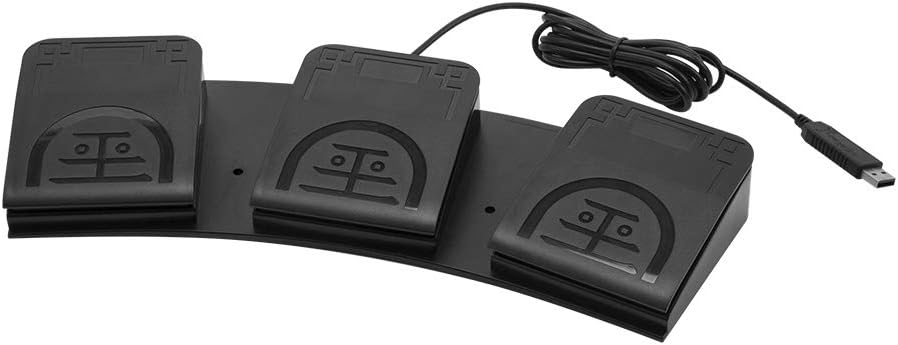
iKKEGOL Upgraded USB Triple Foot Pedal
4.4Editor score
Programmable HID device
Quiet optical switches
Wide pedal surface
This guide compares the top foot pedals for transcriptionists focusing on durability compatibility and ergonomics to help professionals choose the right
Finding the right foot pedal can transform your transcription workflow by keeping your hands on the keyboard. A good pedal offers reliable control over playback speed and direction without interrupting your typing flow.
We compared ten popular models based on build quality software compatibility and user feedback. Each option serves different needs from budget-friendly basic controls to advanced programmable switches.
Every pick highlights key features and potential drawbacks to help you decide quickly. Note that prices and availability change frequently so check current listings before purchasing.
4.4Editor score

4.5Editor score

4.1Editor score
The following table provides a side-by-side overview of all ten models. Use this to quickly compare key specifications and features before diving into detailed reviews.


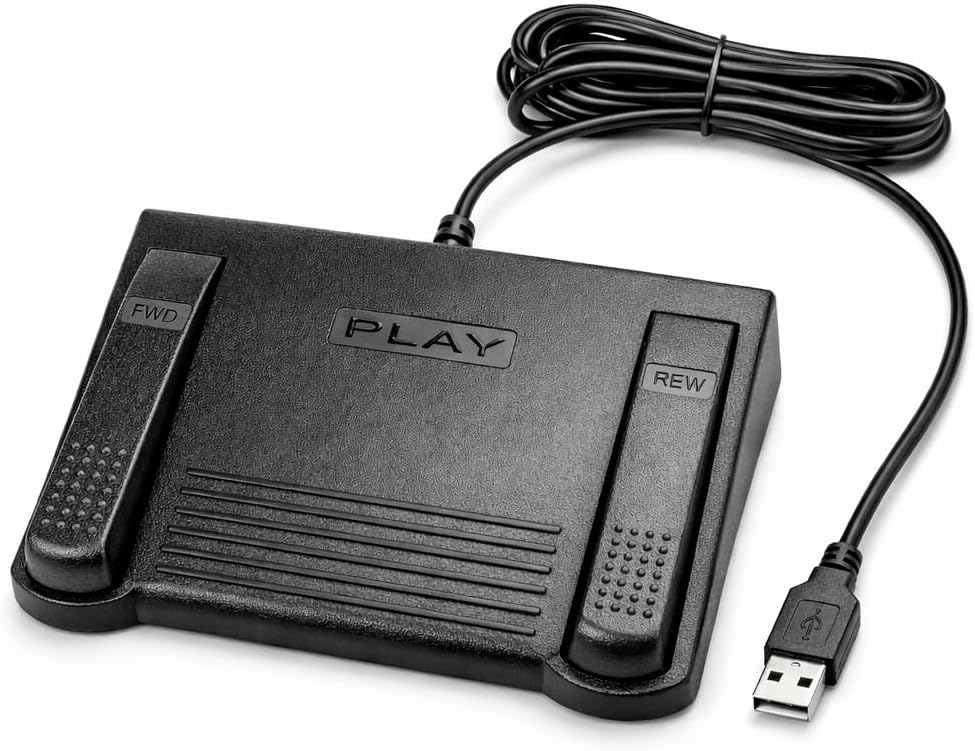


The Infinity 3 USB Foot Pedal stands out for its rugged build and straightforward operation. It holds a strong 4.5 rating thanks to its heavy-duty micro switches that handle thousands of daily presses.
We may earn a commission when you buy through this link, at no additional cost to you.
Its ergonomic design features a wide central sloping pedal that makes it easy to move your foot between play fast forward and rewind. The sturdy construction ensures it stays in place without sliding.
While it lacks software customization the fixed layout works well for most transcriptionists. The only downside is you cannot remap the keys to suit unique workflows.
This is an excellent choice for professionals who need a dependable pedal without complexity. Its balance of durability and comfort makes it our top pick.
The micro switches ensure countless hours of trouble-free performance without failing during long transcription sessions.
The large size enables you to easily move your foot between functions reducing strain during extended use.
We may earn a commission when you buy through this link, at no additional cost to you.
The iKKEGOL Upgraded USB Triple Foot Pedal offers impressive versatility at a low price point. It functions as a standard HID device that can be programmed to act as keyboard keys.
We may earn a commission when you buy through this link, at no additional cost to you.
Its optical switches are quiet and sensitive providing easy touch response with minimal resistance. The wide pedal design ensures lasting comfort and it can support over 100kg of weight.
You will need to use configuration software to set it up for transcription keys which adds a small setup step. It is also marketed for gaming and media so transcription users may need to adjust settings.
If budget is a concern this pedal delivers great value. It works well for transcriptionists who want customization without spending much.
The optical switches are quiet making them ideal for office environments where noise is a concern.
The large size enables you to rest your foot comfortably reducing strain during long transcription sessions.
We may earn a commission when you buy through this link, at no additional cost to you.
The Philips ACC2330 is designed for professional dictation workflows with a 4-pedal setup. It features a unique toe touch control that allows you to change control areas by feeling with your toe.
We may earn a commission when you buy through this link, at no additional cost to you.
You can swing the foot using the heel which promotes easy foot relax during pause time. The increased width of the center pedal helps avoid unintended presses of other pedals.
The learning curve for the toe touch control may be steep for some users. The price is also higher than basic models which may not suit everyone.
This pedal is best for professionals who already use Philips digital dictation systems. Its ergonomic features support comfortable long-term use.
Feel it with your toe when you change the control area for seamless workflow adjustments.
Swing the foot using the heel to allow easy foot relax during pause time and reduce fatigue.
We may earn a commission when you buy through this link, at no additional cost to you.
The VEC in-USB-2 Infinity Digital Foot Control stands out with its rechargeable battery offering up to 1000 hours of digital recording time. This makes it great for mobile or desk setups without constant cables.
We may earn a commission when you buy through this link, at no additional cost to you.
It features a mechanical stop that prevents accidental triggering of the center pedal while stepping on side pedals. The durable construction is built for 2 million depressions ensuring long-lasting performance.
You will need to charge the battery periodically which can be inconvenient if you forget. The price is higher than standard wired pedals.
This is a strong choice for transcriptionists who value mobility and reliability. Its wide compatibility works with most leading dictation brands.
Powered by a rechargeable battery providing up to 1000 hours of digital recording time for extended use.
Mechanical stop prevents accidental triggering of the center pedal while stepping on side pedals.
We may earn a commission when you buy through this link, at no additional cost to you.
The DAC 3 Function Foot Pedal holds a perfect 5.0 rating for its simplicity and clear labeling. It features large buttons labeled Next Job Rew Play and Record for easy identification.
We may earn a commission when you buy through this link, at no additional cost to you.
This pedal is compatible with certain computer software designed for foot control making it ideal for specific workflows. The USB connector ensures plug-and-play functionality on most systems.
Its limited functionality means it may not work with all transcription programs. The simplicity is both a pro and a con depending on your needs.
Choose this if you need a straightforward pedal for supported software. Its high rating reflects user satisfaction with its basic design.
Buttons are labeled as follows from left to right next job rew play record for quick recognition.
USB connector ensures easy setup without requiring complex configuration or additional drivers.
We may earn a commission when you buy through this link, at no additional cost to you.
The Infinity USB Digital Foot Control features a low profile design with a greater non slip surface area. This helps keep it stable under your foot during active transcription work.
We may earn a commission when you buy through this link, at no additional cost to you.
It connects via a standard computer plug and provides digital control for playback functions. The brand is known for reliable foot pedals in the transcription industry.
It lacks advanced customization options found in other models. The design is minimal which may limit flexibility for some users.
This is a solid option for those who prefer a sleek unobtrusive pedal. It works well for basic transcription tasks.
Low profile design allows it to fit easily under desks and reduces visual clutter in your workspace.
Greater non slip surface area ensures the pedal stays in place during active use.
We may earn a commission when you buy through this link, at no additional cost to you.
The Express Scribe Transcription Foot Pedal is designed only for use with Express Scribe transcription software on Windows and Mac. It is pre-programmed to work right out of the box with no wizard needed.
We may earn a commission when you buy through this link, at no additional cost to you.
Its oversized pedal design allows easy movement between play fast forward and rewind functions supporting comfortable low-fatigue operation. The reliability is backed by a 1 year mail-in parts and labor warranty.
You cannot use this pedal with any other transcription software which limits its versatility. The lower user rating suggests some users find it less durable than competitors.
Choose this if you rely on Express Scribe for your work. It simplifies setup for users of that specific platform.
Designed only for use with Express Scribe transcription software by NCH Software on Windows and Mac.
Pre-programmed and ready to use right out of the box with no foot pedal wizard required.
We may earn a commission when you buy through this link, at no additional cost to you.
The ECS-IN-USB-1 Foot Pedal is engineered for comfort during extended use with a thoughtfully contoured layout. It supports natural foot positioning to help minimize strain and fatigue.
We may earn a commission when you buy through this link, at no additional cost to you.
It provides hands-free transcription control allowing you to work faster without interrupting your typing flow. The broad compatibility makes it a dependable choice for most major transcription software.
The user rating is lower than top models which may indicate build quality issues. The features are basic compared to premium options.
This is a decent choice for those prioritizing ergonomics. It works well for general transcription needs.
Engineered for comfort during extended use to help minimize strain and fatigue.
Designed to work with most major dictation and transcription software platforms.
We may earn a commission when you buy through this link, at no additional cost to you.
The Philips LFH-2330 features a 4-pedal design that can be completely configured to suit your needs using a user-friendly wizard. Its slim ergonomic design minimizes physical strain by lessening foot movement.
We may earn a commission when you buy through this link, at no additional cost to you.
The anti-slip bottom surface keeps it in the right place during transcription. It connects via USB and is backed by Philips reputation for quality transcription gear.
Configuration requires using the wizard which takes time initially. The price is higher than basic models.
Choose this if you need custom pedal assignments. It offers flexibility for specialized workflows.
4 pedal design which can be completely configured to suit you using a user-friendly wizard.
Ergonomic design to minimize foot movement during transcription to minimize physical strain.
We may earn a commission when you buy through this link, at no additional cost to you.
The iKKEGOL Upgraded USB Triple Foot Pedal uses mechanical switches that physically close a circuit when pressed. It allows you to execute complex macros key combinations or mouse clicks with your feet.
We may earn a commission when you buy through this link, at no additional cost to you.
The powerful ElfKey configuration software enables you to program custom commands on Windows or macOS before using on Linux. It supports a wide range of systems including Windows Mac and Linux.
The setup process requires downloading and using the configuration software which may be complex for some users. The mechanical switches offer tactile feedback that some prefer.
This is ideal for advanced users needing customization. It works well for transcription and other tasks.
When pressed the pedal actuates a spring-loaded lever which physically closes an electrical circuit.
The powerful ElfKey configuration software is available for Windows and macOS for custom programming.
We may earn a commission when you buy through this link, at no additional cost to you.
Choosing the right foot pedal depends on your workflow software needs and budget. This guide explains key factors to consider before buying.
Ensure the pedal works with your transcription software. Some models like Express Scribe are exclusive while others support multiple programs.
Check official compatibility lists before purchasing to avoid setup issues.
Look for heavy-duty micro switches or optical switches rated for millions of presses. Durability is crucial for daily use.
Higher quality materials ensure long-lasting performance without failure.
Choose a pedal with a comfortable shape and anti-slip bottom. Wide pedals reduce foot movement and fatigue.
An ergonomic design supports natural foot positioning during long sessions.
USB connectivity is standard but some models offer rechargeable batteries for wireless use. Wired options avoid battery charging.
Consider your desk setup and need for mobility when selecting.
Programmable pedals allow you to map keys to your workflow but require software setup. Fixed pedals are simpler out of the box.
Decide if you need custom macros or standard playback controls.
Basic pedals start around thirty dollars while premium models cost double or more. Determine how much you value features over price.
Invest in quality if you transcribe full time.
A warranty like one-year parts and labor provides peace of mind. Check if repairs require sending the unit back.
Good support ensures quick replacement if issues arise.
Mechanical switches offer tactile feedback while optical switches are quieter. Some transcriptionists prefer quiet operation.
Choose based on your environment sensitivity preferences.
Place the pedal on a flat non-slip surface near your keyboard. Ensure it stays in place during active use.
Press the play rewind and fast forward pedals with your toes or heels. Move smoothly to avoid accidental presses.
Keep the area free of dust and debris. Avoid exposing the pedal to liquids or excessive heat.
Not all pedals work with every program. Some are built for specific software like Express Scribe while others are universal. Always check compatibility before purchasing.
While not mandatory they save time by keeping hands on the keyboard. They reduce fatigue and improve speed significantly.
Most pedals plug and play via USB. Some require installing driver software to customize functions. Follow the included instructions.
Many pedals support both Windows and Mac. Confirm compatibility on the product page. Some may need software updates.
Check USB connections and ensure software is running. Restarting may help. Some pedals need recharging.
Mechanical switches click while optical switches are quieter. Choose based on your environment needs.
High-quality pedals last years with daily use. Some switches are rated for millions of presses.
Programmable pedals allow key remapping using software. Fixed models do not offer this.
The Infinity 3 USB Foot Pedal leads for reliability and durability. The iKKEGOL Triple Pedal offers great budget value. The Philips ACC2330 serves professionals best.
Prioritize compatibility and ergonomics to maintain workflow. A good pedal reduces fatigue and improves efficiency.
Prices and availability change often so verify current listings before buying. Choose the model that fits your specific transcription needs.