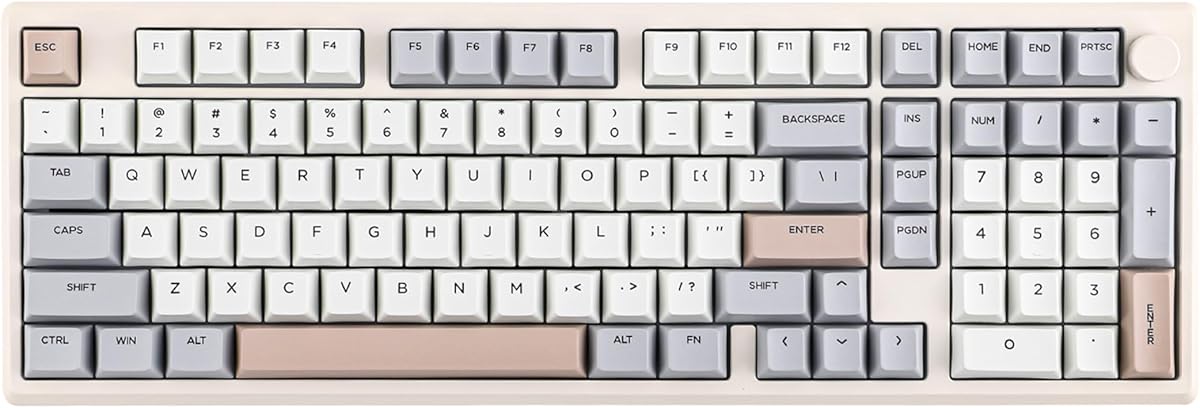
EPOMAKER Galaxy100
4.5Editor score
QMK VIA support included
Premium aluminum alloy shell
Pre-lubed linear switches
This comprehensive guide compares ten top Epomaker keyboards featuring wireless connectivity, hot-swap switches, gasket mounting, and advanced customization
Choosing the right mechanical keyboard can transform your daily computing experience significantly. Epomaker offers a diverse range of options tailored for both productivity and immersive gaming sessions effectively.
We compared ten models based on build quality, wireless performance, customization potential, and acoustic tuning to find the best options available for every type of user today.
Each pick highlights unique strengths like screen integration or hall effect technology so you can choose wisely. Remember that product details may shift over time so verify before buying.
4.5Editor score
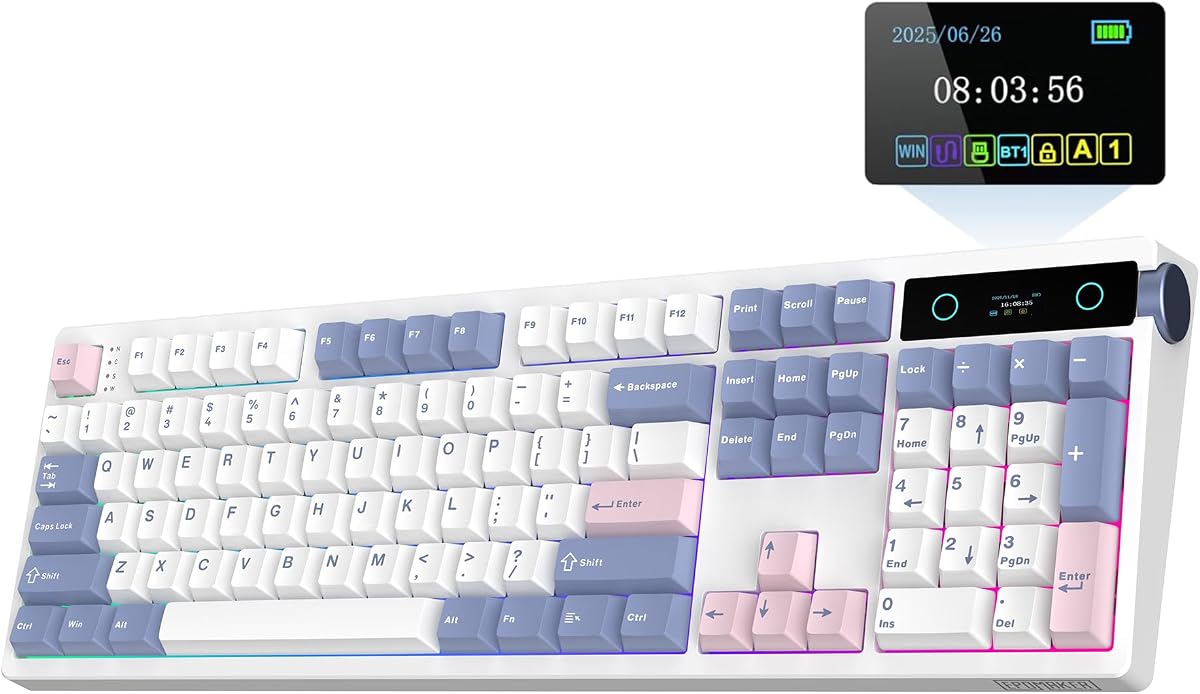
4.7Editor score

4.7Editor score
The following table offers a direct side-by-side comparison of key specifications across all ten models to help you identify the perfect fit for your setup needs.


The EPOMAKER TH108 PRO stands out as the top pick in this guide due to its exceptional balance of features and performance. With a rating of 4.7 stars it delivers a premium experience right out of the box.
We may earn a commission when you buy through this link, at no additional cost to you.
Its massive 10,000mAh battery ensures you stay connected for days without plugging in while the integrated smart screen lets you monitor status and play GIFs. The five-layer gasket mount creates a creamy acoustic profile that satisfies enthusiasts.
While the full-size layout might be bulky for compact setups the stability it offers during intense gaming is unmatched. The Chrome-based software allows deep customization without forcing heavy installations on your system.
This keyboard is ideal for users who want a reliable daily driver with advanced customization. If you value long battery life and a customizable display alongside solid build quality this model is the definitive choice.
The 10,000mAh battery provides up to 200 hours of use freeing you from frequent charging interruptions.
The smart screen shows system stats and lets you upload personal GIFs for a personalized touch.
We may earn a commission when you buy through this link, at no additional cost to you.
The EPOMAKER X Aula F75 MAX earns the Best OLED Premium badge for its stunning display and ergonomic design. It balances modern aesthetics with functional utility making it perfect for gamers and typists alike.
We may earn a commission when you buy through this link, at no additional cost to you.
Its TFT screen doubles as a battery monitor and status indicator while the volume knob adds tactile control. The gasket-mounted structure paired with a flex-cut plate ensures a soft and flexible typing experience.
Although the screen adds visual flair it relies on software integration that might require adjustment. However the sound quality provided by the factory-lubed switches and internal foam layers is remarkably consistent and pleasant.
If you want a compact keyboard with high-end visual feedback this model delivers. It is excellent for users who value space efficiency without sacrificing premium features like hot-swappable switches and RGB lighting.
The 75 percent layout preserves arrow keys and function layers while freeing up mouse movement space.
Multiple foam layers and factory tuning create a creamy and thocky sound that pleases enthusiasts.
We may earn a commission when you buy through this link, at no additional cost to you.
The EPOMAKER Galaxy100 is defined by its premium aluminum shell and open-source software support. It targets enthusiasts who demand durability and total control over their layout and macros.
We may earn a commission when you buy through this link, at no additional cost to you.
QMK and VIA support mean you can program the keyboard on any device without proprietary drivers. The aluminum case not only looks sleek but also provides a stable foundation that prevents flex during typing.
The trade-off is the added weight which makes portability less ideal compared to plastic models. Yet for a stationary desk setup the combination of build quality and switch lubrication makes this a top-tier option.
Buy this if you prioritize premium materials and software flexibility. It is perfect for professionals who need a reliable tool that supports complex workflows and custom layers effortlessly.
VIA software allows complex remapping and macro editing across Windows and Mac systems easily.
The aluminum alloy case ensures durability and a weighty presence on your desk.
We may earn a commission when you buy through this link, at no additional cost to you.
The EPOMAKER TH108 V2 PRO focuses on workflow versatility with its tri-mode connectivity and smart screen. It is designed for users who switch between a PC and laptop or phone frequently.
We may earn a commission when you buy through this link, at no additional cost to you.
The web-based software simplifies customization without needing to install heavy drivers. The rotary knob allows quick volume adjustments which is useful for multimedia and gaming scenarios where efficiency matters.
While the full-size footprint is not portable the stability it offers during intense tasks is commendable. The screen adds a layer of customization that keeps the interface engaging without distracting from work.
Choose this if you need a flexible tool for multiple operating systems. Its ability to pair with up to five devices makes it a strong candidate for hybrid work setups.
FN shortcuts allow instant toggling between paired devices without interrupting your workflow.
Web-based drivers run in your browser making setup quick and easy across all devices.
We may earn a commission when you buy through this link, at no additional cost to you.
The EPOMAKER TH99 PRO merges compact design with full functionality by retaining the numpad. It is a strong choice for those who want to maximize mouse movement space without sacrificing number entry.
We may earn a commission when you buy through this link, at no additional cost to you.
The glass screen adds a modern touch that distinguishes it from standard plastic displays. With a 10,000mAh battery you get long hours of use which supports both office work and gaming sessions.
Typing on a 96 percent layout takes some getting used to due to key proximity. However the internal sound dampening ensures that the thocky profile remains satisfying even with the compact footprint.
If you need a space-efficient keyboard with a full set of keys this is ideal. It works well for office workers who need data entry capabilities without a cluttered desk.
The 96 percent layout compresses the number pad saving valuable desk space.
Multiple sound dampening layers ensure a deep and creamy sound despite the smaller frame.
We may earn a commission when you buy through this link, at no additional cost to you.
The EPOMAKER TH108 provides a traditional full-size experience with high-quality acoustic tuning. It is perfect for users who prioritize typing comfort and reliability over flashy smart features.
We may earn a commission when you buy through this link, at no additional cost to you.
The five-layer padding system ensures every keystroke feels soft and consistent. This acoustic tuning creates a rich sound that enhances the typing experience without requiring aftermarket modifications.
While it lacks the integrated screen of newer models it focuses on core mechanical performance. The hot-swappable PCB makes it easy to change switches if you want a different tactile feel.
This is a solid pick for traditionalists who want a wireless keyboard that performs like a premium wired one. It balances simplicity with high-end acoustic tuning effectively.
The standard full-size layout ensures familiarity and accessibility for all users.
Internal foam layers provide a consistent and pleasing sound out of the box.
We may earn a commission when you buy through this link, at no additional cost to you.
The EPOMAKER G84 HE uses Hall Effect technology to offer adjustable actuation and extreme speed. This is the best choice for competitive gamers who need every millisecond advantage possible.
We may earn a commission when you buy through this link, at no additional cost to you.
With an 8K polling rate the response time is virtually instant. The adjustable actuation lets you customize how far keys must press to trigger which can be tailored to specific game types.
The learning curve is steep because these features require software configuration. However for FPS and rhythm players the precision gains are well worth the effort to set up correctly.
Buy this if performance is your absolute priority. It is a specialized tool designed for high-level play where standard mechanical switches might feel too slow or imprecise.
Hall effect switches use magnets to detect movement allowing for ultra-fast polling.
You can adjust the trigger point from 0.1mm to 3.3mm for personalized control.
We may earn a commission when you buy through this link, at no additional cost to you.
The EPOMAKER TH99 is a productivity-focused board that combines space-saving design with a numpad. It is designed for users who need to enter numbers efficiently without sacrificing too much desk real estate.
We may earn a commission when you buy through this link, at no additional cost to you.
The gasket mount structure provides a comfortable typing feel that reduces fatigue during long work days. Its massive 8000mAh battery ensures it stays powered through multiple workweeks without interruption.
Without a screen or advanced customization this model focuses on reliability and comfort. The Cherry profile keycaps are comfortable and the kickstand helps you find an ergonomic angle easily.
If you are looking for a reliable tool for spreadsheets or coding this fits well. It offers a sweet spot between size and functionality for office environments.
Cherry profile caps and adjustable stands reduce wrist strain during long typing sessions.
The inclusion of a numpad supports data entry without needing a separate external device.
We may earn a commission when you buy through this link, at no additional cost to you.
The EPOMAKER Ajazz AK820 Pro is a compact keyboard that brings a TFT screen to the 75 percent form factor. It is designed for users who want premium features in a portable package.
We may earn a commission when you buy through this link, at no additional cost to you.
The south-facing LEDs provide vibrant backlighting that shines through legends effectively. The TFT screen allows you to customize visuals making it a stylish choice for modern setups.
While the battery is smaller than full-size models it is sufficient for typical usage. The gasket mount ensures that despite its size it still offers a satisfying typing experience.
If you need a keyboard you can travel with without losing features this is ideal. It is excellent for remote workers who want a consistent setup across different locations.
The 75 percent layout saves space and makes travel easy.
South facing LEDs ensure clear brightness and color vibrancy.
We may earn a commission when you buy through this link, at no additional cost to you.
The EPOMAKER x Aula F99 offers excellent value with a gasket-mounted design and high capacity battery. It is a strong contender for budget-conscious buyers who want premium features.
We may earn a commission when you buy through this link, at no additional cost to you.
The single key slotted PCB is a unique feature that isolates switches to improve sound quality. This engineering choice is rare in this price range and elevates the typing experience significantly.
While it lacks some of the marketing polish of other models it delivers on core performance. The pre-lubed switches feel smooth and the battery ensures long usage times between charges.
If you want the best bang for your buck this is the winner. It proves you do not need to spend a fortune to get a solid wireless keyboard with gasket mounting.
Slotted PCB design is usually reserved for high end boards.
Factory pre-lubed switches save you the effort of manual lubrication.
We may earn a commission when you buy through this link, at no additional cost to you.
Selecting the right Epomaker keyboard requires understanding your specific needs regarding layout, connectivity, and customization.
Choose a layout that matches your desk space and usage. Full-size keyboards like the TH108 PRO are great for those who need a numpad regularly. Compact options like the F75 MAX save space and allow more mouse room.
Decide between 100 percent 96 percent or 75 percent based on your workspace.
All models support tri-mode connectivity via Bluetooth 2.4Ghz and wired USB. This ensures you can switch between devices like phones and laptops easily. Always check battery life if you plan to use it frequently.
Look for models with large batteries for minimal interruptions.
Hot-swappable sockets allow you to change switches without soldering. This gives you flexibility to try different types like linear or tactile. Most models come with pre-lubed switches for a smooth feel out of the box.
Ensure the PCB supports the pins you prefer.
Models with TFT screens like the TH99 PRO offer visual feedback and customization. These screens can show battery status or play GIFs. However they may require software integration which adds complexity.
Decide if visual utility is worth the extra steps.
Gasket mounting and internal foam layers create a creamy sound. If you prefer a quiet keyboard look for silent switches. The number of layers often correlates with how soft the typing feel is.
Prioritize sound dampening if you share your space.
Web-based drivers are easier to use than installing heavy software. Some models support QMK and VIA for deep customization. Check if the software works on your operating system before buying.
Choose web-based drivers for simplicity.
Aluminum shells like on the Galaxy100 offer long-term durability. Plastic models are lighter but might feel less premium. Weight can also help anchor the keyboard during intense typing sessions.
Heavier boards often feel more stable.
Prices vary based on features like screens or hall effect technology. You can find great value in the F99 or Ajazz models. Determine which features are essential to your workflow before buying.
Balance cost with the features you need most.
To start pairing your device enable Bluetooth on your computer and long press the function key on the keyboard. The LED indicators will flash to confirm connection.
Use the volume knob on models that have one to adjust system volume quickly without opening menus. This is helpful during multimedia consumption.
Clean your keyboard regularly with compressed air and a soft brush to maintain performance and remove dust.
Yes most models support Mac including Windows. You can switch between modes easily using the function keys. Always check the software for Mac specific features.
If it is hot-swappable simply push the switch down and pull it out with the provided tool. Push the new switch in until it clicks into place.
Yes you can use the keyboard while it is connected via USB-C cable. This allows for uninterrupted use if the battery runs low.
Bluetooth is standard for mobile devices while 2.4Ghz offers lower latency for gaming. You can use both simultaneously to connect multiple devices.
Most basic functions work. Linux but advanced software features may be limited. Models with QMK support like the Galaxy100 work best.
Visit the Epomaker website and download the latest version. Run the tool and follow the prompts to ensure your keyboard stays secure and efficient.
The TH108 PRO and Galaxy100 offer the best balance of features and performance for most users.
Prioritize what matters most to you such as sound or portability when making your final decision.
Verify current availability and features on the official store to ensure you get the right model.