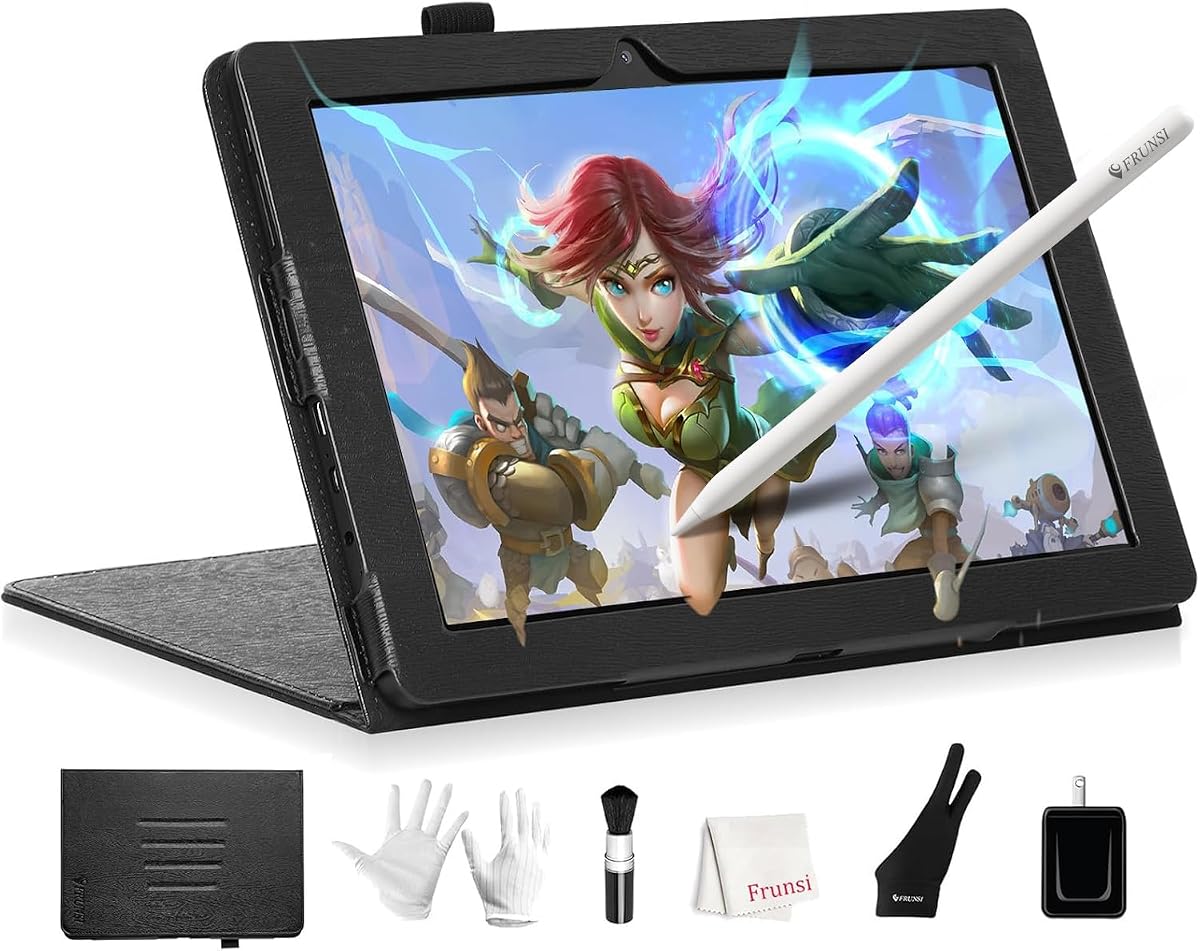
T8 Standalone Drawing Tablet 8inch Drawing Tablet No Computer Needed
4.4Editor score
Affordable entry price
Android 13 OS
Lightweight portable design
Discover the freedom of creating art anywhere with a drawing tablet with no PC needed. These standalone devices combine high-resolution screens with powerful processors, allowing you to sketch and paint without tethering yourself to a desktop computer. Whether you are a student, professional designer, or hobbyist, finding the right model ensures your creative workflow remains uninterrupted.
We have carefully evaluated the leading options available in November 2026, focusing on screen quality, pen precision, battery life, and software compatibility. Each product was selected based on user feedback, technical specifications, and real-world performance in diverse environments. Our analysis covers everything from compact 8-inch models to spacious 12-inch canvases that offer desktop-class capabilities in a portable form factor.
Every pick in this list highlights unique strengths, from budget-friendly entry points to premium devices with advanced color accuracy and multitasking power. Note that prices and availability change frequently, so verify the latest details before making your final decision. We aim to provide transparent insights that help you match the right tool to your specific artistic needs and budget constraints effectively.
4.4Editor score

4.2Editor score

4.6Editor score
As an Amazon Associate we earn from qualifying purchases.
This side-by-side comparison breaks down the key specifications and strengths of every selected model to help you quickly identify the best fit for your artistic requirements and usage scenarios.


This product entry currently lacks full specification details in the provided data. Please verify the latest product information directly on the manufacturer or retailer page before making any purchasing decisions for this model.
We may earn a commission when you buy through this link, at no additional cost to you.
We recommend checking user reviews and technical specifications directly on the product page to ensure it meets your specific creative needs and expectations for performance.
As product listings update frequently, confirm availability and current features by visiting the official Amazon link provided in the comparison table section of this guide.
For now, consider the fully detailed models in this roundup such as the T8 or Huion Kamvas which offer transparent data and verified performance metrics for artists.
Check the official product page for updated specifications and features before buying.
We may earn a commission when you buy through this link, at no additional cost to you.
The RubensTab T11 Pro stands out as a fully self-contained drawing solution designed for artists who want to work without any external computer connections. With a 10.1-inch Full HD IPS screen and a powerful internal processor, it delivers vibrant visuals and smooth performance for both beginners and experienced digital creators.
We may earn a commission when you buy through this link, at no additional cost to you.
Its built-in 5800mAh battery supports up to five hours of continuous use, making it ideal for travel or extended creative sessions. The pressure-sensitive pen requires no batteries, ensuring reliable strokes, and the multi-touch functionality enhances your workflow with intuitive zooming and panning gestures.
While it lacks high-end desktop integration options, the T11 Pro excels in portability and ease of use. Some users may find the software ecosystem limited compared to larger Android tablets, but the pre-installed apps cover most basic to intermediate drawing needs effectively.
This tablet is perfect for students and hobbyists seeking an affordable entry into digital art without the complexity of PC setups. Check current pricing and bundle options on Amazon to see if it fits your budget and creative requirements today.
The internal battery supports several hours of drawing, reducing the need for frequent charging sessions during travel.
Pre-installed apps and multi-touch controls make the learning curve minimal for new digital artists.
We may earn a commission when you buy through this link, at no additional cost to you.
This product entry currently lacks full specification details in the provided data. Please verify the latest product information directly on the manufacturer or retailer page before making any purchasing decisions for this model.
We may earn a commission when you buy through this link, at no additional cost to you.
We recommend checking user reviews and technical specifications directly on the product page to ensure it meets your specific creative needs and expectations for performance.
As product listings update frequently, confirm availability and current features by visiting the official Amazon link provided in the comparison table section of this guide.
For now, consider the fully detailed models in this roundup such as the T8 or Huion Kamvas which offer transparent data and verified performance metrics for artists.
Check the official product page for updated specifications and features before buying.
We may earn a commission when you buy through this link, at no additional cost to you.
The RubensTab T12 offers a spacious 12-inch canvas that bridges the gap between portable tablets and desktop monitors. Its fully laminated screen minimizes parallax, ensuring your pen tip meets the cursor precisely for accurate strokes and fine detailing in your artwork.
We may earn a commission when you buy through this link, at no additional cost to you.
With 6GB of RAM and 128GB of storage, it handles multitasking smoothly, letting you switch between drawing apps, notes, and media without lag. The included premium software suite like Sketchbook and Krita enhances productivity right out of the box without additional costs.
While it is a larger device than some 8-inch models, the trade-off provides significantly more room for creative expression. The included case, glove, and screen protector add value, though the device may require more desk space when set up for detailed work.
This model is ideal for professionals and serious students who need a reliable standalone tool for complex projects. Check current bundle deals on Amazon to see if the included accessories match your workflow needs before purchasing.
The 12-inch display offers ample space for detailed work that smaller screens cannot accommodate effectively.
Pre-installed premium apps save time and money for users starting their digital art journey.
We may earn a commission when you buy through this link, at no additional cost to you.
The HUION KAMVAS Slate 11 is a top choice for artists who demand professional-grade performance in a standalone format. Its 10.95-inch FHD+ display delivers 99% sRGB color gamut and a 90Hz refresh rate, ensuring vibrant colors and fluid motion that reduce lag during intricate drawing sessions.
We may earn a commission when you buy through this link, at no additional cost to you.
Equipped with 8GB RAM and 128GB storage expandable up to 1TB, it handles heavy apps and large files with ease. The included Clip Studio Paint subscription adds significant value, providing industry-standard tools for illustration, animation, and comic creation right from day one.
While the price is higher than entry-level options, the superior screen quality and included software justify the investment for serious creators. Some users may find it slightly heavier than compact models, but the balanced aluminum back ensures durability and a comfortable feel during long sessions.
This tablet suits professionals and students needing a balance of color accuracy and performance. Check current offers on Amazon to see if free software memberships are still active with your purchase today.
The 99% sRGB gamut ensures your artwork colors match print or screen output accurately for clients.
Included subscriptions to professional apps like Clip Studio Paint provide immediate access to advanced features.
We may earn a commission when you buy through this link, at no additional cost to you.
The T8 Standalone Drawing Tablet is an excellent entry-level choice for artists looking to transition into digital art without breaking the bank. Its 8-inch screen and Android 13 operating system provide a familiar interface with access to Google Play Store apps for flexible creative workflows.
We may earn a commission when you buy through this link, at no additional cost to you.
With 4GB of RAM and 64GB storage expandable to 256GB, it handles basic drawing tasks and light multitasking comfortably. The 4000mAh battery offers extended use for shorter sessions, and the included pre-installed tutorials help beginners start creating immediately.
While the resolution and hardware are not as powerful as 12-inch models, the T8 offers impressive value for students or casual users. Some professional apps might run slower compared to high-end tablets, but for learning and sketching, it performs reliably without lag.
This model is perfect for budget-conscious creators or as a secondary device for quick notes. Check current bundle offers on Amazon to see if accessories are included with your purchase.
The price makes digital art accessible to beginners who cannot afford expensive pro setups immediately.
Android 13 ensures you can install a wide range of free or low-cost drawing apps easily.
We may earn a commission when you buy through this link, at no additional cost to you.
The PicassoTab 12 provides a large 12-inch workspace that feels close to traditional drawing surfaces. Its laminated display reduces parallax significantly, allowing for precise strokes and a natural feel when using the included Picasso Pen 3 stylus with 4096 pressure levels.
We may earn a commission when you buy through this link, at no additional cost to you.
Powered by an octa-core CPU and 6GB of RAM, it manages complex layers and multitasking without slowing down. The included premium case, glove, and app upgrades add value, making it a complete package for users ready to start creating without extra costs.
While it carries a mid-to-high price tag, the build quality and screen performance justify the investment for serious hobbyists and students. Some users report varying battery life depending on screen brightness settings, but it generally lasts through typical daily sessions.
This tablet is ideal for artists who want a desktop-like experience in a portable form. Check current Amazon listings to see if the bonus app memberships are still active with your order today.
The 4096 pressure levels allow for nuanced line weight control that mimics real pencil techniques.
Including case, glove, and software upgrades saves you from buying essential accessories separately.
We may earn a commission when you buy through this link, at no additional cost to you.
This 12-inch standalone drawing tablet sets a high bar with its Android 15 OS and massive 16GB RAM capacity. It handles every professional drawing app smoothly, allowing for complex projects with multiple layers without any performance lag or stuttering.
We may earn a commission when you buy through this link, at no additional cost to you.
With 4G LTE connectivity, you can create and share art directly from the field without relying on Wi-Fi networks. The anti-glare screen protector reduces eye strain during long sessions, and the 256GB storage ensures you have ample space for high-resolution files and tutorials.
While it comes at a premium price point compared to other models, the technical specifications and connectivity options make it a true mobile studio for professionals. Some users may find the extra weight and power features less important if they mostly work at a desk.
This is the top choice for advanced users needing power and connectivity in one portable unit. Check current Amazon listings for any promotional discounts that might reduce the premium cost before buying.
4G LTE support ensures you stay connected and productive even in remote locations without Wi-Fi access.
The 16GB RAM allows for smooth multitasking between heavy drawing applications and system processes.
We may earn a commission when you buy through this link, at no additional cost to you.
Choosing the right standalone drawing tablet requires evaluating screen quality, performance, and features to match your artistic needs effectively.
Larger screens like 12 inches offer more workspace but add weight, while 8-inch models prioritize portability. Look for Full HD (1920×1200) or better resolution to ensure crisp lines and sharp details in your artwork.
Most high-quality tablets offer 4096 levels of pressure sensitivity, allowing for varied line thickness. Tilt recognition is also important for shading techniques. Ensure the pen is battery-free for convenience and reliability during long sessions.
For smooth multitasking and app switching, aim for at least 6GB of RAM and an octa-core processor. This prevents lag when using heavy apps like Clip Studio Paint or Krita. Higher RAM ensures future-proofing for complex files.
Look for a minimum of 4000mAh capacity for at least four to five hours of continuous drawing. USB-C charging is standard and convenient. Consider if the device supports power bank usage for extended travel sessions without outlets.
Android 13 and above provide access to Google Play Store for flexible app choices. Pre-installed drawing apps reduce startup costs. Ensure the OS supports external storage expansion for saving large files and projects.
99% sRGB or higher color gamut ensures your digital art looks accurate on other screens. A 60Hz refresh rate is minimum, but 90Hz provides smoother strokes. Anti-glare coatings improve visibility under different lighting conditions.
Metal backs like aluminum provide better durability than plastic models. Look for certified safety standards like FCC or CE. Included protective cases and screen guards add value and extend the lifespan of your device.
If you work outdoors, consider Wi-Fi or 4G LTE models for internet access. Check weight and dimensions for easy transport. Ensure USB-C and SD card slots are present for data transfer and backup options.
Start by calibrating the pen and screen through the settings menu to ensure accuracy and reduce offset issues before you begin drawing sessions.
Clean the screen gently with a microfiber cloth to remove fingerprints and dust that can cause smudges or interfere with touch sensitivity over time.
Charge the tablet at least once a week even when not in use to maintain battery health, and store it in a protective case to avoid accidental damage.
No, standalone tablets are fully self-contained devices with their own operating systems and processors. You can install drawing apps and save files directly to the device or cloud storage without connecting to a PC.
A 12-inch screen is generally recommended for professionals who need more canvas space for complex work. Smaller 10-inch to 8-inch models are better for travel or casual sketching.
Yes, most standalone tablets run Android 13 or higher, giving you access to Google Play Store. You can install any compatible drawing app like Krita, Sketchbook, or Clip Studio Paint.
Many models come pre-installed with a suite of apps ranging from basic sketchers to professional tools like Clip Studio Paint. Always check the product description for included software bundles.
Battery life varies by model but typically ranges from 5 to 10 hours of continuous use. Larger batteries in 12-inch models may offer more power but also weigh more.
Yes, almost all standalone drawing tablets include a compatible pressure-sensitive stylus in the box. Some models may include accessories like gloves and cases for added convenience.
This guide highlights ten standout models ranging from budget-friendly options to premium powerhouses, ensuring every artist finds a suitable match for their workflow. Our top picks like the T8, Huion Kamvas Slate 11, and the 12-inch Android 15 model provide reliable performance across different price points.
Prioritize screen quality, battery life, and RAM capacity when making your decision. If you need professional software included, consider models with Clip Studio Paint or Krita pre-installed to save initial setup costs.
Remember that prices fluctuate frequently on Amazon and other retailers. Check current listings and bundle offers before finalizing your purchase to ensure you get the best value for your investment today.