
Brother DS-640 Compact Mobile Document Scanner
4.3Editor score
Ultra compact lightweight build
Micro USB powered operation
Supports multiple scan destinations
This guide compares the best document scanners for iPhone 18 users offering portable high-quality digitization for receipts contracts and photos on the go.
Finding a reliable document scanner for iPhone 18 users means looking for portable devices that integrate seamlessly with your mobile workflow. Modern scanners offer wireless connectivity and cloud storage options that make managing paperwork effortless anywhere you need to work efficiently.
We evaluated ten top-rated portable scanners based on speed, compatibility, image quality, and ease of use. Each model was selected for its ability to handle diverse document types while maintaining a compact form factor suitable for travel or daily office environments.
Every review highlights key specifications and real-world performance to help you choose the right tool for your needs. Keep in mind that product availability and pricing can change over time so verify current details before making your final purchase decision online.
4.3Editor score

4.3Editor score
4.4Editor score
This comparison table provides a side-by-side overview of the top ten portable document scanners available for iPhone 18 users. Each entry highlights essential specifications like scanning speed resolution and connectivity options to help you quickly identify the best match for your workflow.





The Epson Workforce ES-50 stands out as a top choice for users seeking a reliable portable document scanner for iPhone 18 workflows. With a solid 4.3 star rating it delivers consistent performance for digitizing receipts contracts and general office papers efficiently.
We may earn a commission when you buy through this link, at no additional cost to you.
Its standout feature is the ultra fast scanning speed of 5.5 seconds per page which keeps your workflow smooth without waiting. The included Nuance OCR software transforms scanned images into editable text files making it easy to manage documents digitally on your devices.
While it lacks wireless capabilities the USB powered design ensures you never run out of battery power during critical tasks. The only minor trade-off is the manual feeding process which requires you to insert each sheet individually but this is acceptable for its compact size.
This scanner is ideal for students and professionals who need a dependable tool for organizing paperwork on the go. Its simplicity speed and software integration make it a strong recommendation for anyone prioritizing efficiency in a portable form factor.
Weighing almost nothing this scanner fits easily into bags or pockets for true mobility during travel or commuting.
The bundled software helps you organize save and edit scans quickly reducing manual sorting time significantly.
We may earn a commission when you buy through this link, at no additional cost to you.
The Brother DS-640 offers exceptional value for budget conscious shoppers looking for a quality document scanner for iPhone 18. It holds a 4.3 star rating and provides fast reliable scanning without breaking the bank or compromising on essential features.
We may earn a commission when you buy through this link, at no additional cost to you.
It scans at speeds up to 16 pages per minute which is impressive for its size and price. The micro USB power connection means you can plug it into any laptop to scan without needing extra batteries or power outlets while traveling.
While the lack of wireless might be a downside for some the free iPrint&Scan app allows flexible scanning destinations including email and cloud storage. The compact build makes it easy to stash away when not in use.
This model is perfect for freelancers or small businesses needing an affordable entry point into digital document management. Its balance of speed portability and cost makes it a smart choice for everyday scanning needs.
Pricing competitively this device delivers core scanning features without unnecessary extras that drive up costs.
Direct cloud scanning options let you store documents instantly online without manual file transfers.
We may earn a commission when you buy through this link, at no additional cost to you.
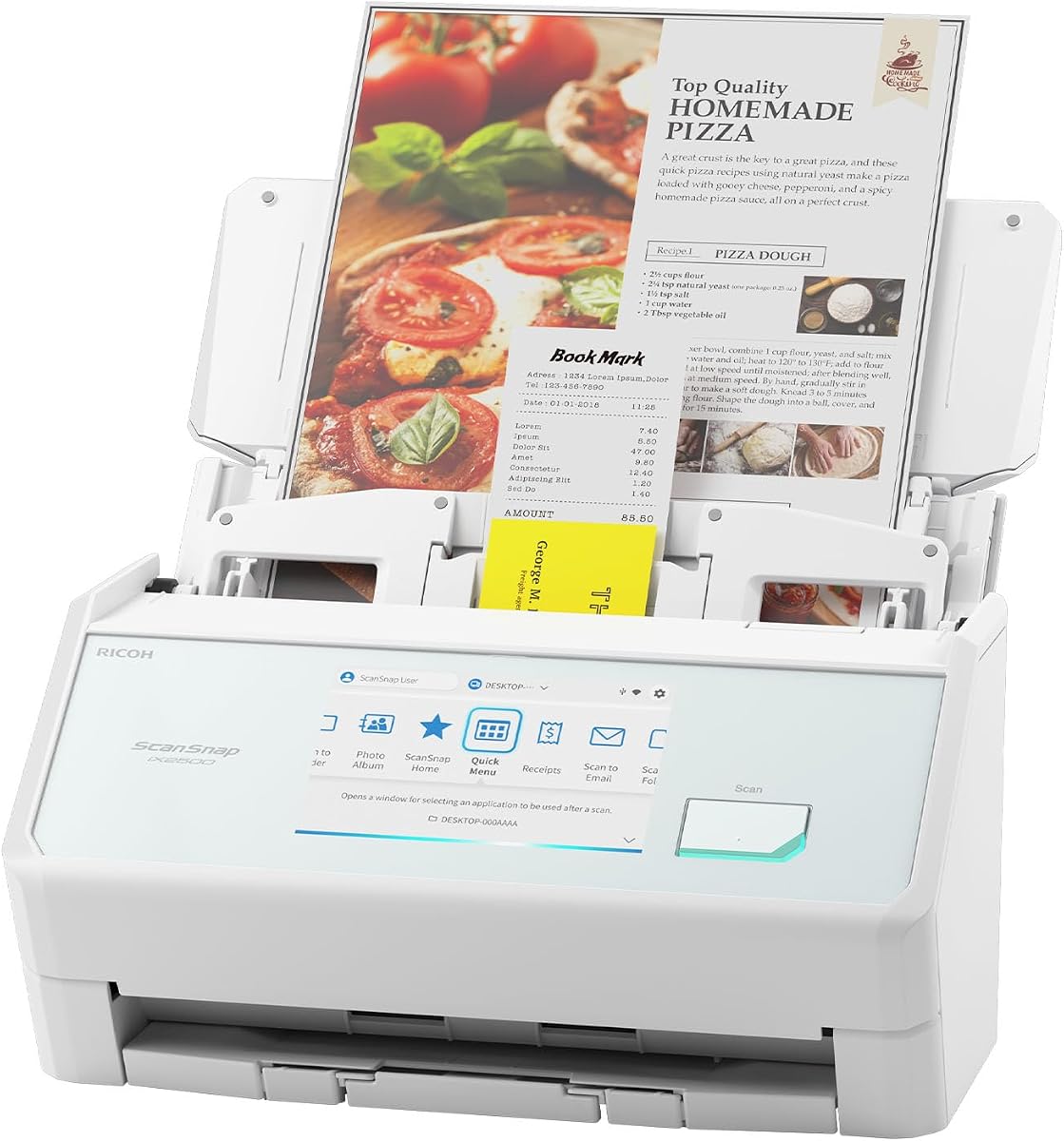
The ScanSnap iX2500 represents the pinnacle of document scanning technology with a 4.4 star rating and powerful features for power users. It is designed for those who need high volume scanning and seamless connectivity with their iPhone 18 ecosystem.
We may earn a commission when you buy through this link, at no additional cost to you.
Its 45 pages per minute speed combined with a 100 sheet feeder allows bulk scanning without constant attention. The built-in Wi-Fi 6 ensures fast secure connections to your devices while the touchscreen simplifies profile management and quick actions.
Although it comes at a higher price point the efficiency gains justify the cost for heavy users. The trade-off is size and weight which makes it less ideal for travel but perfect for office or home setups where speed matters.
This scanner is best for offices or professionals processing large volumes of documents daily. Its advanced automation and wireless capabilities make it a premium investment for streamlined digital workflows.
Wi-Fi 6 support ensures fast stable connections even when scanning large files to the cloud.
Custom profiles and menus let you tailor scanning settings to your specific work needs easily.
We may earn a commission when you buy through this link, at no additional cost to you.
The CZUR Shine Ultra offers a unique solution for scanning books and documents with a 4.2 star rating. Its patented curved page flattening technology makes it stand out for users who need to digitize bound materials without damaging them.
We may earn a commission when you buy through this link, at no additional cost to you.
With a scanning speed of about one second per page it is incredibly fast for document capture. The 13MP CMOS camera ensures high resolution output suitable for detailed images or text recognition tasks.
It is important to note that this scanner does not support iOS or Android directly requiring a computer connection. However it can work as a document camera for remote teaching which adds versatility for hybrid work environments.
This model is best for researchers or archivists who need to scan books efficiently. While not mobile for phone use it excels at handling physical books that traditional feeders cannot process.
This tech flattens curved book pages digitally to produce flat readable scans automatically.
Use it as a webcam for teaching by streaming live document views during virtual classes.
We may earn a commission when you buy through this link, at no additional cost to you.
The Brother DS-740D is a solid choice for users needing duplex scanning capabilities with a 4.3 star rating. It scans both sides of a document in one pass which significantly reduces time spent on multi page documents.
We may earn a commission when you buy through this link, at no additional cost to you.
Its speed of 16 pages per minute combined with the duplex feature makes it efficient for contract or invoice scanning. The desk saving design reduces the footprint making it ideal for shared workspaces or small offices.
While it lacks wireless connectivity the micro USB power ensures it is ready whenever you need it. The trade-off is manual connection but the performance gain from duplexing often justifies this for office use.
This scanner is perfect for administrative teams processing double sided documents daily. Its compact build and duplex speed offer a practical balance for desk based scanning tasks.
Scanning both sides at once cuts processing time by half compared to single sided models.
Designed to take up minimal desk space so it fits easily into crowded work areas.
We may earn a commission when you buy through this link, at no additional cost to you.
The Canon imageFORMULA R10 is designed for mobile users with a 4.1 star rating and a focus on portability and ease. It handles various media types including plastic cards which many standard scanners cannot process without issues.
We may earn a commission when you buy through this link, at no additional cost to you.
Its 20 sheet feeder and 12 pages per minute duplex speed are sufficient for moderate daily loads. The built-in software requires no installation making it ready to use immediately after connecting to your device.
While the feeder capacity is smaller than premium models it suits individual workers well. The trade-off is limited bulk handling but the convenience of no setup and lightweight design makes up for it.
This scanner is ideal for travelers or consultants who need to scan documents on site. Its ability to handle plastic cards adds extra utility for business card or ID digitization.
Just plug in and scan with pre-installed software saving time during initial setup.
Handles plastic or embossed cards easily making it versatile for various business uses.
We may earn a commission when you buy through this link, at no additional cost to you.
The Epson Perfection V19 II is a specialized tool for photo and flatbed scanning with a 3.9 star rating. Its 4800 dpi resolution makes it ideal for capturing fine details in images or documents that require high fidelity.
We may earn a commission when you buy through this link, at no additional cost to you.
The Easy Photo Fix technology restores color to faded photos with one click which is a great bonus for home archives. The removable lid allows you to scan books or albums directly without removing pages.
It is slower than sheet fed scanners but necessary for delicate items. The trade-off is speed for quality making it best for occasional archival use rather than bulk document processing.
This scanner is perfect for photographers or families preserving memories digitally. Its flatbed design ensures nothing gets damaged during the scanning process.
High dpi resolution ensures sharp prints and digital copies for large format viewing.
Built-in tools let you restore old photos quickly without advanced editing skills.
We may earn a commission when you buy through this link, at no additional cost to you.
The Epson Workforce ES-60W brings true wireless freedom to document scanning with a 4.1 star rating. It connects to iOS and Android devices directly allowing you to scan without needing a computer nearby.
We may earn a commission when you buy through this link, at no additional cost to you.
Its speed of 4 seconds per page is among the fastest available ensuring quick results for on-the-go work. The dual power option lets you use it via USB or battery depending on availability.
While slightly heavier due to the battery the flexibility is worth it for mobile users. The trade-off is cost but the convenience of wireless scanning is a major productivity boost.
This model is best for sales reps or mobile staff needing to capture data instantly. Its ability to connect directly to your iPhone 18 makes it a top choice for wireless workflows.
Scan directly to your phone or tablet without relying on a computer connection.
Automatically switches between USB and battery modes without manual user intervention.
We may earn a commission when you buy through this link, at no additional cost to you.
This handheld scanner offers a unique approach to document capture with a 3.9 star rating and extreme portability. It uses AA batteries and an SD card so you can scan anywhere without needing a computer or power outlet.
We may earn a commission when you buy through this link, at no additional cost to you.
The 900 DPI resolution ensures clear images of text or photos. Manual scrolling requires practice but it is very cheap and small enough to fit in any pocket.
While it is slower than automatic feeders the convenience of no wires or drivers is unmatched for travel. The trade-off is manual skill but for occasional use it is highly practical.
This scanner is best for travelers or students on a tight budget. Its simplicity and low cost make it a handy backup for unexpected scanning needs on the road.
Powered by standard AA batteries so you can scan anywhere without looking for an outlet.
Files save directly to SD card allowing easy transfer later without software setup.
We may earn a commission when you buy through this link, at no additional cost to you.
Selecting the right document scanner for iPhone 18 requires understanding your workflow needs and device compatibility. This guide covers key factors to help you find a model that fits your budget and usage patterns effectively.
Modern scanners offer USB Wi-Fi or Bluetooth connections. For iPhone 18 users wireless models provide the most seamless integration allowing you to scan directly to your device without cables.
Prioritize models with native iOS support if you want to avoid using a computer as a middleman.
Speed matters if you process large volumes of documents daily. Look for models that scan at least 10 pages per minute to keep your workflow efficient and reduce wait times.
Higher speed usually comes with a higher price but it is worth it for heavy users.
If you travel often choose a scanner under 1 pound that fits in your bag. Compact designs are easier to store at desks or carry in briefcases for field work.
Balance weight with paper handling capacity to ensure it meets your needs without adding bulk.
Resolution determines image clarity. 300 DPI is standard for text but 600 DPI or higher is better for detailed graphics or small fonts.
Check if the scanner supports adjustable DPI so you can switch between speed and quality modes.
Automatic feeders let you scan stacks of paper at once. If you have multi-page documents consider a model with a 20 sheet feeder or more to save time.
For single sheet feeding models expect to manually insert each page which slows the process but saves space.
Built-in software with OCR helps convert scanned images to editable text. Ensure the provided tools support iOS cloud apps or desktop platforms you already use.
Good software can reduce manual typing and help organize files automatically.
USB powered models are simple but require a computer. Battery powered scanners offer freedom but need recharging or spare batteries for long trips.
Consider dual power options if you need both reliability and mobility in your workflow.
Prices range widely from under fifty to several hundred dollars. Set a budget that matches your expected volume and features like duplex scanning or wireless connectivity.
Cheaper models work fine for occasional use while frequent users should invest in durable faster hardware.
Connect your scanner to your iPhone 18 via USB or Wi-Fi using the manufacturer's app. Ensure drivers are installed if required and follow the on-screen instructions to pair the device securely.
Clean the glass or rollers regularly with a soft lint-free cloth to prevent dust from affecting scan quality. Avoid using harsh chemicals that might damage internal components or plastic parts.
Store the device in a dry place away from extreme temperatures. If using a battery model turn it off when not in use to preserve power and extend overall battery life.
Yes many models support direct iOS connections via Wi-Fi or Bluetooth allowing you to scan straight to your iPhone. Check the product specs for native app support to confirm compatibility with your device.
Some models feature duplex scanning to capture both sides of a document in one pass. This saves time when processing contracts or multi-page forms but requires a specific hardware capability.
Most scanners support saving files as PDFs JPEGs or editable Word documents via OCR. You can often choose the format in the app settings before starting the scan process.
For best results wipe the glass surface weekly and clean rollers monthly depending on usage. Dust and debris can cause streaks so regular maintenance ensures clear scans consistently.
Many come with bundled OCR software to convert text into editable formats. Check the package contents or software section to confirm if this feature is included or requires separate purchase.
While designed for documents some can handle photos depending on resolution and flatbed options. Always verify if the model supports photo media before purchasing for that specific use case.
Most modern scanners use app-based drivers that install automatically. You typically do not need to download extra system drivers since iOS handles connectivity via standard protocols.
We reviewed ten top document scanners offering a range of options from budget handheld models to premium duplex feeders. The Epson Workforce ES-50 and Brother DS-640 lead in balance while the ScanSnap iX2500 excels for high-volume needs.
Prioritize connectivity and speed based on your specific workflow. If you scan frequently invest in a model with wireless support and larger feeders to maximize efficiency throughout the day.
Prices and stock vary often so check the latest offers before buying. Confirm compatibility with your iPhone 18 to ensure a smooth setup and reliable performance for your documents.