
Omada AX3000 Wireless Access Point
4.5Editor score
Free cloud management included
Wi-Fi 6 speeds up to 2976 Mbps
5-year warranty coverage
This guide compares the top commercial wireless routers for business networks, covering security, speed, management features, and scalability for various
Finding the right commercial wireless router is essential for maintaining a secure and efficient business network. These devices provide the backbone for connecting employees, customers, and IoT devices without compromising performance or safety standards.
We evaluated ten top-rated models based on real-world specs, user feedback, and enterprise-grade features. Our analysis covers Wi-Fi standards, security protocols, management tools, and scalability to help you choose the best fit.
Each pick highlights key strengths and trade-offs to guide your decision. Remember that pricing and availability change frequently, so verify current details before purchasing to ensure you get the best value for your specific needs.
4.5Editor score

4.2Editor score

4.6Editor score
The following table provides a side-by-side comparison of all ten reviewed commercial wireless routers. It highlights key specifications to help you quickly identify which model aligns best with your network requirements and budget constraints.





The ASUS ExpertWiFi EBR63 AX3000 is a robust commercial router designed for small to medium businesses needing reliable connectivity. With a rating of 4.2 stars it stands out for its balance of performance and ease of use. It supports up to five SSIDs which allows you to separate guest and employee traffic effectively.
We may earn a commission when you buy through this link, at no additional cost to you.
Key strengths include its customizable guest portal which lets you tailor branding to match your business identity. The free commercial-grade security subscription provides advanced threat protection without extra costs. Remote management via the ExpertWiFi app simplifies maintenance and monitoring for IT staff on the go.
While it lacks Wi-Fi 7 speeds the AX3000 standard offers ample bandwidth for most office tasks. The USB backup WAN feature is a critical reliability tool ensuring connectivity during primary line failures. These trade-offs are acceptable for businesses prioritizing security and management simplicity over cutting-edge raw speed.
Businesses needing scalable and secure networks will find this router ideal. Its ability to mesh with other ExpertWiFi devices future-proofs expansion. For those seeking a plug-and-play commercial solution with strong security built-in the EBR63 is a highly recommended choice.
Tailor the guest network portal with your brand name and templates to create a professional first impression for visitors.
Use the USB port to connect a mobile hotspot as a backup WAN ensuring your business stays online during outages.
We may earn a commission when you buy through this link, at no additional cost to you.
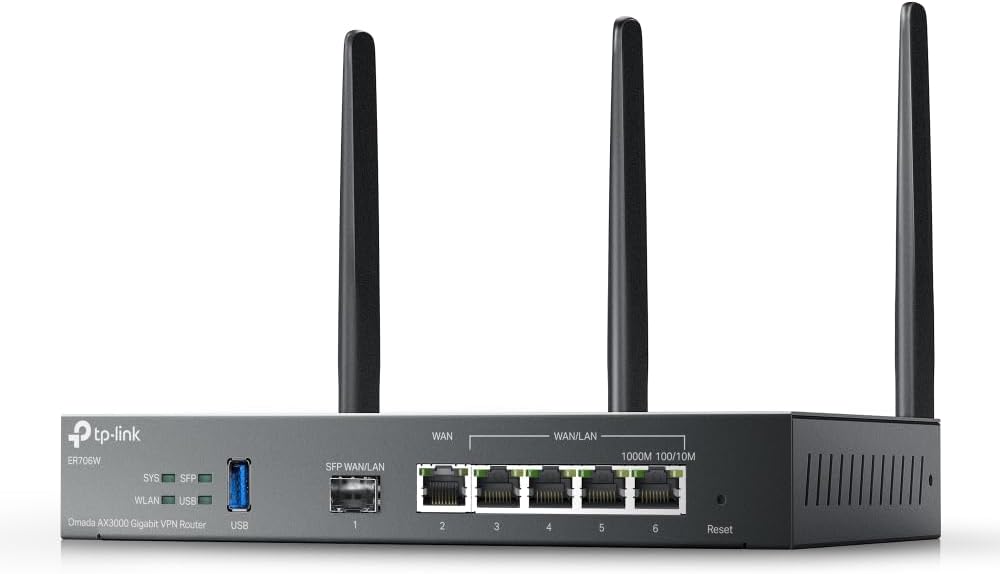
The Omada ER706W is a powerful VPN router designed for businesses that need flexible internet connections and strong security. It delivers AX3000 Wi-Fi 6 performance with a rating of 4.1 stars. Its standout feature is support for up to five WAN ports which enables effective load balancing across multiple internet lines.
We may earn a commission when you buy through this link, at no additional cost to you.
This device integrates seamlessly with Omada access points to extend WiFi without extra cabling. The inclusion of a Gigabit SFP slot allows for direct fiber connections which is vital for high-bandwidth enterprises. Security is robust with support for SSL IPSec WireGuard and other VPN protocols.
However setting up the full network often requires the Omada SDN controller which adds complexity for small teams. The interface is less intuitive than consumer routers but offers more control for IT professionals. This is a minor downside for businesses that need advanced routing capabilities.
Businesses with multiple ISP connections or high security requirements will benefit most from this router. Its ability to unify access points and gateways simplifies network architecture. For IT admins needing multi-WAN flexibility the ER706W is a solid investment.
Maximize your internet utility by balancing traffic across up to five WAN ports to prevent bottlenecks during peak hours.
Secure remote access with support for multiple VPN protocols including WireGuard and OpenVPN for safe data transmission.
We may earn a commission when you buy through this link, at no additional cost to you.
The Ruckus Wireless R750 is an indoor Wi-Fi 6 access point built specifically for ultra-dense environments like stadiums or large offices. With a 4.3-star rating it excels where many devices connect simultaneously. Its design focuses on maintaining performance even when hundreds of devices compete for bandwidth.
We may earn a commission when you buy through this link, at no additional cost to you.
Key strengths include its ability to handle high client loads without significant slowdowns. Ruckus is known for reliable enterprise gear and this model continues that tradition. Beamforming technology ensures signal stability by directing waves toward connected devices rather than broadcasting randomly.
The main drawback is the cost which is higher than typical access points. Additionally you may need a separate controller to unlock all management features which adds to the total expense. These factors make it better suited for large enterprises than small offices.
Large venues or offices with hundreds of employees should consider the R750 for its capacity and stability. It ensures consistent connectivity during peak usage times. If reliability in crowded spaces is your priority this access point is a worthwhile investment.
Maintain fast speeds even when hundreds of devices connect simultaneously thanks to optimization for ultra-dense scenarios.
Beamforming directs signals to devices improving throughput and reducing interference in busy network environments.
We may earn a commission when you buy through this link, at no additional cost to you.
The Ruckus R670 is a Wi-Fi 7 indoor access point designed for mainstream enterprise deployment. It offers a combined data rate of up to 9.34 Gbps with six spatial streams. This makes it capable of connecting more devices simultaneously without performance loss.
We may earn a commission when you buy through this link, at no additional cost to you.
Its BeamFlex+ adaptive antenna technology maximizes coverage and throughput by adjusting signal patterns in real-time. The 5 GbE port prevents wired bottlenecks ensuring the device can deliver its full speed potential. Security is enhanced with WPA3 and DPSK3 for flexible access control.
The primary cons are its high price and the fact that Wi-Fi 7 is still emerging meaning client device support may be limited now. However businesses planning ahead will find value in its future-proof design. It is a premium solution for those who need top-tier performance.
Enterprises with high-density classrooms or meeting rooms will benefit from its capacity and speed. It unifies Wi-Fi and non-Wi-Fi technologies like Zigbee into one network. For those seeking the latest standards the R670 is a strong choice.
Leverage Wi-Fi 7 technology to support next-gen devices and applications with higher throughput and lower latency.
BeamFlex+ adjusts signals to optimize speed and reduce errors ensuring stable connections across various client types.
We may earn a commission when you buy through this link, at no additional cost to you.
The NETGEAR Orbi 970 Series is a top-tier WiFi 7 mesh system capable of covering up to 10000 sq ft. It links up to 200 devices on one network making it ideal for large campuses or multi-site businesses. The rating of 4.6 reflects its exceptional performance and reliability.
We may earn a commission when you buy through this link, at no additional cost to you.
Its quad-band technology includes a dedicated backhaul lane ensuring satellite traffic never slows down main network speeds. The inclusion of 10 Gig internet and LAN ports supports ultra-fast wired connections for servers or NAS drives. This ensures no bottlenecks even with high-speed ISP plans.
While expensive this system is unmatched for coverage and speed. Small offices may not need its full capacity but enterprises with large footprints will appreciate the seamless roaming. The cost is justified by the performance and scalability it offers for growing networks.
Businesses with extensive physical space or high device counts should consider the Orbi 970. It handles 8K streaming and VR without lag. For those needing whole-building coverage without signal loss this is the best premium option available.
Blanket up to 10000 sq ft with reliable WiFi from basement to rooftop using router and satellite units.
Exclusive quad-band tech reserves a lane for satellite traffic so devices stay fast simultaneously without slowdowns.
We may earn a commission when you buy through this link, at no additional cost to you.
The Omada AX3000 (EAP650) is a highly rated access point offering free cloud management without extra fees. With a 4.5-star rating it provides a cost-effective solution for small businesses needing reliable connectivity. It delivers Wi-Fi 6 speeds up to 2976 Mbps ensuring fast data transfer for employees.
We may earn a commission when you buy through this link, at no additional cost to you.
Its ultra-slim design blends into modern offices hotels or classrooms without taking up space. Integrated into the Omada SDN platform it works with hardware or cloud controllers for flexibility. PoE support simplifies installation since you can power it via Ethernet cable.
The main downside is that advanced features require an SDN controller which may add cost if you do not have one. However the free cloud option covers most basic needs. For budget-conscious buyers this unit offers enterprise features at a fraction of the price.
Small shops or classrooms needing affordable and expandable WiFi should choose the EAP650. Its 5-year warranty gives peace of mind for long-term use. For value seekers this is the best budget pick in the commercial category.
Manage your network remotely with free cloud features including no additional fees or hardware controllers required.
Backed by a 5-year warranty and free support ensures reliable service and protection for your investment.
We may earn a commission when you buy through this link, at no additional cost to you.
The Ubiquiti U6+ is a reliable wireless business network access point offering 3 Gbit/s transfer speeds. With a 4.6-star rating it is trusted for stable connections. It supports IEEE 802.11 a/b/g/n/ac/ax standards ensuring compatibility with almost all devices and networks.
We may earn a commission when you buy through this link, at no additional cost to you.
Its PoE+ port receives data and power through a single cable simplifying installation where outlets are unavailable. Data encryption protects valuable business information from unauthorized access effectively. The wall-mountable form factor ensures it fits discreetly in various office or retail spaces.
The lack of an included power adapter means you may need to buy a PoE switch separately. Also managing it typically requires the UniFi controller which has a learning curve. Despite these small cons it remains a favorite for its seamless roaming capabilities.
Businesses needing a dependable and secure access point will find the U6+ suitable for its ease of installation and speed. It works well in UniFi ecosystems for whole-network management. For reliable connectivity with strong security this unit is a solid choice.
Use PoE+ to power and connect via one cable saving time and avoiding extra outlets.
Built-in encryption features effectively protect sensitive business data from unauthorized access and breaches.
We may earn a commission when you buy through this link, at no additional cost to you.
The TP-Link BE6500 is a dual-band WiFi 7 router designed for future-ready performance. With Multi-Link Operation it optimizes speeds on 7 devices. It delivers up to 6.5 Gbps total bandwidth ensuring lag-free streaming and gaming for remote workers or students.
We may earn a commission when you buy through this link, at no additional cost to you.
Its 2.5 Gbps ports support multi-gigabit internet connections which are becoming standard for fiber providers. The router is secure by design aligning with industry security pledges. It also supports VPN clients and server functionality for flexible remote access options.
It is not compatible with Deco mesh systems which limits expansion options if you already own Deco devices. Coverage is capped at 2400 sq ft so larger spaces need mesh units. These factors make it better for medium-sized offices or homes with fast internet.
Businesses with gigabit ISPs and Wi-Fi 7 devices will appreciate its speed and security. It handles 4K8K streaming smoothly. For modern network setups needing high throughput the BE6500 is a strong contender.
MLO transfers data across bands simultaneously improving reliability and reducing latency for real-time applications.
Built with advanced security as a core requirement ensuring safety against malware and unauthorized access.
We may earn a commission when you buy through this link, at no additional cost to you.
The NETGEAR Nighthawk WiFi 7 is a dedicated tri-band router built to keep up with growing connected homes and offices. It delivers up to 9.3 Gbps across three bands ensuring fast speeds for gaming video calls and smart devices. Coverage reaches up to 2500 sq ft making it suitable for medium offices.
We may earn a commission when you buy through this link, at no additional cost to you.
It supports multi-gig internet plans with a 2.5 Gig WAN port. Two 2.5 Gig LAN ports allow you to connect gaming rigs or NAS drives at full speed. Management via the Nighthawk app is intuitive and works from anywhere on mobile devices.
While expensive compared to older models its speed and range are unmatched for single-router setups. Larger spaces may require an Orbi mesh system but this router covers most needs. For businesses needing fast connections the trade-off in price is justified.
Enterprises with high-speed fiber plans should consider the Nighthawk for its bandwidth capacity. It keeps devices on their own lanes to avoid slowdowns. For fast and reliable WiFi this is a top-tier commercial option.
A dedicated high-speed band ensures your fastest devices have their own lane without slowing down other users.
Unlock multi-gig internet plans with the 2.5 Gig WAN port and connect devices via 2.5 Gig LAN ports.
We may earn a commission when you buy through this link, at no additional cost to you.
The ASUS RT-BE88U is a powerhouse router featuring Wi-Fi 7 technology with up to 7.2 Gbps throughput. It stands out with dual 10G ports allowing up to 34G wired network capacity. This ensures your backbone network can handle heavy data loads without bottlenecks.
We may earn a commission when you buy through this link, at no additional cost to you.
AI WAN detection ensures always-on internet by switching to backup links automatically. It supports up to five SSIDs with Guest Network Pro for IoT and parental controls. AiMesh compatibility lets you expand coverage easily with other ASUS routers for a unified network.
The high price and complexity make it less suitable for small teams but ideal for power users or IT pros. It demands a powerful quad-core CPU to manage these speeds. For those needing extreme capacity the RT-BE88U offers unmatched wired and wireless performance.
Businesses with high-bandwidth servers or large offices should choose the RT-BE88U for its 10G capabilities. It supports demanding applications without slowdowns. For enterprise-grade wired speed and robust security this is the best advanced pick.
Bolster wired capacity up to 34G with dual 10G ports for servers and high-speed data transfers.
AI WAN detection maintains always-on internet by automatically switching to backup connections if primary fails.
We may earn a commission when you buy through this link, at no additional cost to you.
Selecting the right commercial wireless router requires evaluating speed, security, and scalability to match your business needs. This guide outlines key factors to consider before purchasing.
Modern businesses need routers supporting Wi-Fi 6 or Wi-Fi 7 to handle multiple devices efficiently. Look for high throughput ratings like AX3000 or BE6500 to ensure fast data transfer for streaming and large file uploads.
Prioritize newer standards to future-proof your network and reduce latency for real-time applications.
Commercial routers must include built-in security like firewalls, intrusion detection, and guest network isolation. Features like WPA3 encryption and free subscriptions to protection suites add essential layers of defense against cyber threats.
Choose models offering comprehensive security to protect sensitive business data without extra costs.
Businesses benefit from remote management apps and cloud controllers for easy network administration. Scalability options like mesh compatibility or multiple SSIDs allow you to expand coverage without replacing hardware later.
Ensure the router supports easy expansion and centralized control as your business grows.
Check the number and speed of LAN WAN ports to match your device connections. Multi-gigabit ports are crucial for businesses with high-speed internet plans or internal servers needing fast data transfer.
Verify port types including SFP slots for fiber if your infrastructure requires specialized connections.
Reliable internet is vital for business operations so consider routers with backup WAN options like USB tethering. This ensures connectivity during primary outages minimizing downtime and maintaining productivity.
Always look for redundancy features to keep your network operational during unexpected disruptions.
A strong warranty and accessible technical support save money and stress over time. Models offering 5-year warranties or 24/7 support provide confidence for long-term deployment in critical environments.
Select brands known for reliable service to ensure quick resolution of any hardware issues.
Place the router in a central elevated location away from physical obstructions to maximize signal coverage. Avoid putting it inside cabinets or near heavy electronics that might cause interference with the wireless signal.
Regularly update the firmware through the app or web interface to benefit from the latest security patches. Most commercial routers offer automatic updates so enable this feature to protect against emerging threats without manual checks.
Reboot the router every few weeks to clear temporary cache and refresh connections for stable performance. Keep cables organized and ensure ventilation is not blocked to prevent overheating during long periods of use.
Commercial routers offer advanced security features like guest portals VLANs and robust encryption. They are designed for higher device counts and provide centralized management tools for IT staff compared to basic home models.
Many models support mesh networking either natively or via compatible access points. This allows businesses to expand coverage across multiple floors or large spaces without dead zones by connecting nodes wirelessly or via ethernet.
High-end commercial routers can support hundreds of simultaneous connections without dropping speed. The exact number depends on the model but enterprise units are optimized for dense environments with many employees.
Wi-Fi 6 and 7 offer higher speeds lower latency and better efficiency in crowded areas. These standards ensure smooth video conferencing and file sharing which are critical for modern workplace productivity.
Yes most commercial routers connect to existing modems via ethernet. Ensure your modem supports the speeds you need and check for bridge mode requirements to avoid conflicts between devices.
Most commercial routers include apps or cloud interfaces for remote setup and monitoring. This allows IT staff to adjust settings or troubleshoot issues without being physically present at the device.
We have reviewed ten top commercial wireless routers covering budget to premium options. Each offers unique strengths whether you need high security scalable mesh or raw speed.
Prioritize factors like Wi-Fi standards and security features to match your specific business environment. Choosing a reliable model ensures consistent connectivity for employees and customers alike.
Remember that prices and availability fluctuate so check current listings before purchasing. Verifying details helps you secure the best value for your network infrastructure.