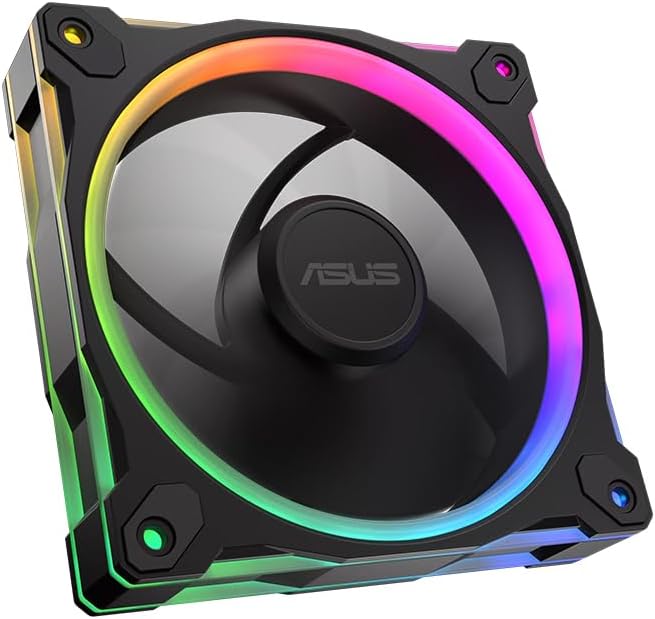
ASUS Prime MR120 ARGB Reverse Fan
4.6Editor score
28mm extra thick frame
20 addressable RGB LEDs
Quiet 23dB(A) operation
This guide compares the top ASUS case fans for cooling performance, noise levels, and RGB lighting to help you choose the best model for your PC build.
Choosing the right case fans is crucial for maintaining optimal thermal performance and acoustic comfort in your PC build. ASUS offers a wide range of options featuring advanced PWM control, ARGB lighting, and robust frame designs tailored for modern chassis.
We evaluated ten leading models based on airflow, static pressure, noise output, and build quality. Our analysis highlights how each fan performs under load, how easily they integrate with motherboards, and their overall value proposition for different types of users.
Each selection below showcases unique strengths from quiet operation to high static pressure for radiators. Note that availability and pricing fluctuate frequently, so check current listings before making your final decision to ensure you get the best deal available today.
4.6Editor score

4.7Editor score

5.0Editor score
The following table provides a side by side comparison of all ten models included in this guide. Each entry lists key specifications to help you quickly identify the best fit for your specific cooling needs and aesthetic preferences.


This triple pack offers exceptional cooling power paired with stunning aesthetics. Rated highly by users, it stands out for its ability to move significant air while maintaining a sleek black design that fits most cases.
We may earn a commission when you buy through this link, at no additional cost to you.
The 3.3mm H2O static pressure makes it ideal for radiator setups where resistance is high. The dual layer LED matrix ensures uniform lighting across the fan frame without dark spots.
While it runs quiet at lower speeds, maximum RPM can produce noticeable noise. This is acceptable given the performance benefits but worth noting for silent PC enthusiasts.
Ideal for gamers and creators needing reliable cooling with visual flair. We recommend this pack for any mid to high end build where thermal performance is a priority.
The 3.3mm H2O rating ensures efficient air push through dense heatsinks and radiators without sacrificing flow rates.
Seamless integration with Aura Sync allows you to match colors and effects across all compatible ASUS components in your system.
We may earn a commission when you buy through this link, at no additional cost to you.
This fan represents the pinnacle of build quality with its LCP blades and brass housing. Users praise its perfect rating due to consistent performance and whisper quiet operation even under stress.
We may earn a commission when you buy through this link, at no additional cost to you.
The precision engineering ensures that tolerances are tight, reducing wobble and noise. The 3 phase 6 pole motor delivers smooth power delivery without the typical hum of cheaper models.
While expensive, the longevity and stability justify the cost for those seeking long term solutions. It avoids common failure points found in standard plastic or rubber bearings.
Best suited for workstations and high end builds where reliability matters most. If you want a fan that will last years without degradation, this is the top choice.
Liquid Crystal Polymer blades and brass housings resist warping and corrosion better than typical materials used in consumer fans.
The motor design minimizes electromagnetic noise allowing high RPMs without the grinding or buzzing common in cheaper alternatives.
We may earn a commission when you buy through this link, at no additional cost to you.
This reverse fan offers a great balance of cost and performance. It is particularly popular for front intake where noise levels are critical. The design ensures cables remain hidden for a cleaner look.
We may earn a commission when you buy through this link, at no additional cost to you.
With a noise level of just 23dB at full speed, it is one of the quietest options available. The 28mm frame adds structural rigidity which helps reduce vibration at higher RPMs.
The lack of daisy chaining means you will need multiple headers or splitters. However, the single unit price keeps the total build cost low for budget focused builders.
Perfect for quiet office PCs or home theater units where silence is key. We recommend this for users who want good airflow without breaking the bank.
The reverse blade layout routes cables away from the fan face keeping your build looking tidy without extra zip ties.
Optimized for low noise output making it ideal for environments where ambient sound levels need to remain minimal throughout the day.
We may earn a commission when you buy through this link, at no additional cost to you.
This triple pack provides an excellent entry point for full case lighting and cooling. Users value the consistent performance across all three fans which simplifies tuning and setup significantly.
We may earn a commission when you buy through this link, at no additional cost to you.
Each fan delivers solid airflow with minimal noise. The dual sided lighting ensures that even from behind the fan the lighting looks consistent and vibrant across the entire case.
While not as high performance as TUF models, they are sufficient for standard air cooling setups. The price per fan makes this a smart choice for bulk replacement.
Ideal for first time builders needing three matching fans at once. We suggest this for anyone wanting a unified look without managing individual fan costs.
All three fans synchronize seamlessly with Aura Sync ensuring your entire system displays a coordinated light show without color mismatches.
A two year warranty provides peace of mind that these fans are built to last through typical daily usage cycles without unexpected failure.
We may earn a commission when you buy through this link, at no additional cost to you.
For white themed builds this fan is a standout choice. It delivers high quality ARGB output that matches other white components perfectly while maintaining efficient airflow performance.
We may earn a commission when you buy through this link, at no additional cost to you.
The dynamic plain bearing offers up to 250,000 hours of operation which is impressive for this price point. Vibration pads help further reduce mechanical noise during operation.
It runs quieter than many competitors at similar RPMs. This makes it suitable for small form factor builds where space constraints often lead to noisy setups.
Best for gamers prioritizing visual aesthetics alongside performance. We recommend this for those building a white PC who need a reliable quiet intake or exhaust fan.
The double layer LED array produces deeper more vibrant colors than standard single row RGB rings ensuring better visual consistency.
Advanced bearing technology ensures the fan maintains smooth operation even after years of continuous use reducing maintenance needs.
We may earn a commission when you buy through this link, at no additional cost to you.
This white version of the TR120 packs serious cooling power into a clean chassis. It is designed for users who demand top tier performance without compromising on style preferences.
We may earn a commission when you buy through this link, at no additional cost to you.
With 3.3mm H2O pressure it handles high restriction cases well. The thick frame ensures durability while the white finish blends seamlessly with modern white hardware components.
The triple pack simplifies setup for full case RGB integration. It costs more than the black version but justifies the price with better aesthetics and consistent quality.
Perfect for white builds needing top tier cooling. We recommend this for enthusiasts who want the best balance of airflow and visual appeal in their rig.
Blade geometry is tuned to maximize air movement through dense components without sacrificing quiet operation at lower speeds.
Matching white blades and frames ensure there are no contrasting black elements visible from the front keeping the look professional.
We may earn a commission when you buy through this link, at no additional cost to you.
This fan focuses purely on performance with a 3000 RPM capability. It is built for users who need maximum air volume and pressure regardless of typical noise levels.
We may earn a commission when you buy through this link, at no additional cost to you.
The daisy chain design simplifies wiring by allowing multiple fans to share one PWM header. This reduces cable clutter significantly in complex cases.
While it can be loud at full speed, lower speeds remain manageable. The brass housing ensures long term mechanical stability which is vital for professional workstations.
Ideal for industrial or professional setups where cooling is priority. We recommend this for users needing high volume air exchange without sacrificing reliability.
Daisy chain connectors streamline the build process by reducing the number of required motherboard headers and cables significantly.
Engineered to push air through high resistance environments efficiently ensuring even the densest heatsinks receive adequate cooling.
We may earn a commission when you buy through this link, at no additional cost to you.
A strong contender for those seeking high pressure cooling without ASUS brand constraints. The RS120 delivers excellent performance for radiators with its unique AirGuide technology.
We may earn a commission when you buy through this link, at no additional cost to you.
Magnetic dome bearings reduce noise by dampening vibrations. This makes it suitable for quiet builds that still need robust airflow through dense heatsinks.
The bundle price often undercuts similar ASUS triple packs making it a viable alternative. It provides similar daisy chain features for cleaner cable management.
Great for users prioritizing cooling efficiency over branding. We recommend this for anyone needing high static pressure for water cooled setups without extra cost.
AirGuide vanes direct air precisely to hotspots improving cooling efficiency where standard fans might scatter air less effectively.
The magnetic dome bearing reduces mechanical friction allowing for smoother rotation and lower audible noise during operation.
We may earn a commission when you buy through this link, at no additional cost to you.
This single fan combines white aesthetics with reverse blade design for clean cable management. It scores very high for users seeking quiet performance without visible wires.
We may earn a commission when you buy through this link, at no additional cost to you.
With 58 CFM airflow it provides efficient cooling for standard cases. The 28mm frame offers better structural integrity than thinner alternatives available in the market.
Noise levels remain low even at top speed. This makes it suitable for users prioritizing quiet operation in living spaces or studios.
Perfect for white builds needing front intake. We recommend this for those needing a single high quality reverse fan without compromising on performance.
Reverse blades keep power cables behind the fan face so they are hidden from the front of your case for a cleaner look.
58 CFM ensures enough air passes through the case to maintain safe temperatures during moderate gaming or work sessions.
We may earn a commission when you buy through this link, at no additional cost to you.
This model is a reliable workhorse for those needing reverse airflow on a budget. It offers solid performance with minimal noise which suits most general use cases well.
We may earn a commission when you buy through this link, at no additional cost to you.
The double sided lighting ensures the frame looks good from any angle. This is a feature often missing in cheaper fans where the back looks dull.
Performance is consistent with other Prime models but lacks TUF features like higher pressure. It remains a solid choice for non extreme cooling requirements.
Ideal for casual users needing better airflow. We recommend this for anyone wanting reverse airflow functionality without spending on high end specs.
Dual sided LEDs ensure the frame looks consistent from both front and back adding depth to your system's lighting scheme.
Running at just 23dB ensures that the fan does not distract from work or games even in quiet room environments.
We may earn a commission when you buy through this link, at no additional cost to you.
Selecting the right case fan requires balancing airflow static pressure noise and aesthetics. Understanding these factors helps you pick a model that fits your case and cooling needs.
Airflow measured in CFM determines how much air the fan moves generally making it good for intake exhaust. Static pressure measured in H2O determines how well it pushes air through resistance like radiators or filters.
Choose high airflow for open cases and high static pressure for water cooled radiators or cases with dense dust filters.
Most modern fans use PWM to adjust speed automatically based on temperature. This allows quiet operation when the system is idle and higher speeds when under load.
Ensure your motherboard supports 4-pin PWM headers to take full advantage of variable speed control and efficient thermal management.
Noise is measured in decibels dB. Lower dB means a quieter fan. However high performance often comes with higher noise at max speed so check idle and load ratings.
Look for fans with vibration dampening pads or fluid bearings to keep noise down during normal daily use cycles.
Most models support ARGB lighting which allows custom color effects. Ensure your motherboard supports your chosen standard like Aura Sync to avoid manual controller boxes.
Consider whether you want single sided or double sided lighting to match your case layout and lighting requirements accurately.
Standard fans are 120mm but thickness varies. Extra thick frames offer better stability and airflow. Check your case clearance before buying larger or thicker fans.
Standard 120mm fans fit almost any case while thicker 28mm models offer better airflow but require more clearance space inside the chassis.
Bearing type affects longevity and noise. Fluid or magnetic bearings are quieter and last longer than standard ball bearings but may cost slightly more.
For long term reliability choose fans with advanced bearing technology especially if you run high speeds frequently.
Some fans support daisy chaining allowing multiple units to connect with one cable. This saves headers and reduces cable clutter inside your PC case.
Check if your fans have daisy chain connectors if you plan to install multiple units without using multiple headers.
Match your fan color to your build theme. White fans offer clean looks for white builds while black fans are universal. Reverse blade fans hide cables better.
Choose reverse blades for front mounts to hide cables for a cleaner professional look inside your case.
Install fans with consistent airflow direction typically intake at the front and exhaust at the rear to optimize air circulation. Use screws or rubber mounts to secure them firmly.
Connect the PWM cables to your motherboard headers and configure fan curves in BIOS or software to ensure smooth speed transitions based on system temperature.
Periodically dust off fan blades to prevent buildup which can increase noise and reduce airflow efficiency over time for optimal long term performance.
PWM stands for Pulse Width Modulation and allows the fan to adjust its speed dynamically based on temperature data from the motherboard. This ensures quiet operation when cool and faster speeds when hot.
No if your motherboard supports ARGB headers you can control lighting directly through software. However if your board lacks these headers you may need a controller hub to manage colors.
Reverse blade fans are better for cases where cable visibility is a concern. They push air while hiding power cables behind the fan face for a cleaner aesthetic look.
Standard 120mm fans are about 25mm thick but some offer 28mm for better airflow and rigidity. Check your case clearance to ensure thick fans fit properly.
You can mix models but performance may vary. Matching brands or series ensures uniform lighting and airflow which looks cleaner and performs more consistently in complex builds.
Typical case fans run between 1000 and 2000 RPM. Higher RPM provides more cooling but adds noise while lower RPM ensures silence with moderate cooling performance.
We found the TUF Gaming TR120 ARGB Triple Pack to be the best all around option for performance and aesthetics. The ProArt PF120 stands out for premium precision for those needing extreme reliability.
Prioritize static pressure if you use radiators and airflow if you rely on air cooling. Ensure the fan size matches your case mounts to avoid fit issues during installation.
Always check current stock and pricing before buying as availability changes often. Compare models carefully to find the right balance for your specific build needs and budget.