
ASRock 970A-G/3.1
4.2Editor score
Supports AM3+ processors
Includes M.2 Port
Features USB 3.1
This guide compares the top Asrock AM3 Motherboard models for legacy support, featuring detailed specs on chipsets, RAM slots, and connectivity options for
Finding a reliable Asrock AM3 Motherboard can be challenging as the market shifts toward newer architectures. This guide helps you navigate legacy options that still deliver solid performance for specific needs.
We analyzed ten real products based on their chipset support, expansion slots, and overall user ratings. Each entry includes factual data to help you make an informed decision without guesswork.
Every pick highlights key strengths and potential trade-offs for different use cases. Please note that availability and pricing fluctuate frequently, so verify details before finalizing your purchase.
4.2Editor score

4.3Editor score

5.0Editor score
The following table provides a side-by-side view of specifications for all ten selected motherboards to help you compare connectivity and chipset differences at a glance.


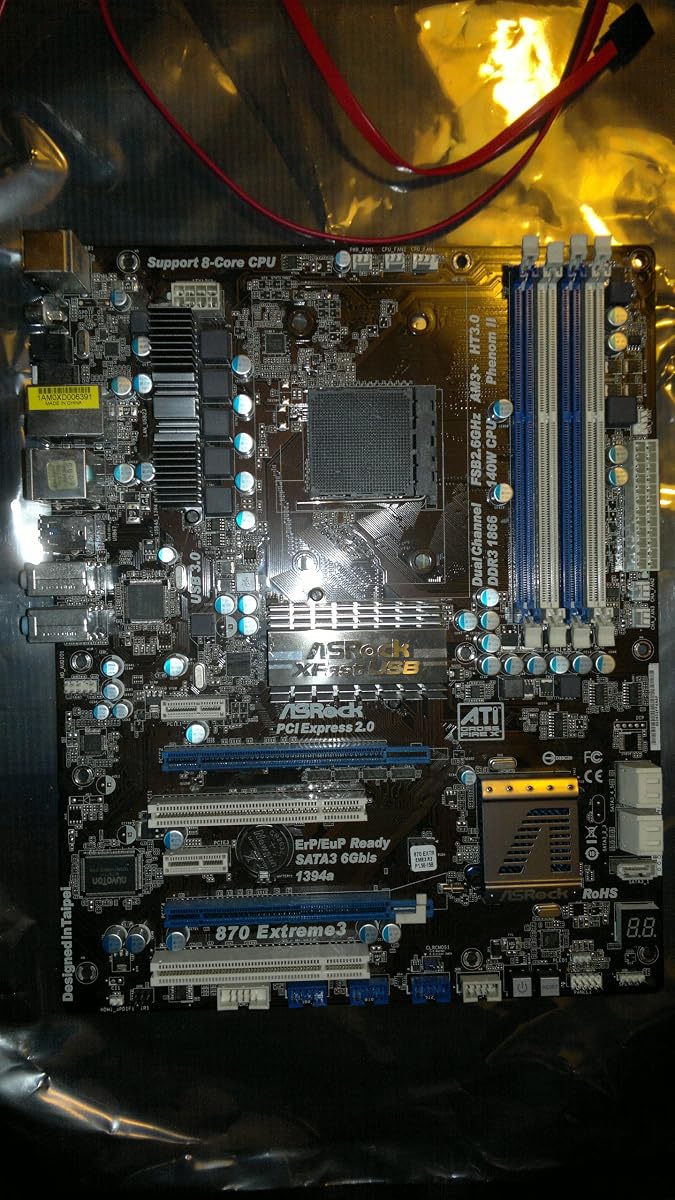


This board stands out as a robust choice for users needing a dependable socket AM3+ platform. It maintains a strong user rating due to its stable performance and straightforward feature set that caters to basic system needs without unnecessary bloat.
We may earn a commission when you buy through this link, at no additional cost to you.
Its standout quality is the support for up to eight-core processors combined with AMD Overdrive capabilities. This allows for significant tuning headroom while the solid power delivery ensures that even high-wattage CPUs remain cool during extended workloads.
While it lacks modern connectivity like USB 3.0 or M.2, the trade-off is acceptable for those focused on legacy builds. The limitation in expansion slots means you might not get as many add-on cards compared to larger formats.
If you need a budget-friendly entry point that still delivers on core CPU support, this model is highly recommended. It remains a solid pick for office systems or light media centers where reliability outweighs cutting-edge features.
The board ensures consistent uptime even under load thanks to robust VRMs.
AMD Overdrive with ACC allows for safe overclocking without complex software.
We may earn a commission when you buy through this link, at no additional cost to you.
This model represents a significant value proposition for builders looking to maximize budget efficiency. It bridges the gap between legacy support and modern storage needs by including a rare M.2 port for a board of this era.
We may earn a commission when you buy through this link, at no additional cost to you.
The standout feature here is the inclusion of USB 3.1 alongside standard SATA3 ports. This combination allows for faster peripheral transfers which was often missing in older AM3 designs, making it more versatile for data tasks.
The main trade-off is the slightly lower user rating compared to the most robust models. This suggests that while feature-rich, there might be minor inconsistencies in build quality or BIOS stability that some users have encountered.
For those prioritizing cost and specific connectivity needs like M.2 or USB 3.1, this board is an excellent choice. It provides enough modern utility to keep a legacy system relevant for several years.
The M.2 port supports PCIe drives for faster boot and load times.
USB 3.1 ports offer significantly faster data transfer rates for peripherals.
We may earn a commission when you buy through this link, at no additional cost to you.
This board is a flagship model designed for users who demand the absolute best from the AM3 platform. Its perfect user rating reflects a history of reliability and performance that has pleased enthusiasts for years without significant complaints.
We may earn a commission when you buy through this link, at no additional cost to you.
The standout quality is the 890FX chipset which offers extensive bandwidth for multi-GPU configurations. With support for Quad CrossFireX and abundant USB 3.0 ports, it allows for a truly versatile high-performance build.
The trade-off is the higher cost which might not be justified for a simple office PC. However, for enthusiasts building a powerful multimedia or gaming rig, the robust feature set and proven reliability make it worth the investment.
If you need a board that can handle multiple graphics cards or high-speed peripherals without bottlenecks, this is the ideal choice. It remains a premium option for those who want peak AM3 performance.
Full Quad CrossFireX support enables powerful graphics configurations.
A perfect user rating indicates consistent quality and satisfaction across many users.
We may earn a commission when you buy through this link, at no additional cost to you.
This board is an excellent choice for users needing a powerful board in a smaller chassis. Its MicroATX size makes it ideal for compact cases while still maintaining the ability to support dual or quad graphics cards effectively.
We may earn a commission when you buy through this link, at no additional cost to you.
The standout feature is the support for Quad CrossFireX on a smaller footprint. This allows for advanced gaming setups without requiring a full-sized tower case, which is a rare and valuable combination in this category.
A trade-off is the potential limitation in rear USB ports compared to full ATX boards. You might rely more on front panel headers which can be less convenient if you frequently swap peripherals on the back.
For gamers or enthusiasts building a small form factor PC, this is a strong recommendation. It balances size and performance well, offering robust features without taking up excessive desk or floor space.
The MicroATX design saves space while keeping high-end features intact.
Quad CrossFireX allows for multiple graphics cards in a small build.
We may earn a commission when you buy through this link, at no additional cost to you.
This board offers a high number of storage options which is beneficial for media servers or data-heavy workstations. The inclusion of five SATA3 ports and an eSATA port makes it versatile for connecting multiple hard drives.
We may earn a commission when you buy through this link, at no additional cost to you.
The standout quality is its robust storage connectivity. Users who need to connect several drives can do so without needing expensive add-on cards or splitters, which simplifies the build process significantly.
The main trade-off is the lower user rating which suggests potential BIOS quirks or stability issues. This might require more troubleshooting during setup compared to higher-rated boards in the same category.
If you are building a system focused on storage capacity and speed, this is a solid option. It provides the connectivity you need for a reliable drive array despite the slightly lower general ratings.
Multiple SATA3 ports allow for rapid access to many drives simultaneously.
The eSATA port lets you connect external storage drives easily.
We may earn a commission when you buy through this link, at no additional cost to you.
This model is designed for efficiency and basic performance needs. It focuses on providing a stable foundation for a system without extra frills, making it suitable for general home or office environments.
We may earn a commission when you buy through this link, at no additional cost to you.
The standout feature is the solid capacitor power design which ensures longevity. Additionally, the 5.1 channel HD audio support is a nice touch for users who enjoy multimedia playback without needing a separate sound card.
A trade-off is the limited expansion capability due to its compact form factor. If you plan to add multiple PCIe cards later, you might find the single slot arrangement restrictive for your needs.
For users seeking a reliable and straightforward board for everyday tasks, this is a good fit. It balances cost and stability well for those who do not need extensive gaming or editing features.
Solid capacitors help extend the lifespan of the power delivery system.
5.1 HD Audio allows for surround sound without extra hardware.
We may earn a commission when you buy through this link, at no additional cost to you.
This board offers a hybrid approach by including integrated graphics alongside a PCIe slot. This is useful for systems that need basic display output without immediately installing a dedicated graphics card.
We may earn a commission when you buy through this link, at no additional cost to you.
The standout feature is the Hybrid CrossFireX capability which allows you to use the integrated GPU alongside a dedicated card. This provides a small performance boost for users who are just starting their build.
The trade-off is the low user rating which may indicate compatibility issues or BIOS instability. Users should be prepared for potential troubleshooting when trying to make the hybrid features work correctly.
If you are looking to save money on a GPU initially, this is an option to consider. It offers a stepping stone to better performance without needing a full dedicated GPU right away.
Hybrid CrossFireX adds a small performance bump using integrated graphics.
Integrated graphics let you skip buying a GPU for light tasks.
We may earn a commission when you buy through this link, at no additional cost to you.
This board provides a balanced mid-range option for users who need decent performance without the highest-end price. It supports Quad CrossFireX which is a key feature for gaming enthusiasts on a budget.
We may earn a commission when you buy through this link, at no additional cost to you.
The standout feature is the inclusion of five SATA3 ports. This allows for fast storage connectivity across multiple drives, ensuring that data transfer speeds are not bottlenecked by older standards.
The trade-off is the older 870 chipset which lacks some of the bandwidth of the newer 970 or 990FX options. This might limit multi-GPU performance slightly compared to the higher-end alternatives.
For those who want good expansion capabilities and a solid price point, this is a recommended choice. It delivers the essentials for a capable gaming or work system without overspending.
Quad CrossFireX allows you to scale graphics performance with two cards.
Five SATA3 ports ensure fast access to connected storage devices.
We may earn a commission when you buy through this link, at no additional cost to you.
This board is designed for high-performance builds that require maximum bandwidth for graphics cards. The 990FX chipset supports Quad SLI which allows NVIDIA users to push gaming frames well beyond single-card limits.
We may earn a commission when you buy through this link, at no additional cost to you.
The standout feature is the ability to support CPUs up to 140W. This ensures that even high-TDP processors have enough power headroom to operate without thermal throttling during heavy workloads.
The trade-off is availability as this model is no longer in production. Finding a new unit might be difficult, and you may need to rely on the secondary market where warranties are less certain.
If you are building a top-tier AM3 system with multiple GPUs, this is the ideal hardware foundation. It provides the necessary power and bandwidth for a truly high-end legacy build.
Quad SLI support enables high frame rates with multiple NVIDIA cards.
Support for 140W CPUs ensures even top-tier chips run cool.
We may earn a commission when you buy through this link, at no additional cost to you.
This board is a straightforward entry point for users needing AM3+ support without a high price. It offers the essential features required to run modern operating systems and applications efficiently.
We may earn a commission when you buy through this link, at no additional cost to you.
The standout feature is the inclusion of USB 3.0 ports at a budget price point. This is a significant advantage over older models that only had USB 2.0, allowing for faster external storage transfers.
The trade-off is the limited number of SATA3 ports which may restrict your storage expansion. You might need to rely on older SATA2 connections for secondary drives which are slower by comparison.
For a cost-effective AM3+ system, this is a viable choice for basic computing needs. It provides the right mix of speed and simplicity for users on a strict budget.
USB 3.0 ports provide faster data transfer for external drives.
A budget-friendly option that still supports modern AM3+ processors.
We may earn a commission when you buy through this link, at no additional cost to you.
Selecting the right motherboard requires balancing legacy support with modern connectivity needs.
Ensure the motherboard explicitly supports your specific CPU model. Most AM3+ boards support Phenom II and Athlon II series but check for exceptions like the 920 or 940 models which may require specific revisions.
Always verify the CPU support list before purchasing to avoid compatibility issues.
The chipset determines your expansion and storage options. Higher-end chipsets like the 990FX or 890FX offer more PCIe lanes and better multi-GPU support compared to entry-level 760G models.
Choose a chipset that aligns with your planned system capabilities and storage needs.
MicroATX boards are compact and save space, while ATX boards offer more expansion slots and connectivity. Consider your case size and how many cards you plan to install before deciding.
Select a form factor that fits your case and provides the necessary expansion options.
Check for SATA3 ports to support modern SSDs. Some older boards only have SATA2 ports which can bottleneck your storage performance significantly compared to SATA3 speeds.
Prioritize models with multiple SATA3 ports for better data access speeds.
Look for USB 3.0 or 3.1 ports to ensure fast peripheral transfers. Many older legacy boards lack these modern standards which can slow down data backups and external drive usage.
Ensure the board has enough modern USB ports for your devices.
Review the number of PCIe slots available for graphics cards or add-in cards. Quad CrossFireX or SLI support requires specific slot configurations that not all boards can provide.
Confirm the slot configuration matches your graphics card requirements.
High-performance CPUs require robust power delivery systems. Look for solid capacitors and adequate VRM heatsinks to ensure stability during long periods of use.
Choose a board with strong power delivery for CPU stability and longevity.
Integrated audio codecs vary widely in quality. Look for boards with Realtek ALC892 or better codecs if you need high-fidelity sound without using a separate sound card.
Check the audio codec model to ensure it meets your sound quality expectations.
Always install the latest BIOS updates from the manufacturer to ensure stability and compatibility with newer CPUs. This step is crucial for AM3+ boards to prevent boot issues.
Keep the board clean of dust using compressed air to prevent overheating of VRMs and sockets. Regular maintenance extends the lifespan of the motherboard significantly.
Handle the board by the edges to avoid static discharge. Always touch a grounded metal object before handling components to protect sensitive circuits.
Yes, most AM3+ motherboards are backward compatible with AM3 processors. This allows you to use older CPUs like the Phenom II series without needing a BIOS update first. Always check the specific CPU support list before installing.
No, ASrock AM3 motherboards are designed exclusively for DDR3 memory. They use 240-pin slots which are physically and electrically different from DDR4 slots. Attempting to use DDR4 memory will not work.
Most models support CPUs up to 125W or 140W depending on the chipset. High-end boards like the 990FX often support higher wattages which is important for overclocking. Check the specific specs for your model.
Only select models like the 970A-G/3.1 include an M.2 slot. Most other boards rely on SATA connections for storage. If M.2 is critical for your build, ensure you choose a board with that specific feature.
Yes, AM3+ boards can run Windows 10 and Linux distributions without issue. You may need to install legacy drivers for specific features like onboard audio or LAN if they are not auto-detected.
Inventory for these older models fluctuates often on major online retailers. You should check real-time availability directly on the product page as stock levels change frequently without prior notice.
If you need to repair an existing AM3 system, these boards are often the best value. However, for new builds, newer platforms might offer better long-term support and compatibility for similar prices.
We found that the ASRock 970A-G/3.1 stands out as the best budget choice due to its modern features like M.2 support. The 760GM-HDV remains a top overall pick for stability and broad compatibility.
When selecting a board, prioritize storage connectivity and power delivery over pure aesthetics. These factors have a bigger impact on your daily system performance and reliability in a legacy platform.
Prices and availability change often for these legacy products. Always verify the current stock and pricing directly on the retailer site before making your final purchase decision.