
ASRock PG 1600G
4.4Editor score
1600W Continuous Power
Japanese Capacitors
ATX 3.1 Compliant
This guide compares the top 1500W PSUs for high-performance PCs, detailing efficiency, ATX 3.1 compliance, and build quality to help you choose the right power
High-performance computing demands reliable power delivery. A 1500W PSU ensures your latest GPU and CPU run smoothly without instability or crashes during intense gaming or rendering tasks.
We evaluated ten top-rated units based on efficiency ratings, certification standards like ATX 3.1, noise levels, and build quality. Our analysis focuses on real-world performance and compatibility with modern hardware.
Each pick highlights specific strengths such as digital monitoring or quiet operation. Prices and stock fluctuate frequently, so always verify current listings before making your final purchasing decision for your system.
4.4Editor score

4.5Editor score

4.7Editor score
Here is a detailed side-by-side comparison of all ten power supplies featured in this guide. We highlight key specifications to help you distinguish between similar models.


The CORSAIR HX1500i is a top-tier choice for high-end builds. It holds a solid 4.5-star rating from users and offers robust power delivery. Its standout feature is the full iCUE software integration for system control.
We may earn a commission when you buy through this link, at no additional cost to you.
This unit meets ATX 3.1 and PCIe 5.1 standards ensuring it can handle modern GPUs. The 140mm Fluid Dynamic Bearing fan provides efficient cooling while staying quiet. You get full modular cabling which helps with cable management.
While it is expensive compared to standard units it offers value through software features. The Zero RPM mode might be inconvenient for some users who prefer constant airflow. However the silence is often worth the trade-off.
Buy this if you want a powerful PSU with software control. It is ideal for enthusiasts needing precise monitoring. The build quality justifies the investment for long-term stability.
The software allows you to set custom fan curves and toggle protection modes easily. This flexibility helps optimize noise and performance dynamically.
With ATX 3.1 certification you are ready for next-generation power spikes. It protects your components from transient power surges effectively.
We may earn a commission when you buy through this link, at no additional cost to you.
The ASRock PG 1600G offers immense power for the price. With a 4.4 rating it stands out as a budget king. It delivers 1600W continuously which is plenty for multi-GPU setups.
We may earn a commission when you buy through this link, at no additional cost to you.
It supports ATX 3.1 and PCIe 5.1 with native 12V-2×6 connectors. The iCool mode ensures silence at low loads. Japanese capacitors ensure reliability and stability over time.
Its depth might not fit all cases so check dimensions carefully. Some users need to confirm clearance before buying. The size is a trade-off for the robust internal components.
Choose this if you need high wattage without breaking the bank. It is perfect for workstation builds. The 10 year warranty provides peace of mind.
You get top-tier power delivery features at a fraction of the cost. This makes high-end computing accessible to more users.
TempGuard monitors temperature at the connector to prevent overheating. This feature adds a layer of safety for your expensive GPU.
We may earn a commission when you buy through this link, at no additional cost to you.
The NZXT C1500 Platinum focuses on digital precision. It features digital power regulation which minimizes ripple. Its magnetic levitation fan is designed for long life and low noise.
We may earn a commission when you buy through this link, at no additional cost to you.
It exceeds 80 Plus Platinum with Titanium efficiency. This lowers heat and electricity usage. Dual 12V-2×6 cables ensure safe connection to modern graphics cards.
User feedback is mixed compared to competitors. Some find the premium price hard to justify. The digital features are excellent but may not suit everyone.
Select this if you prefer NZXT ecosystem integration. It suits users who want digital monitoring. Ensure you value the efficiency and design.
Digital control offers better voltage stability than analog. This protects sensitive components from power fluctuations.
The magnetic levitation fan reduces friction and noise. This leads to a quieter environment during gaming.
We may earn a commission when you buy through this link, at no additional cost to you.
The Seasonic Prime TX-1600 Noctua Edition is a quiet powerhouse. It holds a 4.7 rating for excellent build quality. The Noctua fan makes it one of the quietest units available.
We may earn a commission when you buy through this link, at no additional cost to you.
It achieves Titanium efficiency reducing heat and noise significantly. Semi-passive operation keeps the fan off until 50% load. This is perfect for silent builds requiring massive power.
The cost is a barrier for most users. But if silence is a priority it is unmatched. The engineering justifies the investment for audiophiles.
Buy this for silent high-end workstations. It is ideal for those who hate fan noise. The performance and silence are worth the cost.
The Noctua fan provides silent cooling that few can match. You will barely hear your system under load.
Titanium efficiency ensures minimal waste heat. This keeps your system cooler overall.
We may earn a commission when you buy through this link, at no additional cost to you.
The be quiet! Dark Power Pro 13 offers premium features. It uses digital control for stability and performance. Its overclocking key allows you to switch rail configurations easily.
We may earn a commission when you buy through this link, at no additional cost to you.
It meets ATX 3.1 and Titanium efficiency standards. The mesh front improves airflow effectively. It provides massive 12V rail power for overclocking.
The high price may not suit average users. Some features are niche for specific needs. But enthusiasts will appreciate the flexibility.
Choose this if you prioritize stability and efficiency. It suits professional workstations. The build quality supports high-demand tasks.
This switch lets you switch between multi-rail and single-rail modes. It gives you control over protection levels.
Digital control ensures consistent power delivery. This is vital for stable system performance.
We may earn a commission when you buy through this link, at no additional cost to you.
The Corsair HX1500i is a proven reliable unit. With a 4.7 rating it is well trusted by users. It integrates perfectly with Corsair iCUE software for monitoring.
We may earn a commission when you buy through this link, at no additional cost to you.
Its Zero RPM mode keeps noise low at low loads. The 140mm fan ensures cooling when needed. Platinum efficiency reduces power waste effectively.
You must use the software for full benefits. Some users might prefer simpler hardware controls. But the integration is seamless.
Buy this if you already use Corsair gear. It suits gamers needing reliability. The fan control is excellent for quiet builds.
The fan stops entirely during light tasks. This ensures a quiet environment when gaming lightly.
Use iCUE to track power draw and fan speed. This helps identify system health issues quickly.
We may earn a commission when you buy through this link, at no additional cost to you.
The Triple EPS version of HX1500i supports complex boards. It has three EPS connectors for maximum compatibility. This makes it ideal for professional workstations.
We may earn a commission when you buy through this link, at no additional cost to you.
It shares the iCUE features of its siblings. The fan operates quietly and efficiently. It offers high stability for demanding tasks.
It is expensive but necessary for some builds. The extra connectors are critical for server boards. It is a specialized tool.
Choose this if you need multiple CPU power cables. It suits advanced server workstations. The reliability is unmatched for critical tasks.
This connector count supports high-power server CPUs. It ensures stable power delivery for professional use.
Monitoring power draw helps optimize efficiency. You can ensure your system is running within safe limits.
We may earn a commission when you buy through this link, at no additional cost to you.
The Seasonic Prime TX-1600 is designed for stability. It uses hybrid fan control to balance noise and cooling. It meets the latest ATX standards for new GPUs.
We may earn a commission when you buy through this link, at no additional cost to you.
Its efficiency ensures low heat waste. The Japanese capacitors ensure long-term reliability. It offers excellent protection for your components.
It is a bulky unit requiring space. Ensure your case can support its dimensions. The investment pays off in reliability.
Buy this for workstation stability. It suits users who need consistent power. The cooling system is robust for heavy loads.
The fan runs only when needed. This keeps noise low during idle periods.
Native 12V-2×6 connectors are safe. It ensures secure connections to new hardware.
We may earn a commission when you buy through this link, at no additional cost to you.
The EVGA SuperNOVA 1600 T2 is a classic choice. It features ECO mode to silence the fan. It provides 96% efficiency which is excellent.
We may earn a commission when you buy through this link, at no additional cost to you.
Its reputation is strong among enthusiasts. The 10 year warranty adds value. It supports NVIDIA SLI and Crossfire setups.
It lacks the new 12V-2×6 connectors. This limits it to legacy GPUs. It may not be future-proof.
Choose this for legacy systems. It suits users who need SLI support. The performance is reliable for older hardware.
ECO mode stops the fan at low loads. This keeps your room quiet.
This unit supports older GPU standards. It is a great choice for retro builds.
We may earn a commission when you buy through this link, at no additional cost to you.
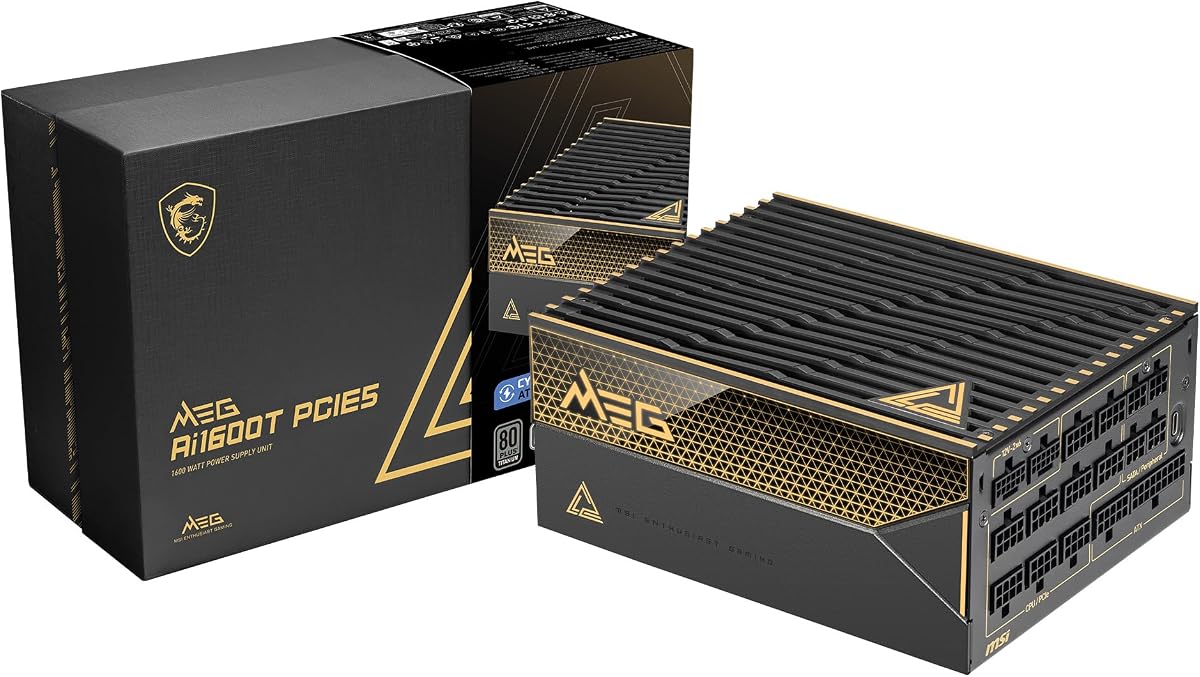
The MSI MEG Ai1600T PCIE5 is built for reliability. It uses server-grade capacitors for stability. Its 12 year warranty is one of the best.
We may earn a commission when you buy through this link, at no additional cost to you.
It meets ATX 3.1 and PCIe 5.1 standards. Industrial protections ensure safety for components. It is designed for high-demand tasks.
It is heavy and expensive. The price may be high for some users. But the durability justifies the cost.
Buy this for gaming and professional setups. It suits those who want long-term reliability. The industrial grade offers peace of mind.
These components offer better stability. It ensures reliable power for demanding tasks.
12 year protection covers long-term use. This reduces risk of expensive repairs.
We may earn a commission when you buy through this link, at no additional cost to you.
Choosing a high-wattage power supply requires attention to several key factors. This guide helps you understand what matters most for your system.
ATX 3.1 is the latest standard for power supplies. It ensures you can handle transient power spikes from modern GPUs. This prevents crashes or shutdowns during gaming.
Always select a unit certified for ATX 3.1 for future-proofing.
Efficiency ratings like Gold or Platinum affect power bills. Higher efficiency means less energy is lost as heat. This keeps your system cooler and lowers electricity costs.
Look for 80 Plus Platinum or Titanium for best performance.
Modern GPUs require 12V-2×6 connectors. Ensure your PSU includes native cables. Using adapters can be risky if they are not rated properly.
Verify native 12V-2×6 support before buying for safety.
Fully modular PSUs allow you to connect only needed cables. This improves airflow and makes cable management easier. It keeps the case looking tidy.
Choose fully modular for better airflow and cleaner builds.
A quiet PSU matters for a peaceful environment. Look for Fluid Dynamic Bearing fans or models with Zero RPM modes. Silent operation helps reduce background noise.
Select models with Zero RPM or magnetic levitation fans.
A long warranty indicates manufacturer confidence. Units with 10 or 12 year warranties are more reliable. This protects your investment over time.
Always check the warranty length before purchasing a PSU.
High-wattage PSUs are often large. Check your case dimensions to ensure a fit. Some units may not fit smaller compact cases.
Verify case clearance before buying to avoid fit issues.
Some PSUs offer digital monitoring via software. This allows you to track voltage and fan speed. It helps you optimize performance dynamically.
Consider software support if you want advanced control features.
Always install the PSU in your case first. Secure it tightly to prevent vibrations. Ensure cables do not obstruct airflow pathways.
Connect only necessary cables to keep things clean. Use the software to manage fan curves and power settings. Avoid overloading the unit beyond its capacity.
Regularly clean dust from the unit. Check for any unusual noises or smells. This helps extend the life of your PSU.
Yes 1500W is more than enough for an RTX 4090. It provides headroom for overclocking. Ensure you use a modern ATX 3.1 unit for safety.
ATX 3.1 is a power standard for high-performance PC. It handles transient spikes better than older standards. It ensures stable power for modern GPUs.
Yes for modern GPUs like RTX 4090. This connector is safer and more stable. Using adapters can be risky for long-term use.
Yes a 10 year warranty ensures reliability. It protects your investment from early failures. High-end units usually have longer warranties.
Zero RPM Mode stops the fan at low load. This keeps your system silent when gaming lightly. It is great for reducing noise.
Yes they allow you to connect only needed cables. This improves airflow and makes management easier. It keeps the system clean.
Use compressed air to remove dust regularly. Do not open the case as it is dangerous. Clean vents to prevent overheating.
We reviewed ten top PSUs for high-performance systems. Each unit offers unique features for specific needs. Choose based on your budget and hardware.
Prioritize ATX 3.1 compliance and efficiency. These ensure safety and reliability over time. The right PSU protects your expensive components.
Prices and stock change frequently. Always verify the current price before buying. Check the warranty to ensure long-term support.