
GIGABYTE B650 Eagle AX
4.6Editor score
Cost Effective AM5 Option
WiFi 6E Integrated
Triple M.2 Slots
This guide compares the top Gigabyte Motherboard models for performance, features, and value to help you choose the right board for your system.
Choosing the right motherboard is critical for system stability and performance. Gigabyte offers a wide range of boards for AMD and Intel platforms. Each model balances power delivery, connectivity, and thermal design for different needs.
We evaluated ten Gigabyte Motherboard options across various price points and chipsets. Our analysis focuses on VRM quality, expansion slots, networking speeds, and build features. This list covers AMD AM5, AM4, and Intel LGA 1700/1851 sockets.
Each pick highlights specific strengths like gaming, workstation use, or budget builds. Note that stock and pricing change frequently. Check current availability before purchasing to ensure you get the best deal for your specific build goals.
4.6Editor score

4.4Editor score

4.2Editor score
This table provides a side-by-side view of key specifications for all ten models. Use it to quickly compare sockets, memory types, and connectivity options.



This board stands out as the top pick for AMD AM5 users seeking balance. It delivers robust power delivery and future-proof connectivity without excessive cost. The thermal design ensures stable operation even under heavy workloads.
We may earn a commission when you buy through this link, at no additional cost to you.
The VRM system uses a 14+2+1 phase design with 70A power stages. This supports high-end Ryzen processors effectively. DDR5 memory support allows for significant bandwidth improvements over DDR4 platforms. PCIe 5.0 M.2 slots ensure rapid storage access for future drives.
Some users may find the BIOS interface dense compared to competitors. The audio codec is functional but not audiophile grade. These trade-offs are acceptable given the board focuses on core performance and stability features.
Ideal for gamers and creators building a new AMD system. It offers the best blend of price and performance in this category. You get premium features without paying flagship prices.
The inclusion of PCIe 5.0 M.2 and USB-C ensures longevity. Your storage and peripherals will remain compatible for years to come.
With 70A power stages, this board handles overclocking well. It provides stable power to the CPU during intense gaming sessions.
We may earn a commission when you buy through this link, at no additional cost to you.
This board pushes the envelope with WIFI7 and USB4 support. It is designed for users who need the absolute latest standards. The performance is excellent for high bandwidth tasks.
We may earn a commission when you buy through this link, at no additional cost to you.
The WIFI7 module provides incredible wireless speeds and lower latency. USB4 ports offer versatile connectivity for high-speed docks. The power design supports the most demanding Ryzen chips effectively.
The price is steep compared to lower tier X870 models. Many users may not utilize WIFI7 immediately. It is a niche choice for those prioritizing connectivity over cost.
Perfect for tech enthusiasts needing the latest wireless standards. It ensures your system is ready for next gen peripherals. Use it if future-proofing is your top priority.
WIFI7 delivers significantly faster speeds than WIFI6E. This is essential for high-resolution streaming and low latency gaming.
USB4 ports support high speed data and video output. You can connect multiple displays or fast storage devices easily.
We may earn a commission when you buy through this link, at no additional cost to you.
This model is designed for white build enthusiasts. It combines high performance with a clean visual theme. The technical specs match the X870 standard closely.
We may earn a commission when you buy through this link, at no additional cost to you.
The white PCB and heatsinks create a cohesive look for light builds. The VRM uses 80A power stages for maximum efficiency. WIFI7 and USB4 ensure it stays relevant for years.
The aesthetic appeal comes with a higher price tag. Finding matching white components might add to the total build cost. This is purely a design decision impacting the budget.
Best for users prioritizing build aesthetics without sacrificing power. It offers a rare white option in the AM5 space. Choose it if you want a standout visual centerpiece.
The white color scheme is perfect for light themed builds. It elevates the visual impact of your entire system.
Despite the focus on looks, performance remains top tier. You do not have to compromise on speed for style.
We may earn a commission when you buy through this link, at no additional cost to you.
This is the flagship choice for Intel Core Ultra users. It offers the highest bandwidth and power limits available. The networking and storage options are unmatched.
We may earn a commission when you buy through this link, at no additional cost to you.
The 10GbE LAN port provides workstation level network speeds. Thunderbolt 4 enables fast external storage and docking. Five M.2 slots allow for massive local storage arrays.
Cost is a significant barrier for most consumers. You pay a premium for the 10GbE and Thunderbolt features. This is not necessary for standard gaming or office tasks.
Designed for professionals and workstation builders. If you need maximum I/O and power, this is the only choice. It ensures top performance for demanding workloads.
10GbE LAN allows for rapid data transfers on networks. It is essential for creative professionals working with large files.
Thunderbolt 4 offers extreme speeds for peripherals. This helps when using external GPUs or high speed drives.
We may earn a commission when you buy through this link, at no additional cost to you.
This board offers the best entry into the AM5 ecosystem. It keeps costs low while providing essential modern features. The connectivity options are generous for the price point.
We may earn a commission when you buy through this link, at no additional cost to you.
It includes three M.2 slots allowing for ample storage space. WIFI6E ensures reliable and fast wireless networking. The VRM is adequate for mainstream Ryzen processors without breaking the bank.
Some ports are sacrificed to hit the low price. Audio quality is standard and may require an external card for audiophiles. These compromises make it accessible for budget builds.
Ideal for gamers building their first Ryzen 7000 or 8000 system. It delivers all the core features you need. You save money for other components like the GPU.
Three M.2 slots allow for multiple SSDs easily. This is rare at this price point and adds significant utility.
It lowers the barrier to entry for AM5 CPUs. You can afford a newer CPU while saving on the motherboard.
We may earn a commission when you buy through this link, at no additional cost to you.
This board is perfect for existing AM4 users upgrading. It provides excellent support for Ryzen 5000 series CPUs. The build quality remains high despite being an older socket.
We may earn a commission when you buy through this link, at no additional cost to you.
DDR4 memory is cheaper and widely available. WIFI6 is a great addition for wireless connectivity. The power delivery supports overclocking Ryzen 7 and 9 CPUs well.
You lose out on PCIe 5.0 support available on newer boards. DDR4 bandwidth is lower than DDR5 limits. This is best for upgrading an existing system rather than a new build.
Recommended for users with a Ryzen 3000 or 4000 CPU. It allows a cost effective performance boost. Choose this if you want to extend the life of your current hardware.
Full support for 5000 series ensures max performance. You get the best from older CPUs without buying new RAM.
DDR4 is significantly cheaper than DDR5 currently. This keeps the total build cost low for budget conscious users.
We may earn a commission when you buy through this link, at no additional cost to you.
This board offers a reliable base for 13th and 14th Gen Intel. It supports DDR5 memory for better bandwidth. The features are balanced for most gaming needs.
We may earn a commission when you buy through this link, at no additional cost to you.
The 12+1+1 power phase handles most gaming CPUs well. Three M.2 slots provide ample space for fast storage. WIFI6E ensures a stable connection for online gaming.
PCIe 5.0 support is limited to M.2 slots. This is sufficient for most users but limits future GPU speeds. It is a practical board for current generation hardware.
Best for Intel gamers wanting a solid DDR5 platform. It avoids the premium of top tier models while maintaining performance. Choose it for a hassle free gaming experience.
DDR5 support brings improved bandwidth to Intel builds. This helps with memory intensive applications and gaming.
The power delivery is stable for daily use. It handles thermal loads well during extended gaming sessions.
We may earn a commission when you buy through this link, at no additional cost to you.
This board enhances the Z790 experience with more power and storage. It targets users needing extra M.2 slots. The build quality is superior to the Eagle tier.
We may earn a commission when you buy through this link, at no additional cost to you.
The 16+1+2 power phase supports high core count CPUs. Four M.2 slots allow for massive storage expansion. The audio section is improved for better sound quality.
It costs more than the Eagle but offers more features. If you need four NVMe drives, this is the logical choice. It balances features and price effectively for Intel users.
Best for power users needing more storage and power headroom. It supports high-end K series CPUs effectively. Choose this if you want room for future upgrades.
Four M.2 slots allow for massive storage setups. This is ideal for libraries with large game collections.
More phases mean better stability for overclocking. You can push your Intel CPU harder without throttling.
We may earn a commission when you buy through this link, at no additional cost to you.
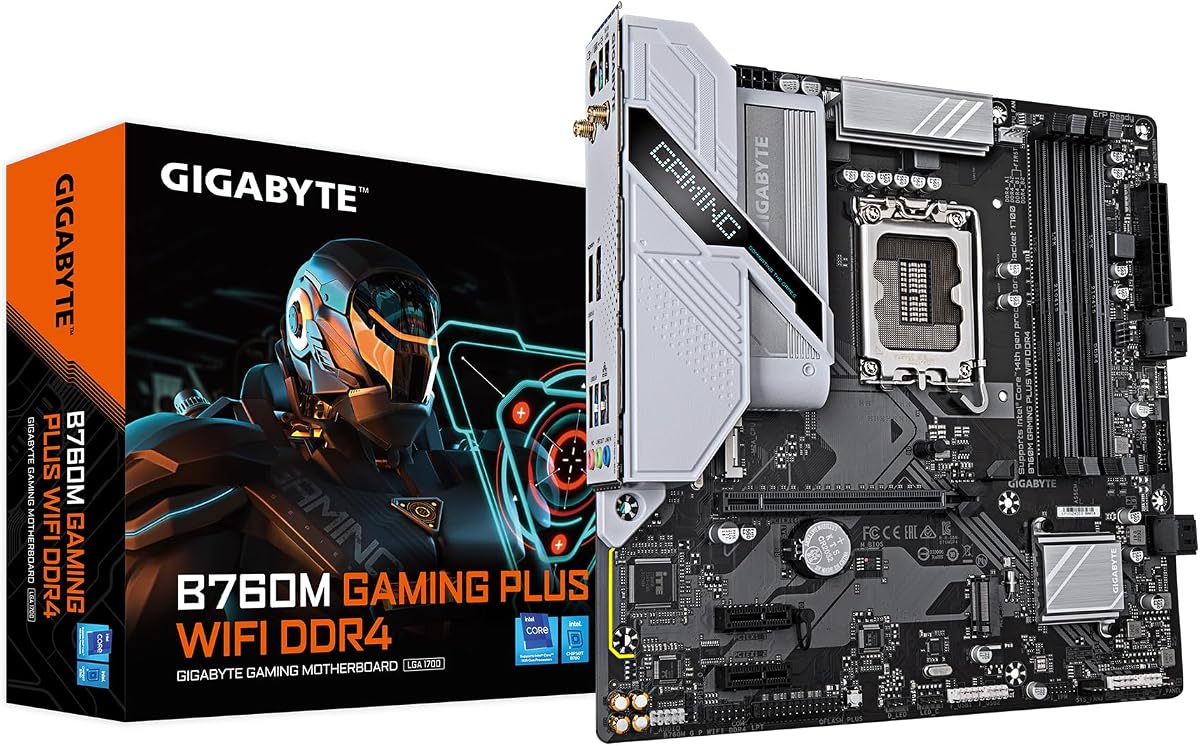
This compact board fits well in smaller cases. It supports Intel Core processors with DDR4 memory. It is a great choice for space constrained builds.
We may earn a commission when you buy through this link, at no additional cost to you.
The M-ATX form factor saves space in the case. It still includes WiFi for convenient wireless connectivity. The VRM is sufficient for non-K Intel CPUs.
You lose some expansion options compared to ATX boards. DDR4 is slower than DDR5 but cheaper. This is a trade-off for a smaller physical footprint.
Ideal for small form factor builds using Intel CPUs. It keeps the cost down while fitting in mid cases. Choose this if case size is a major constraint.
M-ATX fits in many mid-tower cases. It is great for builds where space is tight but performance matters.
DDR4 keeps the RAM cost very low. This helps when budget is tight for a gaming PC.
We may earn a commission when you buy through this link, at no additional cost to you.
This is the most affordable entry to AM4 gaming. It supports PCIe 4.0 for fast storage. It is a no-nonsense board for budget builds.
We may earn a commission when you buy through this link, at no additional cost to you.
The price is very competitive for an AM4 board. PCIe 4.0 ensures your SSD runs at full speed. It supports 5000 series Ryzen CPUs well.
It lacks integrated WiFi which may require a card. The audio is basic and suited for standard use. These are standard trade-offs at this price point.
Best for budget builders who have Ethernet available. It delivers core gaming features at the lowest cost. Choose this if you want maximum performance per dollar.
It offers the best price to performance ratio in AM4. You save money without sacrificing core capabilities.
PCIe 4.0 support ensures modern speeds for drives. This future proofs the storage subsystem effectively.
We may earn a commission when you buy through this link, at no additional cost to you.
Selecting the right board involves checking socket type, memory support, and expansion needs. This guide breaks down the key factors to consider.
The socket determines which CPU you can use. AMD uses AM5 for Ryzen 9000/8000/7000 and AM4 for older Ryzen. Intel uses LGA 1851 for Core Ultra and LGA 1700 for 12th-14th Gen. Always match the socket first.
Check the supported processor list on the product page before buying. Mismatched sockets will not work physically.
DDR5 is the standard for AM5 and newer Intel boards. It offers higher bandwidth and future proofing. AM4 and lower-end Intel boards use DDR4 which is cheaper. Decide based on your budget and CPU.
DDR5 is mandatory for Ryzen 7000 and up. If you have existing DDR4 RAM stick to AM4 or older Intel options.
VRM phases control how much power the CPU gets. High-end CPUs like Ryzen 9 or Core i9 need strong VRMs. Look for 12+ phases or higher for serious workloads.
Basic 4+1 phases work for entry CPUs but can throttle. Check the VRM details in the specs section.
Count the PCIe slots and M.2 slots needed. High-end boards offer 4 M.2 slots while budget have 2. Ensure you have space for your GPU and SSDs.
M.2 slots with thermal guards prevent SSD throttling. Look for PCIe 5.0 if you want future speeds.
WIFI 6E or WIFI 7 is included in most modern boards. GigE or 10GbE LAN depends on the tier. USB-C ports are common but speeds vary.
Choose WIFI for wireless setups. Ethernet is better for gaming stability.
ATX boards fit standard cases. M-ATX boards are smaller and cheaper. Ensure your case supports the board size.
ATX offers more slots. M-ATX is great for compact builds.
Q-Flash allows BIOS updates without a CPU. EZ-Latch features make installing GPU and RAM easier. A good UI simplifies overclocking.
Check if Q-Flash is supported for easy updates. This avoids returning parts for BIOS upgrades.
Gigabyte offers a 5-Year Warranty on many models. Check the specific warranty terms on the listing. Long-term support adds peace of mind.
Always register your board after purchase. This ensures you are covered for defects.
Install the CPU and RAM before placing the board in the case. This prevents bending pins and ensures a secure fit.
Use the thermal guards on M.2 slots to prevent SSD overheating. Attach the heatsinks using the provided screws.
Update the BIOS using Q-Flash for the latest CPU support. Connect a USB drive with the BIOS file to the specific port.
Yes most Gigabyte Z and X series boards support CPU overclocking. B and A series boards support memory overclocking via XMP or EXPO. Always check the specific model specs.
Use the Q-Flash Plus feature. Download the BIOS file to a FAT32 USB drive. Connect the drive to the Q-Flash USB port and press the button.
Gigabyte makes boards for both platforms. Z and B series are typically Intel. X and B series are typically AMD. Check the socket to confirm compatibility.
ATX is the standard size with more expansion slots. M-ATX is smaller and fits compact cases. M-ATX boards are usually cheaper.
Newer AM5 and Intel 13th/14th Gen boards support DDR5. Older AM4 boards support DDR4. Check the memory specs to be sure.
Many models have WIFI6 or WIFI6E built in. Budget models may not include WiFi. Look for the WIFI suffix in the product name.
The Gigabyte B650 AORUS Elite AX stands out as the top pick for AMD users. It balances performance and features perfectly.
Budget builders should consider the B650 Eagle AX for value. It covers all the bases for a new AM5 build.
Check current availability and pricing before you buy. Prices change often and new models are released regularly.