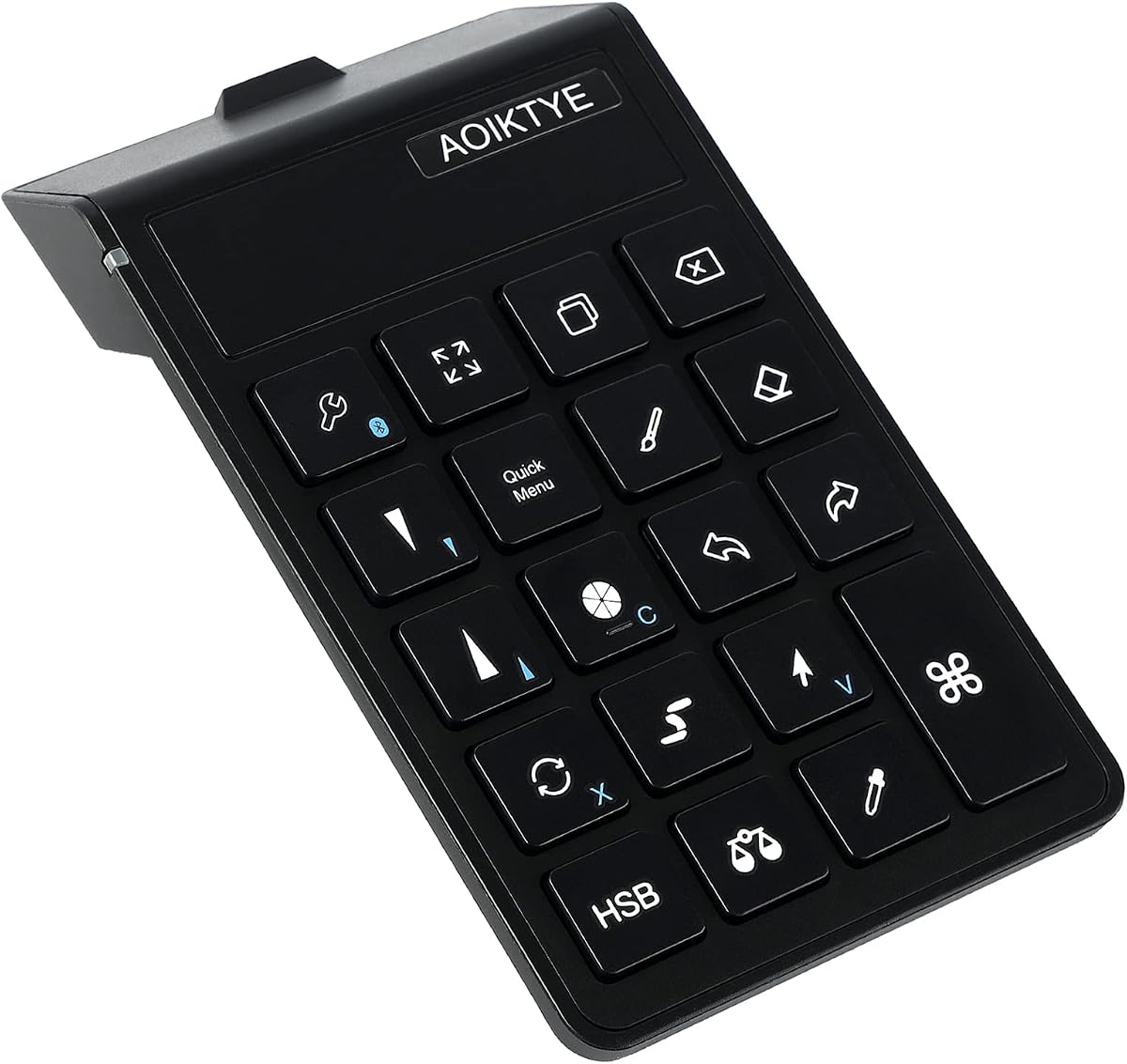
Keyboard for Procreate
4.5Editor score
Twenty two shortcut keys
Long battery life
Procreate focused layout
This guide compares the top 10 iPad Drawing Bluetooth Controller options for digital artists, focusing on compatibility, shortcut customization, and wireless
Digital artists often struggle with limited screen space on tablets. A dedicated Bluetooth controller offers quick access to shortcuts without interrupting your creative flow.
We evaluated ten devices based on connectivity, customization, and build quality. Each entry supports wireless operation with iPads and creative software tools.
Every pick highlights key specs, pros, and cons to help you decide. Note that availability and pricing may vary by region and time.
4.5Editor score

4.3Editor score

4.4Editor score
This table presents a side-by-side comparison of all ten reviewed controllers. It highlights core features and compatibility to help you identify the best match for your workflow.


The XPPen Mini Keydial ACK05 stands out as a versatile tool for digital artists seeking a dedicated Bluetooth controller. It offers a compact footprint while delivering robust functionality through ten customizable keys and a tactile dial.
We may earn a commission when you buy through this link, at no additional cost to you.
Its wireless Bluetooth 5.0 connection ensures stable communication with iPads and Macs. The 1000 mAh battery supports roughly 300 hours of continuous use, minimizing charging interruptions during long creative sessions.
While it supports multi-key anti-ghosting, full customization requires downloading drivers or specific apps depending on your OS. iOS users must install a specific Shortcut Remote app to program the keys effectively.
Artists who value workflow efficiency and physical controls will appreciate this device. It bridges the gap between tablet drawing and desktop shortcuts, making it a top recommendation for serious digital painters.
The dial allows precise zoom and brush adjustments without taking your hand off the device.
Supporting Bluetooth, dongle, and USB cable, it adapts to different device constraints.
We may earn a commission when you buy through this link, at no additional cost to you.
This wireless keyboard is tailored for users heavily invested in the Procreate app. It provides twenty-two shortcut keys that map directly to essential functions like color adjustment and layer management.
We may earn a commission when you buy through this link, at no additional cost to you.
The 84-hour battery life is a standout feature for budget-friendly devices. It ensures the keyboard remains ready for use over several weeks of daily drawing without frequent recharging.
While effective for Procreate, its utility may be restricted compared to universal controllers. It also lacks the tactile dials found in higher-end models for zoom or brush control.
For iPad artists focused primarily on Procreate, this controller offers a practical solution. It enhances productivity without requiring a major investment, making it ideal for beginners.
Buttons are mapped for the most common Procreate tools to speed up your process.
The 250mAh battery supports days of use on a single two hour charge.
We may earn a commission when you buy through this link, at no additional cost to you.
The TourBox Lite Bluetooth represents a premium option for creators seeking a high-end control experience. It features a refined layout that simplifies complex shortcuts into single tactile actions.
We may earn a commission when you buy through this link, at no additional cost to you.
Its software allows automatic app detection, switching layouts as you change tasks. This ensures that you are always using the most relevant commands for your active workspace without manual input.
While the cost is higher than standard keyboards, the build quality and seamless integration justify the investment for professionals. It reduces reliance on screen tapping, allowing for more fluid creation.
Artists who work across multiple software titles will benefit most from this device. It offers a polished, efficient workflow that minimizes interruptions during the creative process.
Console software detects active apps and applies the correct layout automatically.
Knobs and raised buttons provide clear feedback so you can control without looking.
We may earn a commission when you buy through this link, at no additional cost to you.
HUION offers a robust keypad with eighteen programmable keys, giving users significant flexibility. The dial can be mapped to different functions, providing multiple ways to interact with your software.
We may earn a commission when you buy through this link, at no additional cost to you.
The anti-ghosting technology ensures that multiple shortcuts can be pressed simultaneously without errors. This is useful for complex tasks where combinations are needed to execute commands quickly.
Users should note that customization depends on the Huion driver software, which may be extra work to install on mobile devices. The battery life is solid, lasting about three days of continuous use.
This device is suited for power users who need many shortcuts at their fingertips. It provides a tactile alternative to on-screen menus, streamlining repetitive tasks efficiently.
Eighteen keys allow you to assign shortcuts for every major tool you use.
The setting preview popup helps you recall what each button does easily.
We may earn a commission when you buy through this link, at no additional cost to you.
This controller is engineered for robust performance and offers features like Hall Effect sticks for precise input. It connects wirelessly and supports a vast range of modern tablets without needing extra hardware.
We may earn a commission when you buy through this link, at no additional cost to you.
While it is designed with gaming in mind, its precision controls can assist in navigation. The six-axis gyroscope adds an extra layer of interaction, useful for specific creative gestures or navigation.
The magnetic parts allow you to customize the look and feel of the device. This modularity makes it a unique choice for those who want a console-style controller for their iPad.
Artists looking for a durable, tactile interface for navigation may find this useful. It stands out for its build quality and extensive device support.
Hall Effect sensors ensure smooth and accurate stick movement without physical wear.
Magnetic parts allow you to tailor the controller to your specific needs.
We may earn a commission when you buy through this link, at no additional cost to you.
The DIGIDRAW K30 features dual dials that allow simultaneous control over parameters like zoom and brush size. This dual function capability helps maintain flow during complex drawing tasks.
We may earn a commission when you buy through this link, at no additional cost to you.
Its lightweight build and tactile markers allow you to operate it without looking. This is crucial for artists who need to keep their eyes on the canvas to refine details.
Battery life is impressive, offering 40 hours of use and up to 10 months of standby. USB-C charging ensures modern convenience for power users.
This controller is ideal for artists who demand quick, tactile adjustments without menu diving. The dual dial setup is a strong differentiator in the market.
Adjust two settings independently without switching tools or apps.
Raised markers help you identify keys by feel alone for focus.
We may earn a commission when you buy through this link, at no additional cost to you.
This controller offers keyboard and mouse support alongside standard gaming features. It provides a versatile interface that can adapt to different input needs including basic drawing controls.
We may earn a commission when you buy through this link, at no additional cost to you.
Its ergonomic design ensures comfort during extended use. The wireless connection provides freedom of movement without the constraints of cables.
While it is a capable device, user feedback suggests mixed results for specific drawing workflows. It may require some configuration to function optimally with certain creative apps.
Artists looking for an all-in-one controller that doubles as a gaming pad may find this suitable. It balances utility with affordability.
The ability to switch modes offers flexibility across different apps.
Ergonomic design ensures you can use it for long periods without fatigue.
We may earn a commission when you buy through this link, at no additional cost to you.
This remote includes a trackpad that allows you to move a cursor on your iPad screen. This is useful for navigating menus or selecting precise points without touching the display.
We may earn a commission when you buy through this link, at no additional cost to you.
It also includes dedicated media controls, allowing you to manage music and video while you work. The wireless connection ensures a clean workspace without cable clutter.
While it offers navigation benefits, it lacks specific drawing shortcuts or tactile buttons for creative tasks. It serves better as a general control device than a drawing aid.
For artists who need to manage media streams or navigate UI elements easily, this device is helpful. It enhances the general tablet experience but is not a dedicated drawing tool.
The trackpad allows you to control a mouse cursor directly on your iPad.
Control playback of music or video without leaving your application.
We may earn a commission when you buy through this link, at no additional cost to you.
This device is designed specifically for Clip Studio Paint users. It allows you to assign frequent operations to buttons to speed up production significantly.
We may earn a commission when you buy through this link, at no additional cost to you.
The inclusion of a 12-month software license adds value for new users. It ensures you have the necessary tools to get started immediately.
Power is provided by AA batteries, which some may find less convenient than built-in rechargeable options. However, the low energy connection ensures long battery life.
Artists focused on Clip Studio Paint will find this device highly effective. It offers a dedicated workflow tool that integrates deeply with the application.
Buttons can be assigned directly to CSP actions for instant access.
A free 12 month license is included to help you get started.
We may earn a commission when you buy through this link, at no additional cost to you.
While primarily a tablet, the Wacom Intuos offers wireless connectivity that pairs well with your workflow. It includes a pen and software, giving you a complete drawing solution.
We may earn a commission when you buy through this link, at no additional cost to you.
The battery-free pen technology means no charging is required for your stylus. It provides a natural pen-on-paper feel that is hard to match with standard controllers.
This is a traditional drawing surface rather than a Bluetooth controller for your iPad screen. However, it can be used in tandem for a professional hybrid setup.
If you are looking for a high-quality pen input device with wireless freedom, this is a strong choice. It complements an iPad by providing a dedicated drawing surface.
The pen feels natural and does not require charging during use.
Bluetooth connectivity allows you to move the tablet anywhere on your desk.
We may earn a commission when you buy through this link, at no additional cost to you.
Selecting the right controller involves considering connectivity, features, and compatibility with your specific drawing apps.
Ensure the device supports Bluetooth 5.0 or higher for a stable connection. A range of at least 10 meters ensures you can work from a comfortable distance.
Check for dual connection options like USB-C for charging and wired use if needed.
Look for programmable keys that allow you to map specific shortcuts. The more keys available, the more commands you can access quickly.
Verify that the software supports your specific apps to enable these custom mappings.
Long battery life reduces downtime during creative sessions. Aim for devices with rechargeable batteries that last at least 20 hours.
USB-C charging is preferred for convenience and faster recharge times.
The device should fit comfortably in your hand for extended use. Tactile feedback helps you press buttons without looking away from your canvas.
Consider lightweight designs that do not cause fatigue over time.
Confirm that the controller supports your iPad model and OS version. It should also be compatible with your primary drawing software like Procreate or Photoshop.
Some devices may require additional drivers or apps for full functionality.
Durability is key for devices that are handled frequently. High-quality buttons and a sturdy chassis will ensure longevity.
Check reviews for reliability and customer support responsiveness.
Features like dials for zoom or volume control add versatility. Some controllers offer trackpads or media functions for broader utility.
Evaluate if these features align with your specific workflow needs.
The device should work with your active creative apps. Auto-switching profiles based on the app can streamline your workflow significantly.
Ensure that the software allows for easy updates and customization.
Start by pairing the controller with your iPad via Bluetooth settings. Ensure the device is in pairing mode by holding the power button as instructed.
Download any required drivers or apps from the manufacturer website. Configure your shortcuts using the provided software to map them to your favorite tools.
Keep the device clean by wiping it with a dry cloth. Store it in a safe place to prevent physical damage and ensure the battery remains charged.
Most controllers require a driver or app for full customization. Check the product description to see if a specific app is needed for your iPad OS version.
Compatibility depends on the iPad model and OS version. Verify the supported list in the product details before purchasing.
Most modern controllers use USB-C cables. Some may require AA batteries, so check the power source requirements.
Yes, physical controls allow you to keep your eyes on the canvas. They speed up the process by avoiding navigation menus.
Some models allow connecting to two devices simultaneously. Check if the device supports multi-device pairing if you use multiple tablets.
Most devices support up to 10 meters of range. This allows you to move around comfortably without losing the connection.
Most controllers are not waterproof. Avoid exposing them to liquids to prevent internal damage and ensure safety.
Many controllers are compatible with Android tablets. Confirm support in the product description before purchasing.
The top picks like the XPPen Mini Keydial and TourBox Lite offer robust features for artists. They provide a balance of customization and ease of use.
Prioritize compatibility with your specific software to ensure a smooth workflow. Long battery life is also essential for uninterrupted creative sessions.
Check current availability and features before making your decision. Prices and models may change, so review the latest information.