
Thrustmaster T-Flight Hotas X
4.5Editor score
Detachable throttle design
12 programmable buttons
Adjustable stick resistance
This guide compares the top Mac game flight controllers for simulation enthusiasts, evaluating compatibility, build quality, and features to help you choose
Finding the right flight controller for Mac can be challenging due to compatibility nuances. A good simulator brings realistic controls, robust construction, and seamless integration with your favorite simulation titles to ensure immersive and accurate flight experiences.
We evaluated ten top contenders based on user feedback, build quality, and software support. Our comparison focuses on versatility, precision, and ease of setup to help you identify the hardware that best matches your simulation goals and desk space.
Each selection highlights key strengths and potential limitations for Mac users. Prices and availability fluctuate frequently so please verify current details on the retailer site before purchasing to ensure you get the best value for your investment today.
4.5Editor score

4.0Editor score

4.4Editor score
This side-by-side comparison highlights the distinct features and capabilities of each controller to help you quickly identify which model offers the best balance of performance, durability, and compatibility for your Mac flight simulation needs.





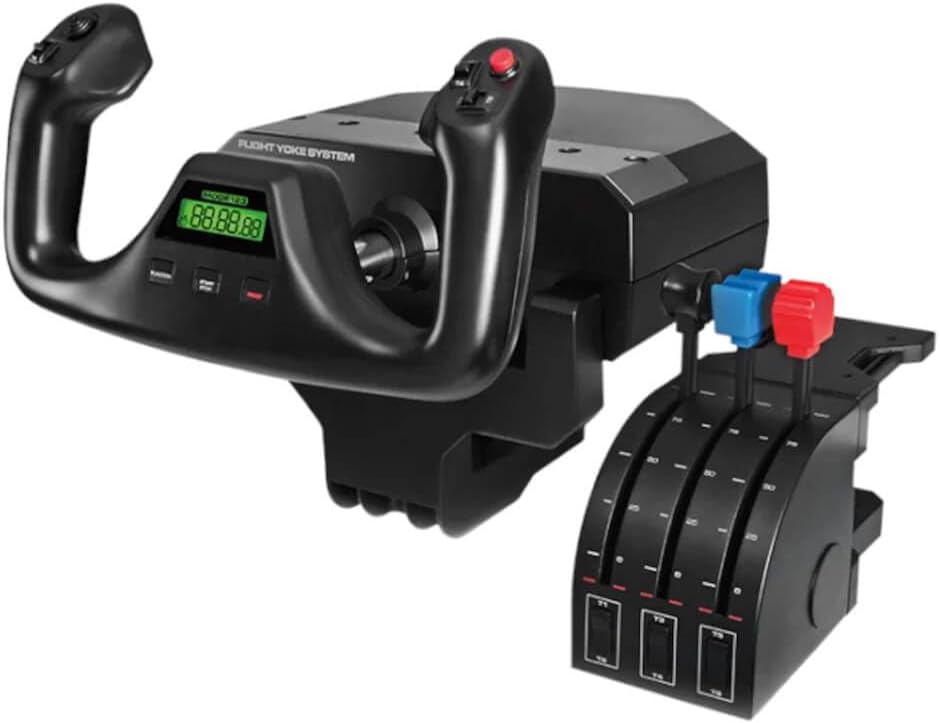

The Logitech G PRO Flight Yoke System offers a realistic setup for new pilots and helps experienced ones build muscle memory effectively. With a robust stainless steel yoke shaft and smooth controls, it ensures accurate virtual aircraft handling in simulators.
We may earn a commission when you buy through this link, at no additional cost to you.
It includes 14 button controls and a 3-position mode switch providing at least 54 programmable controls. This allows you to have most aircraft functions under your fingertips. The throttle quadrant enhances the experience with precise adjustments.
The 2-position desk clamp provides mounting flexibility for a wide range of desks ensuring your controls stay secure. However, users should note that the software is primarily designed for Windows systems which may require configuration on Mac.
This system is ideal for those seeking a professional simulation experience with durable hardware. Its realistic controls and extensive programmability make it a strong choice for serious flight simulation enthusiasts willing to navigate compatibility steps.
The stainless steel yoke shaft provides robust, smooth, and accurate control essential for realistic flight simulation sessions.
With at least 54 programmable controls, you can map most aircraft functions directly to your fingertips for efficient operation.
We may earn a commission when you buy through this link, at no additional cost to you.
The Thrustmaster T-Flight Hotas X features a comfortable ergonomic Hotas design allowing you to fly for hours without fatigue. Its wide hand rest and real size throttle keep hands in a natural position for immersive sessions.
We may earn a commission when you buy through this link, at no additional cost to you.
It offers fully programmable flight controls with 12 action buttons and 5 axes to match your preferred flight sim setup. The detachable throttle allows flexible setups whether you connect it or keep it separate for a compact desktop arrangement.
Precision joystick features adjustable resistance to fine tune stick tension to your liking. Dual rudder control via handle rotation or progressive tilting lever ensures smooth and perfectly responsive aerial maneuvers every single flight.
This model is excellent for those seeking instant takeoff readiness with plug and play features. The lightweight yet sturdy build makes it a top budget choice for casual and semi-serious flight sim enthusiasts starting their journey.
The wide hand rest and ergonomically shaped throttle ensure natural hand positioning reducing fatigue during long flight sessions.
The detachable real size throttle allows you to build a setup that suits your specific space and play style preferences.
We may earn a commission when you buy through this link, at no additional cost to you.
The Logitech G X56 H.O.T.A.S offers military grade space and flight sim precision with customizable options for aspiring combat pilots. It features new mini analog stick control surfaces for detailed movement control in complex simulations.
We may earn a commission when you buy through this link, at no additional cost to you.
RGB backlighting allows you to set the color of the lighting to match your gaming rig for a cohesive look. The fully featured Hotas includes accurate 16-bit aileron and elevator axis with hall-effect sensors for precise inputs.
Adjustable stick force via advanced 4 spring system and twin throttles with friction adjuster provide tailored control. This model is ideal for VR where subtle distinctions in button feel and shape help you navigate the control set with ease.
This controller is a strong choice for users wanting extensive customization and high precision. While it requires configuration, the resulting performance and immersion make it a standout premium option for serious simulation pilots.
Customizable options including all control surface options help you achieve the exact level of performance that demands precision.
RGB backlighting adds immersion and visual flair allowing you to match the controller with your existing gaming setup.
We may earn a commission when you buy through this link, at no additional cost to you.
The Turtle Beach VelocityOne Flightstick provides high-precision non-contact main axes for accurate flight simulation control. It features customizable multi-function throttle and flap levers ensuring you have the right tools for diverse aircraft types.
We may earn a commission when you buy through this link, at no additional cost to you.
An integrated OLED flight management display provides real-time data while the intuitive flight configuration wheel simplifies setup. The touchpad navigation sensor offers full cursor control which enhances menu navigation without leaving the stick.
With 27 programmable buttons, 8 axes, POV hat and rapid-fire trigger it offers extensive control options. The ambidextrous design supports both fighter jets and airliners making it versatile for different simulation genres.
This controller is a great option for users who value display integration and versatile control. Its unique features like the OLED screen and touchpad set it apart in the market for immersive flight simulation experiences.
The integrated OLED flight management display keeps essential flight data visible during critical moments of your simulation.
The intuitive flight configuration wheel and touchpad make managing settings and navigation fast and user-friendly.
We may earn a commission when you buy through this link, at no additional cost to you.
The Logitech G Saitek X52 Pro offers illuminated buttons and enhanced gameplay through an intuitive LCD multi-function display. It features a progressive throttle with resistance adjustment and detents for Afterburner and Idle to mimic real aircraft.
We may earn a commission when you buy through this link, at no additional cost to you.
Precision centering mechanism and no contact technology on x and Y axes improve control accuracy significantly. You can program your controller for each game using the powerful smart technology software to optimize performance per title.
A 5 position handle adjustment system suits all hand sizes with a soft-touch contoured grip for maximum gaming comfort. This ensures long sessions remain ergonomic even with heavy usage during complex flight scenarios.
This controller is suitable for pilots who prefer traditional Hotas layouts with visual feedback. The LCD screen and programmable buttons make it a solid tool for managing complex flight data without looking at the monitor.
The LCD multi-function display provides instant access to flight information enhancing situational awareness during simulation.
Five handle positions ensure a comfortable fit for all hand sizes reducing strain during extended gaming sessions.
We may earn a commission when you buy through this link, at no additional cost to you.
The Honeycomb Alpha Flight Controls Yoke & Switch Panel is the most advanced flight simulation system available to simmers and pilots. The yoke features a realistic full 180 degree rotation and a solid steel shaft with dual linear ball bearings.
We may earn a commission when you buy through this link, at no additional cost to you.
A dampened self-centering mechanism ensures smooth control with no center detent or minimal dead zone. The base includes a Switch Panel with master, alternator, avionics, and light switches providing a true cockpit experience.
The left and right handles feature multiple switches and buttons plus a push to talk button for realistic interaction. Dual mounting solutions allow clamp free use with 3M Micro-Suction Pads for thick tabletops or secure clamps.
This model is perfect for users seeking maximum realism and authentic feel. The engineering by pilots and aerospace engineers ensures every detail mimics actual aircraft controls offering an unmatched simulation experience for serious enthusiasts.
The realistic 180 degree yoke rotation and solid steel shaft deliver precise pitch and roll control matching real aircraft.
The included switch panel with avionics and light switches adds essential realism for managing flight systems efficiently.
We may earn a commission when you buy through this link, at no additional cost to you.
The Logitech G Pro Flight Bundle includes realistic Yoke Controls and smooth and accurate self-centering rudder pedals. This adds another layer of realistic control to your flight simulation setup enabling precise ground and flight maneuvers.
We may earn a commission when you buy through this link, at no additional cost to you.
Differential toe brakes deliver the full control needed when bringing your aircraft up to its stand on the runway. The yoke offers at least 54 programmable controls including a 14 and switch and 3-position mode switch.
Foot rests adjust to accommodate a wide range of sizes and include non-slip materials for stability. This combination ensures both your hands and feet are supported properly during long and complex flight sessions.
This bundle is an excellent choice for those wanting a complete cockpit experience without buying parts separately. The integration of pedals and yoke provides the necessary tools for realistic taxiing and maneuvering essential for professional pilots.
Smooth and accurate self-centering rudder pedals ensure precise directional control during takeoff landing and ground maneuvers.
Adjustable foot rests with non-slip materials support various sizes enhancing stability and comfort during intense flying.
We may earn a commission when you buy through this link, at no additional cost to you.
The Turtle Beach VelocityOne H.O.T.A.S offers 73 programmable inputs and 15 axes for highly detailed control. High-resolution 16-bit Hall-Effect sensors for Flightstick II control ensure precise input recognition and reliability during critical maneuvers.
We may earn a commission when you buy through this link, at no additional cost to you.
A full-color display provides real-time flight data and quick performance tuning without looking away from the screen. Swappable dual throttle detents deliver tactile thrust reference points helping you gauge speed and power levels accurately.
Adjustable throttle resistance and stick tension settings let you customize the feel to your preference. Customizable RGB lighting enhances immersion and matches your cockpit style for a visually cohesive setup.
This model is designed for users seeking extensive customization and high-end features. The VelocityOne Flight Hangar app enables full customization and personalized settings making it a powerful tool for dedicated sim pilots.
High-resolution 16-bit Hall-Effect sensors provide precise and reliable control inputs for detailed flight simulation.
Swappable dual throttle detents deliver tactile thrust reference points for accurate speed and power management.
We may earn a commission when you buy through this link, at no additional cost to you.
The Logitech G PRO Flight Yoke System offers a realistic setup with a stainless steel yoke shaft and 2-position clamp. It comes with a separate three axis lever throttle and integrated 1-USB 2.0 Port Hub for expanded connectivity.
We may earn a commission when you buy through this link, at no additional cost to you.
You get a Hat, 14 button controls, and 3-position mode switch offering 75 programmable controls for flexibility. This allows mapping most aircraft functions directly to your fingertips for streamlined and efficient operation.
Configurable throttle knobs provide realistic tactile feedback mimicking real aircraft systems. The USB hub allows you to connect additional peripherals without using extra ports on your computer enhancing overall setup flexibility.
This model is a solid choice for users needing extensive programmability and durable build. Its realistic design and detailed controls make it suitable for both beginners and experienced pilots looking to improve muscle memory and accuracy.
A stainless steel yoke shaft provides durable and smooth control ensuring precise pitch and roll in simulations.
75 programmable controls and configurable knobs allow you to tailor the interface to your specific simulation needs.
We may earn a commission when you buy through this link, at no additional cost to you.
For a truly lifelike aviation simulation experience check out Saitek Industries incredibly well-designed Flight Yoke & Throttle Quadrant System. This top-of-the-line device features a stainless steel shaft with ultra-precise bearings for exceptionally smooth control.
We may earn a commission when you buy through this link, at no additional cost to you.
It boasts a dedicated control quadrant with realistic throttle prop and mixture controls. The unit includes a whopping 14 buttons including a 3-position mode switch and a POV hat switch for versatile inputs.
The integrated digital chronograph is perfect for brushing up on various IFR and cross-country procedures. This adds functional value helping you practice realistic flight operations including holds and instrument approaches effectively.
This renewed option is suitable for budget-conscious buyers seeking high-quality features. The combination of durable build and practical software tools makes it a smart choice for those willing to accept refurbished goods.
An ultra-precise stainless steel shaft ensures smooth and durable control inputs for reliable simulation sessions.
The digital chronograph supports realistic flight procedures helping you track holds and approaches accurately.
We may earn a commission when you buy through this link, at no additional cost to you.
Choosing the right flight controller involves balancing compatibility precision and build quality. This guide breaks down the essential factors to consider before making your purchase to ensure a seamless experience.
Many flight controllers are designed primarily for Windows so checking Mac compatibility is crucial. Review system requirements carefully to ensure the software drivers work well with your macOS version.
Look for controllers with universal drivers or official support to avoid configuration headaches during setup.
High-quality materials like stainless steel shafts and ball bearings ensure smooth and durable operation. These components reduce dead zones and improve the accuracy of your flight inputs significantly.
Prioritize controllers with robust construction if you plan to use them frequently or for long periods.
More buttons and axes allow for detailed mapping of complex aircraft functions. This reduces the need to look at the keyboard and keeps your focus on the simulation environment.
Choose a model with enough programmable inputs to match the complexity of your preferred flight sim.
Flight simulation often involves long sessions so ergonomic design is essential. Hand rests and adjustable features prevent fatigue and ensure comfort over extended use.
Test grip size and button placement virtually to ensure it fits your hand style properly.
Advanced mapping software allows you to customize controls for different aircraft and scenarios. Tools like Smart Technology or dedicated apps enhance the utility of your hardware.
Ensure the software is easy to use and supports your Mac environment for smooth configuration.
Flight controllers vary widely in price from budget options to premium systems. Determine how much you are willing to invest based on your simulation goals and budget constraints.
A higher price often correlates with better durability and features but mid-range options can also be highly effective.
Stability is key for accurate control so secure mounting is important. Look for models with strong clamps or suction pads to prevent movement during intense flight operations.
Check if the mounting solution fits your desk thickness and material to avoid damage or instability.
Some controllers work better with specific simulators like X-Plane or Microsoft Flight Simulator. Verify that your chosen model supports the software you intend to use for the best experience.
Review community feedback on specific simulator compatibility before purchasing to ensure smooth integration.
Begin by installing the provided software drivers and configuring your controls through the mapping interface. Ensure all axes and buttons are correctly assigned before starting a flight session to avoid confusion.
Regularly check cable connections and mounting clamps to prevent loosening during use. Wipe down surfaces and buttons with a dry cloth to remove dust and oils that might affect performance over time.
Store your controller in a cool dry place away from direct sunlight to protect internal components. Adjust tension settings as needed to maintain the preferred feel and responsiveness for your flying style.
Most controllers listed are designed for PC but some have universal drivers. Always check the system requirements on the product page to ensure macOS compatibility before purchasing. Software configuration may be required.
Many controllers are sold as standalone units so pedals are often purchased separately. Some bundles include both yoke and rudder pedals for a complete setup. Verify the bundle contents before buying to meet your needs.
Most manufacturers provide software tools allowing you to create profiles for different aircraft. These tools let you assign buttons and axes to specific in-game functions for precise control.
Hall-effect sensors use magnets to detect position rather than mechanical contacts. This results in higher durability precision and smoother control inputs without physical wear and tear over time.
Many modern controllers are VR compatible but it is best to verify specific support. VR setups often require controllers to be positioned comfortably for easy access without obstructing headsets.
Use a soft dry cloth to wipe down buttons and surfaces regularly. Avoid harsh chemicals that might damage the plastic or coatings. Check cables for wear to prevent connectivity issues.
Upgrading can significantly enhance realism and control precision. If you fly complex aircraft a dedicated flight controller provides more accurate inputs and customization options.
With proper care flight controllers can last many years of regular use. Build quality varies but models with metal components tend to be more durable than those with plastic parts.
Selecting the right flight controller can transform your Mac simulation experience into a realistic and immersive activity. The top picks offer a range of options from budget friendly to high-end professional systems.
Prioritize build quality and compatibility with your preferred software to ensure a seamless setup. A well-designed controller reduces fatigue and improves control precision for more enjoyable flights.
Prices and availability change frequently so check current offers on the retailer sites before finalizing your purchase. Investing in a quality controller now will enhance your simulation sessions for years to come.