
VEVOR Portable Digital Magnifier
3.4Editor score
2X to 48X Magnification
13MP Dual Lens System
AV and HDMI Outputs
Foldable Stand Design
Digital magnifiers for low vision are essential tools that help individuals with visual impairments read text and see details more clearly. These devices use cameras and screens to enlarge images, making daily tasks like reading books or menus much easier and more comfortable for users.
We compared ten top-rated digital magnifiers based on their magnification range, screen quality, color modes, and ease of use. Our analysis covers portable models suitable for travel and larger units designed for home use, ensuring you find the right aid for your specific needs.
Each pick in this list highlights key features, pros, and cons to help you make an informed decision. Remember that product availability and prices can change frequently, so checking the latest details on the product pages is recommended before making a purchase.
3.4Editor score

4.6Editor score
4.0Editor score
As an Amazon Associate we earn from qualifying purchases.
The following table provides a side-by-side comparison of the ten selected digital magnifiers. It highlights key specifications such as screen size, zoom capabilities, and special features to help you quickly identify which model aligns with your visual needs.


The Eyoyo 3.5" Portable Digital Video Magnifier stands out as a top choice for users seeking a reliable and portable reading aid. With a solid rating of 4.6, it offers a versatile zoom range from 2X to 25X, making it suitable for various reading tasks.
We may earn a commission when you buy through this link, at no additional cost to you.
One of its strongest features is the inclusion of 8 adjustable color modes, which allow users to customize text visibility according to their specific vision needs. The snapshot and screen lock functions add convenience by letting users capture and save important images for later reference.
While the 3.5-inch screen is compact and easy to carry, some users might find it small for extended reading sessions. However, the AV output feature allows connection to a larger TV, mitigating this limitation for home use scenarios.
This model is ideal for individuals who need a lightweight and flexible magnifier for on-the-go use. Its ergonomic design and foldable bracket ensure comfort during use, making it a highly recommended option for daily reading assistance.
The variety of color modes helps reduce eye strain by allowing users to select high contrast settings like white on black or yellow on blue.
Its compact form factor and lightweight build make it easy to carry in a bag for reading at different locations like libraries or stores.
We may earn a commission when you buy through this link, at no additional cost to you.
This 5-inch digital magnifier is designed with simplicity in mind, featuring simplified buttons that make it accessible for elderly users or those with limited dexterity. It offers a zoom range up to 32X, providing powerful magnification for detailed reading tasks.
We may earn a commission when you buy through this link, at no additional cost to you.
The 26 color modes ensure that users can find the perfect contrast setting for their eyes, reducing fatigue during long reading sessions. The memory function remembers user settings, so adjustments don't need to be made every time the device is turned on.
While the rating is slightly lower compared to other models, the ergonomic handle and foldable bracket design contribute to a comfortable user experience. The ability to connect to a TV also adds versatility for home-based reading activities.
This device is a strong candidate for users who prioritize ease of use and a larger display. Its features cater well to those with macular degeneration or other low vision conditions who need a straightforward and effective visual aid.
The removal of redundant buttons simplifies the interface, allowing users to focus on reading without getting confused by complex controls.
The 800×480 resolution screen ensures text is sharp and clear, which is essential for maintaining readability at high zoom levels.
We may earn a commission when you buy through this link, at no additional cost to you.
This 5.0-inch digital video magnifier is praised for its ergonomic design, featuring a foldable handle that allows users to position the device at an angle to avoid hunching over. The 2X to 32X zoom range provides flexibility for reading various text sizes.
We may earn a commission when you buy through this link, at no additional cost to you.
Users can choose from 26 color modes to suit their specific vision needs, ensuring that the text is always clear and easy to read. The HD LCD screen with advanced image processing DSP technology helps restore colors and details accurately without distortion.
The memory feature is particularly useful as it saves preferred settings, streamlining the user experience. Whether for reading books, menus, or labels, this magnifier offers a reliable and consistent visual aid for individuals with low vision or macular degeneration.
Given its ergonomic benefits and robust feature set, this model is an excellent choice for those who spend significant time reading. The investment in comfort and quality features makes it a top contender in the digital magnifier market.
The integrated handle and bracket design helps maintain a comfortable posture, reducing strain on the back and neck during extended use.
The 800×480 resolution ensures that magnified text remains crisp, preventing blurring that can occur with lower quality screens.
We may earn a commission when you buy through this link, at no additional cost to you.
This 5-inch electronic reading aid offers a powerful magnification range from 2X to 32X, making it a cost-effective solution for those needing significant visual assistance. The simplified button layout is designed for ease of use, catering to elderly users and those with amblyopia.
We may earn a commission when you buy through this link, at no additional cost to you.
The device features multiple color modes to help users find the right contrast for their eyes. With the ability to connect to a TV, it extends the viewing area, which is beneficial for users who need a larger display to read comfortably.
While the overall rating is moderate, the core functionality meets the daily reading needs of many users. The HD color LCD screen aims to restore colors and details truthfully, ensuring that the text is legible and clear without deformation.
For those looking for a reliable magnifier without breaking the bank, this model provides a solid foundation of essential features. It is particularly suitable for quick reading tasks like checking labels or reading menus in a store or restaurant.
The price point makes it accessible for users who need a functional magnifier but may not require premium features like OCR or extensive battery life.
The ability to adapt to different visual needs through color modes ensures that it can serve a wide range of users with varying degrees of visual impairment.
We may earn a commission when you buy through this link, at no additional cost to you.
The VEVOR Portable Digital Magnifier stands out with its impressive zoom range of 2X to 48X, catering to users who need extreme magnification for detailed tasks. The inclusion of a 13MP near and far dual lens system adds versatility for both close reading and viewing distant objects.
We may earn a commission when you buy through this link, at no additional cost to you.
Users can customize their viewing experience with 26 color modes and 5 levels of brightness adjustment. The AV and HDMI outputs allow for connection to larger screens, which is ideal for home use where a bigger display enhances visibility significantly.
Despite a lower rating, the features offered at this price point are compelling. The foldable stand and lightweight design make it portable, while the rechargeable battery ensures it can be used for extended periods without needing constant power sources.
This model is best for budget-conscious users who require high magnification capabilities. It is a practical tool for tasks like reading fine print on medicine bottles or viewing distant signs while traveling or shopping.
The near lens handles detailed reading while the far lens helps with navigation, making it a versatile tool for various environments.
Connecting to a TV via HDMI or AV provides a massive screen real estate, which can reduce eye strain for users with significant vision loss.
We may earn a commission when you buy through this link, at no additional cost to you.
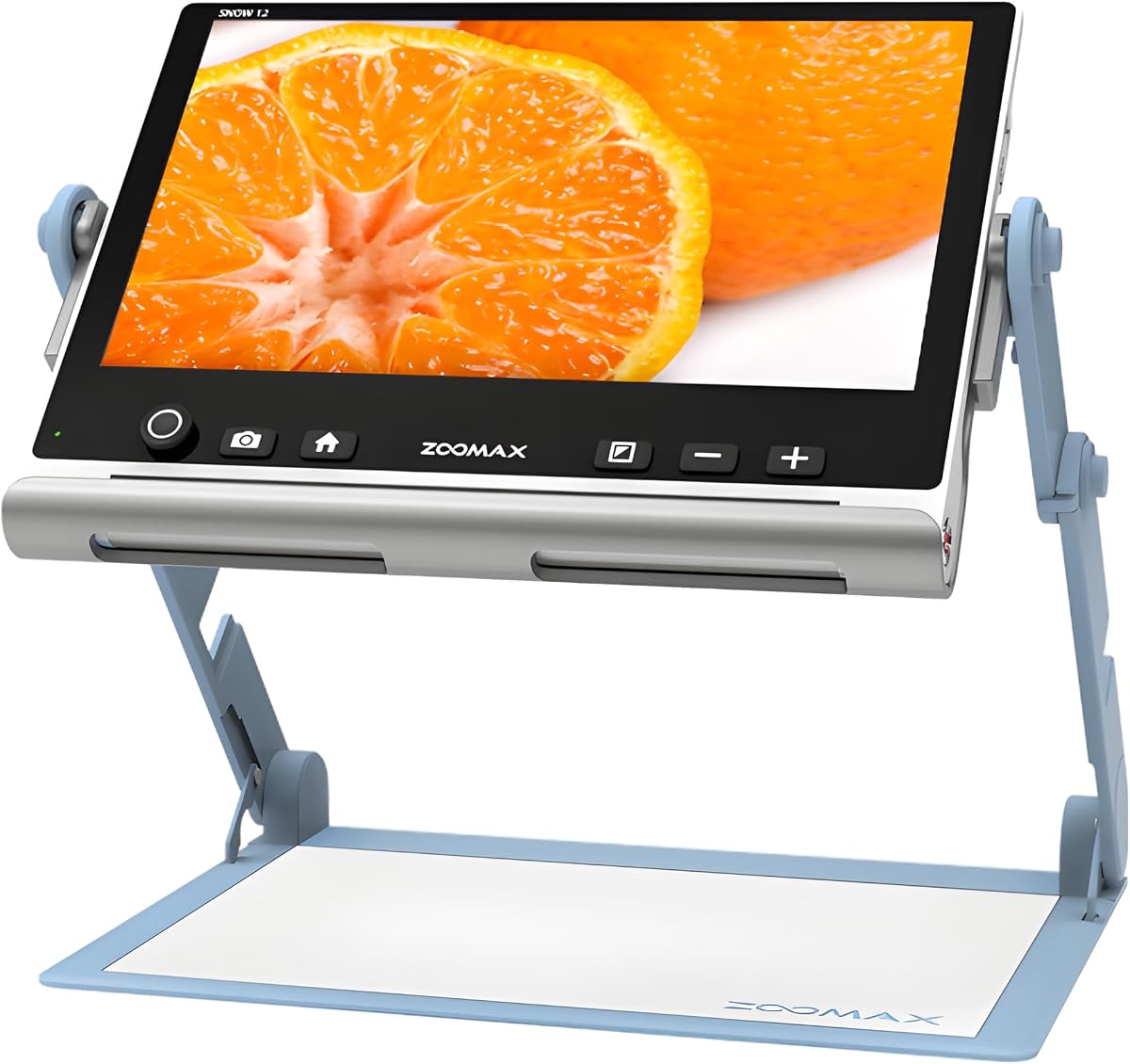
The Zoomax Snow 12 Inch magnifier brings premium features to the table, including a large 12-inch HD display that offers exceptional viewing comfort. Its OCR technology and text-to-speech functionality allow users to convert written text into spoken words, adding an auditory dimension to reading.
We may earn a commission when you buy through this link, at no additional cost to you.
With support for over 20 languages, this device is ideal for multilingual users or those traveling abroad. The ultra-portable design ensures it is easy to carry, while the versatile folding stand provides stability at different viewing angles.
The high-quality camera ensures clear and detailed visuals, which is crucial for reading small print or identifying objects. This level of technology is often reserved for high-end devices, making it a powerful choice for those needing advanced accessibility tools.
Investing in this premium model is suitable for users who value advanced features like speech output and large screens. It transforms reading from a visual task into a more accessible and efficient experience for those with profound low vision.
Optical Character Recognition allows the device to read text aloud, which is particularly helpful for users who prefer auditory learning or have severe vision loss.
The 12-inch screen significantly reduces the need to move the device constantly, providing a stable field of view for extended reading sessions.
We may earn a commission when you buy through this link, at no additional cost to you.
This 5-inch digital magnifier from Eyoyo offers a robust feature set with a 4X to 32X zoom range and a powerful 4500mAh battery that supports over 4 hours of continuous use. It is designed to provide clear and sharp displays for comfortable reading.
We may earn a commission when you buy through this link, at no additional cost to you.
The customizable viewing options include 17 color modes and 5 brightness levels, allowing users to personalize their experience. The device remembers preferred settings, making it convenient for daily use without constant adjustments.
The photo capture and playback functions, along with TF card support, enable users to save images for reference. Connecting to a TV via AV output further enhances visibility for those who prefer a larger display at home.
For users who need a reliable handheld magnifier with solid battery performance, this model is a strong choice. It balances portability with powerful magnification, making it suitable for both home and on-the-go reading tasks.
The high capacity battery ensures that users can rely on the device for longer periods without frequent recharging, which is useful for travel.
Saving images allows users to keep records of text or documents they might need to revisit later without carrying physical copies.
We may earn a commission when you buy through this link, at no additional cost to you.
This electronic reading aid is specifically noted for helping those with macular degeneration by providing clear and sharp text enlargement. The 2X to 32X zoom range combined with 26 color modes ensures that users can find the perfect setting to enhance visibility and reduce eye strain.
We may earn a commission when you buy through this link, at no additional cost to you.
The integrated design of the handle and bracket allows for comfortable positioning without hunching over. The memory function retains user settings, ensuring a consistent experience every time the device is used.
With HD LCD technology and professional image processing, the device maintains clarity even at high magnification levels. Connecting to a TV provides a larger display option, which is beneficial for extended reading sessions at home.
This model is an excellent option for users prioritizing comfort and clarity. Its features are tailored to improve daily living for those with significant visual impairments, making reading and writing more accessible and enjoyable.
The advanced DSP technology ensures that text remains sharp and does not blur at high zoom levels, which is critical for effective reading.
The ability to save settings means users do not have to waste time recalibrating the device every time they turn it on.
We may earn a commission when you buy through this link, at no additional cost to you.
The Eschenbach SmartLux is a premium handheld digital magnifier that offers a lightweight and portable solution for users with low vision. It provides magnification levels from 5X to 12X with five viewing modes, making it versatile for different tasks.
We may earn a commission when you buy through this link, at no additional cost to you.
Designed for convenience, it features image capture capabilities that allow users to save photos of important text. The HD video quality ensures that the display is clear, and the included cleaning cloth helps maintain the lens and screen.
While the zoom range is more modest compared to other models, the build quality and reliability are standout features. It is particularly useful for quick reading tasks where a compact and easy-to-hold device is preferred.
For users who prefer a reputable brand and a more streamlined device, this magnifier is a solid choice. It offers a reliable and high-quality experience for those who do not need extreme zoom levels but value precision and durability.
Eschenbach is known for optical quality, and this device reflects that through its clear display and durable construction.
Its lightweight design makes it easy to carry in a pocket or bag, ensuring it is always available when needed.
We may earn a commission when you buy through this link, at no additional cost to you.
This digital magnifier offers an impressive zoom range from 3X to 48X, making it highly versatile for various reading needs. The simplified buttons and memory function ensure that it is easy to use for elderly users or those with visual impairments.
We may earn a commission when you buy through this link, at no additional cost to you.
The foldable handle design makes it comfortable to hold for extended sessions, and the ability to connect to a TV provides a larger viewing area. The high-resolution screen ensures that text is clear and distortion-free.
While it is recommended for short reading tasks rather than long novels, it excels at reading labels, maps, and small print. The memory function saves user settings, providing a consistent and personalized viewing experience.
This model is a great choice for users who need a flexible tool for daily tasks. It balances high magnification with ease of use, making it a practical aid for individuals with low vision looking to improve their independence.
The wide zoom range allows users to switch between reading small details and scanning larger text with ease.
The simplified button layout reduces confusion, allowing users to operate the device intuitively without a learning curve.
We may earn a commission when you buy through this link, at no additional cost to you.
Choosing the right digital magnifier involves considering several factors to ensure it meets your specific visual needs and lifestyle. Here are key aspects to evaluate before making a purchase.
Screen size impacts how comfortable the reading experience is. Larger screens like 5 inches or 12 inches offer more space for text, reducing the need to move the device frequently. Resolution is equally important; higher resolution ensures that text remains sharp and clear at high zoom levels.
Look for screens with at least 800×480 resolution to avoid pixelation and ensure legibility during extended use.
The zoom range determines how much you can enlarge text or images. Models typically offer ranges from 2X up to 48X. If you need to read very small text, a higher maximum magnification is beneficial.
Consider your specific needs; for general reading, 2X to 32X is often sufficient, while specialized tasks may require higher zoom.
Color modes allow you to change the contrast between text and background. This is crucial for users with color blindness or those who find certain color combinations easier on the eyes. More color modes provide greater flexibility.
Ensure the device offers at least a few options like white on black or yellow on blue to suit your preference.
If you plan to carry the magnifier with you, weight and size are important. Handheld models are lighter but have smaller screens, while desktop units are heavier but offer better viewing options.
Choose a device that you can carry comfortably for the duration of your typical usage.
Battery life determines how long you can use the device without plugging it in. Look for models with rechargeable batteries that support several hours of continuous use.
Check the battery capacity and estimated usage time to ensure it meets your daily needs.
Some magnifiers allow connection to a TV or computer via HDMI or AV output. This can significantly enhance the viewing experience for home use by providing a larger screen.
If home use is a priority, ensure the device supports external display connections.
Simplified buttons and memory functions make the device more user-friendly, especially for elderly users. Look for intuitive interfaces that do not require complex setup.
Test the device to ensure that buttons are large and easy to press.
Features like OCR (optical character recognition) and text-to-speech can add significant value by converting text to audio. These are helpful for users who need auditory assistance.
Consider if these advanced features are necessary for your workflow or daily tasks.
To start using your digital magnifier, charge the battery fully and turn it on. Place the device over the text you want to read and adjust the zoom level until the text is clear and comfortable.
Utilize the color modes to find a setting that reduces eye strain. Many users prefer high contrast modes like white text on a black background for better readability.
Clean the lens and screen regularly with a soft cloth to prevent dust and smudges from affecting the image quality. Store the device in a safe place to avoid damage to the screen or lens.
Digital magnifiers use cameras and screens to enlarge text, offering adjustable zoom and color options. Traditional magnifiers are static glass lenses that provide a fixed magnification level and no contrast settings.
Yes, many digital magnifiers have built-in lights that illuminate the text. This feature helps users read in dim environments where a traditional magnifier might not be effective.
Yes, simplified models with large buttons and high contrast modes are suitable for children. They can help kids read text more comfortably and reduce eye strain during learning.
Most digital magnifiers work offline and do not need an internet connection. However, some premium models with OCR or text-to-speech features may require Wi-Fi for updates.
Consider where you will use the device. Smaller screens are better for portability, while larger screens are more comfortable for home use. Think about your travel habits versus home reading needs.
OCR stands for Optical Character Recognition. It allows the device to scan text and convert it into digital text that can be read aloud by a text-to-speech engine.
Some models support connection to computers or TVs via USB, HDMI, or AV cables. Check the device specifications to see if it supports external display outputs.
It is recommended to clean the lens and screen every few days or whenever you notice smudges. Use a microfiber cloth to avoid scratching the surface.
Choosing a digital magnifier depends largely on your specific visual needs and how you plan to use it. Whether you prioritize portability or a larger screen, the options listed here provide a range of solutions for different requirements.
Focus on features like zoom range, screen resolution, and ease of use to find a device that enhances your daily reading experience. The right tool can make a significant difference in your independence and quality of life.
Remember that prices and availability can change, so always check the latest details on product pages before buying. Consider your budget and the features that matter most to you when making your final decision.