
CENMATE Aluminum 8 Bay Hard Drive Enclosure
4.3Editor score
USB 3.0 interface
Tool-free HDD installation
Hot swappable drive bays
Finding the right storage solution is crucial for professionals needing high capacity and speed. An 8 Bay Hardware RAID Enclosure offers expandability and data protection for demanding workflows involving large media files and backups.
We compared ten top-rated models based on transfer speeds, build quality, cooling systems, and compatibility with various drive types. Our analysis highlights key features that matter most for enterprise and personal storage needs.
Each pick showcases specific strengths like Thunderbolt connectivity, hot swap capabilities, or budget-friendly DAS options. Please note that prices and availability change frequently, so check current listings before purchasing your next storage array.
4.3Editor score

5.0Editor score

3.7Editor score
As an Amazon Associate we earn from qualifying purchases.
This side-by-side comparison highlights the core specifications and unique features of each model to help you decide which enclosure fits your specific performance and budget requirements.

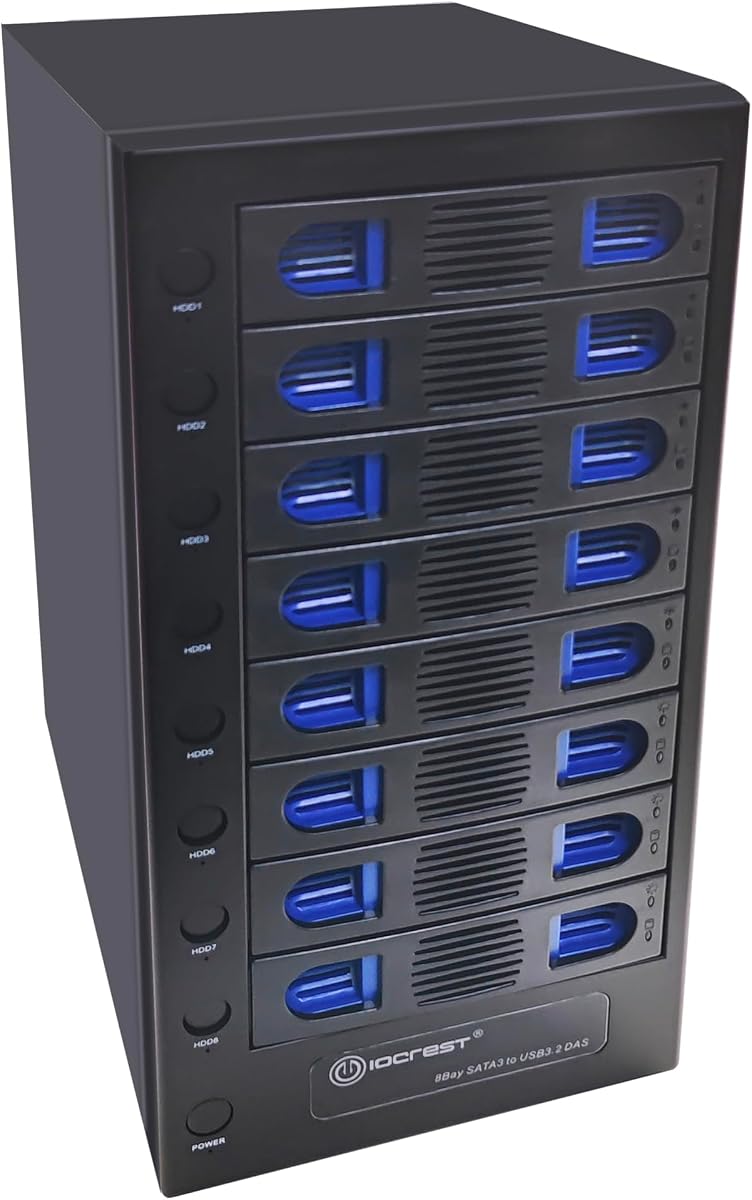


The CENMATE Aluminum 8 Bay Hard Drive RAID Enclosure is an affordable option for those needing significant storage capacity. It supports various RAID modes and offers a sturdy aluminum build.
We may earn a commission when you buy through this link, at no additional cost to you.
Its standout feature is the flexibility to configure RAID setups like RAID 0 or 5, which provides both speed and redundancy. The tool-free design makes installing drives straightforward for users.
However, users should be aware that fan noise can reach 50 decibels, which might be distracting in quiet environments. Careful drive testing is recommended before full setup to avoid issues.
This enclosure is best for individuals or small businesses looking for a cost-effective way to manage large amounts of data without breaking the bank.
Supports eight different RAID modes including RAID 0, 5, and 10 for flexible data management strategies.
Built with two 2.9 inch fans and aluminum alloy to ensure drives stay cool during extended usage periods.
We may earn a commission when you buy through this link, at no additional cost to you.
The SanDisk Professional G-RAID Shuttle 8-Bay is a powerhouse for professionals handling 4K and 8K video workflows. It offers massive capacity and Thunderbolt 3 speeds.
We may earn a commission when you buy through this link, at no additional cost to you.
Its pre-configured RAID 5 setup ensures data redundancy while maintaining high read write performance. The removable Ultrastar drives make it easy to transport data securely.
While the performance is top-tier, the price point is significantly higher than other options. It is also quite large, requiring dedicated space on a desk or shelf.
This drive is the ultimate choice for video editors and studios needing reliable, fast, and portable high-capacity storage for critical projects.
Achieves read speeds up to 1900MB/s and write speeds up to 2000MB/s for rapid large file transfers.
Powered by eight removable Ultrastar hard drives designed for mission-critical footage and demanding workflows.
We may earn a commission when you buy through this link, at no additional cost to you.
This CENMATE enclosure focuses on simplicity and direct access storage without RAID complexity. It allows users to swap drives while the system is running.
We may earn a commission when you buy through this link, at no additional cost to you.
The daisy chain feature expands potential storage capacity significantly by connecting up to three devices. It is great for archiving large libraries of files.
Users might find the lack of hardware RAID limiting for redundancy needs. Also, the fan noise level is similar to other models in this category.
It is ideal for users who need quick access to multiple drives and want to expand storage easily over time without complex setup.
Supports hot swapping allowing users to replace hard drives without powering off the device for convenience.
Features a USB HOST port to daisy chain up to three devices for up to 480TB storage expansion.
We may earn a commission when you buy through this link, at no additional cost to you.
The OWC ThunderBay 8 is a reliable external storage solution designed to work seamlessly with Mac and Windows systems via Thunderbolt. It offers eight universal bays for drives.
We may earn a commission when you buy through this link, at no additional cost to you.
Its quick drive swap trays with thumb screws make changing drives easy and fast. The dual Thunderbolt ports allow you to chain multiple units for massive storage expansion.
While it does not include a RAID card, it provides the physical platform to manage drives efficiently. The build quality is robust, ensuring durability over years of use.
This enclosure is perfect for creative professionals who need a dependable base for high-speed storage without requiring complex hardware RAID configurations.
Includes dual Thunderbolt 3 ports allowing you to connect up to six units for up to 1152TB total storage.
Requires no drivers and comes with Thunderbolt 3 cable for immediate use upon connection.
We may earn a commission when you buy through this link, at no additional cost to you.
This model upgrades the interface to USB 3.2 Gen 2 providing faster data transfer speeds than standard USB 3.0. It retains the hot swap and tool-free benefits.
We may earn a commission when you buy through this link, at no additional cost to you.
The Type-C interface supports various computer ports including Thunderbolt 3 and 4 for broad compatibility. It is a solid choice for modern laptops and desktops.
As with other models, the fan noise should be considered if placed in a quiet office. The lack of RAID means you rely on software solutions for backups.
It is a great upgrade for users needing faster USB speeds without the higher cost of Thunderbolt enclosures while maintaining easy drive management.
Equipped with advanced chip to reach up to 10Gbps under UASP control for fast file transfers.
The Type-C interface supports various interfaces including USB 3.0, 3.1, 3.2, Thunderbolt 3, and 4.
We may earn a commission when you buy through this link, at no additional cost to you.
This enclosure stands out with a smart fan function that adjusts speed based on temperature for better thermal management. It supports large drives up to 22TB each.
We may earn a commission when you buy through this link, at no additional cost to you.
Independent control switches for each drive allow you to power off specific drives individually reducing power consumption and noise. The steel housing adds durability.
Users should note that testing drives before full setup is recommended to ensure all units work correctly. The learning curve for managing independent switches might be steep.
It is an excellent choice for users needing robust cooling control and support for high-capacity drives without complex RAID requirements.
Built-in thermal sensor supports Auto and Manual modes with 3 levels of fan speed for efficient cooling.
Independent control switch for each drive allows drives to be powered off individually saving energy.
We may earn a commission when you buy through this link, at no additional cost to you.
The OWC ThunderBay Flex 8 is more than an enclosure it includes a PCIe slot for adding graphics cards or capture cards. It supports a wide range of drive types.
We may earn a commission when you buy through this link, at no additional cost to you.
Front USB ports and card readers make it a full dock for creative workflows requiring quick access to SD cards. The PCIe x16 connector expands computer capabilities.
Managing the various features requires some technical knowledge compared to simpler DAS units. The price reflects its multi-functionality as a storage and expansion hub.
This is best for advanced users who need both massive storage and hardware expansion in one device to upgrade their workstation performance.
Includes PCIe x16 connector and x4 lane slot for audio video capture networking or hardware RAID cards.
Front mounted USB-C and USB-A 10Gb/s ports plus SD and CFexpress card readers for peripheral access.
We may earn a commission when you buy through this link, at no additional cost to you.
This QNAP enclosure is designed primarily to expand QNAP NAS systems via a fast USB-C connection. It offers a convenient desktop tower design for easy placement.
We may earn a commission when you buy through this link, at no additional cost to you.
The free QNAP JBOD Manager utility allows you to monitor drive health and manage configurations directly from the host system. It simplifies storage scaling.
If you do not use a QNAP NAS, its utility is reduced compared to other standalone options. It is a specialized tool for existing QNAP users.
It is the go-to solution for QNAP owners needing to add storage capacity quickly without purchasing a whole new NAS system.
Uses free QNAP JBOD Manager utility or QTS app to monitor drive health and manage configurations.
Features USB 3.2 Gen 2 Type-C port delivering up to 10Gbps for rapid file access and backup.
We may earn a commission when you buy through this link, at no additional cost to you.
This case allows you to build your own NAS server using standard motherboard components. It includes hot swap bays for easy maintenance and upgrades.
We may earn a commission when you buy through this link, at no additional cost to you.
The dual independent air channel design separates heat from hard drives and the motherboard improving cooling efficiency. It supports low power NAS mainboards.
As it is a case not a complete unit you must supply the motherboard CPU and power supply yourself. This requires some technical assembly skills.
It is perfect for enthusiasts who want a customized media server or backup system without paying for pre-built hardware solutions.
Compatible with Mini-ITX and Micro-ATX motherboards and low power supplies for extreme freedom in setup.
Adopts upper and lower separated independent air duct design to dissipate heat efficiently and keep temps low.
We may earn a commission when you buy through this link, at no additional cost to you.
This ICY DOCK cage fits into an external 5.25 inch drive bay to hold eight 2.5 inch drives internally. It offers a compact way to add SSDs.
We may earn a commission when you buy through this link, at no additional cost to you.
Locking trays provide security and easy access to the drives. It supports both SATA and single channel SAS which increases drive compatibility.
Since it uses an external bay your case must have a free slot. It is not a stand-alone enclosure but an internal cage for specific desktop cases.
It is ideal for users needing high-density internal storage for SSDs or small form factor drives in a tower PC setup.
Full metal structure ensures durability and effective heat dissipation for connected storage drives.
Compatible drive types include SATA and SAS allowing flexible storage configurations with various drive types.
We may earn a commission when you buy through this link, at no additional cost to you.
Selecting the right enclosure requires balancing speed capacity and connectivity features to match your specific workflow and hardware ecosystem.
Interfaces range from USB 3.0 to Thunderbolt 3 and 4. Thunderbolt offers the fastest speeds for professionals while USB 3.2 Gen 2 is sufficient for general users.
Choose the interface that matches your computer ports and file transfer needs.
RAID enclosures support hardware redundancy and performance setups like RAID 5 or 10. Direct Attached Storage (DAS) models simply display drives without RAID capabilities.
DAS is simpler and cheaper but RAID provides better data protection for critical files.
Ensure the enclosure supports both 2.5 and 3.5 inch drives if you plan to mix SSDs and HDDs. Check max capacity per drive to avoid limitations.
Look for models that support your specific drive size and capacity needs.
Eight drives generate significant heat so effective cooling is essential. Look for aluminum housings or active fans with adjustable speeds.
Good cooling extends drive life and prevents performance throttling.
Hot swap allows you to remove and insert drives without shutting down the system. This is vital for servers or frequent data swapping tasks.
Prioritize hot swap if you need continuous uptime or frequent access.
Aluminum and steel housings protect drives better than plastic. Check for features like locking trays or sturdy trays to prevent accidental drops.
Durable builds are essential for portable or frequently moved units.
Daisy chaining lets you connect multiple enclosures to one port. This expands total storage capacity beyond a single unit.
Check if the enclosure has dedicated ports for daisy chaining devices.
Some models come with management software like SoftRAID or JBOD managers. These tools help monitor health and configure settings easily.
Included software can save time on setup and maintenance.
Always test hard drives individually before inserting all of them into the enclosure to identify bad drives early. This prevents data loss and setup errors during the initial configuration.
Keep the enclosure in a well-ventilated area to ensure the cooling fans function properly. Dust buildup can block airflow and cause overheating so clean vents regularly.
Use high-quality cables to ensure stable power and data transfer. Low quality cables may lead to disconnections or reduced speeds affecting your performance.
Most modern enclosures are compatible with both Mac and Windows systems. However, some proprietary software may be limited to one OS so check product descriptions for OS requirements.
Yes, most 8 Bay enclosures require an external power adapter because USB cannot supply enough power for eight spinning drives. Always use the included adapter for stable operation.
Thunderbolt offers faster transfer speeds and daisy chaining compared to standard USB-C. Look for the Thunderbolt icon on the port to distinguish high speed options from standard data transfer.
Switching RAID modes often requires reformatting the drives so always back up data before changing settings. Some models allow switching but this results in data loss.
Many enclosures support both sizes but may include mounting adapters for 2.5 inch drives. Check the specifications to ensure your drive size is supported without extra hardware.
With proper care and ventilation, these enclosures can last many years. Regularly monitoring drive health and keeping the unit clean helps extend the lifespan of the unit.
The SanDisk Professional G-RAID Shuttle remains the top choice for professional workflows needing speed and capacity. Its Thunderbolt connectivity and pre-configured RAID make it a premium solution.
For budget conscious users the CENMATE Aluminum options provide excellent value with essential features like hot swap and decent build quality. They suit general storage needs well.
Remember to check current prices and availability before buying as stock levels fluctuate. Choose the model that fits your current hardware and future expansion plans.