
Cable Matters 2-Pack 6-Pin to 8-Pin PCIe GPU Power Adapter Cable
4.7Editor score
Secure PCIe connections
Convenient 2-pack design
Supports select Radeon cards
This guide compares the top 10 GPU power adapters for 2026, covering 12VHPWR, PCIe 6-pin, and 8-pin converters for reliable graphics card performance.
Selecting the right GPU power adapter ensures your graphics card receives stable electricity without risking hardware damage or system instability during intense gaming sessions.
We evaluated ten leading adapters based on connector types, build quality, wattage ratings, and user feedback to help you find the perfect match for your setup.
Each pick highlights specific strengths and trade-offs so you can choose confidently. Note that pricing fluctuates often, so verify current offers before purchasing your component.
4.7Editor score

4.7Editor score

4.2Editor score
The following table provides a side-by-side comparison of all ten products to help you quickly identify the best adapter for your specific graphics card and power supply configuration.


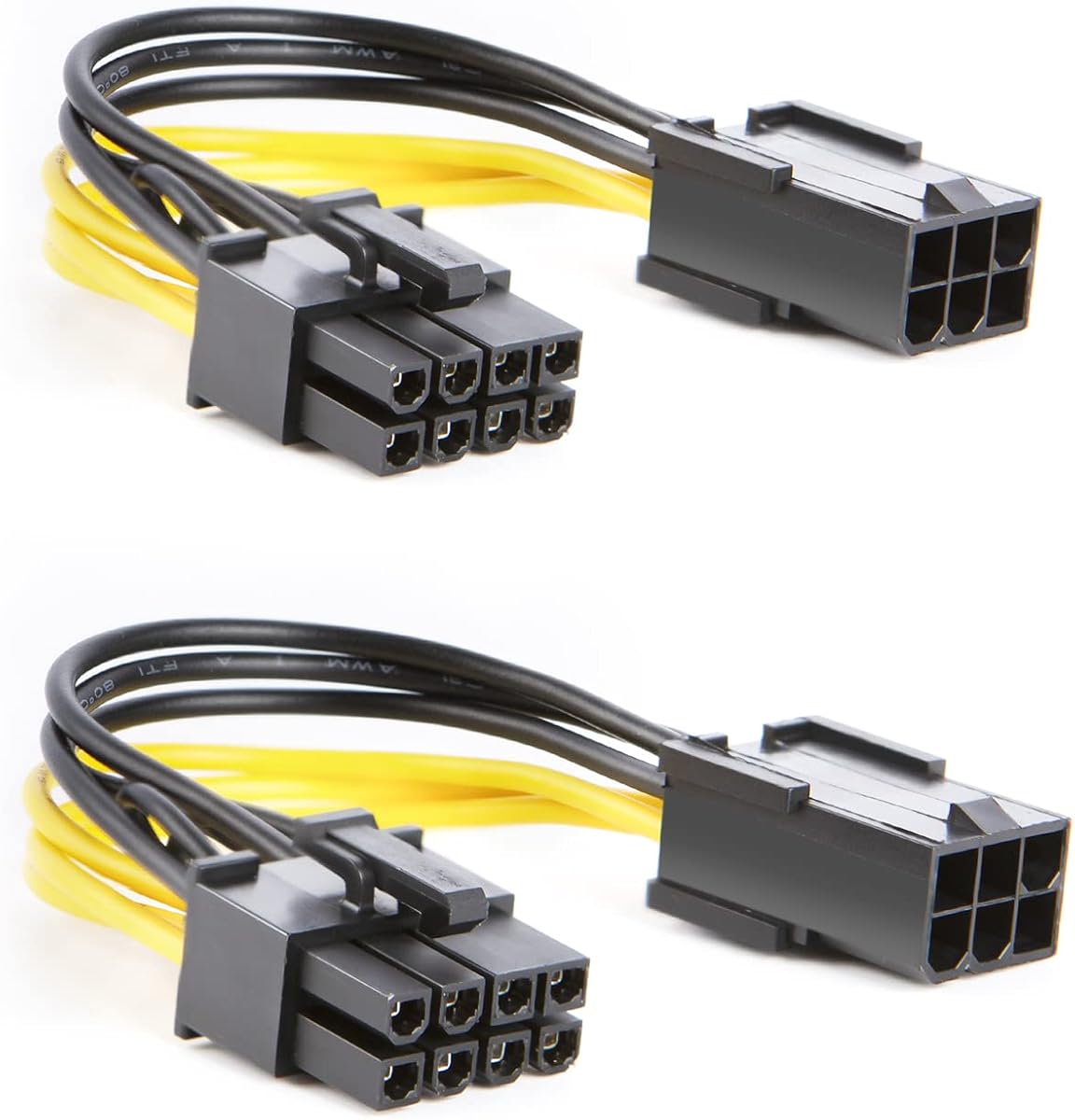


The Cable Matters 2-Pack adapter offers an affordable way to connect graphics cards requiring 8-pin power when your PSU only provides 6-pin connectors.
We may earn a commission when you buy through this link, at no additional cost to you.
Its locking latch ensures the connection stays secure during system movement, while the 2-pack allows one to be used immediately and one kept as a spare.
This adapter does not increase power capacity so it is strictly for compatibility and requires your PSU to already supply sufficient current for your specific GPU.
Budget builders needing basic connectivity without breaking the bank will find this product a reliable solution for lower power demanding graphics cards.
The locking latch mechanism prevents accidental disconnection during transport or vigorous use cases ensuring consistent power delivery to your GPU.
Buying a pack of two provides excellent value allowing immediate installation and future readiness for additional builds without extra costs.
We may earn a commission when you buy through this link, at no additional cost to you.
This adapter solves common overheating issues caused by bent factory cables on high-end GPUs like the RTX 4070 Super by offering a right-angle connection design.
We may earn a commission when you buy through this link, at no additional cost to you.
Its 13-inch length provides ample room to route power cables neatly in smaller cases reducing strain on the connector and improving airflow around the GPU.
Constructed with 16AWG tinned copper wire it supports up to 400W peak power ensuring stable voltage transmission even under heavy gaming loads or rendering tasks.
Gamers and creators using RTX 40 series cards will appreciate the reliability and clean build quality this extension cable brings to their workstation or gaming rig.
The right-angle connector reduces physical stress on the plug preventing micro-fractures that often lead to power instability or overheating during operation.
Included transparent acrylic clips help route the extension cord neatly ensuring a tidy interior that improves airflow and aesthetics simultaneously.
We may earn a commission when you buy through this link, at no additional cost to you.
The NZXT 12VHPWR adapter delivers up to 600 watts of stable power to modern 40 Series graphics cards without needing an ATX 3.0 power supply.
We may earn a commission when you buy through this link, at no additional cost to you.
Its compact design is a significant upgrade over the bulky standard adapter included with NVIDIA cards making cable routing easier and more aesthetically pleasing.
This cable guarantees compatibility with NZXT C-Series Gold ATX 2.X PSUs providing peace of mind that the power delivery chain will remain stable under load.
Premium builders who prioritize clean cable management and system safety should consider this adapter for high-performance NVIDIA setups requiring reliable power delivery.
Rated for 600 watts this adapter ensures high-end GPUs receive sufficient stable power reducing risk of system instability during demanding workloads.
The sleek black design blends seamlessly into modern PC builds offering a professional look that matches premium components and cases.
We may earn a commission when you buy through this link, at no additional cost to you.
Fasgear offers a robust extension cable supporting up to 600W using 16AWG tinned copper wire that resists oxidation and ensures stable high current transmission.
We may earn a commission when you buy through this link, at no additional cost to you.
The cable is designed for RTX 4090 and similar cards requiring 16-pin inputs providing a clean alternative to stiff factory cables in tight PC cases.
Users must ensure their power supply has two free 8-pin PCIe ports for this adapter to function correctly and safely without risking system damage.
PC builders seeking high power reliability and neat cable management will find this Fasgear adapter a solid middle-ground option between budget and premium tiers.
Tinned copper wire prevents oxidation over time ensuring consistent conductivity and reducing resistance that could lead to heat buildup.
Four transparent acrylic clips allow users to secure the cable neatly preventing it from interfering with fans or other components inside the case.
We may earn a commission when you buy through this link, at no additional cost to you.
This conversion cable allows power supplies with native 12VHPWR output to connect to older GPUs using standard dual 8-pin PCIe connectors effectively bridging generations.
We may earn a commission when you buy through this link, at no additional cost to you.
Its 6.8-inch length is ideal for compact cases where extra slack could cause clutter or obstruct airflow to other components like CPU cooling units.
The cable uses 16AWG copper wire to support up to 600W ensuring that high performance cards receive stable power without voltage drops under load.
Builders with new PSUs wanting to use older GPUs will find this short conversion cable a practical and reliable solution for their system configuration.
This cable solves compatibility issues between new ATX 3.0 power supplies and older graphics cards using standard PCIe power connectors seamlessly.
The short 6.8-inch length keeps cable management simple and prevents excess wire from obstructing airflow in small form factor builds.
We may earn a commission when you buy through this link, at no additional cost to you.
This extension cable offers a 13-inch length that provides flexibility to route power cleanly away from GPU fans preventing interference and overheating.
We may earn a commission when you buy through this link, at no additional cost to you.
The 16AWG tinned copper wire ensures stable voltage transmission supporting up to 450W peak power which is sufficient for most mid-range and high-end RTX cards.
The nylon braided fiber sleeve protects the internal wires from abrasion and allows the cable to bend easily without kinking inside the PC case.
Users looking for a neat tidy look with better cable handling than stock cables will find this PCIE 5.0 extension a reliable upgrade for their build.
The high-density flexible protective sleeve allows the cable to bend easily around corners reducing strain on the 16-pin connector.
Upgraded 16AWG wire ensures stable voltage transmission which is critical for maintaining performance stability during high-load gaming sessions.
We may earn a commission when you buy through this link, at no additional cost to you.
CableCreation provides a certified safe adapter that converts 6-pin connectors to 8-pin ensuring reliable power for graphics cards needing slightly more wattage.
We may earn a commission when you buy through this link, at no additional cost to you.
The pure copper conductors offer superior electrical conductivity compared to cheaper materials helping maintain stable current flow during normal usage scenarios.
Supporting a maximum of 75 watts this adapter is ideal for mid-range cards that do not require extreme power delivery but need a secure connector interface.
PC users needing a quick affordable fix for power compatibility issues will find this 2-pack a practical and durable solution for their systems.
RoHS certification ensures the materials used in the cable are environmentally friendly and meet safety standards for electronic components.
Pure copper conductors minimize electrical resistance helping to prevent unnecessary heat generation during power transmission to the GPU.
We may earn a commission when you buy through this link, at no additional cost to you.
The Corsair Power Bridge offers a specialized 180-degree bend solution that prevents power cables from pressing against the side panel of PC cases.
We may earn a commission when you buy through this link, at no additional cost to you.
Its high thermal endurance allows it to withstand temperatures up to 105°C ensuring reliable operation even with the most power-hungry modern graphics cards.
This adapter helps maintain clean cabling aesthetics by reducing physical stress on the power connector which can extend the life of the GPU port.
Builders focused on airflow and aesthetics in tight cases will appreciate how this bridge directs power away from sensitive internal components efficiently.
Built to withstand high heat this bridge maintains connection integrity even when ambient temperatures rise inside the PC during extended gaming sessions.
The right angle design prevents cables from obstructing fans or blocking airflow ensuring better cooling for GPU and CPU components.
We may earn a commission when you buy through this link, at no additional cost to you.
EVGA PowerLink improves cable management by providing an adapter with integrated solid state capacitors that help filter power noise for cleaner electricity.
We may earn a commission when you buy through this link, at no additional cost to you.
Its adjustable spacing allows users to connect power sources to GPUs more flexibly reducing strain on cables inside the PC chassis.
This adapter is designed primarily for NVIDIA Founders Edition and EVGA RTX 20 and 16 series cards providing legacy support for older but still capable systems.
Enthusiasts who value power quality and clean cable routing on legacy builds will find this unique PowerLink adapter a beneficial upgrade for their system.
Integrated capacitors filter power noise ensuring cleaner electricity reaches the GPU which can help stabilize performance during sensitive tasks.
Adjustable connector spacing accommodates different GPU layouts making installation easier in cramped cases where standard cables fall short.
We may earn a commission when you buy through this link, at no additional cost to you.
This adapter supports a versatile configuration connecting a 16-pin GPU port to three separate 8-pin PSU connectors for maximum power delivery stability.
We may earn a commission when you buy through this link, at no additional cost to you.
With a robust aluminum alloy build it delivers up to 600W ensuring that next-generation graphics cards receive sufficient power even under peak usage conditions.
The 90-degree angled connector allows for cleaner routing and helps reduce strain on the GPU port while improving airflow in compact computer cases.
Users with high-end power supplies and demanding graphics cards will find this Type B adapter a strong choice for ensuring consistent stable performance.
Connecting to three PSU ports distributes the load across multiple circuits significantly reducing risk of overheating during intensive workloads.
Aluminum alloy construction provides better heat dissipation than plastic adapters helping to keep connections cooler and safer during use.
We may earn a commission when you buy through this link, at no additional cost to you.
Selecting the right GPU power adapter involves understanding your graphics card requirements and your power supply's capabilities to ensure safety and performance.
Always match the adapter connector type to both your graphics card and power supply. Common connectors include 6-pin, 8-pin, and the newer 12VHPWR 16-pin standards.
Confirm the specific pin layout on your GPU to avoid forcing incompatible connectors which could damage ports or cause power failures.
Check the maximum wattage the adapter supports to ensure it handles your GPU's power draw safely. High-end cards may require adapters rated for 600W.
Never rely on an adapter that exceeds its rated capacity as this can lead to melting cables or voltage instability during gaming.
Consider the physical length of the adapter to ensure it reaches without stretching. Too short a cable strains connectors while too long creates clutter.
Shorter cables improve airflow in compact cases but longer ones offer more flexibility for routing in larger chassis.
Look for cables made with tinned copper conductors which resist oxidation better than standard copper and ensure stable conductivity over time.
Aluminum alloy housing offers better heat dissipation compared to plastic and helps keep connections cool during extended high-load usage.
Right-angle adapters help route cables away from the GPU fans preventing airflow obstruction and physical stress on the connector port.
This design is especially useful in tight cases where straight cables might press against the side panel or other components.
Choosing reputable brands ensures you get reliable safety certifications like RoHS that protect your hardware from electrical hazards.
Trusted brands often include warranty support and customer service which adds peace of mind for long-term system reliability.
Verify your power supply supports the required standard whether it is ATX 2.X or ATX 3.0 to ensure proper voltage delivery to the GPU.
Newer PSUs often include native 12VHPWR cables reducing the need for adapters and improving safety for high-wattage graphics cards.
Some adapters come with cable management clips or combs that help organize wires and improve internal airflow within your PC case.
These small accessories add value by making your build cleaner and easier to maintain over time.
Turn off your PC and unplug the power supply before installing the adapter to prevent electrical shorts or accidental hardware damage.
Plug the adapter securely into both the power supply and the graphics card ensuring all latches click into place for a firm connection.
Regularly inspect your adapter for signs of wear or melting especially if you use high-wattage cards that generate more heat over time.
You can use a 6-pin to 8-pin adapter only if your power supply provides enough current through that 6-pin connector. High-end GPUs often require more power than a single 6-pin line can safely deliver so check your PSU specifications before installing.
The 12VHPWR and 16-pin connectors are technically the same interface type. The name 12VHPWR refers to the power standard while 16-pin describes the physical connector shape on the GPU.
No adapters do not increase the total power output of your power supply. They only convert connector types so you must ensure your PSU provides enough wattage to support your graphics card.
Right-angle adapters prevent the power cable from bending too sharply which reduces stress on the connector port. This design helps avoid connection issues that have been reported with straight cables on high-end GPUs.
Touch the adapter carefully after system use to check for unusual heat. If you detect significant warmth or smell burning you should stop using it immediately to prevent hardware damage or fire risks.
High-quality adapters from reputable brands are safe for long-term use provided they match your GPU and PSU wattage requirements. Always follow safety guidelines and inspect them regularly for wear.
We reviewed ten top adapters ranging from budget-friendly options to premium high-wattage solutions. The Cable Matters 2-Pack offers excellent value for basic needs.
For high-performance RTX 40 series cards the 16Pin GPU adapter or NZXT 12VHPWR adapter provide the reliability and safety required for stable power delivery.
Always check current prices and availability before purchasing to ensure you get the best deal on the adapter that fits your specific system configuration.