
ASUS Vivobook 14 Flip Laptop
5.0Editor score
OLED touchscreen with adaptive audio
Wi-Fi 7 connectivity support
US MIL-STD 810H durability
Finding a laptop with good hinges is essential for long-term durability and versatile usage. Whether you need a 2-in-1 convertible or a traditional clamshell, the hinge mechanism determines how well the device withstands daily wear and tear.
We have analyzed ten real products based on their build quality, hinge design, and user feedback. Our comparison covers various price points and form factors to help you find a reliable machine that fits your specific workflow and mobility needs.
Each pick highlights key features like 360-degree rotation or ergonomic lift designs. Please note that product availability and pricing can change frequently, so checking current details before purchasing is always recommended for the best value.
5.0Editor score

4.6Editor score

4.3Editor score
As an Amazon Associate we earn from qualifying purchases.
The following table provides a side-by-side overview of all ten selected laptops. We focus on display size, processor type, memory, and storage to highlight the core specifications that impact hinge stability and overall device longevity.
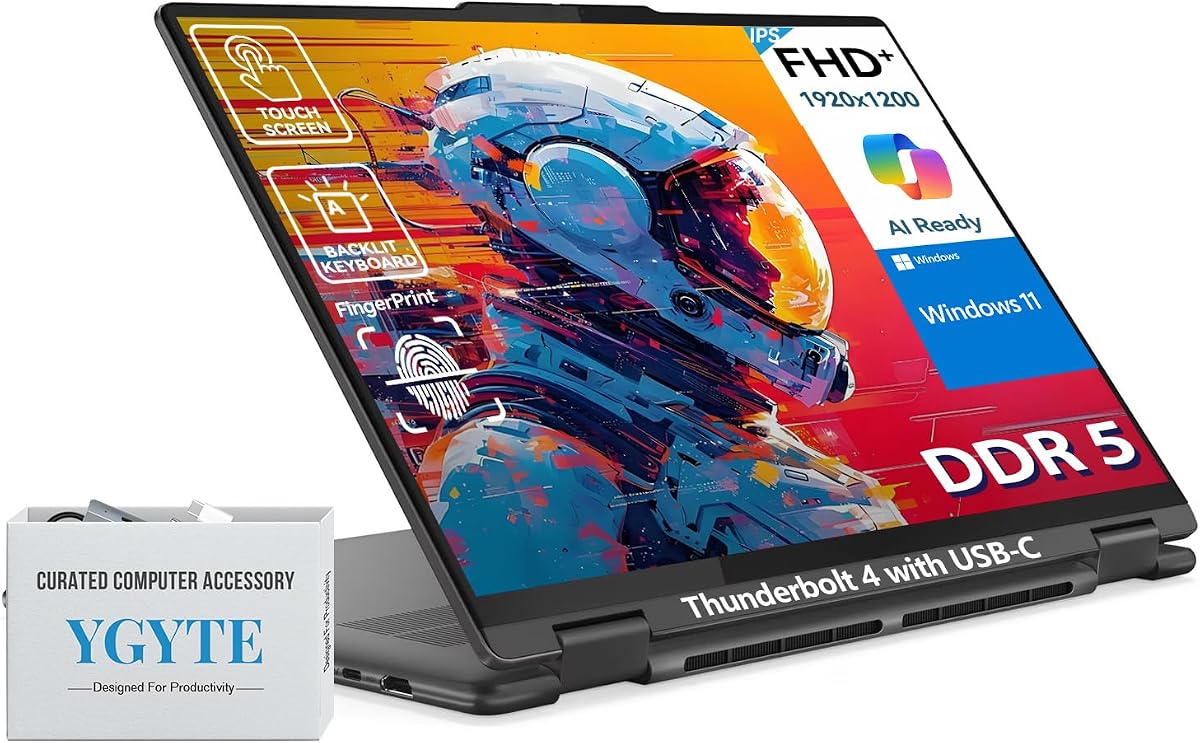


The Lenovo Yoga 7i stands out as a top choice for users seeking a reliable hinge mechanism. With a strong 4.6 rating, it offers a 360-degree flip-and-fold design that seamlessly transitions between laptop, tablet, tent, and stand modes.
We may earn a commission when you buy through this link, at no additional cost to you.
Its core strengths lie in the flexible hinge that maintains stability across multiple positions. The 16-inch 2K touchscreen provides vivid colors, while the Intel Core Ultra 7 155U processor ensures efficient multitasking for work and creativity.
Some trade-offs include a higher price compared to standard laptops. However, the ability to adjust the screen angle freely justifies the cost for those who value adaptability and robust build quality in their daily computing needs.
This device is ideal for professionals and students who need a versatile machine. We recommend it for anyone prioritizing hinge durability and screen flexibility without compromising on processing power or display quality.
The hinge allows effortless switching between modes, enhancing usability for presentations and media consumption.
The 2K display ensures sharp visuals, making it suitable for detailed design work and content viewing.
We may earn a commission when you buy through this link, at no additional cost to you.
This model emphasizes a durable metal chassis paired with a flexible 360-degree hinge. It is designed for business users and creators who need reliability and security features like a fingerprint sensor.
We may earn a commission when you buy through this link, at no additional cost to you.
Key strengths include the Intel Core Ultra 7 processor and 16GB high-bandwidth LPDDR5x RAM. This combination supports seamless AI-driven workloads and video editing while maintaining energy efficiency.
The main consideration is the potential variation in accessories included in the bundle. Users should verify the specific items before purchase to ensure they meet their connectivity and productivity needs.
Ideal for professionals seeking a secure and powerful convertible, this laptop offers enterprise-grade features. Its hinge design supports various workflows, making it a strong choice for mobile offices.
Built-in fingerprint sensors and Windows 11 Pro ensure your data remains protected during business travels.
The NPU boosts AI workloads, allowing for faster processing of creative and analytical tasks.
We may earn a commission when you buy through this link, at no additional cost to you.
The HP OmniBook 3 offers a spacious 17.3-inch display with a standard hinge designed for daily computing. It is rated 4.5 and focuses on delivering a balanced experience for media consumption and basic productivity.
We may earn a commission when you buy through this link, at no additional cost to you.
Its strengths include a vibrant IPS display with wide viewing angles and a battery that lasts up to 14 hours. The AMD Ryzen 3 30 processor handles everyday tasks smoothly without excessive power consumption.
Trade-offs involve the modest RAM and processor choice, which may limit heavy multitasking. However, for users primarily watching videos or browsing the web, these specs are sufficient and cost-effective.
This laptop is best suited for students or home users needing a larger screen. The hinge stability provides a reliable platform for long viewing sessions, making it a practical choice for entertainment.
With up to 14 hours of battery life, you can work or watch content throughout the day without constant charging.
The AMD Ryzen 3 30 ensures smooth performance for web browsing and document editing tasks.
We may earn a commission when you buy through this link, at no additional cost to you.
The ASUS Vivobook 14 Flip features a 360-degree hinge with a premium OLED display. Rated 5.0, it meets US MIL-STD 810H durability standards, ensuring robust build quality for rigorous use.
We may earn a commission when you buy through this link, at no additional cost to you.
Key strengths include the vibrant OLED screen and powerful Core Ultra 9 processor. The adaptive audio system adjusts sound based on orientation, enhancing the media experience in any mode.
The premium price reflects its advanced features and high-end materials. Users should consider the longevity of OLED panels if displaying static images for extended periods daily.
This is the top pick for creative professionals and tech enthusiasts. Its hinge allows versatile viewing angles, and the durability rating provides peace of mind for travelers.
Built to withstand rigorous conditions, this laptop offers reliable performance in various environments.
Sound adjusts automatically to your laptop orientation, ensuring immersive audio in any mode.
We may earn a commission when you buy through this link, at no additional cost to you.
The HP Envy x360 combines a modern hinge with a sleek aluminum chassis. With a 4.4 rating, it is known for its vibrant edge-to-edge touchscreen and quick charge capabilities.
We may earn a commission when you buy through this link, at no additional cost to you.
Strengths include the 15-inch display that minimizes bezels and the Intel Core i7 processor for robust multitasking. The metallic finish adds a touch of elegance to the portable design.
Users may notice the processor is slightly older compared to newer Ultra models. However, it remains highly capable for general productivity and entertainment tasks.
Best for professionals wanting a stylish convertible, this laptop offers reliability. Its hinge design supports creative workflows, making it a solid choice for designers and writers.
Recharge your battery to 50% in about 30 minutes, minimizing downtime during busy workdays.
The expansive screen provides more viewing area, enhancing immersion for media consumption.
We may earn a commission when you buy through this link, at no additional cost to you.
This Dell model features a unique design with lifted hinges that create an ergonomic typing angle. Rated 4.3, it focuses on efficient computing with a focus on eye comfort and productivity.
We may earn a commission when you buy through this link, at no additional cost to you.
Strengths include the ComfortView software that reduces harmful blue light emissions. The numeric keypad ensures quick data entry, which is useful for finance and admin tasks.
The design is practical but lacks high-end materials found in premium models. However, it provides a solid foundation for home office work and study.
Ideal for users prioritizing typing comfort and eye health. The hinge structure aids airflow and typing posture, making it a practical choice for long working hours.
Lifted hinges provide a natural typing position, reducing wrist strain during extended use.
Reduced blue light emissions help keep your eyes comfortable during long viewing sessions.
We may earn a commission when you buy through this link, at no additional cost to you.
The HP 17.3 inch Laptop offers a large display with a standard hinge design. Rated 4.3, it focuses on providing ample screen real estate for multitasking and entertainment.
We may earn a commission when you buy through this link, at no additional cost to you.
Strengths include a physical camera shutter for privacy and 16GB RAM for smooth multitasking. The IPS display ensures vibrant colors for movies and web browsing.
It lacks the flexible hinge found in convertibles, meaning it is best suited for traditional laptop use. However, the screen size compensates for this limitation by reducing the need for external monitors.
Best for users needing a large screen on a budget. The sturdy build supports everyday tasks effectively, making it a practical choice for home offices.
Physically close your camera when not in use to ensure complete privacy and peace of mind.
The 17.3 inch screen provides ample space for spreadsheets and video content simultaneously.
We may earn a commission when you buy through this link, at no additional cost to you.
This compact HP laptop is designed for basic mobility with a standard hinge. Rated 4.5, it offers a lightweight profile ideal for students and light home users.
We may earn a commission when you buy through this link, at no additional cost to you.
Strengths include its slim 0.71-inch profile and long battery life. The inclusion of Microsoft 365 adds value for document creation and collaboration tasks.
Performance is limited by the processor and RAM. It is best suited for web browsing and media consumption rather than heavy multitasking.
Best for students needing a portable device. The hinge is simple but effective for basic opening and closing, providing reliability for daily transport.
The thin design makes it easy to slip into bags for commuting or travel.
Access tools like Word and Excel to manage your daily tasks easily.
We may earn a commission when you buy through this link, at no additional cost to you.
The HP 17 inch Business laptop focuses on productivity with a reliable hinge. Rated 4.5, it is built for tasks requiring significant screen space and typing comfort.
We may earn a commission when you buy through this link, at no additional cost to you.
Strengths include the full-size numeric keypad and large anti-glare display. The AMD Ryzen 5 processor ensures responsive performance for business applications.
It lacks a convertible hinge but offers stability for traditional use. The included software adds value for professional tasks like reporting and data entry.
Best for business users needing a desktop replacement. The sturdy design supports heavy daily use, making it a practical choice for office environments.
Quickly enter data and perform calculations without needing an external calculator.
The screen reduces reflections, improving readability in various lighting conditions.
We may earn a commission when you buy through this link, at no additional cost to you.
This value laptop features a standard hinge with a strong focus on memory and connectivity. Rated 5.0, it offers 12GB RAM and an upgradeable SSD for expanding storage.
We may earn a commission when you buy through this link, at no additional cost to you.
Strengths include the high RAM configuration and multiple ports for peripherals. The Pentium Gold processor handles daily web browsing and document editing smoothly.
Storage can be upgraded to 1TB, which is a significant benefit for long-term use. The basic processor may limit advanced applications but remains reliable for daily tasks.
Best for students and home users needing expandability. The hinge provides standard stability for opening and closing, making it a solid entry-level choice.
The 12GB of RAM allows for better multitasking compared to standard budget laptops.
The M.2 SSD slot supports upgrades up to 1TB, ensuring room for future data.
We may earn a commission when you buy through this link, at no additional cost to you.
Choosing a laptop with a good hinge involves evaluating build quality and intended usage. This guide covers key factors to help you find a model that ensures durability and versatility.
The hinge mechanism determines whether a laptop is a standard clamshell or a 2-in-1 convertible. Convertibles feature 360-degree hinges that allow the screen to fold back completely, enabling modes like tent or stand. Traditional models have hinges that support opening angles up to 180 degrees but do not fold fully. Decide if you need flexibility for touch input or presentation modes.
Look for hinges that offer resistance and stability. A good hinge should feel solid without wobbling or excessive looseness when typing or adjusting the screen angle.
Materials like aluminum or magnesium alloys often indicate better hinge durability compared to plastic. Metal chassis models can withstand more stress and provide a more premium feel. Check if the laptop meets military standards like MIL-STD 810H for durability.
Metal builds often support the weight of the screen better, reducing wear on the hinge over time. Inspect product descriptions for mentions of sturdy construction or premium finishes.
Larger screens like 17 inches place more stress on the hinge mechanism. Ensure the device is designed to support the weight of the panel during opening and closing. Heavier laptops may require stronger hinges to prevent sagging or damage.
For travel, consider how the weight affects portability. A lightweight chassis with a reinforced hinge often offers the best balance between durability and mobility.
Many modern laptops route air through the hinge area to aid cooling. A well-designed hinge ensures unobstructed airflow, preventing overheating during heavy tasks. Check reviews to see if users report thermal issues near the base or screen.
Good thermal design supports the longevity of internal components. Proper ventilation prevents heat buildup that could weaken hinge materials or affect system performance.
An adjustable hinge allows you to position the screen for comfortable viewing. Look for models that offer multiple stable positions for different environments. This is especially important if you use a laptop in a car or on a soft surface.
Ergonomic designs often include lift hinges that elevate the keyboard. This improves typing posture and aids airflow. Check if the hinge supports a comfortable angle for long work sessions.
Touchscreens often require stronger hinges to handle finger pressure during interaction. Convertible models specifically support touch input in multiple orientations. If you use a stylus, ensure the hinge allows for a flat surface for writing.
OLED or high-resolution screens may add weight. Verify the hinge strength supports the display quality. High-end models often feature reinforced hinges for touch-enabled displays.
Hinges are subject to wear and tear. A strong warranty that covers mechanical failures can save you from replacement costs. Check the manufacturer's terms to see if accidental damage or hinge breakage is included.
Some brands offer on-site service for repairs. This ensures that if a hinge fails, a technician can fix it without you needing to ship the device. Prioritize brands with reliable support networks.
Premium hinge designs often come with higher price tags. However, investing in a sturdy laptop can save money in the long run by avoiding early replacements. Compare features against the cost to find the best value.
Budget models may have simpler hinges. Weigh the trade-offs between price and longevity. Sometimes a mid-range model offers better build quality than a low-end one.
Open and close the lid gently to preserve the hinge mechanism. Avoid forcing the screen open beyond its designed angle. Using two hands to open the laptop can distribute force evenly and prevent strain.
Keep the hinge area free of dust and debris. Use a soft cloth to wipe around the pivot points. Dust buildup can interfere with smooth movement or cause internal components to wear out faster.
If your laptop has a convertible hinge, ensure you place it on a stable surface when using tent or stand modes. Uneven surfaces can put lateral stress on the hinge, leading to potential damage over time.
Check the build materials such as aluminum or magnesium alloys. Look for certifications like military-grade durability testing. Reading user reviews about long-term usage also provides insight into real-world hinge reliability.
A standard hinge allows the screen to open up to 180 degrees. A 2-in-1 hinge allows 360-degree rotation, enabling modes like tent or tablet. This makes the 2-in-1 hinge more versatile but often requires stronger engineering.
Replacing a hinge often requires professional service. Most manufacturers offer on-site or mail-in repairs. Check your warranty terms to see if hinge damage is covered before attempting any DIY fixes.
The hinge mechanism itself does not directly impact battery life. However, using modes like tent might keep the screen on longer or change how the system manages power. Generally, the difference is minimal.
Loud hinges may indicate internal friction or lack of lubrication. High-quality hinges are designed to open silently. If a hinge becomes noisy, it might be a sign of wear that requires inspection.
Yes, convertible laptops are designed for stylus use. Ensure the screen is flat and stable when using a stylus. The hinge must support the weight of the pen and your hand without wobbling.
We explored ten laptops that excel in hinge design and build quality. The Lenovo Yoga 7i and ASUS Vivobook 14 Flip offer exceptional versatility with 360-degree hinges. Meanwhile, the HP models provide reliable standard hinge stability for traditional use.
Prioritize the hinge type based on your workflow. Convertibles are great for creative professionals and students needing flexibility. Standard models are ideal for those who value typing stability and longer battery life.
Always check current availability and pricing before making a final decision. A good hinge is an investment in the longevity of your device. Choose a model that fits your needs and usage habits for the best experience.