
VOYEE PC Controller
4.3Editor score
Wide Xbox Compatibility
Responsive Triggers
Rumble Feedback
Ergonomic Grip
This guide compares the top joysticks for Windows 11 across budget, mid range, and premium tiers to help you choose the best controller for flight simulation
Finding the right joystick for Windows 11 can transform your gaming experience. Whether you love flight simulators or action games, a quality stick offers precise control and immersion that keyboards cannot match for serious enthusiasts.
We evaluated ten top rated models based on compatibility, build quality, and feature sets. Each product was chosen for its ability to work seamlessly with modern PC operating systems and popular simulation software available today.
Each pick below highlights specific strengths and potential limitations for different users. Prices and availability change frequently so always verify the current deal before purchasing to ensure you get the best value for your setup.
4.3Editor score

4.4Editor score

4.0Editor score
This side by side comparison breaks down the key specifications and capabilities of each top pick. Use this table to quickly identify which model matches your specific gaming needs and budget constraints.






This joystick stands out as a top choice for Windows 11 users seeking accuracy. It features Hall Effect technology to prevent wear and drift over time. The 4.4 rating reflects strong performance in flight simulation environments.
We may earn a commission when you buy through this link, at no additional cost to you.
Its 16 programmable buttons allow detailed control setups without cluttering your desktop. The ambidextrous design ensures comfort regardless of your dominant hand. Independent axes provide smooth movement for all aircraft movements.
While excellent for PC gaming it lacks console compatibility which may limit versatility. The fixed cable can be cumbersome depending on your desk layout. These are minor issues given the overall build quality and precision.
Buy this if you want a reliable stick that lasts for years. It suits serious flight sim pilots who value precision above all else. The software support further enhances its long term value for enthusiasts.
This technology uses magnets instead of contacts to ensure the joystick does not wear out over years of heavy use.
Sixteen buttons plus a hat switch let you map complex commands easily using the included TARGET software for customization.
We may earn a commission when you buy through this link, at no additional cost to you.
This controller delivers excellent value for casual gamers on Windows 11. It mimics the familiar Xbox 360 layout making it easy to use immediately. A high 4.3 rating confirms user satisfaction with its responsiveness.
We may earn a commission when you buy through this link, at no additional cost to you.
The rumble feedback adds immersion during action games without costing much. The seven foot cord allows enough reach to position yourself comfortably. Buttons react quickly to commands reducing input lag during intense play.
It lacks the specialized features needed for complex flight simulators or heavy machinery. The design focuses on general gaming rather than niche simulation needs. This limits its appeal if you need advanced axis control.
Pick this if you need an affordable option for general PC gaming. It works well for casual play where budget is a priority. Users appreciate the straightforward setup and reliable performance daily.
The grip contours fit hands comfortably allowing extended gaming sessions without strain or fatigue during long use.
Automatic vibration matches in game events to enhance immersion during action sequences or crashes.
We may earn a commission when you buy through this link, at no additional cost to you.
This premium suite offers unmatched control depth for dedicated sim pilots. Its 189 programmable controls ensure no function is left unmapped even in complex aircraft. A 4.0 rating highlights its appeal to enthusiasts despite the cost.
We may earn a commission when you buy through this link, at no additional cost to you.
Military grade precision ensures every input is captured accurately during critical maneuvers. RGB lighting helps identify key zones quickly in dark cockpits. The twin throttles add another layer of realism for flight scenarios.
The high price makes it inaccessible for casual gamers or those with limited space. Setup requires two USB ports and a dedicated area on your desk. These trade offs reflect its focus on serious simulation rather than broad appeal.
Invest in this if you demand professional grade accuracy and customization. It transforms flight simulation into a highly realistic cockpit experience. Serious users find the investment worthwhile for the control it provides.
This massive number of inputs lets you map every possible function of complex aircraft without using keyboard shortcuts.
Customizable lighting zones help you identify critical controls instantly in low light flight conditions.
We may earn a commission when you buy through this link, at no additional cost to you.
This Hotas system bridges the gap between PC and console users effectively. Its modular throttle lets you play on your lap or desk as needed. A strong 4.4 rating shows high satisfaction across different platforms.
We may earn a commission when you buy through this link, at no additional cost to you.
Ergonomics are prioritized to ensure comfort during extended flight sessions. Adjustable resistance on the stick allows you to tailor stiffness to preference. Compatibility with Xbox Series X expands its utility beyond Windows environments.
The throttle lacks the weight and depth of higher end models. It may feel too light for pilots needing significant force feedback. This makes it better for casual use rather than professional training.
Choose this if you play on multiple platforms and want a simple setup. It balances performance and convenience well for most gamers. Users appreciate the flexibility of detaching the throttle when needed.
Separating the throttle from the stick allows flexible configurations for desk or lap play.
Works seamlessly with Windows PC and Xbox consoles providing value for multi system users.
We may earn a commission when you buy through this link, at no additional cost to you.
This flight stick is designed specifically for PC flight simulators. It includes vibration feedback to enhance immersion during takeoffs or turbulence. A 3.6 rating indicates it serves niche users well despite minor software hurdles.
We may earn a commission when you buy through this link, at no additional cost to you.
Twelve programmable buttons allow detailed mapping for complex flight operations. The suction cup base keeps the device secure on smooth surfaces. Axis control supports pitch yaw and roll for precise aircraft handling.
Compatibility is limited to Windows excluding Mac or console platforms. Driver setup may require a few steps for full functionality. These constraints limit it to dedicated PC users only.
Consider this if you fly on Windows and want a budget flight stick. It offers essential features without a high price tag. Users focused on flight sims find it a solid entry point.
Realistic vibration adds immersion during flight events and engine responses when enabled in settings.
Four suction cups anchor the stick firmly to prevent sliding during intense control inputs.
We may earn a commission when you buy through this link, at no additional cost to you.
This model combines classic design with modern sensor technology. It delivers consistent performance for flight sim enthusiasts using Windows systems. A 4.4 rating confirms high quality and reliability over time.
We may earn a commission when you buy through this link, at no additional cost to you.
Sixteen buttons plus a hat switch allow comprehensive control mapping. The ambidextrous structure ensures comfort for any user. Independent axes manage aircraft movement smoothly without drift issues.
It is limited to PC environments and lacks detachable cables for transport. This reduces flexibility for mobile setups. However the stability and precision make up for these minor drawbacks.
Buy this if you prioritize accuracy and longevity in a PC setup. It remains a top choice for those who fly often. The build quality justifies the cost for serious users.
Hall effect sensors ensure precision and durability without mechanical contact wear over time.
The shape supports natural hand positions reducing fatigue during long simulation sessions.
We may earn a commission when you buy through this link, at no additional cost to you.
This controller connects to PCs Android devices and PS3 systems easily. It supports multiple modes to ensure broad compatibility with various games. A 4.2 rating reflects its versatility across different ecosystems.
We may earn a commission when you buy through this link, at no additional cost to you.
Android support via OTG adapters allows for on the go gaming. The vibration feature enhances immersion during supported titles. Its compact design makes it easy to store when not in use.
Xbox consoles are not supported limiting its range slightly. Build quality is functional but may not withstand heavy daily use. Still it offers great value for multi device households.
Select this if you need a controller that works across multiple platforms. It is especially useful for Android gaming or legacy PC setups. Users appreciate its flexibility and ease of setup.
OTG adapters allow use with mobile devices enabling gaming on phones and tablets.
Switching between Xinput and Dinput ensures compatibility with most game engines and emulators.
We may earn a commission when you buy through this link, at no additional cost to you.
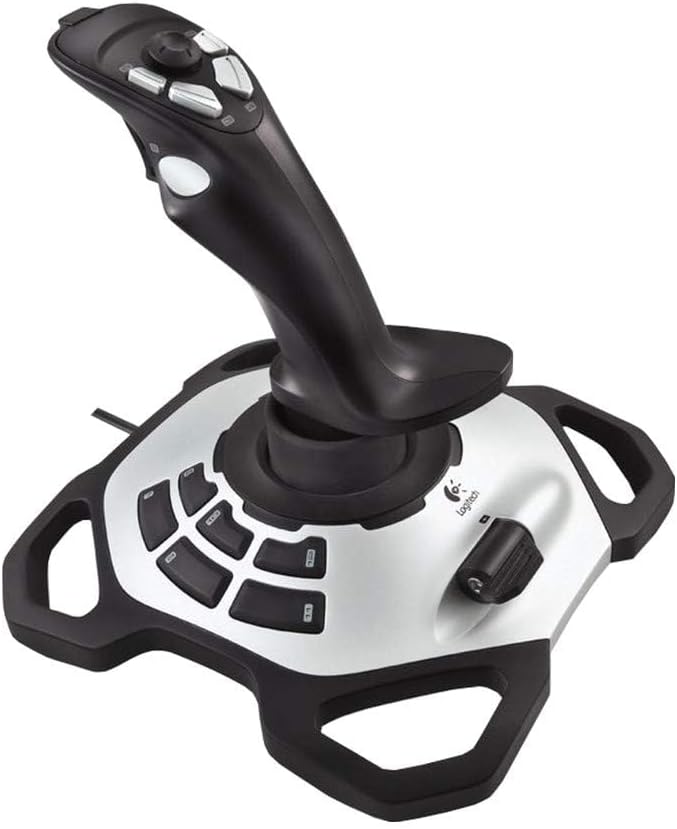
This joystick offers a classic feel trusted by many PC gamers. It includes features like rotating handles and programmable profiles for convenience. A 4.0 rating shows consistent performance and reliability for standard tasks.
We may earn a commission when you buy through this link, at no additional cost to you.
The rotating handle provides precise rudder control without extra pedals. Sixteen functions allow decent customization for various games. Downloadable game profiles make switching between titles simple.
It lacks modern enhancements like RGB or advanced pressure sensitivity. The design dates back a bit but still works well. Users may find it less intuitive for complex sim setups.
Pick this if you want a dependable stick with proven features. It suits gamers who value simplicity and stability. Its reliability makes it a strong contender for basic simulation.
The handle rotates to control rudder axes giving precise flight maneuvering without extra hardware.
Save different control profiles for various games and download them quickly for each session.
We may earn a commission when you buy through this link, at no additional cost to you.
This fightstick provides reliable performance for various game genres. It features high resolution inputs that capture every movement accurately. A 4.2 rating reflects its solid build and consistent behavior over time.
We may earn a commission when you buy through this link, at no additional cost to you.
Adjustable resistance allows you to set the stick tension to your liking. The classic design ensures familiarity and ease of use. It works well for both flight and general gaming scenarios.
The base can be bulky and requires significant desk space. Cable management might need care to keep the area tidy. These are minor complaints given the overall quality and utility.
Choose this if you want a trusted brand with high precision. It balances performance and ease of use effectively. Gamers appreciate its durability and straightforward setup process.
Precision sensors ensure that every movement is translated into accurate in game responses.
A dial on the stick lets you increase or decrease resistance for personal preference.
We may earn a commission when you buy through this link, at no additional cost to you.
This entry level stick covers the basics for casual flight play. Its unique point of view button adds useful camera control. A 3.9 rating suggests it fits those needing a simple controller for gaming.
We may earn a commission when you buy through this link, at no additional cost to you.
Four buttons plus a trigger provide essential functions for games. The ergonomic handle ensures comfort during short to medium sessions. It is easy to set up without any driver requirements.
It lacks advanced features like multiple axes or extensive programmability. This limits its use for complex simulations. It remains suitable for beginners or secondary setups.
Get this if you want a budget friendly option for simple play. It works well for light use or quick sessions. Users find it reliable for basic control needs.
A dedicated button lets you control camera angles quickly without using keyboard commands.
The handle is designed to fit the hand comfortably for reduced strain.
We may earn a commission when you buy through this link, at no additional cost to you.
This stick is engineered for fans of farming simulations specifically. It offers precise control suited for tractors and heavy machinery. A 4.3 rating indicates high satisfaction within its target niche community.
We may earn a commission when you buy through this link, at no additional cost to you.
With 33 inputs managing complex functions becomes easier. Hall Effect sensors ensure smooth and accurate movements. It is ambidextrous making it comfortable for any user to operate.
Its focus on farming limits broader utility compared to general sticks. A racing wheel is also required for full functionality. This makes it less flexible for mixed gaming libraries.
Choose this if you dedicate your setup to simulation titles. It transforms the farming experience into something immersive and realistic. Enthusiasts find the specialized design worth the investment.
Buttons and switches are mapped to common farm machinery operations for easy access.
Hall Effect sensors ensure smooth and precise movement without wear over time.
We may earn a commission when you buy through this link, at no additional cost to you.
Selecting the right controller requires understanding your gaming needs and budget. This guide breaks down key factors to help you make an informed decision.
Ensure the joystick supports Windows 11 natively. Check for Mac or console support if you plan to switch devices later. Some models offer plug and play while others need drivers.
Prioritize devices with broad OS support for long term value.
Look for durable materials that can withstand frequent use. Metal components and reinforced joints add longevity. Check reviews for reports of stick drift or breakage.
A sturdy build ensures your investment lasts years.
More axes allow smoother movement for complex simulations. Buttons should be easily accessible and programmable. Consider if you need separate throttle controls.
Balance button count with ease of access for your play style.
Vibration or force feedback adds immersion during play. Check if feedback strength is adjustable to suit your preference. This feature varies significantly across different models.
Feedback systems enhance immersion but add to cost.
Comfortable grips reduce fatigue during long sessions. The stick should feel balanced in your hand. Adjustable resistance can help tailor the feel to your needs.
Ergonomics play a vital role in sustained gaming comfort.
Set a realistic budget and compare features within that range. Higher price does not always mean better performance. Consider if extra features justify the cost for you.
Value is defined by your specific requirements and budget.
Good software allows detailed button mapping and calibration. Check for regular updates and community support. Custom profiles can save time switching between games.
Software tools significantly enhance controller flexibility.
USB wired connections offer the most stability. Wireless options exist but may have latency issues. Ensure your PC has available ports for your chosen device.
Choose wired for reliability or wireless for flexibility.
Connect your joystick to a USB port before launching games. Most devices are recognized automatically by Windows 11. If drivers are needed install them from the manufacturer site.
Calibrate the stick through Windows settings to ensure accuracy. Adjust sensitivity in game options for better control. Check settings after any software updates.
Keep the device clean with a dry cloth. Store it away from dust when not in use. Check cables periodically to avoid wear and tear.
Most modern joysticks work with Windows 11 automatically. Older models may require specific drivers or updates for full functionality. Check compatibility details before purchasing.
Many new controllers use plug and play technology. However some advanced models need drivers for full features. Always check the product manual for specifics.
Flight sticks focus on precision for aviation simulations. They include extra axes and buttons for complex controls. Standard controllers suit general gaming needs.
Some joysticks support Windows Xbox and other consoles. Check compatibility lists for each device before buying. Many modern sticks are cross platform.
Quality devices can last many years with proper care. Hall Effect sensors reduce mechanical wear significantly. Avoid exposing them to moisture or drops.
Vibration adds immersion but is not essential for flight. It helps feel engine changes or turbulence during play. Decide based on personal preference and budget.
We reviewed ten top joysticks for Windows 11 ranging from budget to premium. Each offers unique features catering to different gaming styles and needs.
Focus on compatibility build quality and ergonomics when deciding. The right device enhances your gaming experience significantly over time.
Verify current prices and availability before purchasing. Deals can change quickly so act when you find a suitable offer.