
NetumScan USB 1D Barcode Scanner
4.4Editor score
Affordable wired CCD connection
Durable drop-resistant ABS design
Plug and play USB setup
Find the best barcode scanner for library use. We compare top models for speed, compatibility, battery life, and budget to help you manage collections
Libraries require reliable tools to manage vast collections efficiently. A good barcode scanner ensures quick check-ins and check-outs, reducing wait times for patrons and improving staff productivity during busy hours.
We evaluated ten top-rated models based on connectivity, scanning accuracy, battery life, and compatibility with common library systems. Our analysis focuses on real-world performance in high-volume and quiet environments.
Each pick highlights specific strengths for library workflows, from portable options for shelf reading to robust wired units for circulation desks. Prices and availability may change, so verify details before purchasing.
4.4Editor score

4.4Editor score

4.3Editor score
This side-by-side comparison highlights key specifications for all ten models. Evaluate connectivity types, battery performance, and scanning capabilities to find the ideal match for your library's unique workflow needs.




The NETUM Bluetooth Barcode Scanner leads our list with robust features designed for busy library environments. It earns a high rating for its ability to switch seamlessly between wired and wireless modes, ensuring uninterrupted workflow during circulation or inventory checks.
We may earn a commission when you buy through this link, at no additional cost to you.
Its standout feature is the 100,000 code storage capacity, which allows staff to scan shelves without an active connection. The 2600mAh battery supports extensive use without frequent recharging, while the CCD sensor handles damaged or low-contrast ISBN labels effectively.
While the unit offers programmable settings, initial configuration requires scanning specific barcodes from the manual, which might slow down setup for non-technical staff. Also, compatibility limitations with some modern POS systems mean it suits standalone library management software best.
This model is ideal for libraries needing versatile connectivity and offline capabilities. Its balance of battery life, storage, and scanning accuracy makes it a top recommendation for circulation desks and mobile inventory tasks alike.
The storage mode enables staff to scan large sections of shelving in remote areas without worrying about wireless signal loss, syncing data once they return to the main desk.
Users can mute the buzzer to prevent noise disturbances in quiet reading zones, allowing silent scanning without compromising feedback on successful reads.
We may earn a commission when you buy through this link, at no additional cost to you.
The NetumScan USB 1D Barcode Scanner offers exceptional value for libraries on a tight budget. It is designed for fixed locations like check-out desks where mobility is less critical than reliability and cost-efficiency. Its CCD technology ensures quick reading of standard book barcodes.
We may earn a commission when you buy through this link, at no additional cost to you.
Its sturdy construction can withstand accidental drops, making it suitable for shared staff use. The lack of a battery means no downtime for charging, and the plug-and-play USB connection simplifies installation across different workstations without driver hassles.
The main drawback is the lack of wireless freedom, restricting staff to a fixed area around the USB port. Additionally, its focus on 1D codes means it cannot read QR codes if your library plans to expand to digital links in the future.
This scanner is perfect for small libraries or stationary workstations where budget constraints are a priority. Its durability and consistent performance make it a reliable workhorse for daily circulation tasks.
The wired design ensures a constant power supply and stable data transmission, eliminating battery anxiety during peak hours of patron traffic.
Built with high-quality ABS materials, this unit resists wear and tear from daily use, reducing replacement costs over time.
We may earn a commission when you buy through this link, at no additional cost to you.
The Tera Barcode Scanner Wireless with Screen distinguishes itself as a premium choice for libraries needing advanced scanning capabilities. Its unique on-device screen allows users to customize settings directly on the hardware, removing the need to connect to a computer for configuration changes.
We may earn a commission when you buy through this link, at no additional cost to you.
Supporting both 1D and 2D codes, it offers future-proof versatility for QR-based book tracking or event check-ins. The included charging cradle simplifies battery management, ensuring the device is always ready for use without fumbling with cables.
While its premium price is higher than basic models, the added features justify the cost for larger institutions. However, the learning curve for navigating the screen menu might require some initial training for staff unfamiliar with technical settings.
Libraries seeking a high-end, flexible solution will find this model excellent. Its combination of visual controls, 2D support, and reliable wireless performance makes it a robust investment for modern library management.
Staff can adjust language, volume, and connectivity settings directly on the scanner screen, streamlining setup and troubleshooting without PC access.
The included cradle serves as a charging dock and receiver hub, ensuring the scanner is always powered and paired when placed in the slot.
We may earn a commission when you buy through this link, at no additional cost to you.
The Eyoyo Mini 1D Bluetooth Scanner is designed for mobility, weighing just 35 grams. It is perfect for staff conducting mobile inventory checks or shelf reading throughout large library stacks where carrying a heavy device would be cumbersome.
We may earn a commission when you buy through this link, at no additional cost to you.
Its vibration mode allows for silent scanning, which is crucial in quiet zones. The Bluetooth connectivity ensures a wide range, and the device handles various 1D formats well, including damaged codes that standard readers might miss.
The main limitation is the lack of 2D scanning, limiting it to traditional ISBN barcodes. The battery life is moderate, so users must plan charging cycles carefully during busy shifts to avoid interruptions.
For mobile librarians prioritizing comfort and portability, this model is an excellent fit. Its light weight and silent operation make it ideal for staff who spend most of their day moving around the collection.
At only 35 grams, this scanner reduces hand fatigue during long shifts, allowing staff to focus on the task rather than the device.
Vibration mode ensures patrons in reading rooms remain undisturbed while staff confirm successful scans without audible beeps.
We may earn a commission when you buy through this link, at no additional cost to you.
The Tera 5100 Purple is a reliable wireless scanner for library circulation desks. Its standout feature is the battery indicator light, which reduces anxiety about sudden power loss during peak hours. This simple visual cue helps staff plan charging proactively.
We may earn a commission when you buy through this link, at no additional cost to you.
Built for durability, it includes a silicone protective cover and IP54 dust resistance, ensuring it survives accidental drops and dusty environments. The wireless range is substantial, allowing freedom of movement across the front desk area without signal drops.
While it excels in connectivity and ruggedness, it is limited to 1D barcodes. Staff needing to scan QR codes for digital access would need to look elsewhere. Also, the battery light is a general indicator rather than a precise percentage display.
This scanner is a solid choice for front-line work where reliability and battery awareness are key. Its durable build and long range make it a dependable tool for daily library operations.
The light indicator provides immediate visual feedback on battery status, ensuring staff never run out of power unexpectedly during busy periods.
The silicone cover and IP54 rating protect the unit from scratches and dust, ensuring longevity in active circulation areas.
We may earn a commission when you buy through this link, at no additional cost to you.
The Tera HW0009 provides advanced configuration options through its onboard screen. This allows library staff to customize settings directly on the device, such as adjusting volume or changing output formats, without needing external tools or software.
We may earn a commission when you buy through this link, at no additional cost to you.
It supports both 1D and 2D scanning, making it versatile for modern libraries. The built-in 2.4G receiver simplifies setup since no separate USB dongle is required, reducing lost parts risks. The included cradle ensures easy charging and pairing.
The learning curve for the screen menu might require initial training, and the cost is higher than standard models. However, for libraries needing frequent customization or 2D support, these features provide significant operational value.
This model is best suited for tech-forward libraries that need flexible scanning setups. Its advanced features and robust connectivity make it a powerful tool for varied workflows.
Adjusting settings like language and volume directly on the screen saves time and avoids complex manual barcode scanning for changes.
The receiver built into the cradle means one less device to track or connect, streamlining the setup process for new staff.
We may earn a commission when you buy through this link, at no additional cost to you.
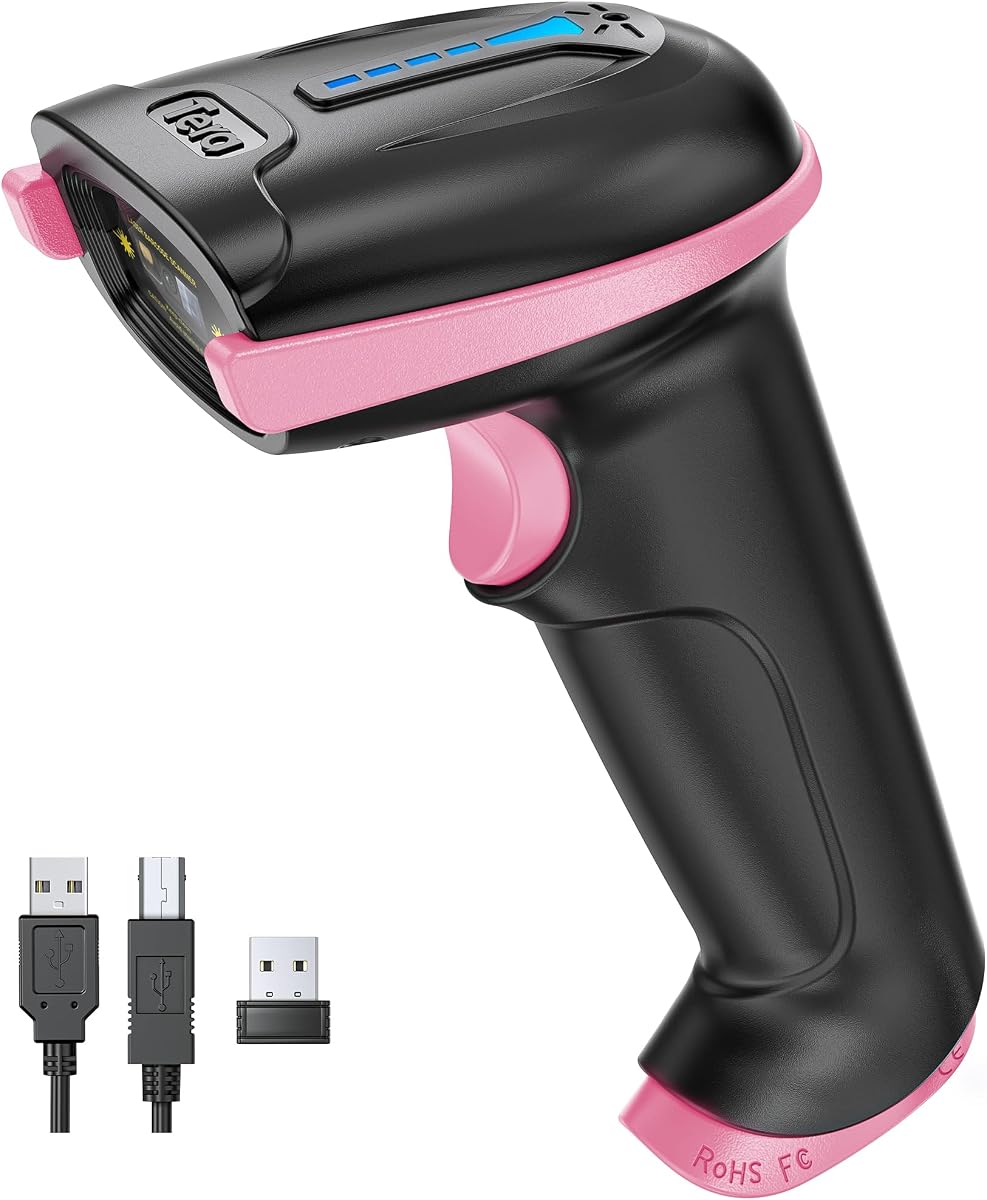
The Tera 5100 Pink offers the same robust features as its purple counterpart but with a distinctive design that helps quickly identify it on busy desks. It is ideal for environments where staff might swap scanners and want easy visual differentiation.
We may earn a commission when you buy through this link, at no additional cost to you.
It includes the reliable battery indicator light and wide wireless range, ensuring smooth workflow during shifts. The IP54 rating protects against dust, which is helpful in older library buildings. The ergonomic design ensures comfortable handling.
Like other 1D models, it cannot read QR codes. The specific color might also limit resale options if the library decides to upgrade later. However, for internal use, these limitations are minor compared to its performance benefits.
This scanner is a great choice for libraries valuing quick identification and reliable wireless performance. Its durable build and battery awareness features make it a solid tool for front-desk circulation.
The unique pink color allows staff to instantly identify their scanner among others, reducing confusion during shared equipment usage.
With a 328-foot range, the scanner maintains a stable connection even in large front desk areas or open library spaces.
We may earn a commission when you buy through this link, at no additional cost to you.
The WoneNice USB Laser offers rapid scanning capabilities with 200 scans per second. It is designed for high-volume check-ins where speed is critical. The laser technology is effective for reading clean printed barcodes quickly and accurately.
We may earn a commission when you buy through this link, at no additional cost to you.
Its build quality is robust, capable of withstanding drops on concrete surfaces, which is a plus for staff who handle equipment frequently. The USB setup is straightforward, and configurable options allow for precise customization to match specific library software needs.
The laser cannot read codes from phone or computer screens, limiting its use for digital barcodes. Additionally, the visible red laser line might be distracting to patrons in quiet zones. It works best on physical labels or printed books.
For libraries focused purely on speed for physical book processing, this model delivers. Its durability and high scan rate make it an efficient choice for circulation workflows requiring rapid throughput.
The fast scan rate minimizes wait times for patrons returning multiple items, keeping lines moving efficiently during busy periods.
With 300 options, staff can customize prefixes or suffixes to match their specific library management system requirements exactly.
We may earn a commission when you buy through this link, at no additional cost to you.
The Symcode Wireless Scanner supports multiple units transmitting data to a single receiver, which is unique for shared workflows. This network mode is ideal when multiple staff members scan inventory simultaneously without interference. It also offers a long standby time.
We may earn a commission when you buy through this link, at no additional cost to you.
With a 2000mAh battery, it lasts for extensive offline storage of up to 100,000 codes. This is useful for large shelf inventories where connectivity is intermittent. The setup is simple, avoiding software installation issues.
However, it only reads 1D codes, limiting future-proofing for digital systems. The separate USB receiver requires a dedicated port, which might be tricky on modern laptops. But for dedicated systems, this is manageable.
This model is excellent for team environments where multiple scanners are needed. Its network capability and offline storage make it a strong contender for large-scale library inventory projects.
Multiple units can connect to one receiver, enabling simultaneous scanning by different staff members without signal conflict.
The ability to store 100,000 codes offline ensures no data is lost even when wireless range is temporarily exceeded.
We may earn a commission when you buy through this link, at no additional cost to you.
The Eyoyo Pink Portable combines practical features with an attractive design that can boost staff morale. Its lightweight form factor makes it easy to carry during rounds. It supports Bluetooth and 2.4G connections for flexible use across different library setups.
We may earn a commission when you buy through this link, at no additional cost to you.
The vibration mode is valuable for maintaining quiet environments during inventory. While the battery life is shorter than larger units, it is sufficient for standard shifts. The device handles common 1D codes effectively, including ISBNs.
It lacks 2D scanning and has a moderate battery capacity, which might require charging during long shifts. However, its design and ease of use make it a pleasant tool for staff who appreciate a touch of color in their workspace.
This scanner is a great choice for libraries seeking a blend of function and style. It works well for mobile tasks and provides a cost-effective solution for smaller inventory checks.
A colorful, well-designed tool can improve daily satisfaction for staff handling repetitive scanning tasks throughout the day.
Its compact size ensures it fits easily in a pocket or bag, enabling quick access during shelving checks.
We may earn a commission when you buy through this link, at no additional cost to you.
The Anyeast Scanner with Stand is designed for hands-free operation, which is useful for processing multiple items quickly. The included stand allows the scanner to rest securely while the auto-sensing feature triggers scans when books are placed under the beam.
We may earn a commission when you buy through this link, at no additional cost to you.
It supports both 1D and 2D codes, adding versatility for QR-based library tasks. The USB connection ensures stable power and data transfer. This setup is ideal for high-throughput areas where staff handle many items at once.
The cable limits movement, keeping the scanner fixed to the desk. The auto-sensing feature requires precise positioning for accurate reads. However, for fixed workstations, this constraint is acceptable in exchange for freeing up staff hands.
This model is best for desks where items are placed on a flat surface for scanning. The stand and auto-sensing features significantly reduce manual trigger fatigue, making it a productivity booster.
The stand allows staff to stack books and let the scanner trigger automatically, freeing hands to manage the next item.
The ability to read QR codes opens possibilities for digital links or modern library events beyond standard ISBN scanning.
We may earn a commission when you buy through this link, at no additional cost to you.
Selecting the right scanner depends on your library's workflow, budget, and technical requirements. Here are the key factors to evaluate.
Wireless scanners offer freedom to move around shelves, while wired models provide stable connections at fixed desks. Libraries with limited power outlets or noisy networks may prefer wired options for consistency. Consider how much movement staff require during daily tasks.
Choose wireless for mobile inventory and wired for high-volume stationary check-ins to balance flexibility and stability.
Long battery life is crucial for staff working full shifts without interruption. Units with 2600mAh or higher last longer, reducing downtime for charging. Look for features like battery indicators to proactively manage power levels during busy periods.
Prioritize models with large batteries or charging cradles to ensure uninterrupted operations during peak patron hours.
Most books use 1D barcodes, but some modern systems use QR codes. 2D scanning future-proofs your investment for digital links or event tracking. If your library plans to expand, choose a model that supports both code types.
Verify support for your specific barcode formats to avoid needing replacements when requirements change.
Libraries often see heavy use, so durability matters. Look for drop-resistant designs and protective covers. Dust resistance is beneficial in older buildings. A sturdy unit reduces replacement costs and maintenance over time.
Invest in models with rugged features to extend the lifespan of your equipment in active environments.
Offline storage allows scanning large inventories without a continuous connection. High capacity ensures data is not lost if wireless signal drops. This is useful for remote areas or large collections.
Ensure the device can store enough codes to complete full inventory cycles without syncing.
Check compatibility with your library management software. Some units may have specific settings or drivers. Ensure the scanner works with your operating system and POS needs to avoid integration issues.
Test or confirm compatibility with your current software before purchasing to save installation time.
Comfortable designs reduce strain during long shifts. Lightweight models are better for mobile tasks. Adjustable triggers or grips improve usability. Staff comfort can impact productivity and satisfaction.
Choose models that fit comfortably in the hand to minimize fatigue during repeated scanning.
Audible beeps can disturb study areas. Mute or vibration modes allow silent feedback. This feature is essential for maintaining a calm environment while tracking circulation efficiently.
Prioritize quiet modes for scanners used near reading zones or quiet stacks.
Before first use, pair the device with your system following the manual. For wireless models, ensure the receiver is plugged in and batteries are charged. Verify settings for output formats to match your library software requirements.
To clean the lens, use a soft cloth to remove dust or smudges. Avoid harsh chemicals that might damage the scanner body. Store the device in a protective case or cradle when not in use to prevent drops.
Regularly update firmware if supported by the manufacturer to fix bugs. Charge batteries fully before long shifts. If issues arise, reset the device using the manual's recovery barcode to restore default settings.
Most models work with standard systems like Sierra or Polaris since they emulate keyboards. However, always verify compatibility with your specific software version before purchasing to avoid integration issues.
Wireless models like the NETUM Bluetooth or Eyoyo Mini are ideal for mobility. They offer long battery life and Bluetooth connectivity to allow staff to walk the stacks without cables.
Many CCD sensors handle damaged codes better than lasers. Models like the NetumScan and Tera specifically mention ability to read smudged or low-contrast labels effectively.
Most devices have a setting barcode to mute the buzzer. Consult the user manual to scan the mute command code to disable audible feedback.
Only 2D models like the Tera HW0009 or Anyeast with Stand read QR codes. Others focus on 1D ISBN codes. Verify 2D support if you plan to scan digital links.
Yes, some models like the NETUM and Symcode allow storing up to 100,000 codes offline. This is useful for large inventories in areas with weak wireless signals.
No, most are plug-and-play via USB. Configuration is usually done by scanning specific setting barcodes from the manual or using on-device menus.
Battery life varies from moderate to excellent. Models like the NETUM last weeks on a single charge, while smaller units may last 8 hours. Check capacity before deciding.
We highlighted the NETUM Bluetooth for overall versatility, NetumScan for budget-conscious needs, and Tera with Screen for advanced features. Each offers distinct strengths depending on workflow requirements.
Prioritize connectivity and durability based on where the scanner will be used most. If mobility is key, go wireless; if speed is vital, consider wired options with high scan rates.
Always verify current pricing and availability before purchase. Your library's specific needs and budget will dictate the best fit among these high-performing options.