
HP DeskJet 2955
3.7Editor score
Compact design
Wireless printing
Instant ink trial
This guide compares the top ten cheap fax machine options for 2026, evaluating performance, features, and value to help you choose the right model.
Finding a reliable fax machine without breaking the bank is essential for small businesses and home offices. Modern devices offer versatile features like scanning and printing alongside traditional faxing capabilities.
We compared ten top-rated models based on transmission speed, memory capacity, paper handling, and user reviews. This list covers a range of options from basic thermal units to advanced all-in-one printers.
Each pick highlights specific strengths and ideal use cases for different needs. Please note that prices and availability fluctuate frequently, so verify current details before making a purchase decision.
3.7Editor score

4.0Editor score
3.9Editor score
The following table provides a side-by-side comparison of all ten models to help you quickly identify key specifications and features that matter most for your specific needs.


The Canon PIXMA TR8620a stands out as a versatile all-in-one printer that handles faxing with ease. With a solid four-star rating from users, it balances print quality and functionality well for home offices. Its standout quality lies in the smart features that keep you connected and efficient without manual monitoring.
We may earn a commission when you buy through this link, at no additional cost to you.
This device offers 15 pages per minute black printing and includes auto two-sided printing to save paper. The 200 sheet capacity ensures you rarely need to reload paper during busy workdays. Built-in fax capabilities mean you can transmit documents directly from the device or mobile app.
While the printer delivers excellent results, users note that ink can run out quickly without monitoring. The physical size is also substantial compared to compact budget models. These trade-offs are acceptable given the productivity gains from wireless connectivity and smart notifications.
Ideal for small business owners needing reliable faxing alongside high-quality printing. The integration with voice assistants and smart reordering makes it a future-proof choice for modern offices seeking convenience and efficiency in document management workflows.
Connect to Alexa to receive notifications when ink is low and enable smart reorders for automatic delivery.
Wireless 4-in-1 functionality allows printing, copying, scanning, and faxing from any connected device.
We may earn a commission when you buy through this link, at no additional cost to you.
The HP DeskJet 2955 is an excellent entry point for users needing basic document functions including faxing. With a three-star rating, it offers essential features at a fraction of the cost of dedicated fax machines. It is ideal for those who rarely need to send faxes but require reliable printing and scanning.
We may earn a commission when you buy through this link, at no additional cost to you.
Key strengths include its compact design and dual band Wi-Fi for stable connectivity. The AI-capable features help optimize web pages and emails for cleaner printing. A three-month trial of Instant Ink ensures you have supplies without immediate extra costs.
However, users note limited fax-specific functionality compared to dedicated machines. Printing speeds are modest at 7.5 pages per minute which may slow busy workflows. These limitations are acceptable for casual use where cost savings are the priority.
Best for home users or small businesses with infrequent fax needs. Its affordability and compact footprint make it a smart choice for those prioritizing budget and space over heavy-duty faxing capabilities.
HP AI removes unwanted content from web pages so your prints look just the way you want.
Made with at least 70 percent recycled plastics and is Energy Star certified for efficiency.
We may earn a commission when you buy through this link, at no additional cost to you.
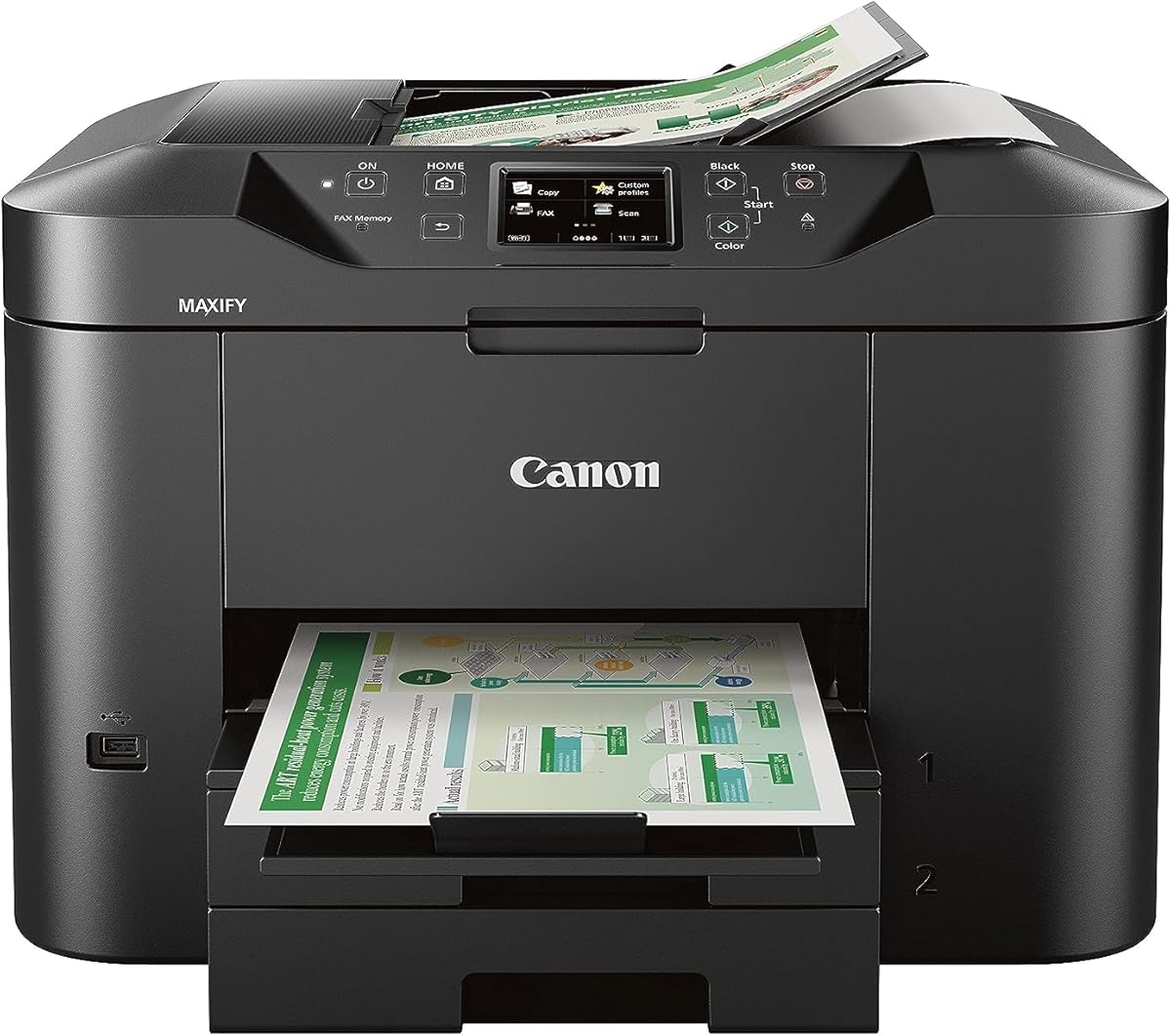
The Canon MAXIFY MB2720 is designed for business environments that require robust faxing and printing capabilities. With a 3.9 rating, it promises longevity and high-volume performance. Its standout qualities include a massive paper capacity and durable construction for daily heavy use.
We may earn a commission when you buy through this link, at no additional cost to you.
This printer features two paper cassettes totaling 500 sheets and a 20000 page duty cycle. The Dual Resistant High Density inks ensure text remains sharp and smudge resistant even after highlighting. US-based service and support provide peace of mind for business users.
Users may find the initial investment higher than basic models. The physical size is larger and requires dedicated office space. These factors are reasonable trade-offs for businesses needing reliability and high capacity without frequent maintenance.
Recommended for growing businesses with moderate to high document volumes. It balances fax functionality with professional printing needs ensuring your office stays productive with minimal downtime or paper jams.
Two paper cassettes provide a combined capacity of 500 sheets so you are ready for any job.
Dual Resistant High Density inks produce laser-sharp text that is highlighter and smudge resistant.
We may earn a commission when you buy through this link, at no additional cost to you.
The Brother FAX-575 is a classic personal fax and phone unit suitable for traditional offices. With a four-star rating it is known for convenient operation and reliable performance. Its standout quality lies in combining fax, phone, and copier functions in one compact device.
We may earn a commission when you buy through this link, at no additional cost to you.
This model offers black-and-white copying with up to 400 by 400 dpi resolution. The 512 KB memory stores up to 25 pages and the 50 sheet paper capacity handles routine jobs easily. Transmission speed is about 15 seconds per page which is standard for this type.
Users note it lacks modern wireless or smart features found in newer printers. The design is dated and may not fit sleek modern office aesthetics. These trade-offs are acceptable for users prioritizing function over form and needing a dedicated fax line.
Best for users who want a dedicated fax phone combo without extra digital complexity. It delivers straightforward performance for home offices that still rely on traditional document transmission methods.
512 KB memory stores up to 25 pages so you can continue working while faxes are sent.
9600 BPS fax modem transmits at about 15 seconds per page for efficient communication.
We may earn a commission when you buy through this link, at no additional cost to you.
The Brother FAX-575 Renewed offers the same functionality as the new model at a reduced cost. With a 3.8 rating it provides reliable fax and phone capabilities for budget conscious buyers. Its standout quality is delivering proven performance without the full retail price.
We may earn a commission when you buy through this link, at no additional cost to you.
This renewed unit maintains the 400 by 400 dpi resolution and 9600 BPS modem speed. Memory and paper capacity remain consistent with the original model supporting up to 25 pages and 50 sheets. Transmission speed is still around 15 seconds per page.
Users note that refurbished items may show minor cosmetic wear. Warranty coverage is typically shorter than brand new units. These trade-offs are acceptable for those comfortable with refurbished products seeking a reliable fax solution.
Ideal for small offices needing a cost-effective fax phone combo. It is a smart choice for buyers who prioritize function and value over having a brand new device.
Renewed models offer significant savings while maintaining the core features of the original device.
The same easy-to-operate faxing and copying features ensure consistent daily performance.
We may earn a commission when you buy through this link, at no additional cost to you.
The Sharp UXB20 is an inkjet fax machine offering fast transmission and useful memory features. With a 3.3 rating it provides basic fax and copy functionality suitable for light office use. Its standout quality includes a quick 15 second transmission time for efficient document sending.
We may earn a commission when you buy through this link, at no additional cost to you.
This unit features 449 KB memory allowing 24 page out-of-paper memory capacity. It supports up to 99 multi copies and includes 30 speed dial presets. Corded handset and caller ID features make it a complete communication tool.
Users note the lower rating may indicate reliability concerns over time. Inkjet cartridges may require frequent replacement compared to thermal or laser models. These trade-offs are acceptable for those needing specific inkjet quality for color documents.
Best for small businesses needing basic fax and copy capabilities. It offers a solid balance of features for daily use where speed and memory are priorities.
449 KB memory provides 24 page out-of-paper memory capacity so you never miss a document.
30 speed dial presets allow you to save frequent contacts for quick access.
We may earn a commission when you buy through this link, at no additional cost to you.
The Canon PIXMA TR4720 is a versatile all-in-one printer with built-in fax for home use. With a 3.8 rating it balances functionality and ease of use. Its standout quality is the compact design that fits easily into small home office spaces.
We may earn a commission when you buy through this link, at no additional cost to you.
This printer offers print copy scan and fax in one device. It includes a 100 sheet plain paper capacity and an auto document feeder. Easy setup via the Canon PRINT app makes it user friendly for non-technical users.
Users note it is slower than business class printers and has a smaller paper tray. These trade-offs are acceptable for home users with moderate printing needs and limited space. It offers good value for basic document handling.
Ideal for home offices needing wireless printing and faxing. It simplifies document management with mobile support and an intuitive setup process for everyday tasks.
Enjoy simple setup through the Canon PRINT Inkjet and SELPHY app for quick connectivity.
Front paper tray allows fast and easy to load 100 sheet plain paper capacity.
We may earn a commission when you buy through this link, at no additional cost to you.
The Brother IntelliFAX-2840 is a dedicated laser fax machine offering sharp document quality. With a 3.9 rating it provides fast and efficient faxing for business needs. Its standout quality is laser technology ensuring crisp text and professional results.
We may earn a commission when you buy through this link, at no additional cost to you.
This unit prints at 21 pages per minute with 200 by 300 dpi resolution. It handles fax tasks reliably and is compact enough for most workspaces. The lack of network readiness limits sharing but keeps costs lower.
Users note the resolution is lower than modern printers but sufficient for standard faxes. Network limitations may hinder collaboration in larger teams. These trade-offs are acceptable for solo users needing fast laser faxing without extra features.
Best for professionals prioritizing print speed and document quality. It is a reliable standalone unit for offices that do not require network sharing capabilities.
Laser print technology ensures high quality professional document output for business use.
21 pages per minute print speed allows efficient document processing without delays.
We may earn a commission when you buy through this link, at no additional cost to you.
The Brother IntelliFax 575 Thermal is a budget-friendly option for basic faxing needs. With a 3.3 rating it offers simple thermal transfer faxing suitable for low volume use. Its standout quality is the Energy Star rating and compact design.
We may earn a commission when you buy through this link, at no additional cost to you.
This unit features 512 KB memory and 50 sheet input tray. It supports 400 by 400 dpi resolution with 9.6 Kbps speed. A 10 sheet auto document feeder allows easy scanning of multi-page documents.
Users note that thermal paper can be more expensive than plain paper over time. Output quality is lower than laser models which may not suit all needs. These trade-offs are acceptable for strict budgets needing essential fax functions.
Ideal for home offices with minimal fax requirements. It provides a cost effective solution for sending documents without investing in advanced technology.
Energy Star rating ensures lower power consumption during operation to save costs.
10 sheet ADF makes scanning and faxing multiple pages straightforward and efficient.
We may earn a commission when you buy through this link, at no additional cost to you.
The Panasonic KX-FHD331 is a simple plain paper fax unit for basic communication. With a 2.7 rating it provides fundamental faxing functions with caller ID. Its standout quality is the use of standard plain paper instead of specialized rolls.
We may earn a commission when you buy through this link, at no additional cost to you.
This machine operates at 9.6 Kbps modem speed and supports plain paper for convenience. It includes answering machine interface and caller ID compatibility for added utility. A six-month warranty with exchange program provides limited buyer protection.
Users note the low rating may indicate reliability issues or limited functionality. Feature set is minimal compared to modern all-in-one printers. These trade-offs are acceptable for those needing a very basic fax line only.
Best for minimal users requiring straightforward document transmission. It is a straightforward choice when advanced features are not necessary and plain paper is preferred.
Uses plain paper which is readily available and easy to find for any office.
Caller ID compatible so you can see who is calling before answering.
We may earn a commission when you buy through this link, at no additional cost to you.
Selecting the right fax machine depends on your specific volume, budget, and connectivity needs. Consider the following factors to find a model that offers the best value.
Transmission speed determines how quickly documents are sent. Look for at least 9600 BPS or faster speeds to minimize waiting time for important documents.
Faster transmission ensures efficiency especially during busy workdays when quick communication is essential.
Paper capacity affects how often you need to reload paper. Choose a model with at least 50 sheets or more if you handle frequent printing.
Higher capacity reduces interruptions and keeps your workflow smooth during high volume periods.
Memory allows you to store documents when out of paper or when the device is busy. Look for at least 512 KB of memory for storing multiple pages.
Sufficient memory ensures no documents are lost and you can continue working while transmissions occur.
Connectivity options such as wireless or network access enable remote faxing. Modern devices offer mobile apps for sending faxes from anywhere.
Wireless connectivity increases flexibility and makes your fax machine more useful in a digital office.
Resolution impacts how clear your documents appear. A minimum of 300 dpi is recommended for legible text and professional quality.
Higher resolution ensures documents look clean and avoid issues with readability for clients.
Durability factors like duty cycle indicate how many pages a device can handle monthly. Businesses should choose models with high duty cycles to prevent breakdowns.
A high duty cycle ensures your machine remains reliable even with heavy daily usage demands.
Additional features such as scanning, copying, or auto document feeders add versatility. Evaluate if these features justify the extra cost or complexity.
Versatile features can save money by replacing separate devices while consolidating office functions.
Cost of consumables like ink or paper affects long-term expenses. Thermal or laser units may have different costs compared to inkjet models.
Calculate the total cost of ownership including supplies to ensure the machine fits your budget over time.
Ensure the fax machine is connected to a phone line or network properly. Verify the connection by testing with a known working line or calling your number to confirm reception.
Load paper correctly into the input tray according to the manufacturer's instructions. Avoid using crumpled or damp paper to prevent jams and ensure clear transmissions.
Perform regular maintenance such as cleaning the rollers and checking ink levels. Keeping the device clean helps avoid document quality issues and prolongs its lifespan.
Traditional fax machines require a dedicated analog phone line. However, some modern devices support VoIP or internet faxing which eliminates the need for a traditional line. Check device specs to confirm compatibility with your connection type.
Yes, you can use online fax services or software drivers to fax directly from your computer. These services allow sending and receiving faxes via email or web portals. This approach eliminates the need for a dedicated physical device.
A well-maintained fax machine can last between five to ten years. Usage volume and environment conditions significantly affect the lifespan of the device. Regular cleaning and careful use will help maximize its operational life.
Thermal faxes use special heat sensitive paper that fades over time. Plain paper faxes use standard paper which is durable and can be copied easily. Plain paper is generally preferred for long-term record keeping.
Check that the phone line is connected properly and not busy. Verify the recipient's fax number is correct and that the receiving machine is ready. Restarting the device often resolves minor glitches causing transmission failures.
Yes, multiple users can share a fax machine via a shared network or phone extension. Ensure users have access codes or designated settings to prevent document overlap or confusion. Proper labeling and storage of received documents helps maintain organization.
The Canon PIXMA TR8620a and HP DeskJet 2955 represent excellent options for modern offices seeking connectivity and value. These models balance fax capabilities with additional functions like printing and scanning efficiently.
Prioritize features based on your volume and connectivity needs when making your selection. A dedicated fax machine may suit those with high volume while all-in-one printers work well for mixed tasks.
Remember that prices change regularly so verify current pricing and availability before purchasing. Checking current deals ensures you get the best value for your investment at the time of buying.