
Hard Drive Reader USB 3.0 & Type C
4.1Editor score
Affordable price point
Universal USB connectivity
Supports up to 20TB
Finding the right laptop hard drive adapter kit is crucial for anyone looking to upgrade their storage or recover data from old drives. These tools bridge the gap between internal drives and external ports, making data migration seamless and efficient for users of all skill levels.
We have carefully evaluated ten leading products based on compatibility, transfer speeds, power requirements, and overall build quality. Our analysis focuses on real-world performance to ensure you choose a kit that meets your specific technical needs without unnecessary complications.
Each pick in this guide highlights unique strengths and potential limitations to help you make an informed decision. Please note that prices and availability can change frequently, so verify the latest details before purchasing your preferred adapter kit today.
4.1Editor score

4.4Editor score
4.6Editor score
As an Amazon Associate we earn from qualifying purchases.
This side-by-side comparison highlights the key specifications of each adapter kit to help you quickly identify the best fit for your storage requirements.


The Unitek USB 3.0 IDE/SATA Adapter stands out as a reliable solution for data migration and backup tasks. With a solid rating of 4.4 stars, it offers dual-drive capability that allows you to connect both IDE and SATA drives simultaneously.
We may earn a commission when you buy through this link, at no additional cost to you.
Its high-speed USB 3.0 interface ensures efficient data transfers up to 6Gbps via SATA III. The included 12V/2A power adapter guarantees stable operation, especially when handling multiple drives or larger capacity devices without power fluctuations.
While the lack of USB-C connectivity might limit use with newer laptops, the adapter compensates with robust compatibility for 2.5 and 3.5 inch drives. The on/off switch helps protect drives from unnecessary wear during transitions between tasks.
This adapter is ideal for IT professionals or home users needing a versatile tool for recovering old data or upgrading storage. Its plug-and-play design eliminates the need for complex driver installations, making it accessible for non-technical users.
The ability to connect two drives at once streamlines the cloning and backup process significantly.
Included power supply ensures consistent performance even with power-hungry 3.5 inch hard drives.
We may earn a commission when you buy through this link, at no additional cost to you.
This Hard Drive Reader offers excellent value for those seeking a cost-effective way to access old storage media. It supports both USB-A and USB-C connections, making it versatile for modern and older laptops alike.
We may earn a commission when you buy through this link, at no additional cost to you.
The adapter handles drives up to 20TB capacity, ensuring longevity as storage needs grow. USB 3.0 connectivity provides fast data transfers for SATA drives, though IDE speeds are limited by the interface itself.
While it lacks premium features like extensive power solutions, it works reliably for standard data recovery tasks. The included instructions and support team help users troubleshoot any recognition issues quickly.
Ideal for students or budget-conscious users, this kit provides essential functionality without breaking the bank. It is a practical choice for occasional use rather than intensive professional data recovery workloads.
Support for both USB-A and USB-C ensures compatibility across a wide range of devices.
Accommodates drives up to 20TB, future-proofing your data access solutions.
We may earn a commission when you buy through this link, at no additional cost to you.
This adapter from YINNCEEN focuses heavily on utility and ease of use for recovering data from old systems. It comes equipped with a 12V/2A power supply to ensure stable operation across various drive types.
We may earn a commission when you buy through this link, at no additional cost to you.
With support for up to 6TB drives, it handles most consumer storage needs effectively. The compact body design makes it portable, while the LED indicator provides clear visual feedback on power and activity status.
Users might need to adjust jumper settings on older IDE drives, which can be a hurdle for beginners. However, the included manual and plug-and-play nature simplify the process once initial configurations are understood.
This kit is particularly useful for home users looking to salvage photos or documents from retired computers. Its balance of features and performance makes it a trustworthy choice for occasional data migration tasks.
The included adapter ensures drives spin up reliably without power dropouts during use.
Compatible with Windows, Mac, and Linux systems for seamless cross-platform data access.
We may earn a commission when you buy through this link, at no additional cost to you.
FEMORO's adapter is engineered for reliability and durability in demanding environments. It features upgraded components like a flexible USB cable and an extended body to accommodate older IDE ports more easily.
We may earn a commission when you buy through this link, at no additional cost to you.
The 12V/2A power supply is critical for maintaining stability during large file transfers or extended recovery sessions. The on/off switch protects drives from sudden power cuts that could lead to data corruption.
While it costs slightly more than entry-level options, the build quality justifies the investment for professionals. The included manual offers clear safety guidance to prevent electrical damage to sensitive hardware.
IT enthusiasts and office workers will appreciate the thoughtful design that minimizes setup time. This kit is a strong contender for anyone needing a dependable tool for regular data management tasks.
Ergonomic improvements make connecting old drives faster and less frustrating.
Switch and robust power management prevent accidental damage during critical operations.
We may earn a commission when you buy through this link, at no additional cost to you.
The SABRENT docking station simplifies the process of swapping drives without tools. It supports both 2.5 and 3.5 inch SATA drives, offering a flat bay design that secures the drive securely in place.
We may earn a commission when you buy through this link, at no additional cost to you.
UASP support enhances transfer performance on compatible systems, reaching typical speeds of 100-160 MB/s for mechanical drives. This makes it efficient for moving large datasets or backups between systems.
The included 12V adapter ensures 3.5 inch drives spin up correctly, avoiding issues common with insufficient power. However, users with only USB-C ports will need an additional adapter since the host cable is USB-A only.
This docking station is perfect for power users who frequently swap drives for testing or storage expansion. Its robust design ensures longevity and consistent performance over years of heavy use.
UASP support maximizes the potential of your SATA drives for faster data movement.
No tools or reboots are needed to access drives, saving valuable time.
We may earn a commission when you buy through this link, at no additional cost to you.
This compact cable is designed specifically for laptop drives, making it perfect for travel or quick backups. It draws power directly from the USB port, eliminating the need for an external power supply.
We may earn a commission when you buy through this link, at no additional cost to you.
With a rating of 4.7 stars, users trust its ability to handle daily data transfers without issues. The UASP support ensures that speeds are optimized when connected to compatible USB 3.0 ports.
The simplicity of the design means fewer points of failure compared to complex docks. However, it is limited to 2.5 inch drives, so it cannot be used for standard desktop hard drives.
Ideal for students or professionals needing a lightweight solution, this cable is a reliable companion. It offers excellent performance for its size, making it a great value for targeted storage needs.
Small enough to fit in a laptop bag for on-the-go data access anywhere.
Direct bus power removes the hassle of carrying extra adapters on the go.
We may earn a commission when you buy through this link, at no additional cost to you.
This enclosure transforms a bare SSD into a portable external drive with minimal effort. Its push-out cover design allows for tool-free installation, making setup a matter of seconds.
We may earn a commission when you buy through this link, at no additional cost to you.
Support for UASP significantly boosts transfer speeds compared to standard USB 3.0 protocols. With both Type-C and Type-A connectors, it adapts easily to various laptop ports without needing extra adapters.
While the plastic casing is not premium, it serves its purpose well for protecting the drive. The 18-month warranty adds peace of mind for users investing in long-term data storage solutions.
This enclosure is a top choice for SSD upgrades or creating portable backup drives. It balances performance and convenience effectively, ensuring data is accessible whenever you need it.
UASP technology ensures your SSD runs at peak efficiency when connected externally.
Supports both Type-C and Type-A interfaces for wide compatibility.
We may earn a commission when you buy through this link, at no additional cost to you.
This converter kit is designed for flexibility, allowing you to connect both IDE and SATA drives. It features a unique dual interface with USB 3.0 and Type-C ports to suit different laptop models.
We may earn a commission when you buy through this link, at no additional cost to you.
The included power adapter ensures that 3.5 inch drives receive the necessary voltage to spin up reliably. LED lights provide visual cues regarding drive activity, which helps during data transfers.
New drives may require initialization in disk management before they are recognized, which is a standard process. The included manual helps users navigate settings to ensure smooth operation from the start.
Great for users with mixed storage types, this kit covers most scenarios in one package. It is a practical solution for upgrading old PCs or accessing legacy data efficiently.
Handles both SATA and IDE drives to access different generations of hardware.
USB-A and USB-C ports ensure you can connect regardless of laptop age.
We may earn a commission when you buy through this link, at no additional cost to you.
This adapter stands out by supporting optical drives in addition to standard hard drives. It is ideal for users who still need to read CDs or DVDs from older systems without internal drives.
We may earn a commission when you buy through this link, at no additional cost to you.
The 5Gbps transfer speed ensures data moves quickly, while the included 12V adapter maintains stability for heavier drives. An on/off switch helps manage power cycles safely during operations.
Users should initialize new drives in disk management before use to ensure system recognition. The manual provides tips for jumper settings to avoid configuration errors with legacy hardware.
Perfect for multimedia archives, this kit offers comprehensive support for legacy and modern media. It is a robust choice for anyone needing to preserve data from multiple device types.
Reads CD-ROM and DVD drives to access physical media archives easily.
Switch and power management prevent accidental data corruption during use.
We may earn a commission when you buy through this link, at no additional cost to you.
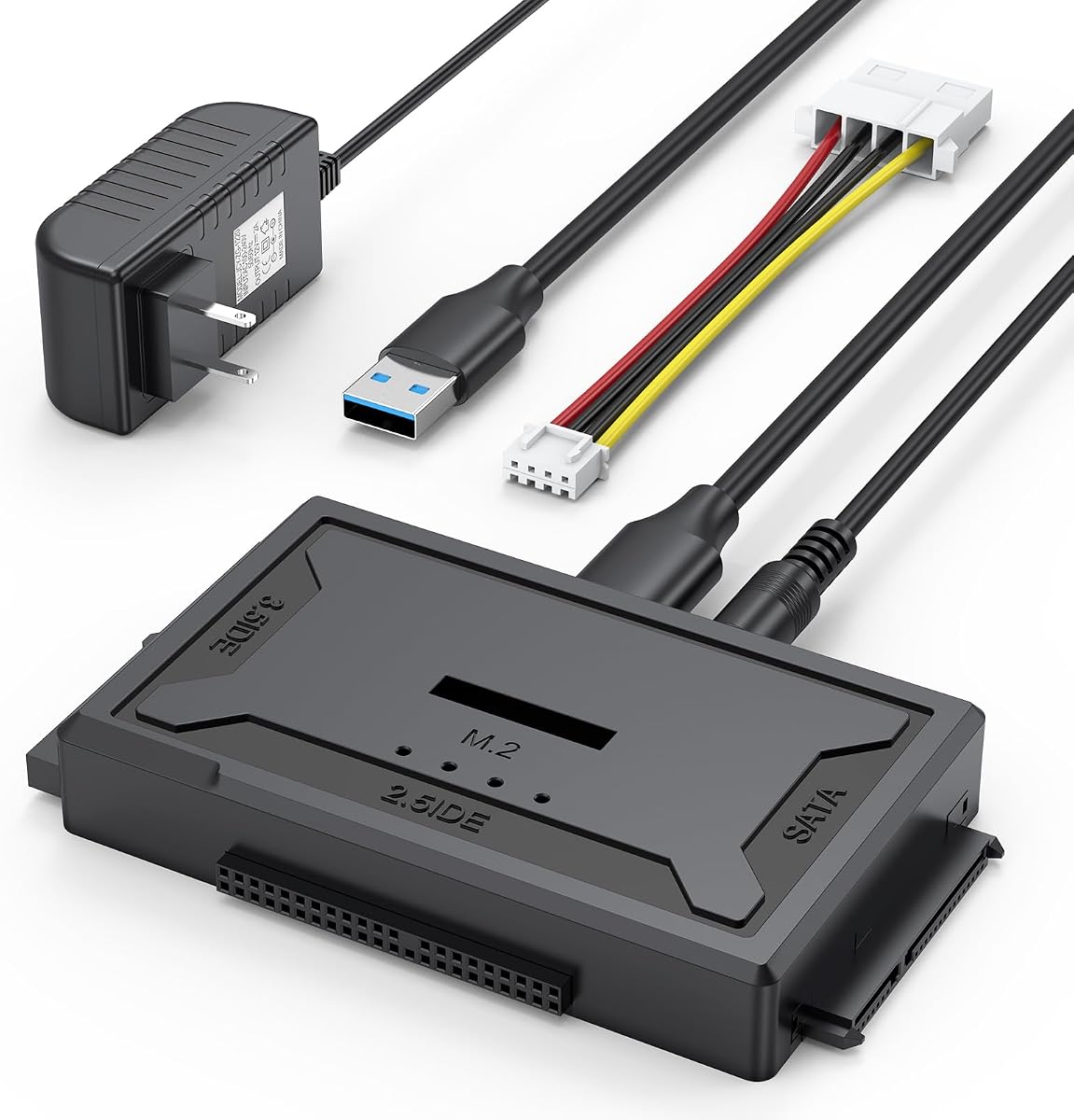
This 4-in-1 reader covers almost every storage interface from legacy IDE to modern NVMe drives. Its ability to handle M.2 drives with 10Gbps speeds makes it the most future-proof option in this guide.
We may earn a commission when you buy through this link, at no additional cost to you.
The upgraded design includes a flexible power cable and improved connections for older IDE ports. This thoughtful engineering reduces strain on cables and ensures secure connections during use.
While it is the most expensive option, the versatility it offers justifies the cost for power users. It eliminates the need for multiple adapters by consolidating functionality into one unit.
This reader is essential for IT professionals who encounter a wide variety of hardware. Its comprehensive support ensures you never get stuck trying to access data from a new or old drive type.
Support for NVMe protocols delivers ultra-fast data retrieval from modern SSDs.
Handles IDE, SATA, and M.2 drives to cover all storage generations.
We may earn a commission when you buy through this link, at no additional cost to you.
Choosing the right adapter kit requires understanding your specific drive types and connection needs. This guide outlines key factors to consider before making a purchase.
Ensure the adapter supports your specific drive interface. Most kits support SATA and IDE, but some may exclude M.2 or NVMe formats. Check the connector type on your drive before buying.
Matching the adapter to your drive interface is critical for successful data access.
3.5 inch drives typically require an external power adapter to spin up. Some kits include this, while others rely on bus power from the USB port. Verify what is included in the box.
Always check if the power adapter is included for larger drives to avoid interruptions.
Newer laptops often lack USB-A ports, requiring a USB-C connection. Look for adapters that offer dual interfaces or include a USB-C to USB-A adapter for convenience.
Choose a kit with USB-C support for modern laptops without extra dongles.
USB 3.0 and USB 3.1 offer significantly faster data transfers compared to USB 2.0. Ensure your system supports these speeds to benefit from the adapter's capabilities.
Faster transfer speeds reduce wait times when moving large amounts of data.
Plug-and-play functionality eliminates the need for driver installations. Look for kits with hot-swap capabilities to switch drives without restarting your computer.
Simple setup saves time and reduces frustration during data recovery tasks.
Durability is key for frequent use. Metal housings often dissipate heat better than plastic ones. Also, check cable flexibility to prevent breakage over time.
Investing in sturdy construction ensures long-term reliability for your tools.
Some adapters have limits on the maximum drive size they can recognize. Ensure the kit supports drives larger than your current capacity to future-proof your purchase.
Checking capacity limits prevents compatibility issues with larger storage devices.
Reliable customer support helps resolve technical issues quickly. Check the warranty period and availability of manuals or troubleshooting resources online.
Good warranty terms protect your investment against defects or failures.
Always connect the power adapter before attaching 3.5 inch drives to ensure stable power. Plug the USB end into your computer first, then connect the drive interface securely to avoid data corruption.
Allow the drive to spin up fully before accessing files. Eject the drive safely through your operating system before disconnecting the USB cable to prevent data loss.
Store the adapter in a dry place to protect cables from moisture. Check connections periodically for dust or damage to maintain optimal performance over time.
Most standard adapters do not support M.2 NVMe drives unless specified. The premium 4-in-1 kit in our list supports M.2 NVMe with high speeds. Always check product details before purchasing for this specific drive type.
No, these adapters are designed to be plug-and-play. They work automatically with Windows, Mac, and Linux systems without needing extra driver installations. Just plug them in and your system should recognize the drive.
This usually happens because the drive needs external power to function. Make sure you are using the included 12V power adapter. Bus power from USB is not sufficient for most 3.5 inch desktop drives.
Yes, most adapters work with Mac systems via USB ports. However, file systems might need reformatting if transferring between Windows and Mac. Check compatibility notes in the product description before buying.
IDE uses a ribbon cable and is older, while SATA uses a thinner cable and is newer. Adapters often support both, but you need the correct connector for your drive. Check your drive's connector type to confirm.
USB 3.0 adapters offer transfer speeds up to 5Gbps or higher. Actual speeds depend on the drive type. SSDs transfer faster than mechanical hard drives. Always use USB 3.0 ports for best performance.
We have highlighted top picks ranging from budget-friendly options to versatile premium kits. The Unitek adapter and the 4-in-1 reader stand out for reliability and versatility in diverse scenarios.
Prioritize compatibility with your existing hardware to ensure seamless integration. Consider how often you need to use the adapter and the specific drive types you intend to access regularly.
Always verify the latest product details and pricing before making your purchase. Technology evolves quickly, so confirming current features ensures you get the best value for your specific needs.