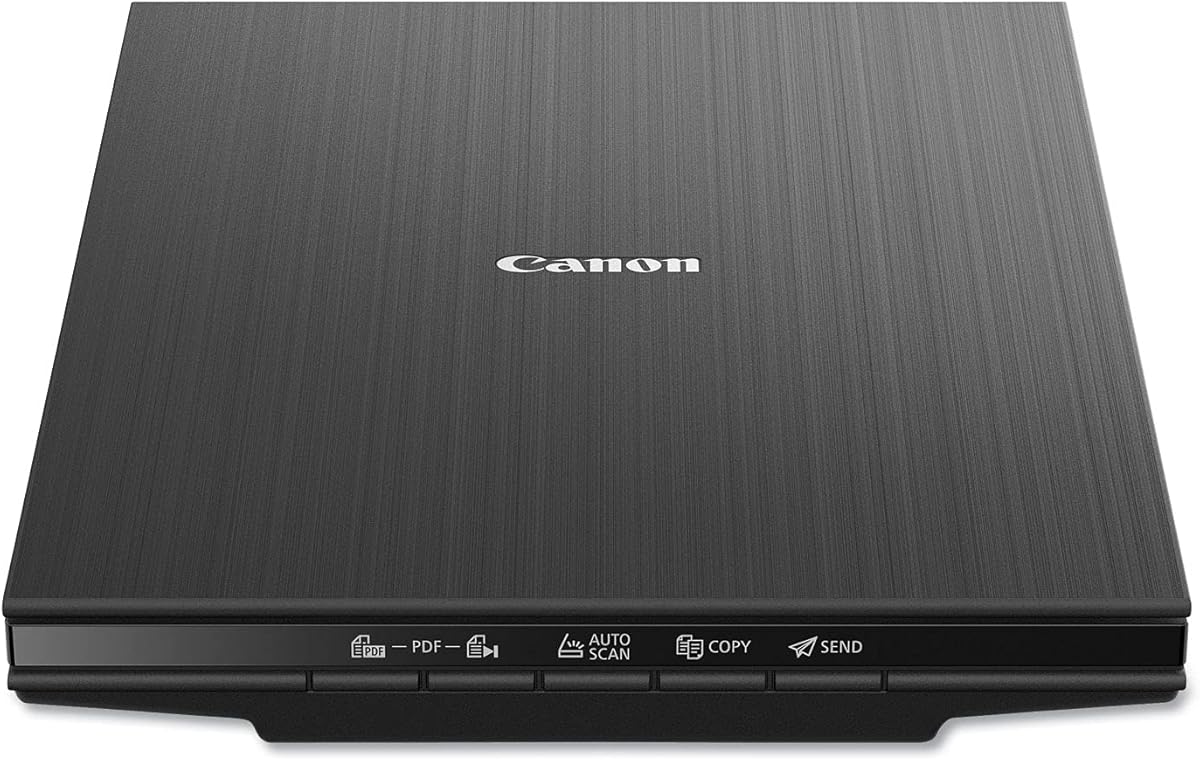
Canon CanoScan LiDE 400
4.1Editor score
USB Type-C power and data
4800 dpi high resolution
Compact slim profile design
Finding the right document and photo scanner for your MacBook workflow is essential for modern professionals who need to digitize paper efficiently. A good scanner offers seamless integration, fast processing speeds, and high-quality output that matches your digital expectations for clarity and detail.
We compared ten leading models based on compatibility, speed, image quality, and software features to help you choose the perfect device. Our analysis focuses on real-world usability for MacBook users who require reliable performance for both documents and precious photo archives without unnecessary complexity.
Each pick below highlights key strengths and trade-offs so you can match a scanner to your specific needs and budget constraints. Please note that pricing and availability may change over time, so checking current listings before purchasing is always recommended for the best deal.
4.1Editor score

4.3Editor score

4.2Editor score
As an Amazon Associate we earn from qualifying purchases.
Here is a side-by-side comparison of the top ten scanners evaluated for performance, features, and value to help you make an informed decision for your specific digitization needs.


The Epson Workforce ES-50 is a top rated mobile scanner that earns our editor's choice for its exceptional portability and speed. It handles single sheet documents quickly and is designed for professionals who need to digitize paper on the move without carrying heavy equipment.
We may earn a commission when you buy through this link, at no additional cost to you.
Its standout quality is the ultra-fast scanning speed of 5.5 seconds per page combined with a very low weight that fits easily in a bag. The USB power means you never need to charge batteries, making it ideal for travel or remote work where outlets are scarce.
The trade-off is that it only handles one sheet at a time and may struggle with thicker documents like bound books. This limitation is acceptable for users who prioritize speed and weight over bulk scanning capacity for everyday receipts and letters.
If you need a reliable tool for quick digitization while commuting or working in different locations, this model is a strong recommendation. Its Mac compatibility and software suite ensure your files remain searchable and organized effortlessly.
The lightweight design allows you to carry it anywhere without burdening your workspace or travel gear.
Connecting directly via USB eliminates the need for separate power adapters or battery replacements.
We may earn a commission when you buy through this link, at no additional cost to you.
The Canon CanoScan LiDE 400 is the best budget choice for users who need high quality scanning without spending a lot on premium features. It offers a slim profile that blends into any desk and supports both documents and photos effectively for home use.
We may earn a commission when you buy through this link, at no additional cost to you.
Its key strength lies in the 4800 dpi resolution which preserves detail in photos and text, along with a single USB Type-C cable for power and data. The EZ buttons make operation straightforward so you can scan and save PDFs with minimal effort.
It is slower than mobile feeders and requires manual page flipping which can be tedious for large batches. However this trade-off is worth it for the low price and image quality which are perfect for occasional scanning tasks and family photos.
This scanner is ideal for students or home offices where cost and image fidelity matter more than speed. Mac users will appreciate the reliable driver support and intuitive software included with the device.
The 4800 dpi resolution ensures that your photos and documents look crisp and clear when digitized.
Using a single USB Type-C cable for everything reduces cable clutter on your desk.
We may earn a commission when you buy through this link, at no additional cost to you.
The Brother DS-640 stands out as a compact mobile scanner that delivers impressive speed without a larger footprint. It is designed for users who need to scan multiple pages quickly and value portability for their daily workflow on a MacBook.
We may earn a commission when you buy through this link, at no additional cost to you.
Its strengths include a blazing fast 16 pages per minute speed for both color and black and white documents. The automatic feeding mode combines multi-page scans into one file, which saves significant time compared to single sheet models.
The only notable downside is the reliance on a micro USB 3.0 cable instead of a more modern USB Type-C connection. This is a minor inconvenience for many since it still provides reliable power and data transfer for consistent performance.
This model is perfect for busy professionals who need fast results and a small device to fit in a backpack. The included software supports OCR and cloud services ensuring your digitized files are organized and accessible.
Scanning both color and black and white at the same speed ensures no slowdown during color work.
The multi-page scan feature keeps documents grouped logically without manual sorting.
We may earn a commission when you buy through this link, at no additional cost to you.
The Canon imageFORMULA R10 is a powerful portable scanner that adds duplex scanning to a compact package. It is designed for users who need to process documents with two-sided pages efficiently and want a simple setup experience on their MacBook.
We may earn a commission when you buy through this link, at no additional cost to you.
Its key advantage is the ability to scan both sides of a document at the same time using a 20 sheet automatic feeder. This feature drastically reduces the time needed to digitize reports and contracts while maintaining high quality imaging.
The device is slightly heavier than other mobile options and relies solely on USB connectivity which may limit placement flexibility. However the high suggested daily volume of 500 scans makes it a reliable workhorse for consistent office use.
If you need a balance of portability and capacity for medium volume document tasks this model is a great choice. The built-in software ensures you can organize and edit files without needing additional installations.
Scanning both sides simultaneously saves half the time compared to single-sided devices.
The design supports daily volumes up to 500 scans for consistent heavy duty use.
We may earn a commission when you buy through this link, at no additional cost to you.
The Plustek ePhoto Z300 is a dedicated photo scanner designed specifically for digitizing large collections of family albums efficiently. It handles 4×6 photos in just 2 seconds, making it an excellent tool for preserving memories on a MacBook system.
We may earn a commission when you buy through this link, at no additional cost to you.
Its standout quality is the combination of speed and automatic enhancement features that restore faded images with a single click. The software supports various photo sizes from 3×5 to 8×10, offering flexibility for diverse personal archives.
This device is not intended for general document scanning, so users need a separate tool for business or letter-sized papers. The trade-off is acceptable for those whose primary focus is photo preservation and sharing with family members.
If your goal is to digitize hundreds of photos quickly and restore their quality, this model is highly recommended. Its Mac support ensures you can manage your digital library with ease and share it across devices.
Scanning a 4×6 photo in just 2 seconds saves hours when digitizing large albums.
Built-in tools correct color and dust to make old photos look new again.
We may earn a commission when you buy through this link, at no additional cost to you.
The Epson Perfection V19 II is a compact flatbed scanner that delivers high detail for photos and small documents. It is designed for users who need to scan books and photo albums without flattening pages and values image quality over raw speed.
We may earn a commission when you buy through this link, at no additional cost to you.
Its main strength is the 4800 dpi optical resolution which captures fine details and colors accurately. The high-rise removable lid allows you to scan books and thick items easily, a feature often missing in standard document scanners.
The scanning speed is slower compared to automatic feeders and requires manual page handling for each image. This limitation is worth it for the flexibility to scan diverse media types like bound books and artwork that feeders cannot handle.
This scanner is ideal for hobbyists and families who want to archive physical media with high fidelity. The included software simplifies the process with one touch buttons and tools to fix faded photos.
The removable lid allows you to scan books and thick photo albums without damage.
High resolution capture ensures your prints look as good as the originals.
We may earn a commission when you buy through this link, at no additional cost to you.
The ScanSnap iX1600 is a premium scanner that offers wireless flexibility and advanced software for seamless workflow. It is designed for users who need a high-performance device that integrates effortlessly with their MacBook and cloud services.
We may earn a commission when you buy through this link, at no additional cost to you.
Its key strengths include 30 pages per minute duplex scanning and a single touch Quick Menu that lets you scan directly to apps. The wireless option means you can place it anywhere in your home office without being tethered to a computer.
The main drawback is the higher price compared to other models which may not be suitable for budget conscious buyers. However the time saved on manual file management and the robust features justify the cost for professionals.
If you want a top tier solution for organizing documents and photos with minimal effort this model is the best choice. Its ScanSnap Home software brings all your favorite functions together for effortless management.
Connecting via Wi-Fi allows you to place the scanner anywhere without cable clutter.
The Quick Menu feature sends scans directly to your preferred apps without manual sorting.
We may earn a commission when you buy through this link, at no additional cost to you.
The Epson FastFoto FF-680W is a specialized high-speed scanner that digitizes photos at an unmatched rate for archival purposes. It is designed for families who want to process thousands of old photos quickly while preserving details with enhancement tools.
We may earn a commission when you buy through this link, at no additional cost to you.
Its standout feature is the ability to scan photos at 1 per second and batch up to 36 at a time with wireless upload. The duplex capability captures handwritten notes on the back of photos which adds significant historical value.
The high price point and photo-specific focus mean it might not be the best primary scanner for general business documents. This trade-off is acceptable for those whose main goal is preserving and sharing memories rather than office paperwork.
If your priority is converting a large photo collection into a digital archive efficiently, this is the ideal device. The included app also lets you add voice notes, making it a powerful tool for storytelling.
Scanning photos at 1 per second reduces a years of archiving to just a few hours.
Duplex scanning captures notes on the reverse side so no context is lost.
We may earn a commission when you buy through this link, at no additional cost to you.
The Canon imageFORMULA RS40 is a versatile scanner that handles both photos and documents efficiently with a fast feeder. It is designed for users who need a single device to digitize mixed media like receipts, IDs, and family photos.
We may earn a commission when you buy through this link, at no additional cost to you.
Its key strength is the ability to scan 40 items per minute through an automatic feeder while applying enhancement tools. This ensures that both text documents and photos come out with improved quality and less noise or blur.
It is not as fast as dedicated photo scanners for large photo collections and requires a physical USB connection. However for mixed use cases, it offers a balanced solution that saves space and simplifies your workflow.
This model is ideal for families or small offices that need to digitize various paper types regularly. The bundled software makes it easy to organize files and share them with cloud services.
Handles everything from receipts to Polaroids without needing separate machines.
Fast enough for general document work and capable of handling photos effectively.
We may earn a commission when you buy through this link, at no additional cost to you.
The ScanSnap iX2400 is the fastest document scanner in this list with a massive feeder capacity for high volume tasks. It is designed for busy professionals who need to digitize stacks of paperwork quickly and efficiently without interruption.
We may earn a commission when you buy through this link, at no additional cost to you.
Its main advantage is the speed of 45 pages per minute combined with a 100 sheet feeder which means you can load and walk away. The one touch button simplifies operation so everyone can scan documents to specific destinations instantly.
The price is high and it lacks wireless connectivity compared to some other models in the series. This trade-off is acceptable for office environments where speed and reliability take priority over placement flexibility.
If you need a workhorse for managing large document workflows, this model is the best choice. Its robust software ensures your files are organized and clean without any extra effort.
Scanning at 45 pages per minute allows you to process hours of paper in minutes.
The 100 sheet feeder lets you handle large stacks without frequent reloading.
We may earn a commission when you buy through this link, at no additional cost to you.
Selecting the right scanner involves evaluating several key factors to ensure it meets your workflow and budget.
Speed is critical for users who handle large volumes of paper daily. Look for models with pages per minute (PPM) ratings that match your needs, especially if you have tight deadlines or high daily tasks.
Prioritize high PPM rates if you scan regularly, but balance this with cost to avoid overspending on speed you may not need.
Connectivity options determine how easily you can integrate the scanner into your MacBook setup. USB Type-C is becoming standard for modern laptops, while Wi-Fi offers more placement flexibility in shared spaces.
Choose USB-C for simplicity and Wi-Fi if you need to place the scanner away from your desk.
If digitizing photos is a priority, look for scanners with high DPI settings and specialized software tools for restoration. Models with CCD sensors often perform better for color accuracy and detail preservation.
Prioritize DPI and enhancement tools over raw speed if you are archiving family memories or artwork.
Consider whether you need a flatbed for books and fragile items or an automatic feeder for loose papers. Duplex scanning adds value if you frequently scan both sides of documents like receipts or contracts.
Select a model with the right feeder capacity to avoid manual reloading during long scanning sessions.
The included software can make or break your experience. Look for tools that offer optical character recognition (OCR) and easy organization features that integrate with your cloud storage.
Ensure the software supports Mac specifically and offers updates to keep functionality secure and current.
Budget varies significantly between portable feeders and premium desktop units. Determine the most important features first to find a model that fits your price point without sacrificing necessary performance.
Balance cost against speed and quality to ensure you get the best value for your specific use case.
For those who work remotely, weight and dimensions are key. Mobile scanners are lightweight and USB-powered, making them easy to carry in a laptop bag for travel.
Prioritize compact designs and battery independence if you plan to scan in different locations regularly.
Some scanners handle a wide variety of media, from plastic cards to books. Check specifications for thickness and size limits to ensure compatibility with your documents.
Choose a versatile model if you plan to scan diverse items like IDs, receipts, and photos in one place.
To ensure best results, keep your scanner clean by wiping the glass bed and rollers regularly with a soft lint-free cloth. Dust and debris can cause streaks on your scanned images and reduce overall quality over time.
Use the manufacturer provided software to organize your files into folders immediately after scanning. This habit helps you maintain a digital workflow and prevents losing important documents in your download folder.
When scanning photos, handle them carefully and avoid touching the surface to prevent oil transfer. Use gloves if available or hold them by the edges to preserve their condition during the digitization process.
Yes, all models listed are compatible with macOS and work seamlessly with MacBook Pro systems. Ensure your macOS version is supported by the driver software for best results.
The Epson FastFoto FF-680W is best for large photo collections due to its high speed and batch capabilities. For smaller batches, the Plustek ePhoto Z300 is an excellent choice.
Most models include native drivers or use standard TWAIN drivers that work without extra downloads. Always check the product page for the latest software updates.
Yes, all scanners handle receipts well. Mobile models are ideal for quick digitization while on the go to keep track of expenses.
No, most scanners work via USB without internet. However, wireless models allow for more flexible placement in your workspace.
Yes, flatbed models like the Epson Perfection V19 II can scan books with a removable lid. Feeders cannot handle bound materials safely.
Use the included software to rename files and save them to cloud services. This keeps your digital library accessible and secure.
With proper care, scanners can last several years. Regular cleaning and avoiding excessive heat extend the device lifespan.
The top picks like the Epson Workforce ES-50 and ScanSnap iX1600 offer excellent solutions for portability and premium features respectively. Choosing the right one depends on whether you prioritize speed or flexibility for your workflow.
For most users, balancing speed, software quality, and price will lead to the best long-term satisfaction. Consider your specific document types and volume before making a final decision.
Remember to check current prices and availability before buying to ensure you get the best deal. Technology evolves quickly, so keeping an eye on updates helps you make the most informed choice.