
X99 LGA 2011-3 Motherboard
3.9Editor score
Dual Channel DDR4 Support
M.2 Protocol Integration
Realtek Audio Codec
This guide compares ten top Lga 3 X99 Motherboard options for Xeon and Core i7 processors featuring DDR4 support and PCIe connectivity.
Finding the right Lga 3 X99 Motherboard is crucial for building a powerful workstation or gaming rig. These boards support high core count CPUs and offer robust connectivity for modern storage solutions and graphics cards.
We analyzed ten distinct models focusing on compatibility, expansion slots, and power delivery. Each entry provides detailed specifications to help you match the hardware with your specific performance needs and budget constraints.
Every pick highlights key strengths and potential trade-offs found in real-world usage. Please note that product availability and pricing can fluctuate frequently so verify current details before making your final purchase decision.
3.9Editor score

3.7Editor score

4.1Editor score
This table offers a side by side comparison of all ten models evaluated in this guide including their key specifications and compatibility details.


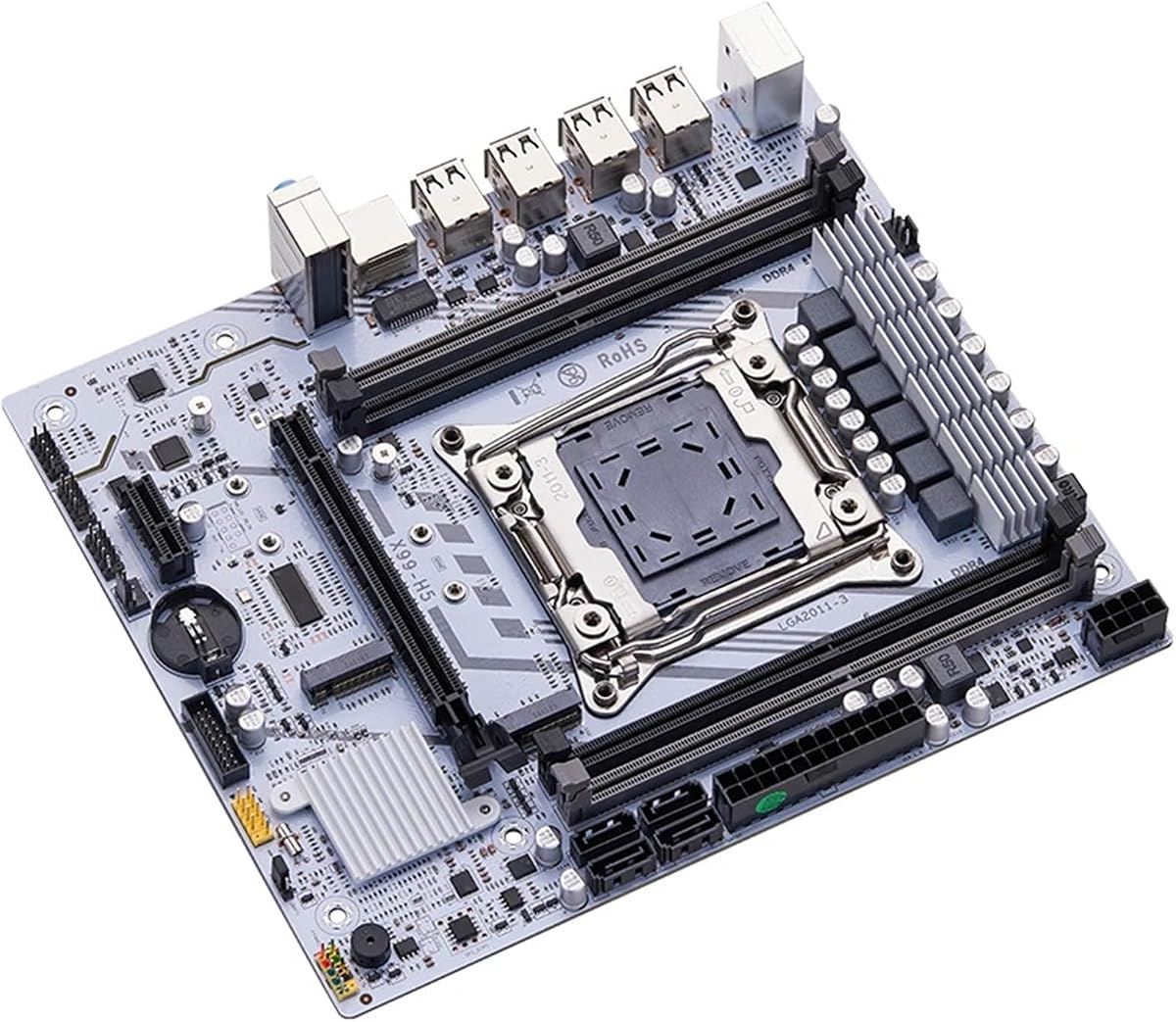

The MACHINIST X99 V9S is a versatile choice for those needing high core count CPU support. It earns high marks for its three NVME M.2 slots and broad compatibility with Xeon and i7 processors.
We may earn a commission when you buy through this link, at no additional cost to you.
Its four channel DDR4 architecture allows for massive memory capacity which is essential for virtualization and heavy multitasking. The Intel C612 chipset ensures stable communication across all high speed components.
While it lacks an included user manual the online resources available compensate for this minor inconvenience. The battery must be purchased separately but this is a common practice to reduce shipping risks.
This board is ideal for workstation builders needing expansion without breaking the bank. Its balance of features and cost makes it a top contender for budget conscious power users.
With three NVME M.2 slots you can configure a RAID array or use multiple high speed SSDs for different applications simultaneously.
The support for ECC and RECC memory ensures data integrity which is critical for servers and professional workloads.
We may earn a commission when you buy through this link, at no additional cost to you.
The X99 PR9-H White offers an impressive feature set at a very competitive price point. It is designed for ease of use with a pre-assembled I/O shield that saves time during assembly.
We may earn a commission when you buy through this link, at no additional cost to you.
Its six layer PCB design and solid capacitors contribute to stable power delivery for CPUs. The Realtek audio codec provides decent sound quality for general use without external sound cards.
The dual channel DDR4 support is sufficient for most home and office needs. While it may not match high-end workstation specs it covers the essentials very well for the cost.
This board is perfect for entry level server builds or cost effective gaming PCs. Its simplicity and included accessories make it a great starting point for hardware enthusiasts.
The Realtek ALC897 codec supports 2.1 channel audio providing studio grade sound for gaming and media consumption.
Full solid capacitors and optimized layouts ensure stable power supply and better heat dissipation during extended use.
We may earn a commission when you buy through this link, at no additional cost to you.
The ASUS X99-E WS/USB 3.1 is a workstation grade board designed for extreme graphics power. It supports 4-Way PCI-E Gen3 x16 links making it perfect for multi GPU rendering tasks.
We may earn a commission when you buy through this link, at no additional cost to you.
Its 10Gb/s USB 3.1 built into the board offers twice the speed of USB 3.0 ensuring fast data transfers for external storage. The M.2 x4 slot adds further high speed storage flexibility.
The Supreme Power Solution uses premium components to deliver industry leading efficiency and stability. This reduces heat output and ensures longevity under heavy workloads like video editing or 3D rendering.
Ideal for professionals needing top tier performance this board justifies its premium status. While it targets specific workflows its build quality and feature density are unmatched in this category.
Support for NVidia GeForce SLI and AMD CrossFireX allows for maximum graphical rendering power in professional applications.
5-Way Optimization by Dual Intelligent Processors 5 provides one click total system optimization for easy tweaking.
We may earn a commission when you buy through this link, at no additional cost to you.
The ASUS X99-A balances performance and value for general high end desktop builds. It features the Intel X99 Express chipset which provides robust connectivity for modern devices.
We may earn a commission when you buy through this link, at no additional cost to you.
ASUS OC Socket allows users to drive 8-core CPUs and DDR4 performance beyond standard expectations. This makes it a solid choice for enthusiasts looking to squeeze out extra performance.
The Crystal Sound 2 and Intel Gigabit Ethernet combo ensures quality audio and network performance out of the box. This reduces the need for additional peripherals in standard setups.
This board suits users who need reliability and standard ATX form factor compatibility. Its feature set covers most common use cases well without unnecessary complexity.
ASUS OC Socket drives performance beyond expectations allowing for fine tuning of CPU and memory speeds.
PCI Express 3.0 x4 M.2 and SATA Express offer multiple high speed data paths for modern storage drives.
We may earn a commission when you buy through this link, at no additional cost to you.
This motherboard stands out for its dual CPU support which is rare in consumer grade boards. It allows for extreme multi-threaded performance essential for heavy data processing tasks.
We may earn a commission when you buy through this link, at no additional cost to you.
With eight DDR4 DIMM slots it can support up to 256GB of memory making it ideal for virtualization or database hosting. The PCIe slots accommodate multiple graphics cards or capture cards.
The integrated RTL8111H NIC ensures reliable networking without requiring add-on cards. Audio is handled by a standard 6-channel chip for basic system sounds.
Best suited for enterprise or serious workstation environments this board offers density and power. It lacks consumer features but excels in raw capacity and expandability.
Support for two CPUs allows for maximum thread counts in rendering and scientific computing workloads.
Eight DIMM slots enable up to 256GB of RAM capacity for large datasets and virtual machines.
We may earn a commission when you buy through this link, at no additional cost to you.
The Tangxi X99 Gaming is designed for compact builds needing high performance. Its Micro ATX form factor saves space while still supporting 4-channel DDR4 memory configurations.
We may earn a commission when you buy through this link, at no additional cost to you.
The 8 layer PCB provides strong structural integrity and better signal quality. This ensures stable operation for CPUs and memory even during long gaming sessions.
It supports NVME and NGFF drives for fast storage access. The Gigabit LAN port ensures consistent network connectivity for online gaming or downloads.
This board is a good fit for gamers needing space saving designs without sacrificing core features. It prioritizes essential performance over extra bells and whistles.
Micro ATX design fits into smaller cases allowing for compact high performance builds.
8 layer PCB and solid capacitors ensure stability and longer service life for daily use.
We may earn a commission when you buy through this link, at no additional cost to you.
This board mirrors the high capacity features of its sibling offering dual CPU support and 8 memory slots. It is targeted at users needing massive system resources for enterprise tasks.
We may earn a commission when you buy through this link, at no additional cost to you.
The two PCIe X16 slots allow for dual GPU setups or expansion cards. Integrated audio and network reduce dependency on add-on hardware for basic functionality.
It includes six SATA 3.0 interfaces ensuring plenty of room for mechanical storage drives. This is beneficial for bulk storage or backup solutions.
Ideal for home labs or small server racks this board delivers density and utility. It focuses on core server capabilities rather than consumer aesthetics or features.
Two PCIe X16 slots enable multiple graphics cards or high speed network cards simultaneously.
Six SATA 3.0 interfaces provide ample connections for hard drives or SSDs in large arrays.
We may earn a commission when you buy through this link, at no additional cost to you.
This motherboard offers unique flexibility by supporting both DDR3 and DDR4 memory types. This compatibility allows users to utilize older memory kits while upgrading their platform.
We may earn a commission when you buy through this link, at no additional cost to you.
Dual M.2 NVME slots provide high speed storage options for operating systems or active applications. Optimized trace routing preserves signal integrity for better memory overclocking potential.
A passive heatsink design keeps noise levels low during operation. High quality materials ensure stability and performance under typical daily workloads.
Users needing memory flexibility and modern storage will find this board valuable. It bridges the gap between legacy hardware and newer performance demands effectively.
Support for both DDR3 and DDR4 allows for cost effective memory upgrades and reuse of existing modules.
Careful routing of traces preserves signal integrity for improved memory overclocking and stability.
We may earn a commission when you buy through this link, at no additional cost to you.
This M-ATX board offers a small footprint suitable for space constrained builds. It supports Xeon E5 V3 V4 CPUs which deliver excellent multi-threaded performance for the price.
We may earn a commission when you buy through this link, at no additional cost to you.
NVME M.2 slots ensure modern storage speeds are available for the operating system. PCIe 3.0 support accommodates modern graphics cards effectively for gaming or rendering.
SATA ports provide additional storage flexibility for data drives. The layout allows for a functional build without requiring a large tower case.
Best for compact workstations or mini servers this board balances size and capability. It meets the needs of users prioritizing physical dimensions without sacrificing core CPU power.
M-ATX layout allows for smaller cases ideal for home offices or limited desk space.
Supports Xeon E5 V3 V4 processors for powerful multi-core performance in a small board.
We may earn a commission when you buy through this link, at no additional cost to you.
This ATX board provides standard dimensions compatible with most mid tower cases. It supports LGA 2011-3 Xeon processors for robust system performance in office or gaming environments.
We may earn a commission when you buy through this link, at no additional cost to you.
The inclusion of NVME M.2 ensures fast boot times and application loading. USB3.0 interfaces offer convenient high speed connections for external drives and peripherals.
Safety protections are integrated to safeguard hardware during operation. This helps prevent damage from power spikes or overheating events.
A reliable choice for standard builds this board meets essential needs effectively. It balances stability and modern interface support for typical desktop applications.
ATX form factor fits most standard cases allowing for easy component access and cooling.
USB3.0 interfaces ensure fast data transfer rates for modern external storage devices.
We may earn a commission when you buy through this link, at no additional cost to you.
Selecting the right motherboard requires checking CPU support, memory capacity, and expansion slots to ensure your build meets performance goals.
Ensure the board supports your specific Xeon E5 or Core i7 processor. Check the official compatibility list for BIOS version requirements before purchase to avoid boot failures.
Look for boards with stable BIOS updates to ensure long term compatibility with newer CPU revisions.
Decide on the total RAM needed and check the number of DIMM slots. Boards with 8 slots allow higher capacity than those with 4 which is crucial for virtualization.
Verify if ECC or RECC memory is supported if you need data integrity for server workloads.
Check for NVME M.2 slots for fast OS storage. Multiple slots allow RAID configurations which improve speed or redundancy for critical data.
Ensure there are enough SATA ports for any mechanical drives you plan to install alongside SSDs.
Count the PCIe slots needed for graphics cards or capture devices. High bandwidth slots like PCIe 3.0 x16 are essential for modern GPU performance.
Consider future upgrades; boards with more slots allow for dual GPU setups or network cards later.
Choose ATX or M-ATX based on your case size. ATX boards offer more ports but require larger cases while M-ATX saves space for compact builds.
Verify case compatibility to ensure all ports and headers fit without obstruction during installation.
Built-in Gigabit LAN is standard but check for higher speeds if needed. Integrated audio codecs vary in quality so consider external options for critical listening.
Some boards offer better audio shielding for reduced background noise in quiet environments.
Look for solid capacitors and strong VRM cooling to support high core CPUs. A stable power supply ensures longevity and reduces the risk of hardware failure.
Boards with dedicated VRM fans or large heatsinks dissipate heat better during heavy loads.
Prioritize brands with available driver updates and documentation. Access to BIOS downloads ensures you can fix issues without needing specialized support services.
Check for warranty terms and return policies to protect your investment against defects.
Install the motherboard in a grounded case to prevent static damage. Use the correct standoffs to keep the board elevated from the case chassis.
Update the BIOS immediately after installation if possible. Download the latest version from the manufacturer website to ensure CPU and memory compatibility.
Monitor temperatures using software tools to ensure cooling fans are working. Dust buildup can reduce airflow so clean the board regularly for optimal performance.
Most modern X99 boards support DDR4 but some older models may support DDR3. Always check the product specifications before purchasing to ensure it matches your memory type requirements.
Yes most boards support both Xeon E5 and Core i7 processors from the 5th and 6th generations. Verify the specific socket and BIOS support for your chosen CPU model.
The capacity depends on the number of slots. Some boards support up to 128GB while others with eight slots can reach 256GB or more depending on the memory module size.
They are capable for gaming especially with multiple GPUs. However consumer boards may offer better gaming specific features and optimization than workstation focused models.
Warranty terms vary by seller and brand. Some offer limited warranties while others might have shorter periods. Check the product listing for specific warranty details before buying.
Many X99 boards support ECC memory which is useful for servers. However some consumer models restrict this so check compatibility if you plan to use ECC RAM.
The MACHINIST and ASUS options lead this list with distinct strengths. Choose based on whether you need raw capacity or reliable consumer features for your specific build needs.
Prioritize compatibility with your CPU and memory needs above all else. Ensure the form factor matches your case to avoid installation issues.
Always verify current pricing and availability since these items fluctuate often. Check the latest reviews for any BIOS updates before finalizing your purchase decision.