
WUKUR Dock for Square Reader 2nd Generation
4.4Editor score
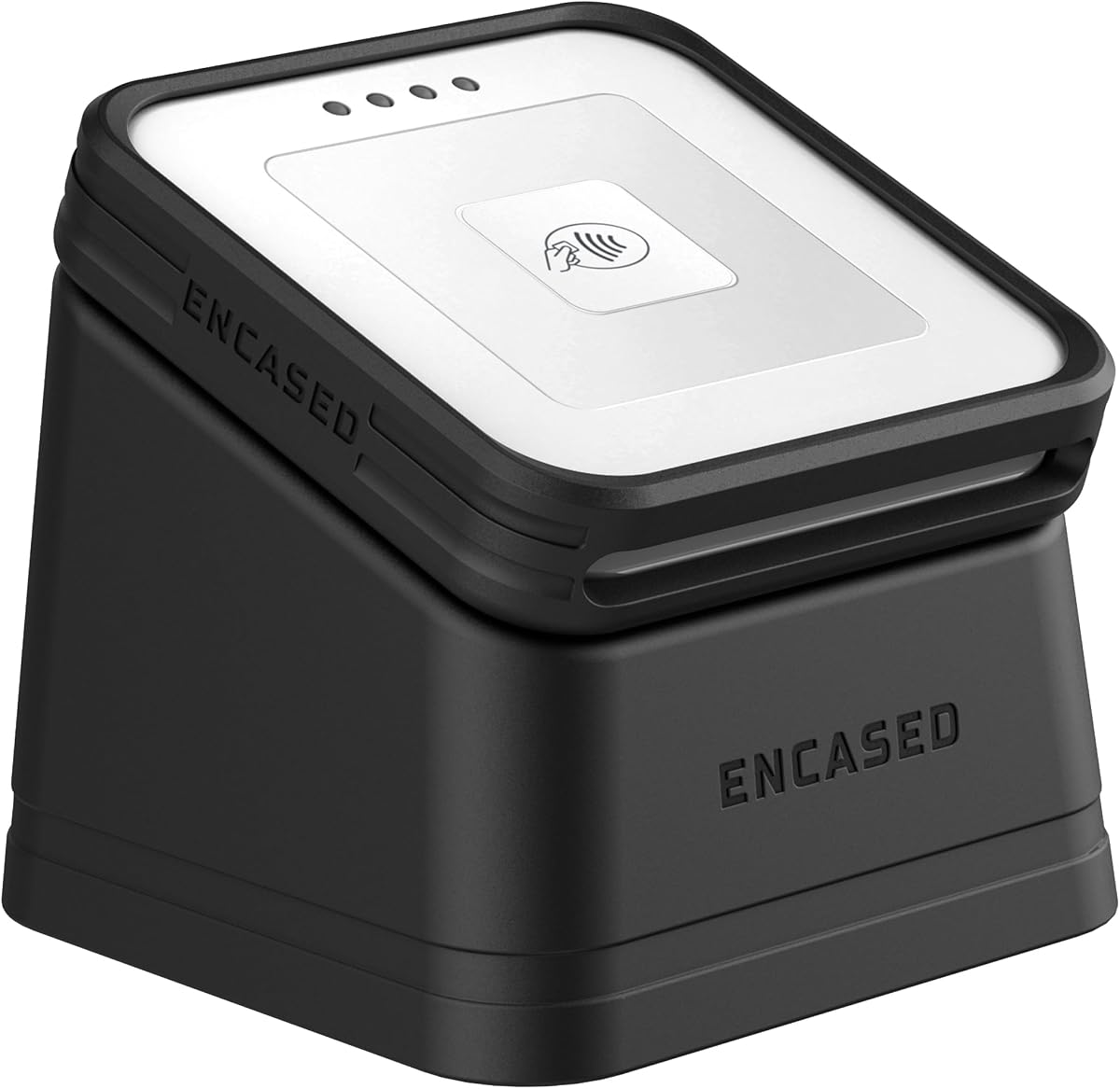
Upgraded detachable USB-C port
Compact lightweight design
Stable counterweight base
This guide compares the top 10 Dock for Square Reader options including features, compatibility, and design to help small business owners choose the best stand.
Finding the right Dock for Square Reader is essential for maintaining a professional checkout experience. A quality stand keeps your device secure and accessible while ensuring it remains charged throughout busy shifts.
We compared ten top-rated models based on build quality, ease of use, and compatibility. Each option offers unique features like anti-sleep buttons and detachable cables to suit different business environments.
Each pick highlights key specs and real-world benefits to help you decide. Remember that availability and stock can change quickly, so verify details before purchasing your ideal charging solution.
4.4Editor score

4.6Editor score
4.5Editor score
This side-by-side comparison evaluates all ten top models on key performance metrics to help you select the perfect dock for your Square Reader setup.


This dock stands out as the top recommendation for most users. It combines reliability with smart features that keep your workflow smooth during busy hours.
We may earn a commission when you buy through this link, at no additional cost to you.
The anti-sleep button allows you to wake your reader without removing it from the base. The detachable cable lets you use the dock as a simple holder after charging.
While it does not rotate, the stable design ensures it stays put. The package includes a wall charger so you do not need to source one separately.
Choose this if you want a complete and reliable docking solution. It is perfect for businesses that need a professional and efficient checkout setup.
The anti-sleep button wakes the reader in seconds with four flashing lights to confirm connection.
The detachable USB-C port allows the dock to function as a stand once the cable is removed.
We may earn a commission when you buy through this link, at no additional cost to you.
This model is ideal if you need flexibility in positioning. Its 360-degree rotation allows both customer and cashier to see the screen clearly.
We may earn a commission when you buy through this link, at no additional cost to you.
The weighted iron inside the base ensures stability on smooth surfaces. It supports both generations which offers more value for shops planning upgrades.
It lacks a wall charger so you must provide your own power adapter. The design is clean but does not offer the extra safety certifications of other models.
Select this if flexibility in viewing is your priority. It works well in dynamic retail environments where customer interaction is key.
Rotate the dock fully to accommodate different customer heights and stand layouts.
Compatible with both 1st and 2nd gen readers to future-proof your checkout station.
We may earn a commission when you buy through this link, at no additional cost to you.
This is the go-to choice for cost-conscious buyers. It delivers core docking features without the higher cost of more complex models.
We may earn a commission when you buy through this link, at no additional cost to you.
The detachable USB-C port on the back makes cable removal easy. It is slim enough to fit into tight pockets or travel bags.
It does not include a wall charger so you will need to find one separately. It also lacks ETL certification which some safety-focused buyers might prefer.
Pick this if you need an affordable stand for a small counter. It is reliable for basic use and saves money for other tools.
The slim profile makes it easy to pack for mobile sales events or market booths.
Detachable USB-C lets you swap cables easily if your current one wears out.
We may earn a commission when you buy through this link, at no additional cost to you.
Safety is the main draw of this model. It holds an ETL certification which provides peace of mind for continuous charging setups.
We may earn a commission when you buy through this link, at no additional cost to you.
It includes over-voltage and over-temperature protection to guard your device. The longer cable gives you more flexibility in placement on a wide desk.
It does not feature an anti-sleep button so you may need to tap the reader. It is also limited to the second generation of readers only.
Choose this if safety certifications are critical for your business. It is a solid choice for environments where power safety is monitored.
Built-in circuit protection prevents overheating and short-circuit damage to your reader.
The nearly 6-foot cable allows for distant wall outlets without using extension strips.
We may earn a commission when you buy through this link, at no additional cost to you.
This model offers a complete protection system for your reader. It includes a magnetic case that snaps onto a display stand for flexible use.
We may earn a commission when you buy through this link, at no additional cost to you.
The case is made of TPU with a raised lip to prevent screen damage. It is also MagSafe compatible so you can mount your phone nearby.
It comes at a higher price and adds bulk from the case. The magnetic connection is convenient but may feel less secure than a clip.
Pick this if device protection is your top concern. It is perfect for mobile use or crowded counters where drops are a risk.
The TPU case absorbs shocks and protects buttons from accidental presses during transport.
Use the case for magnetic phone mounting to create a unified payment station.
We may earn a commission when you buy through this link, at no additional cost to you.
This model is a great middle-ground option. It supports both generations and includes the necessary charging components right out of the box.
We may earn a commission when you buy through this link, at no additional cost to you.
It features an anti-sleep button and is made from durable ABS plastic. The compact size means it does not take up much space on a counter.
It is heavier than many portable docks which reduces portability. The design is simple and does not offer rotation or advanced safety features.
Choose this if you need a plug-and-play solution for any reader. It is reliable for small shops needing a ready-to-use station.
The included wall charger and cable means you can start using it immediately upon arrival.
Supports both 1st and 2nd gen models which makes it versatile for mixed fleets.
We may earn a commission when you buy through this link, at no additional cost to you.
This dock has achieved a perfect rating from users. It combines a smart button with a stable base that prevents accidental tipping.
We may earn a commission when you buy through this link, at no additional cost to you.
The scientific counterweight ensures the stand remains steady even when inserting or removing a card. It comes with a wall charger to reduce clutter on your desk.
It does not rotate which limits viewing angles for customers. The base is wide which may take up more space on a narrow counter.
Select this if stability is critical for your checkout. It is ideal for high-volume environments where accidental drops are a concern.
Weight distribution ensures the dock stays put even with frequent handling by customers.
A perfect rating suggests users found it reliable and easy to use in daily operations.
We may earn a commission when you buy through this link, at no additional cost to you.
This dock offers a complete set of features for the price. It includes a wall charger and supports both smart and portable use cases.
We may earn a commission when you buy through this link, at no additional cost to you.
The anti-sleep button helps you stay active without removing the device. The non-slip base ensures the stand stays stable during busy transactions.
It is made from plastic which feels less premium than other materials. It also lacks the rotation feature found in some higher-end models.
Choose this if you want a complete solution ready for setup. It is a reliable choice for standard countertop use.
The included wall charger means you do not need to buy extra accessories to use it.
A quick press wakes the reader so you can process transactions immediately.
We may earn a commission when you buy through this link, at no additional cost to you.
This dock is built to resist scratches and daily wear. It includes all the necessary components to get started quickly.
We may earn a commission when you buy through this link, at no additional cost to you.
The anti-sleep button ensures you can reactivate the device without moving it. The compact design means it fits well on smaller counters.
It does not offer any rotation which may limit customer visibility. The generic design does not stand out aesthetically compared to others.
Pick this if you need a durable and reliable base. It is suitable for shops prioritizing functionality over style.
ABS construction resists scratches and wear from frequent handling and contact.
Charging cable and wall adapter included make it ready to use right out of the box.
We may earn a commission when you buy through this link, at no additional cost to you.
This dock is ideal if you prefer simple and clean solutions. It uses USB power so you can connect directly to a laptop or port.
We may earn a commission when you buy through this link, at no additional cost to you.
The scientific counterweight and non-slip pad keep it stable. The long cable gives you enough slack to position it comfortably.
It does not include a wall adapter so you must source your own. It is also limited to second-generation models only.
Choose this if you value simplicity and existing USB ports. It is a practical choice for modern desks.
Use with any USB port to charge directly without needing a wall outlet.
Engineered balance ensures the stand stays steady even with heavy use.
We may earn a commission when you buy through this link, at no additional cost to you.
Choosing the right dock involves looking at compatibility, power options, and build quality to match your business needs.
Ensure the dock supports your specific reader generation. Some docks only work with 2nd gen readers while others support both generations to offer more flexibility.
Always check compatibility before buying to avoid returns.
Decide if you want a dock that includes a wall charger or relies on a USB connection. Those with wall chargers are better for dedicated checkout counters.
USB-only docks are more portable but need a nearby power source.
Look for a dock with an anti-sleep button so you can wake the reader without removing it. This feature saves time during busy transactions.
Docks without this feature require you to tap the reader each time.
Materials like ABS plastic are durable and scratch-resistant. Some docks also carry safety certifications like ETL which protect against electrical hazards.
Higher quality builds tend to last longer in busy environments.
A good base should have non-slip silicone pads and scientific counterweight. These prevent the dock from sliding or tipping when customers interact with it.
Look for weighted bases if your counter is slippery or busy.
If you travel to markets or events choose a compact lightweight dock. Some models are designed to be portable and fit into travel bags easily.
Check the dimensions to ensure it fits in your carrying case.
Consider how the dock matches your counter decor. Some offer sleek white designs while others have more utilitarian looks that may not suit boutique settings.
Choose a design that fits your brand identity and customer experience.
Look for bonus features like rotation or detachable cables. Rotation allows better customer viewing while detachable cables add versatility to use the dock as a stand.
Prioritize features that match your specific workflow needs.
To start simply insert your Square Reader into the dock. If your model has an anti-sleep button press it to activate the connection without removing the device.
Keep the dock and cable clean by wiping them with a soft dry cloth. Avoid using water or harsh chemicals that may damage the plastic or rubber components.
If you use the dock as a stand ensure the cable is detached properly. Always store the dock in a dry place when not in use to prevent wear.
No, the dock is sold separately and does not include the Square Reader. You must already own the reader to use the dock. The package typically includes only the dock base and accessories like cables or chargers.
You can use the dock as a simple holder without power, but it will not charge the reader. For charging you must connect the USB cable to a power source like a wall adapter or laptop.
Check that the dock is properly connected to power and that the reader is seated correctly. Sometimes restarting the reader or resetting the dock connection can resolve the issue.
Most docks are designed for indoor use but can work outdoors if protected from rain. Portable models with compact designs are better for markets and pop-up shops than heavy ones.
Wipe the silicone pads with a damp cloth and mild soap. Avoid harsh chemicals that can degrade the rubber. Ensure they are completely dry before using the dock again.
Only specific models with a 360-degree rotation feature allow you to turn the dock. Most standard docks are fixed in place and do not have a swivel base.
Not all docks include a wall charger. Some come with a USB cable and require you to provide your own adapter. Always check the package contents before purchasing to avoid extra costs.
With normal use a good quality dock can last several years. Durability depends on material quality and how often it is moved or dropped in daily use.
Our top picks cover a range of needs from budget-friendly to premium options. The Editor's Choice offers the best balance of features for most small businesses.
Prioritize features like anti-sleep buttons and stability for busy environments. Ensure compatibility with your reader generation to avoid any setup issues.
Always check current stock and availability before finalizing your purchase. These docks can sell out quickly during peak business seasons.