
Redragon K585
4.4Editor score
42-Key Layout
Swappable Switches
Macro Recording Keys
This guide compares the top ten gaming keypads for performance, ergonomics, and customization to help you choose the best one-handed controller for your setup.
Gaming keypads offer a specialized solution for players who want to free up their right hand for mouse movement while keeping essential commands within reach. These devices replace the standard left side of a keyboard with programmable keys, macros, and often analog controls. They are ideal for MMOs, MOBAs, and competitive shooters where rapid skill activation is critical for success in intense matches.
We evaluated ten leading keypads based on switch type, customization options, ergonomics, and build quality. Our analysis covers everything from budget-friendly membrane models to high-end Hall Effect devices with analog thumbsticks. Each product was reviewed for its ability to enhance gameplay efficiency, reduce hand fatigue, and integrate seamlessly with your existing gaming hardware and software ecosystem.
Each pick below highlights specific strengths like macro support, wireless connectivity, or rapid trigger technology. We also include detailed buying advice to help you match a keypad to your hand size and preferred game genres. Please note that prices and availability change frequently, so verify current details before making your final purchase decision online.
4.4Editor score

4.3Editor score

4.3Editor score
The following table provides a side-by-side comparison of all ten keypads reviewed in this guide. It highlights key specifications such as switch technology, key count, connectivity options, and unique features to help you quickly identify the model that best fits your specific gaming needs and budget constraints.




The Razer Tartarus V2 stands out as the most versatile one-handed keypad available today. It combines 32 programmable keys with an analog thumbpad, offering a unique blend of keyboard precision and controller-like movement. Its high rating reflects strong user satisfaction with comfort and customization features that cater to both gaming and creative work.
We may earn a commission when you buy through this link, at no additional cost to you.
Its Mecha-Membrane switches deliver tactile feedback similar to mechanical keys but with less noise and cushioned comfort for long sessions. The analog thumbpad is a standout feature, allowing for smooth WASD movement without needing a full keyboard layout. Razer Hypershift enables complex macro layering, while Chroma sync creates an immersive visual experience across your entire setup.
While the switches are not hot-swappable, the build quality is robust enough to handle intense daily use without degradation. The non-detachable cable can be slightly limiting for some cable management setups, but the overall ergonomic shape minimizes strain. These trade-offs are minor compared to the value provided by its comprehensive feature set.
This keypad is ideal for MMO players who need many ability bindings and creative professionals who require custom shortcuts. If you prioritize ergonomics and software integration over mechanical switch customization, the Tartarus V2 is the top recommendation. It balances performance and comfort better than most competitors in this category.
The 8-way directional thumbpad provides console-style movement control that is precise and ergonomic, allowing you to walk or fly in-game without shifting your hand position.
Hypershift technology lets you map multiple command layers to single keys, enabling complex combinations and quick-access tools that streamline your workflow significantly.
We may earn a commission when you buy through this link, at no additional cost to you.
The Redragon K585 offers exceptional value for gamers seeking a customizable one-handed controller without spending a fortune. Its 42-key layout provides ample space for complex ability rotations in MMOs and MOBAs. The ability to swap switches without soldering makes it a favorite among enthusiasts who want to tune the feel to their preference.
We may earn a commission when you buy through this link, at no additional cost to you.
Key strengths include the robust macro system that allows binding multiple commands to keys for instant combos. The USB pass-through port is a practical addition for connecting a mouse directly to the keypad, reducing cable clutter on your desk. The detachable wrist rest ensures comfort during extended play sessions while offering flexibility for storage.
The main drawback is that the software requires some time to master for advanced customization. RGB effects are vibrant but lack the dynamic animations found in higher-end models. However, these are acceptable compromises given the low price, making it a solid entry point for those exploring one-handed gaming setups.
This device is perfect for budget-conscious players or those who want to experiment with switch types. If you need a functional, reliable keypad with decent customization and comfort features, the K585 is a strong contender. It delivers on the essentials that matter most for gameplay efficiency.
The upgraded socket accepts almost any 3-pin or 5-pin switch, allowing you to easily tune the tactile feel to match your main keyboard setup.
The included USB pass-through port lets you plug your mouse directly into the keypad for a cleaner desk setup while keeping your mouse within easy reach.
We may earn a commission when you buy through this link, at no additional cost to you.
The AZERON Cyborg II is a true powerhouse for gamers who demand the highest level of control and customization. It replaces the traditional keyboard layout with a compact design featuring an analog thumbstick and 30 programmable keys. This device is built for precision and adaptability, making it a top choice for serious enthusiasts.
We may earn a commission when you buy through this link, at no additional cost to you.
Its Hall Effect thumbstick eliminates stick drift and supports smooth WASD or 360-degree movement, a feature rare in this category. The adjustable parts ensure a perfect fit for various hand sizes, while modular enhancements allow for future software updates. Each button is individually connected to avoid matrix issues, ensuring reliable input registration.
While the price is significantly higher than standard keypads, the build quality and unique features justify the investment for dedicated users. The software is complex but offers deep customization for layouts and sensitivity. It may take time to learn, but the performance gains in compatible games are substantial and worth the effort.
This keypad is ideal for competitive players or those with specific ergonomic needs who want a tailored solution. If you value analog movement and advanced configurability over simple key binding, the Cyborg II is unmatched. It represents the cutting edge of one-handed gaming hardware technology.
The Hall Effect thumbstick eliminates stick drift and supports analog movement, giving you smooth control over speed and direction in compatible games.
Adjustable parts ensure a perfect fit for your hand, allowing you to customize the keypad shape to reduce strain during long gaming sessions.
We may earn a commission when you buy through this link, at no additional cost to you.
The Redragon K585 PRO brings the popular wired K585 features into a wireless form factor. This allows for untethered placement on your desk, freeing up USB ports and reducing cable clutter. It retains the 42-key layout and macro capabilities of the original while adding flexibility for cleaner setups.
We may earn a commission when you buy through this link, at no additional cost to you.
Key strengths include the long battery life that supports continuous play for extended periods on a single charge. The ability to swap switches without soldering remains, giving you customization options. The detachable wrist rest ensures comfort even in this smaller footprint design, making it suitable for long sessions.
The higher price compared to the wired version is offset by the convenience of wireless freedom. Some users may need to remember to charge it regularly, but the battery life is generous. These trade-offs are minor considering the significant benefit of a cable-free experience in a tight gaming space.
This device is perfect for gamers who want to minimize desk clutter without sacrificing macro performance. If you value wireless convenience and still want customizable switches and comfort features, this is a strong choice. It balances performance and portability well.
BT and 2.4GHz connectivity let you place the keypad anywhere on your desk without being tethered by cables for a cleaner setup.
The internal battery supports up to twenty hours of continuous play, allowing for extended gaming sessions without frequent recharging needs.
We may earn a commission when you buy through this link, at no additional cost to you.
The RedThunder One Handed Gaming Keyboard is a portable solution designed for gamers on the go. Its small size makes it easy to carry to LAN parties or fit into small workspaces. The ergonomic design includes a wrist rest, ensuring comfort even with its reduced footprint compared to larger keypads.
We may earn a commission when you buy through this link, at no additional cost to you.
It features 35 anti-ghosting keys and two sets of macro recording keys that allow for quick command binding. The RGB backlit modes provide visual customization with static and breath effects. Being driver-free means you can plug it in and use it immediately on Windows or Mac systems without installation.
The main trade-off is the basic RGB and limited key count compared to more advanced models. This is acceptable for casual gamers or those who prioritize portability over complex macros. The simple design ensures reliability and ease of use without technical hurdles.
This device is ideal for travelers or users with minimal desk space who need essential macros. If you want a simple, reliable keypad that works out of the box, the RedThunder is a solid option. It focuses on core functionality and ease of use.
Using FN keys allows for immediate macro recording and playback without installing any drivers, making it easy for beginners to customize quickly.
The small size and lightweight build make it easy to transport, fitting neatly into a backpack for gaming on the go or travel.
We may earn a commission when you buy through this link, at no additional cost to you.
The Keychron C0 HE is designed for competitive FPS players who need the fastest response times. It features Rapid Trigger Hall Effect magnetic switches that reset instantly on lift-off, allowing for quicker directional changes. This technology provides a distinct advantage in titles like Valorant or CS2 where movement precision is key.
We may earn a commission when you buy through this link, at no additional cost to you.
Key strengths include the 8K polling rate and adjustable actuation points that let you tune the trigger depth to your preference. The web-based configurator simplifies setup, avoiding complex software installs. Per-key RGB lighting adds visual flair while maintaining the professional build quality Keychron is known for.
The device requires compatible PC hardware to fully utilize the 8K polling rate, which may be a hurdle for some users. The learning curve for adjusting actuation points can be steep for beginners. However, for those seeking competitive edge, these features are essential and worth the setup effort.
This keypad is perfect for competitive gamers and content creators who need precise shortcuts. If you prioritize speed and customization over simplicity, the C0 HE is a top choice. It delivers high-performance features that cater specifically to skilled players.
Rapid Trigger allows keys to reset instantly upon release, giving you faster reaction times and precise control during high-intensity movement sequences.
Customize key mapping and lighting directly in your web browser without installing heavy software, ensuring quick setup across different systems.
We may earn a commission when you buy through this link, at no additional cost to you.
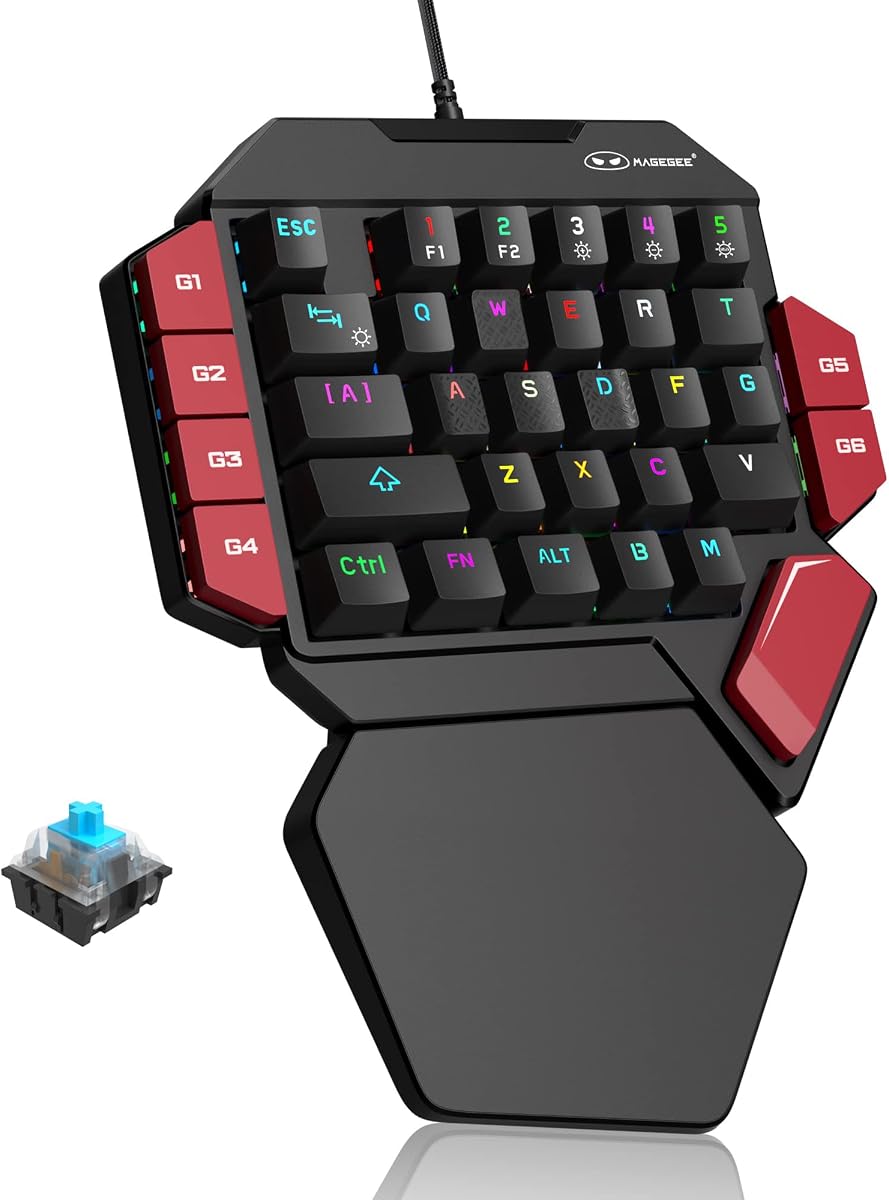
The MageGee One Handed keyboard is built for those who love the satisfying click of mechanical switches. Its Blue switches provide strong tactile feedback and clear actuation points. This design is great for typing and gaming where you want to confirm each press clearly without visual confirmation.
We may earn a commission when you buy through this link, at no additional cost to you.
It features 35 keys with anti-ghosting and six macro recording keys that can be assigned easily via function keys. The RGB lighting offers multiple dynamic modes to match your setup. The ergonomic palm rest helps reduce hand fatigue during long periods of gameplay or work.
The main trade-off is the loud clicking noise which may disturb others. The lighting software is limited compared to premium brands. However, for those who value tactile feedback and durability, the mechanical build is superior to membrane options. It is reliable and straightforward.
This device is ideal for gamers who prefer clicky switches and basic macro needs. If you want a mechanical feel without full keyboard size, this is a strong pick. It offers a satisfying typing and gaming experience at a low cost.
Blue switches offer a loud click and strong tactile feedback, providing precise confirmation for every keypress during intense gaming sessions.
Six macro recording keys let you assign common commands easily using function combinations for quick access without complex software setup.
We may earn a commission when you buy through this link, at no additional cost to you.
The AJAZZ AK029 is an ultra-compact option that saves significant desk space. Its 29-key layout is designed for minimalism, freeing up room for mouse movement. This model uses Hall Effect switches which provide consistent performance and no debounce delay, ensuring every tap is registered instantly.
We may earn a commission when you buy through this link, at no additional cost to you.
It supports web-based customization for key mapping and actuation points without needing software. The aluminum plate ensures stability and durability, while the PBT keycaps offer lasting quality. RGB lighting with 20 modes adds style to the clean design. It is a highly functional device for specific needs.
The limited key count may restrict macro options for MMO players. The actuation force is relatively high which could fatigue fingers quickly. However, the build quality and switch performance are excellent. These trade-offs are acceptable for users prioritizing portability and durability.
This device is perfect for users with minimal desk space who still want Hall Effect technology. If you value stability and switch performance over key count, this is a great choice. It is reliable and well-built for daily use.
The twenty-nine key layout saves sixty percent of desk space, freeing your mouse for better movement and reducing clutter significantly.
Zero dead zone magnetic switches ensure instant response without debounce delay, giving you tournament-grade performance for years.
We may earn a commission when you buy through this link, at no additional cost to you.
This Razer Tartarus V2 unit represents the standard model with core features. It includes 32 programmable keys and a thumbpad for movement control. The Mecha-Membrane switches offer comfort and tactile feedback suitable for gaming. It integrates well with Chroma for visual immersion across your setup.
We may earn a commission when you buy through this link, at no additional cost to you.
Key strengths include the ergonomic design and macro capabilities that streamline gameplay. The thumbpad allows for console-style movement without shifting hands. It supports various game integrations making it versatile for many genres. The build quality is solid and reliable for long-term use.
It lacks some advanced features found in custom variants like hot-swap switches. The price is standard for the brand but lacks premium customization options. However, the core functionality remains strong for general use. It is a reliable choice for Razer fans.
This device is ideal for users wanting a reliable standard keypad. If you prefer the Razer ecosystem and need solid ergonomics, this is a good fit. It offers consistent performance and comfort for daily tasks.
The ergonomic design and soft cushioning reduce hand fatigue, providing a relaxing gaming experience even during long sessions.
Full Chroma sync supports 16.8 million colors, allowing you to match your keypad lighting with other Razer gear for an immersive look.
We may earn a commission when you buy through this link, at no additional cost to you.
The Redragon RM104 is a versatile keyboard with a unique multifunction control knob. It offers tri-mode wireless connectivity allowing you to switch between Bluetooth and 2.4GHz easily. The smart knob lets you adjust volume and RGB modes, providing control beyond typical key inputs.
We may earn a commission when you buy through this link, at no additional cost to you.
Its 4000mAh battery ensures long usage times without frequent charging. The software support allows deep customization of buttons and macros. RGB lighting syncs with other Redragon gear to match your mood. It is a functional device for multimedia and gaming use.
It is not a dedicated one-handed keypad but offers wireless features similar to them. The button count is limited compared to full keyboards. However, for those wanting a compact wireless tool with control knobs, it is unique. It serves well for multimedia and simple macros.
This device is ideal for users wanting wireless convenience and a smart knob. If you need a compact keyboard for gaming and media control, this is a strong option. It offers flexibility and modern connectivity features.
The multifunction knob lets you adjust volume and cycle RGB modes faster than any standalone keyboard shortcut for smoother control.
Tri-mode connectivity enables seamless switching between Bluetooth and wireless, keeping your desk clean and flexible for multiple devices.
We may earn a commission when you buy through this link, at no additional cost to you.
Choosing the right gaming keypad depends on several factors ranging from switch technology to ergonomic needs and connectivity options. This guide breaks down the essential elements to help you find a device that matches your specific gaming style and budget.
Switches determine the feel and speed of your inputs. Membrane switches are quiet and soft, while mechanical switches offer tactile feedback. Hall Effect switches provide adjustable actuation and rapid trigger for competitive gaming.
Choose switches based on your preference for noise and feel. Competitive players should consider Hall Effect for speed, while casual gamers may prefer mechanical for durability and feedback.
Key count varies from 29 to 42 keys. More keys allow for extensive macro binding which is useful for MMOs and MOBAs. Fewer keys save desk space and may suit FPS players.
Select a layout that matches your needs. If you need many ability bindings, choose a model with higher key count. If you prioritize mouse space, a compact layout is better.
Wired models ensure zero latency and consistent power, while wireless models offer freedom and less clutter. Bluetooth offers multi-device pairing but 2.4GHz provides lower latency for gaming.
Consider your desk setup. If you want a clean look, go wireless. If you need absolute reliability, stick to wired options that guarantee consistent performance.
Look for wrist rests and adjustable shapes. Comfort is critical for long sessions to prevent strain. Adjustable thumbpads or analog sticks can improve movement control significantly.
Prioritize devices with ergonomic design. Wrist rests and angled layouts help reduce fatigue. If you have larger hands, ensure the keypad fits comfortably without forcing awkward positions.
Macro support allows you to bind complex commands to single keys. Software quality varies; some require installation while others use web configurators. Deep customization adds value to the device.
Check software capabilities before buying. If you need complex macros, ensure the software supports layering and profiles. Browser-based tools offer convenience without extra installs.
Materials like aluminum reinforce the chassis and reduce wobble. PBT keycaps are more durable than ABS. Ensure the device is sturdy enough to withstand daily use.
Invest in solid construction. Aluminum plates and high-quality switches ensure the keypad lasts longer. A sturdy build prevents movement during intense gameplay sessions.
Prices range from budget-friendly to premium. Basic models offer good value for macros while advanced models with Hall Effect switches cost more. Balance cost with needed features.
Set a realistic budget and stick to it. You do not always need the most expensive model. Focus on features that improve your workflow rather than just price tags.
RGB lighting can sync with other gear for immersion. Static or dynamic modes add visual flair. Some devices offer per-key RGB which looks more premium.
If you care about your setup's look, check RGB options. Syncing with Chroma or other ecosystems enhances the gaming atmosphere. Ensure brightness and customization meet your expectations.
To get started, connect your keypad via USB or pair via wireless settings on your computer. Install any required drivers or access web configurators to map your keys. Spend time setting up macros that match your game's skill rotation or workflow needs.
Clean your device regularly by brushing out dust from key switches and wiping the surface with a dry cloth. Avoid liquids near the electronics to prevent damage. If your keypad has detachable parts like wrist rests, remove them for thorough cleaning when needed.
Update firmware periodically through the manufacturer software or website to access new features. Keep your macros organized and backed up if possible. Proper storage when not in use prevents wear and ensures the device remains responsive over time.
Yes, keypads can be highly beneficial for FPS games because they free up mouse space and reduce hand strain. The compact layout allows for easier movement and macros for specific actions like weapon switching or reloads. However, ensure you choose a model with low latency and good ergonomics.
Absolutely. Many keypads support macro programming which can streamline typing workflows. You can bind common commands or shortcuts to single keys. This speeds up coding and reduces repetitive strain on your typing hand during long sessions.
Most modern keypads are compatible with Macs via USB or Bluetooth. Some software may require Windows specific tools but basic key functions usually work out of the box. Check product details to confirm OS compatibility before purchasing.
Wireless keypads typically last between 15 to 20 hours on a single charge depending on usage and RGB settings. Some models offer longer endurance with dimmed lighting. Charging cables are usually included for quick recharging when needed.
No, not all models have hot-swappable switches. Some budget and standard models have fixed switches while higher-end options allow you to swap them without soldering. Check product specs to confirm if switch customization is supported.
Analog thumbpads provide console-style movement control allowing smooth directional input. This is useful for flying vehicles or character movement without a keyboard. It offers a natural feel for players accustomed to controllers.
Some models require driver software while others use onboard memory or function keys. Budget models often support plug-and-play macros without installation. Advanced models may need software for deep customization. Check the product description for details.
Yes, one-handed keypads are designed to save space by removing the standard left side of a keyboard. This frees up desk area for mouse movement and reduces clutter. Compact models save even more room for small setups.
We reviewed ten top keypads offering diverse features from Hall Effect switches to wireless connectivity. The Razer Tartarus V2 leads in ergonomics and integration while Redragon offers excellent budget and wireless options. For competitive FPS players, the Keychron C0 HE provides unmatched speed.
Prioritize your specific needs when selecting a model. If you play MMOs, look for high key counts and macro support. If you value wireless freedom, consider models with strong battery life and dual-mode connectivity. Comfort should never be overlooked for long gaming sessions.
Always check current prices and availability before buying as these can fluctuate frequently. Use the links provided to find the best deals for each model. With the right keypad, you can improve your efficiency and comfort during gameplay.