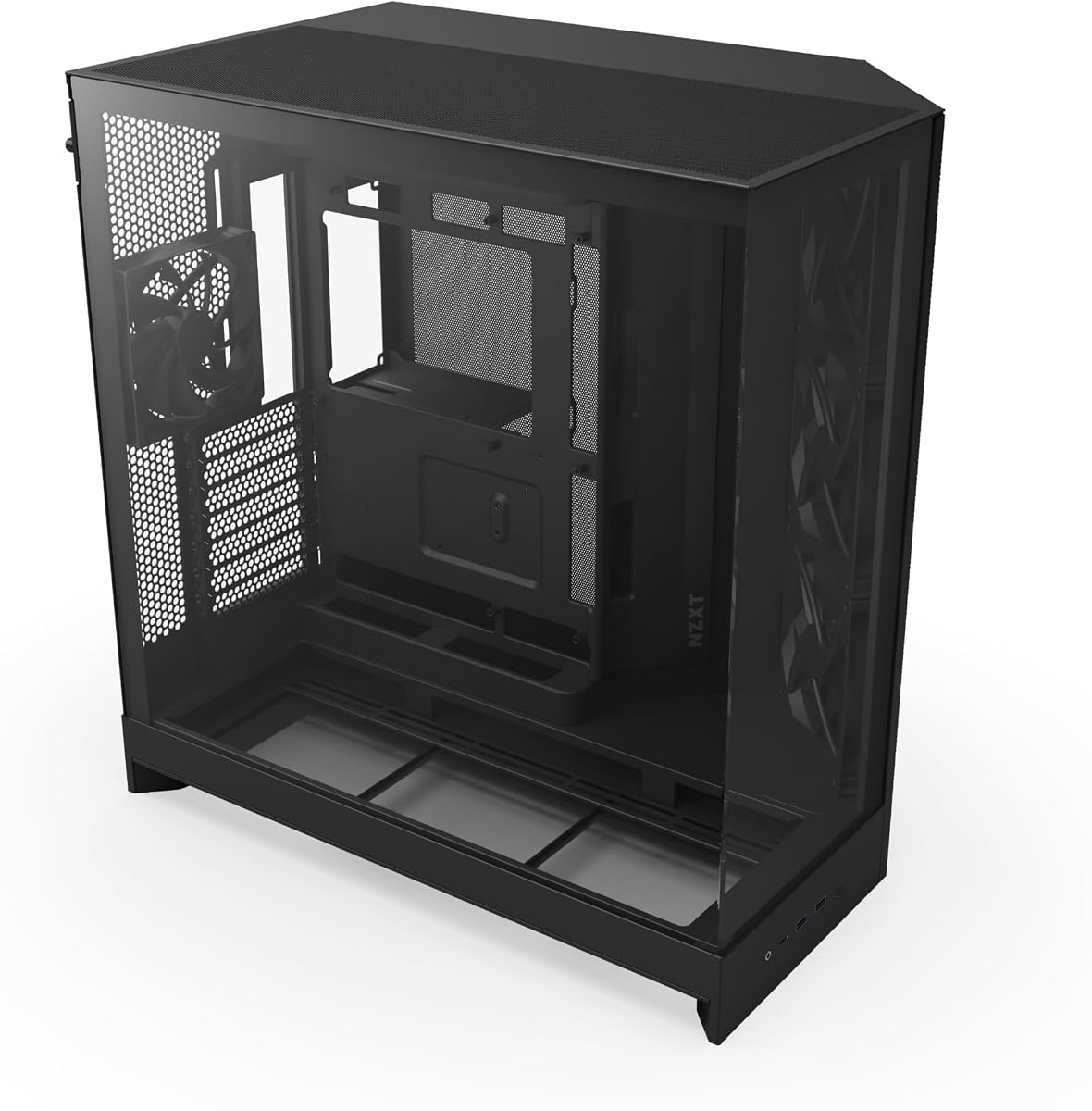
NZXT H9 Flow
4.7Editor score
Dual chamber design
Optimized airflow
Pre-installed fans
This guide compares the top dual chamber PC cases for 2026, focusing on thermal performance, cable management, aesthetics, and build quality for gamers and
Dual chamber PC cases have revolutionized how we approach system building by separating power supplies from critical components. This design improves airflow significantly while reducing clutter inside the main compartment. Builders love the clean look and improved thermal dynamics that come with this modern chassis layout.
We evaluated ten leading models based on airflow efficiency, component compatibility, and aesthetic appeal. Each case was reviewed for fan support, radiator clearance, and cable routing options. Our goal is to help you find the perfect fit for your specific hardware needs without compromising on style.
Every pick in this list highlights unique strengths whether you need budget value or premium features. We include detailed specs and honest assessments of real-world performance. Please note that pricing fluctuates frequently so always verify current costs before making your final purchase decision today.
4.7Editor score

4.8Editor score

4.6Editor score
The following table provides a side-by-side comparison of all ten top-rated dual chamber cases. Review the key specifications to determine which model aligns best with your hardware requirements and aesthetic preferences for your next build.


The NZXT H6 Flow stands out as the top dual chamber PC case for most builders due to its balance of size and performance. It earns an outstanding 4.8 rating from users who appreciate its clean design and efficient airflow system. The wraparound glass panels provide an unobstructed view of your components without compromising structural integrity.
We may earn a commission when you buy through this link, at no additional cost to you.
Key strengths include its compact footprint which fits smaller desks while still supporting ATX motherboards and large graphics cards. The included pre-installed fans are positioned at ideal angles to maximize cooling efficiency right out of the box. Perforated panels on top and sides enhance airflow while filtering dust effectively to keep internals clean.
Honest trade-offs involve limited storage expansion compared to larger towers and the lack of latest USB standards on the front panel. These are acceptable given the case focuses on streamlined aesthetics and efficient cooling rather than extreme modularity. Most users find the trade-off worthwhile for the visual simplicity it offers.
This case is perfect for gamers and creators who want a sleek look without sacrificing cooling performance. It is highly recommended for anyone building a mid-range to high-end system in a compact space. The intuitive cable management system makes assembly easier for first-time builders too.
The H6 Flow uses perforated panels to ensure cool air reaches components efficiently while minimizing dust accumulation inside the chassis.
Wraparound glass panels with seamless edges provide a continuous panoramic view of your build highlighting key components beautifully.
We may earn a commission when you buy through this link, at no additional cost to you.
The NZXT H9 Flow offers exceptional value for builders seeking a dual chamber design without breaking the bank. It holds a solid 4.7 rating thanks to its effective thermal separation and spacious interior. The main components stay separate from the power supply and drives improving overall system efficiency significantly.
We may earn a commission when you buy through this link, at no additional cost to you.
Strengths include the optimized airflow design with angled front-right fans ensuring high-performance cooling. It supports up to nine 140mm fans plus a 120mm rear fan for massive cooling potential. Extra-wide channels and built-in Velcro straps make cable routing effortless and tidy.
Some users note the case is heavier than typical mid-towers and the glass panels attract fingerprints easily. These are minor issues given the price and performance balance. The back-connect ready feature also ensures a clean look for compatible motherboards without extra cables.
Buy this if you need a budget-friendly dual chamber case with high end features. It suits gamers wanting a clean build on a budget. The large radiator support ensures you can upgrade cooling later without needing a new case.
Dual chamber design separates main components from power supplies enhancing thermal performance and enabling cleaner cable management solutions.
Compatible with rear-connecting motherboards like ASUS BTF and MSI Project Zero for a completely cable-free aesthetic look.
We may earn a commission when you buy through this link, at no additional cost to you.
The HAVN HS 420 represents the pinnacle of dual chamber cases with its unique hybrid structure. It earns a 4.6 rating for exceptional build quality and innovative features. The balanced airflow ratio directs cool air from the bottom intake onto the centrally positioned GPU for optimal cooling.
We may earn a commission when you buy through this link, at no additional cost to you.
Key strengths include its ability to fit eleven 140mm fans and three 420mm radiators simultaneously. The SimpliCable routing system uses top-to-bottom grooved guides for a pristine appearance without cable mess. A unique 3-way adjustable GPU support bracket handles a wide range of graphics cards neatly.
High price and complex installation are real trade-offs that casual builders may find challenging. But for enthusiasts seeking the ultimate cooling and aesthetics this case delivers. Vibration isolation with flexible rubber pads reduces resonance significantly during heavy load.
This case is for professionals and enthusiasts who want the absolute best. It ensures maximum cooling potential and sleek aesthetics for high-end systems. The VESA mount allows portable displays to be integrated into the case design easily.
Dual chamber design with balanced airflow directs cool air from bottom intake onto centrally positioned GPU for optimal thermal performance.
User-friendly SimpliCable routing system and fan hub with grooved guides route cables cleanly for a pristine overall appearance.
We may earn a commission when you buy through this link, at no additional cost to you.
The Thermaltake View 380 impresses with its pillarless front and side glass panels. It has a 4.7 rating highlighting its aesthetic appeal and hardware compatibility. The case supports hidden-connector motherboards to hide cables behind the board for a cleaner look.
We may earn a commission when you buy through this link, at no additional cost to you.
Strengths include the four pre-installed hydraulic bearing ARGB Lite fans. These provide good lighting and airflow without extra cost. Max VGA length of 415mm supports most current graphics cards easily. The Gen.2 USB 3.2 Type-C port ensures modern connectivity.
Users mention fan noise can be noticeable at high speeds and RGB controller quality is average. These are acceptable given the glass design focus. The 3-year warranty also adds significant peace of mind for long-term use.
Buy this if you prioritize a pillarless view and hidden-connector support. It fits well in modern minimalist setups. The ARGB fans allow customizable lighting without extra purchases.
Dual chamber case with pillarless front and side tempered glass panel offers an uninterrupted view of internal components.
Compatible with hidden-connector motherboards to reduce visible clutter and improve overall aesthetics inside the case.
We may earn a commission when you buy through this link, at no additional cost to you.
HYXN H1 stands out for its ability to hold up to three 360mm radiators simultaneously. It holds a 4.4 rating for its spacious design and robust cooling potential. The dual cavity structure separates components effectively improving airflow through the chassis significantly.
We may earn a commission when you buy through this link, at no additional cost to you.
Strengths include the pre-installed 7 PWM ARGB fans with reverse blade options. This allows flexible airflow configurations. Dust filters on top and bottom reduce accumulation improving system longevity. The 270-degree field of view enhances aesthetic appeal.
Some users note brand support is limited and the case is quite heavy for its size. These trade-offs are acceptable given the cooling flexibility. Type-C 3.0 port adds modern convenience for peripherals.
Buy this if you need extreme liquid cooling support without extra bulk. It suits gamers pushing high-end GPUs and CPUs. Reverse blade fans allow flexible lighting and airflow setups.
Bottom and sides are air intakes and top and rear are exhaust ports creating vertical airflow design for better cooling.
Ultra-spacious design accommodates up to two 360mm radiators simultaneously for powerful liquid cooling setups.
We may earn a commission when you buy through this link, at no additional cost to you.
The HYXN H2 2026 is designed for future hardware with massive component support. It has a 4.3 rating for its large interior and extensive fan options. The dual chamber design separates hardware from power supplies enhancing thermal performance significantly.
We may earn a commission when you buy through this link, at no additional cost to you.
Strengths include support for GPUs up to 455mm and PSUs up to 220mm. This accommodates the largest current components. Includes 8 ARGB PWM fans with six 140mm and two 120mm units. Type-C 3.2 ensures fast data transfer speeds.
Users note it has a large footprint requiring ample desk space. Cable grommets are average compared to premium cases. But the cooling power and flexibility make it a solid choice for enthusiasts.
Buy this if you plan to use top-end GPUs or E-ATX boards. It fits large setups needing massive cooling. The high fan count allows flexible airflow configurations.
Supports GPUs up to 455mm and PSUs up to 220mm ensuring ample room for high-end configurations.
Includes Type-C 3.2 front panel port providing high-speed data transfer and fast charging capabilities.
We may earn a commission when you buy through this link, at no additional cost to you.
The Antec C8 is a full tower dual chamber designed for high-end E-ATX builds. It has a 4.8 rating for robust construction and exceptional cooling potential. The seamless edge on front and side panels creates a premium look that highlights components effectively.
We may earn a commission when you buy through this link, at no additional cost to you.
Strengths include support for thick 360mm radiators on top, bottom, and side simultaneously. Full cut-out bottom allows interchangeable fan brackets for flexible configurations. It is ready for custom fan setups without unnecessary stock fans.
Not including fans is a notable trade-off increasing initial cost. But quality build and radiator support justify the price. E-ATX support makes it ideal for workstation or high-end gaming rigs.
Buy this if you need E-ATX support and custom fan control. It suits professionals needing massive thermal headroom. The seamless edge glass design offers unmatched aesthetics.
Designed for E-ATX motherboards and provides ample space for professional workstations and enthusiast gaming systems.
Supports thick 360mm radiators on top, bottom, and side simultaneously ensuring maximum cooling flexibility.
We may earn a commission when you buy through this link, at no additional cost to you.
The ASUS TUF GT502 offers distinct dual chamber design with independent cooling zones. It has a 4.6 rating for its rugged build and versatile mounting options. The main chamber separates from the rear chamber allowing clean independent cooling zones for CPU and GPU.
We may earn a commission when you buy through this link, at no additional cost to you.
Strengths include versatile graphics card mounting with included vertical mount and support bracket. Tool-free side panels allow quick access by pressing a button on the rear. High-speed USB 3.2 Gen 2 Type-C connectivity ensures fast data transfer speeds.
Cost and weight are trade-offs for casual users. But for TUF fans needing durability the case delivers. The tinted glass provides a tactfully tinted view without excessive glare.
Buy this if you need independent cooling zones and vertical mounting. It fits gamers wanting durability and clean aesthetics. High-speed USB ensures future-proof connectivity.
Dual chamber design allows you to configure independent cooling zones for the CPU and GPU for better airflow.
Includes vertical mount and bundled support bracket to banish sag and display your graphics card proudly.
We may earn a commission when you buy through this link, at no additional cost to you.
darkFlash DY470 offers a distinctive top-angled glass design that enhances visual appeal. It has a 4.6 rating for build quality and generous internal space. The dual chamber layout supports vertical GPU mounting and back-mounted motherboards effectively.
We may earn a commission when you buy through this link, at no additional cost to you.
Strengths include accommodation for 410mm GPUs and dual 360mm radiators. The chassis features snap-on design for easy installation. Dust filters at bottom reduce accumulation keeping components clean. Includes velcro straps for tidy cable management.
No RGB controller included means extra purchase for lighting. But build quality and aesthetic appeal justify the cost. The 1-year assurance adds peace of mind for customers.
Buy this if you value unique aesthetics and spaciousness. It fits gamers wanting a centerpiece build. Snap-on design simplifies assembly significantly.
Distinctive top-angled glass design enhances aesthetic appeal and provides optimal visibility of internal components.
Accommodates 410mm GPUs and dual 360mm radiators ensuring ample space for latest hardware configurations.
We may earn a commission when you buy through this link, at no additional cost to you.
MONTECH King 95 PRO features curved tempered glass that opens a wide view of the interior. It holds a 4.8 rating for its unique visual appeal and included accessories. The 4mm curved glass and 0.8mm metal panels create a seamless look.
We may earn a commission when you buy through this link, at no additional cost to you.
Strengths include six pre-installed fans and a 10-port controller included in box. Quick-release panels allow access without a screwdriver. Patented side fan bracket carries side cooling effectively. Supports GPUs up to 420mm easily.
Cost is higher than similar options but accessories justify it. Heavier build is acceptable for the quality. The dual chamber layout keeps cabling out of the main compartment effectively.
Buy this if you want curved glass and included controller. It suits enthusiasts valuing convenience and visuals. Quick-release panels simplify maintenance and upgrades.
Curved 4mm tempered glass on front and side opens a wide view of the interior for stunning aesthetics.
Includes 10-port controller and six pre-installed fans ensuring complete lighting and cooling control out of box.
We may earn a commission when you buy through this link, at no additional cost to you.
Selecting the right dual chamber PC case requires understanding how airflow and component separation impact performance. Consider these critical factors before purchasing.
Dual chamber cases separate hot exhaust air from cool intake air effectively. Look for models with perforated panels and intake filters to maximize cooling potential for high-end components.
Prioritize airflow layouts that direct cool air to GPU and CPU zones.
Check GPU length clearance and PSU size support carefully. Dual chambers may reduce width slightly so measure your parts accurately before purchase.
Ensure your case supports your motherboard form factor and GPU dimensions.
Review maximum fan count and sizes supported. Larger cases should support 140mm fans on front and top for optimal cooling.
Choose cases with pre-installed fans if you want to reduce setup time.
Look for wide channels and Velcro straps to route cables neatly. Dual chamber cases often offer better space behind the motherboard tray.
Adequate cable management improves airflow and visual aesthetics.
Tempered glass offers durability and clarity. Consider panel thickness and mounting mechanisms for easier access.
High-quality glass reduces visual distortion while protecting components.
Ensure the front panel includes USB 3.2 Gen 2 Type-C if needed. Standard 3.0 ports are often sufficient for legacy peripherals.
Modern ports ensure faster data transfer speeds for current devices.
Thick steel and reinforced corners protect components during shipping. Dual chambers add structural rigidity to the chassis.
Premium materials ensure longevity and better vibration dampening.
Choose between wraparound glass or standard panels based on visual preference. ARGB fans and controllers add customization options.
Match the case style to your room decor for a cohesive setup.
When assembling your system, utilize the separate compartments to route power cables through the rear chamber. This reduces clutter in the main area and improves airflow across the motherboard. Use built-in Velcro straps to bundle wires neatly along the channels provided.
Clean dust filters regularly to maintain optimal cooling performance. Dual chamber cases often have multiple intake points so check bottom and top filters every month. Compressed air can be used to blow debris from the intake grilles safely.
Update RGB lighting settings through your motherboard software to sync with other peripherals. Most modern cases support ARGB controllers that allow custom color patterns. Adjust fan speeds to balance noise and cooling based on your workload demands.
Dual chamber cases are better for thermal performance and cable management. They separate hot exhaust air from cool intake air reducing overall system temperatures. This design also hides cables behind the motherboard tray for a cleaner look inside the chassis.
Not all dual chamber cases fit E-ATX boards so check specifications carefully. Some models like the Antec C8 support E-ATX while others are limited to ATX. Always verify your motherboard size before purchasing a case to ensure compatibility.
They can be slightly harder due to tighter clearances on the main side. However, the cable management space is usually improved compared to standard cases. Most builders find the trade-off worth the better airflow and cleaner aesthetics achieved.
Many dual chamber cases support side radiators but check specific clearance limits. Some models allow dual 360mm radiators while others limit side support. Always review the product specs for maximum radiator size and mounting locations.
Most include fans but some models exclude them to reduce cost. Always check the product description to see if fans are pre-installed. Cases without fans require additional purchases to ensure adequate cooling for your components.
The primary benefit is improved thermal separation between hot and cool zones. This design reduces heat buildup on the motherboard and GPU for stable performance. Additionally, it allows for cleaner cable routing behind the main compartment.
Generally yes but some budget-friendly options exist in the current market. The added structure and glass usually increase costs slightly compared to standard cases. However, the improved airflow and aesthetics justify the price difference for most builders.
Yes you can replace or add fans as needed. Ensure the new fans match the mounting size such as 120mm or 140mm. Always check voltage compatibility with your motherboard headers before connecting new hardware.
We explored ten top dual chamber cases in this guide and found standout choices for every budget. The NZXT H6 Flow offers best overall performance while the H9 Flow serves budget builders well. Premium seekers should consider the HAVN HS 420 for ultimate cooling potential.
Prioritize airflow design and component clearance when selecting your case. Ensure your GPU and PSU fit comfortably within the internal layout before purchasing. Cable management options and fan support also play vital roles in build satisfaction.
Remember to check current prices and availability before finalizing your decision. Product costs fluctuate often so verify the latest deals for your chosen model. Happy building and enjoy the improved thermal performance dual chambers provide.